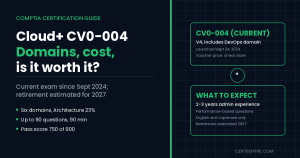
TL;DR: CompTIA Cloud+ CV0-004 (V4) is CompTIA’s vendor-neutral cloud exam for systems administrators and cloud engineers. It has up to 90 questions in 90 minutes, a mix of multiple choice and performance-based tasks, a passing score of 750 on a 100 to 900 scale, and six domains: Cloud Architecture (23%), Deployment (19%), Operations (17%), Security (19%), DevOps Fundamentals (10%) and Troubleshooting (12%). It launched on September 24, 2024, CompTIA calls it the first of its certifications to include a DevOps domain, and the exam page says retirement is usually three years after launch, estimated for 2027. The voucher price is not on CompTIA’s exam page, so check the store. Cloud+ makes sense if you work across providers or want a broad base before you specialize, and it is a weaker fit if you are certain you will live in one cloud. This guide walks through every objective, the tools and standards CompTIA names, a 10-week study plan and an exam-day approach, because one minute per question is the number to plan around.
Quick Facts
| Item | Detail |
| Exam code | CV0-004 (V4) |
| Launched | September 24, 2024 |
| Questions | Up to 90, multiple choice and performance-based |
| Time | 90 minutes |
| Passing score | 750 on a 100 to 900 scale |
| Languages | English and Japanese |
| Recommended experience | 2 to 3 years as a systems administrator or cloud engineer |
| Domains | 6 |
| Work roles | Network operations specialist, systems administrator, enterprise architect, security architect |
| Expected retirement | Around 2027, three years after launch |
| Voucher price | Not listed on the exam page; check CompTIA’s store |
Where CV0-004 Stands Today
CV0-004 has been live for 758 days. CompTIA’s exam page says the exam usually retires three years after launch and estimates 2027, which would be about 11 months from now if it follows the pattern. There is no announcement of a successor, so you are free to study and sit the exam now. If you plan a long study runway, keep an eye on CompTIA’s announcements.
How the Exam Works
The exam mixes multiple-choice questions with performance-based questions (PBQs), which put you in a scenario and ask you to complete something instead of picking an answer. CompTIA does not publish how PBQs are weighted.
The maximum is 90 questions in 90 minutes, which is one minute per question at the top end. You may get fewer than 90, but the ratio tells you what to do: PBQs can take several minutes each, and every minute they take comes out of your multiple-choice time. A plan that works:
- Spend about 45 seconds on multiple-choice questions you know.
- Flag anything that needs more than 90 seconds and come back to it.
- Check the clock after 20 questions. You should be roughly 22% of the way through your time.
- If PBQs show up early, consider flagging them and returning once you have banked time.
You need 750 on a 100 to 900 scale to pass. CompTIA does not publish a pass rate.
The Six Domains
| Domain | Weight | Topics |
| 1.0 Cloud Architecture | 23% | 8 |
| 2.0 Deployment | 19% | 4 |
| 3.0 Operations | 17% | 3 |
| 4.0 Security | 19% | 5 |
| 5.0 DevOps Fundamentals | 10% | 6 |
| 6.0 Troubleshooting | 12% | 5 |
The weights add to 100%, and CompTIA lists 31 topics across the six domains. Architecture is the largest block. Deployment and Security together are 38% and are the practical core. Operations and Troubleshooting together are 29% and reward real administration experience. DevOps is the smallest domain, but it is new for CompTIA and easy for non-DevOps people to underestimate.
Domain 1: Cloud Architecture (23%)
1.1 Cloud models. Analyze public, private, hybrid and multi-cloud models to support business needs. The exam is scenario-driven here. A regulated workload might point to private or hybrid, bursty demand to public. Practice the reasoning, not memorized answers.
1.2 Virtualization. Understand virtualization technologies and their role in the cloud. Know how virtual machines and hypervisors sit underneath cloud services.
1.3 Cloud networking. Deploy solutions like VPNs and virtual networks, and know how cloud networks connect to on-premises networks.
1.4 Containerization. Explain containers and their role, and how they differ from virtual machines.
1.5 Orchestration. Manage containers with orchestration techniques, and know why orchestration becomes necessary at scale.
1.6 Database fundamentals. Understand database concepts and their cloud applications, including when each type fits.
1.7 Resource optimization. Optimize cloud resources for performance and cost, including right-sizing and scaling choices.
1.8 Billing management. Manage billing considerations for cloud usage. Usage-based billing changes how you design, so cost is part of architecture, not an afterthought.
Virtual machines, containers and orchestration form a progression. Be able to describe each layer and the problem the next layer solves.
Domain 2: Deployment (19%)
2.1 System requirements. Analyze the requirements for workload migrations. Think dependencies, performance needs, compliance and data volume.
2.2 Infrastructure as code (IaC). Use IaC techniques for automation. The point is repeatability: the same template should produce the same environment every time, and you should know what happens when you change a template and apply it again.
2.3 Workload migrations. Plan and execute migrations to the cloud. Know the phases (assess, plan, move, validate) and the risks.
2.4 Resource provisioning. Provision and configure cloud resources effectively. Expect PBQs here: ordering steps or filling in configuration values.
Analysis comes before migration, so do not skip 2.1. A migration is a plan, not a button.
Domain 3: Operations (17%)
3.1 Lifecycle management. Manage the lifecycle of cloud resources, including scaling and updates. Know the difference between scaling out (more instances) and scaling up (bigger instances), and when each helps.
3.2 Backup and recovery. Implement strategies that protect data integrity. Questions often state a recovery goal, such as how much data loss and downtime the business can tolerate, and ask you to pick the matching approach.
3.3 Observability. Monitor and analyze cloud environments for performance. Know how metrics, logs and traces work together and which one answers which question.
Domain 4: Security (19%)
4.1 Vulnerability management. Identify and address vulnerabilities in cloud environments: scanning, prioritizing and patching.
4.2 Identity and access management. Implement IAM to control access. Least privilege is the single most useful idea for this exam.
4.3 Container security. Safeguard containerized applications and resources. Containers share a host kernel, so image and runtime controls matter.
4.4 Compliance standards. Ensure compliance with standards like PCI DSS, SOC 2 and ISO 27001. Learn one line on each: PCI DSS covers payment card data, SOC 2 covers service organization controls, and ISO 27001 covers information security management.
4.5 Security controls. Deploy controls to protect cloud environments, such as encryption, segmentation and monitoring, matched to a scenario.
Security and troubleshooting overlap. Leaked credentials and privilege escalation show up in Domain 6.
Domain 5: DevOps Fundamentals (10%)
5.1 Automation. Use tools to streamline cloud operations, and know which tasks are worth automating.
5.2 Source control. Manage code with source control: branches, commits and why infrastructure code belongs in version control.
5.3 CI/CD pipelines. Build and manage continuous integration and continuous deployment pipelines. CI merges and tests code often. CD pushes validated changes toward production. Know the stages in order.
5.4 System integration. Integrate systems for seamless operations, usually through APIs and automation.
5.5 DevOps tools. CompTIA names Kubernetes, Ansible and Jenkins. Know one sentence on each: Kubernetes orchestrates containers, Ansible automates configuration, and Jenkins runs CI/CD pipelines.
5.6 Event-driven architectures. Understand architectures where events trigger actions instead of polling.
This domain is only 10%, but it is where candidates without DevOps exposure drop easy points.
Domain 6: Troubleshooting (12%)
6.1 Deployment issues. Diagnose and resolve deployment problems. Work from symptom to likely cause.
6.2 Network connectivity. Troubleshoot connectivity in cloud environments. Check routing, security rules, DNS and addressing in a logical order.
6.3 Security incidents. Address problems like leaked credentials and privilege escalation. With leaked credentials, the first moves are revoking and rotating, then investigating.
6.4 Service disruptions. Resolve disruptions in DNS, DHCP and NTP. A DNS failure looks like a name that will not resolve, a DHCP problem looks like a device with no valid address, and an NTP problem can show up as time skew that breaks authentication.
6.5 Misconfigurations. Identify and fix misconfigurations in cloud setups.
Troubleshooting questions are ordered thinking. Learn a repeatable sequence: identify the symptom, check recent changes, test connectivity, check names and addresses, then check access rules.
Six Practice Scenarios
These are our own study examples, not exam questions.
| Scenario | Objective | What to think |
| A regulated workload must keep some data on-premises but scale a web tier on demand | 1.1 | Hybrid model |
| A team provisions the same environment by hand and gets different results | 2.2 | Infrastructure as code |
| A business can tolerate losing at most 15 minutes of data | 3.2 | Pick a backup and replication approach that meets that goal |
| An access key is found in a public repository | 4.2, 6.3 | Revoke and rotate, then investigate use |
| A deployment fails after a template change | 6.1 | Check what changed and compare with a known-good version |
| Users cannot reach a service, but the servers are healthy | 6.2, 6.4 | Check DNS, routing and security rules |
Cost, Retakes and Renewal
CompTIA’s Cloud+ page does not list a voucher price, so check the store for your region. There is a CompTIA store bundle listed at US1,165 (list price US 1,651) that includes an exam voucher with a retake, CertMaster Perform and CertMaster Practice. That is a training bundle, not the exam fee, so do not read it as the price of sitting the exam.
On that bundle, if you fail the first attempt you can reuse the same voucher to retake, but only for the exam version you failed. The voucher and retake expire 12 months after purchase, and you must redeem access keys within 12 months.
The Cloud+ page does not state validity or renewal rules, so check CompTIA’s continuing education policy before you plan.
If you already have the 2 to 3 years of cloud experience CompTIA recommends, a voucher plus practice tests may be enough. If you are newer to cloud, a bundle with a retake lowers the risk, at a higher price.
Who Should Take Cloud+
CompTIA recommends 2 to 3 years of hands-on experience as a systems administrator or cloud engineer. There is no formal prerequisite listed. It maps the exam to four work roles: network operations specialist, systems administrator, enterprise architect and security architect.
| You are | Fit |
| A systems administrator moving into cloud work | Strong fit |
| A cloud engineer who wants a vendor-neutral credential | Good fit |
| A network or server admin adding cloud knowledge | Good fit with extra lab time |
| A help desk technician with no cloud exposure | Start with foundations first |
| Someone targeting only one provider (AWS, Azure or Google) | Check whether that provider’s own exam fits better |
| Someone chasing one job ad | Check which certification the ad names |
If you are building a CompTIA path, see our CompTIA certification roadmap and the stackable certifications guide. Related exam pages include Network+ N10-009, Server+ SK0-005 and Security+ SY0-701. If Linux is part of your plan, read what changed in Linux+ XK0-006.
What Is New in V4
CompTIA says Cloud+ CV0-004 includes new and updated domains like DevOps and cloud security, and that it is the first CompTIA certification to include a DevOps domain. CompTIA does not publish a line-by-line comparison with CV0-003 that we could find, so the clearest changes to plan around are the DevOps domain and the stronger cloud security coverage.
How Cloud+ Fits With Other CompTIA Exams
| Exam | Focus | How it helps Cloud+ |
| Network+ N10-009 | Networking | Helps with cloud networking and troubleshooting |
| Server+ SK0-005 | Server administration | Helps with deployment and operations |
| Security+ SY0-701 | Security | Supports Domain 4 |
| Cloud+ CV0-004 | Cloud architecture, deployment, operations, security, DevOps, troubleshooting | The cloud layer on top |
Cloud+ builds on skills from the others. It is not a replacement for them, and if your networking or security basics are shaky, fix those first.
Vendor-Neutral vs Provider Exams
| Question | Cloud+ | Provider exam (AWS, Microsoft, Google) |
| Scope | Concepts across cloud models and providers | Services and tools of one provider |
| Best when | You work in mixed environments or want broad grounding | Your employer or target job uses one provider |
| Style | Multiple choice plus PBQs | Varies by provider |
Many people take Cloud+ for the vendor-neutral foundation and then add a provider credential for the platform they use. If you already know you will work on one platform, start with that provider’s credential and treat Cloud+ as optional.
A 10-Week Study Plan
This assumes some administration experience and about 6 to 8 hours a week.
| Week | Focus | Topics |
| 1 | Cloud models, virtualization, cloud networking | 1.1 to 1.3 |
| 2 | Containers, orchestration, databases, optimization, billing | 1.4 to 1.8 |
| 3 | Requirements analysis and infrastructure as code | 2.1, 2.2 |
| 4 | Migrations and provisioning | 2.3, 2.4 |
| 5 | Lifecycle, backup and recovery, observability | 3.1 to 3.3 |
| 6 | Vulnerability management, IAM, container security | 4.1 to 4.3 |
| 7 | Compliance standards and security controls | 4.4, 4.5 |
| 8 | DevOps: automation, source control, CI/CD, integration, tools, events | 5.1 to 5.6 |
| 9 | Troubleshooting | 6.1 to 6.5 |
| 10 | Timed practice with PBQ-style tasks, weak-area review | All |
Hands-on practice worth doing:
- Deploy a small workload on a free-tier account and tear it down.
- Write a short infrastructure-as-code template and deploy it twice to see what changes.
- Containerize a small app and run it, then deploy it with an orchestrator if you can.
- Set up a simple CI/CD pipeline and break it on purpose.
- Practice a backup and restore of a test environment.
- Create an IAM role with least privilege and test what it can and cannot do.
- Troubleshoot a broken network setting or a wrong DNS record in a lab and write down the steps that found it.
- Read a PCI DSS or ISO 27001 checklist and map each control to a cloud setting.
Key Terms to Know
| Term | Meaning |
| Public, private, hybrid, multi-cloud | Core architecture models |
| Hypervisor | Software that runs virtual machines |
| VPN, virtual network | Cloud networking building blocks |
| Container, orchestration | Packaging and managing workloads |
| Infrastructure as code | Repeatable, template-driven provisioning |
| Scaling, right-sizing | Matching capacity to demand |
| Observability | Metrics, logs and traces |
| IAM, least privilege | Access control |
| PCI DSS, SOC 2, ISO 27001 | Standards named by CompTIA |
| CI/CD | Continuous integration and deployment |
| Kubernetes, Ansible, Jenkins | Tools named by CompTIA |
| Event-driven | Systems that react to triggers |
| DNS, DHCP, NTP | Services named in troubleshooting |
| PBQ | Performance-based question |
Exam Day Checklist
- Re-read the six domain names the night before.
- Plan your pacing: about 45 seconds for a multiple-choice question you know.
- Decide how you will handle PBQs before you start.
- Read the last sentence of each scenario first.
- Eliminate answers that name a different cloud model than the scenario.
- Keep the last 10 minutes for flagged items.
- Confirm your ID and testing setup in advance.
Mistakes People Make
- Underestimating the clock. 90 questions in 90 minutes is tight.
- Skipping DevOps. It is 10%, but it is new and easy to overlook.
- Treating the bundle price as the exam price.
- Studying one provider only. The exam is vendor-neutral.
- Skipping troubleshooting practice. It is 12% of the exam.
- Ignoring billing. Objective 1.8 names it directly.
- Overlooking named tools and standards. Kubernetes, Ansible, Jenkins, PCI DSS, SOC 2 and ISO 27001 are all named.
- Using older study guides. Material for the previous version may miss the DevOps domain.
- Forgetting the estimated 2027 retirement. Check for announcements if you study over months.
Is Cloud+ Worth It in 2026?
I will not quote salary numbers, because I have not seen a reliable figure that isolates Cloud+ holders from the wider cloud workforce.
Where it helps. It is vendor-neutral, so it fits mixed or changing environments. It covers architecture, deployment, operations, security, DevOps and troubleshooting in one exam, and the PBQs test applied skill. It maps to four work roles and fits naturally after Network+, Server+ or Security+.
Where it falls short. CompTIA recommends 2 to 3 years of hands-on experience, which many candidates do not have yet. Provider-specific roles may value that provider’s own certification more. The estimated 2027 retirement means a version change may come soon. And the voucher price is not on CompTIA’s page, so budgeting takes an extra step.
Bottom line. Cloud+ makes sense if you manage cloud workloads across providers, or want a broad base before specializing. If you will work on one platform, start with that provider’s credential.
FAQS
What is CompTIA Cloud+ CV0-004?
It is CompTIA’s vendor-neutral cloud certification exam (V4) for systems administrators and cloud engineers, launched on September 24, 2024.
How many questions are on the exam?
Up to 90, including multiple-choice and performance-based questions. You may get fewer.
How long is it and what is the passing score?
90 minutes, and you need 750 on a 100 to 900 scale.
What are the domains and weights?
Cloud Architecture 23%, Deployment 19%, Operations 17%, Security 19%, DevOps Fundamentals 10% and Troubleshooting 12%.
How much does Cloud+ cost?
CompTIA’s Cloud+ page does not show a voucher price. A store bundle with a voucher, retake and study software is listed at US$1,165, but that is not the exam fee. Check the store for your region.
Are there prerequisites?
No formal prerequisite. CompTIA recommends 2 to 3 years of hands-on experience as a systems administrator or cloud engineer.
What languages is it offered in?
English and Japanese.
When will CV0-004 retire?
CompTIA says Cloud+ usually retires three years after launch and estimates 2027. That is an estimate, not an announcement.
What is new in this version?
CompTIA says it is the first CompTIA certification with a DevOps domain, and it adds new and updated cloud security coverage.
Which tools and standards does the exam name?
Kubernetes, Ansible and Jenkins for DevOps, and PCI DSS, SOC 2 and ISO 27001 for compliance. Troubleshooting names DNS, DHCP and NTP.
Is there a free retake?
Not with a single voucher, as far as we know. The store bundle includes a retake that reuses the same voucher and covers only the exam version you failed.
Is Cloud+ better than an AWS, Azure or Google certification?
They do different jobs. Cloud+ is vendor-neutral, while provider exams test one platform. Choose based on the platform you use and the job you want.
How long is Cloud+ valid and how do I renew it?
CompTIA’s Cloud+ page does not state this, so check CompTIA’s continuing education policy before you plan.
For the official exam details, see CompTIA’s Cloud+ page. Practice material is on our Cloud+ CV0-004 exam page, and more guides are in our CompTIA articles.