Free SC-200 Practice Test Questions and Answers (2026)

Last Update Check
View Mode
Q: 1

DRAG DROP

You have an on-premises Windows 11 Pro device named Device1 that is onboarded to Microsoft Defender for Endpoint.

You have a Microsoft 365 subscription.

You need to identify the processes running on Device1 and which network connections the processes have open. The solution must minimize administrative effort.

Which four actions should you perform in the Microsoft Defender portal in sequence? To answer, move the appropriate actions from the list of actions to the answer area and arrange them in the correct order.

Drag & Drop
25 comments in the community discussion
7
Pretty sure the order is: Initiate a live response session, go to Device1 page, collect investigation package, then extract the ZIP. This uses built-in Defender tools so less admin effort. Let me know if anyone did it differently.
5
Initiate a live response session → Navigate to Device1 page → Collect investigation package → Extract the ZIP file. I don’t think you need to manually run netstat here-Defender investigation package includes process and network data. Pretty confident but if anyone has a different order, let me know.
Q: 2
You need to receive a security alert when a user attempts to sign in from a location that was never used by the other users in your organization to sign in. Which anomaly detection policy should you use?
Options
31 comments in the community discussion
5
Makes sense to go with C. The "infrequent country" detection catches when a location is new for the org, not just a user. Not 100 percent sure but fits what the question asks for.
3
Option C is the one. "Impossible travel" (A) checks for impossible timing between two locations, but not necessarily if the country was never accessed by anyone before. The question wants an org-wide anomaly, so C fits better. Seen this tripped up in similar MS practice sets.
Q: 3

HOTSPOT You have an Azure subscription that contains a Log Analytics workspace named Workspace1. You configure Azure activity logs and Microsoft Entra ID logs to be forwarded to Workspace1. You need to identify which Azure resources have been queried or modified by risky users. How should you complete the KQL query? To answer, select the appropriate options in the answer area.

Your Answer
25 comments in the community discussion
6
Yeah, I'm with you on SigninLogs, AzureActivity, Caller for this one. It’s the only way to join user risk info with the actual resource actions in KQL, I think. Makes sense unless Microsoft throws a curveball in wording.
6
Not AuditLogs, it's SigninLogs, AzureActivity, Caller. Easy to mix those up but this matches similar exam scenarios.
Q: 4
You have an Azure subscription that uses Microsoft Sentinel. You need to create a custom report that will visualise sign-in information over time. What should you create first?
Options
36 comments in the community discussion
6
Why would you pick a hunting query (B) if the requirement is for visualization? Workbooks actually support charts and time-based reporting.
4
Option A Saw a similar question in some exam reports, workbook is the way to go for visualizing sign-in events in Sentinel.
Q: 5

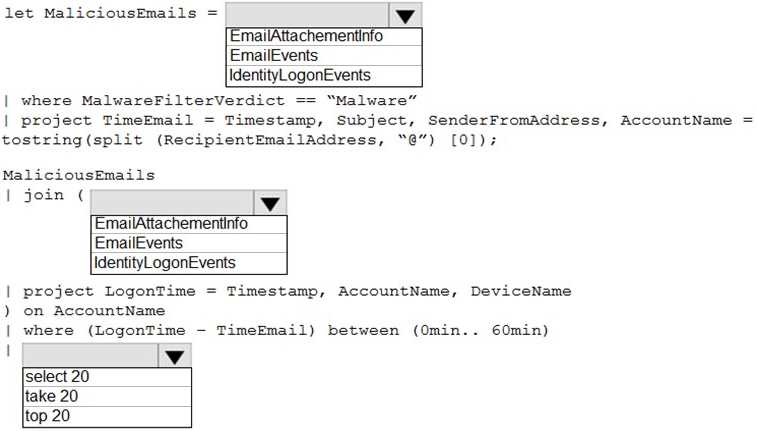
HOTSPOT You are informed of an increase in malicious email being received by users. You need to create an advanced hunting query in Microsoft 365 Defender to identify whether the accounts of the email recipients were compromised. The query must return the most recent 20 sign- ins performed by the recipients within an hour of receiving the known malicious email. How should you complete the query? To answer, select the appropriate options in the answer area. img0

Your Answer
31 comments in the community discussion
5
Makes sense to use AccountLogonEvents.
4
AccountLogonEventsHad something like this in a mock, and for user compromise checks after phishing, AccountLogonEvents always surfaced sign-in attempts best. DeviceLogonEvents is more about the endpoint itself. This lines up with what I've seen reported on other exams too. Think that's right but happy to see other
Q: 6

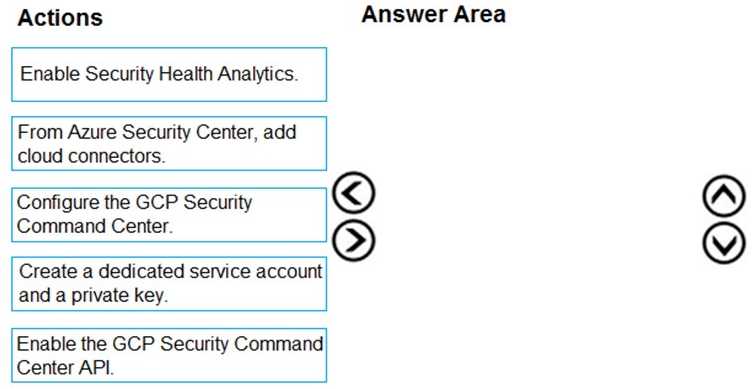
DRAG DROP You have resources in Azure and Google cloud. You need to ingest Google Cloud Platform (GCP) data into Azure Defender. In which order should you perform the actions? To answer, move all actions from the list of actions to the answer area and arrange them in the correct order. SC-200 question

Drag & Drop
27 comments in the community discussion
6
Matches the Microsoft docs and labs: Configure SCC, then enable Security Health Analytics, SCC API, create service account/key, finally add Azure connector.
6
I don't think you make Security Health Analytics first, it's after you configure SCC. Map should be: Configure SCC → Enable Security Health Analytics → Enable SCC API → Create service account/key → Add Azure connector. The trap is putting Analytics before SCC itself.
Q: 7

DRAG DROP A company wants to analyze by using Microsoft 365 Apps. You need to describe the connected experiences the company can use. Which connected experiences should you describe? To answer, drag the appropriate connected experiences to the correct description. Each connected experience may be used once, more than once, or not at all. You may need to drag the split between panes or scroll to view content.

Drag & Drop
20 comments in the community discussion
6
Editor goes with grammar and style refinements, Tap is the one you use to repurpose coworker files, and Similarity checker is what detects originality with citations. Friendly links isn't matched here. Pretty sure this is right based on similar questions I've seen, but open if someone thinks differently.
4
Editor to grammar/style, Tap for coworker reuse, Similarity checker for originality and citations. No spot for Friendly links.
Q: 8

DRAG DROP You have a Microsoft Sentinel workspace named workspace1 and an Azure virtual machine named VM1. You receive an alert for suspicious use of PowerShell on VM1. You need to investigate the incident, identify which event triggered the alert, and identify whether the following actions occurred on VM1 after the alert: The modification of local group memberships The purging of event logs Which three actions should you perform in sequence in the Azure portal? To answer, move the appropriate actions from the list of actions to the answer area and arrange them in the correct order. SC-200 question

Drag & Drop
39 comments in the community discussion
6
Insights → VM1 entity → Investigate, just like in official guide. Microsoft docs and lab exercises cover this exact flow.
6
Insights → VM1 entity → Investigate. Really clear steps here, matches what I've seen in practice exams.
Q: 9

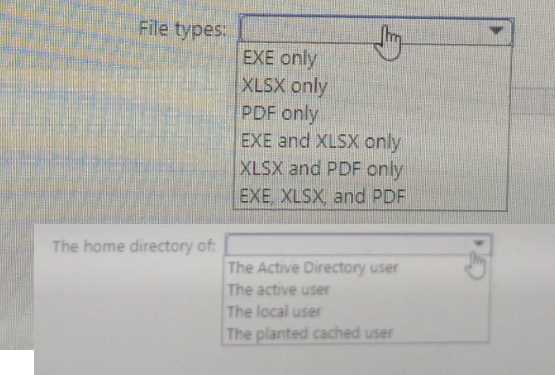
HOTSPOT You have a Microsoft 365 E5 subscription that uses Microsoft Defender XDR. You are implementing a deception rule. You need to provide a custom lure file. For the custom lure, you set Planting path to HOME. Which types of files can you use for the custom lure, and in which home directory should the file be located on a device? To answer, select the appropriate options in the answer area. SC-200 question

Your Answer
27 comments in the community discussion
5
Seen this pop up in exam reports, it’s EXE, XLSX, and PDF for custom lures with HOME path. File needs to go in the Active Directory user’s home directory. I think docx is only for Documents path, not HOME. Anyone disagree?
4
Yep, it’s EXE, XLSX, and PDF, and the file goes in the Active Directory user’s home directory when you pick HOME as the path. Lure support doesn’t include DOCX for that location as far as I know. If I missed something recent let me know!
Q: 10
You receive a security bulletin about a potential attack that uses an image file. You need to create an indicator of compromise (IoC) in Microsoft Defender for Endpoint to prevent the attack. Which indicator type should you use?
Options
43 comments in the community discussion
5
Yeah, option C fits since you're targeting a known image file. File hash is the right indicator for something specific like that, and setting it to alert and block means Defender stops it outright. Pretty sure that's how MS expects you to handle these but open if someone spots a catch.
3
If the attack came from a custom file and not, say, a signed cert, I'd pick C.
Q: 11
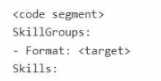
You have a Microsoft 365 E5 subscription that uses Microsoft Copilot for Security. You plan to run the following code to create a custom Copilot for Security plugin. SC-200 question You need to specify a format and complete the code segment. Which format should you use for the variable?
Options
9 comments in the community discussion
1
Maybe A, unless the question actually wants a query and not an endpoint-then C would be valid. Seen both wordings.
A is right for this one. Copilot plugins point to API endpoints, not query languages like KQL or SQL here.
Q: 12

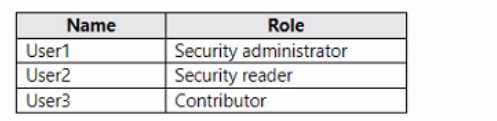
DRAG DROP You have an Azure subscription that contains the users shown in the following table. SC-200 question You need to delegate the following tasks: • Enable Microsoft Defender for Servers on virtual machines. • Review security recommendations and enable server vulnerability scans. The solution must use the principle of least privilege. Which user should perform each task? To answer, drag the appropriate users to the correct tasks. Each user may be used once, more than once, or not at all. You may need to drag the split bar between panes or scroll to view content.

Drag & Drop
9 comments in the community discussion
8
Pretty sure both tasks go to User2 since Security Admin has just enough rights for Defender policy changes. Anyone else pick differently?
6
Yeah, both tasks go to User2 for least privilege. Security Admin is all you need for enabling Defender and reviewing recommendations, Owner is too much. Looks correct to me.
Q: 13

DRAG DROP You have a Microsoft 365 E5 subscription that uses Microsoft Exchange Online. You need to identify phishing email messages. Which three cmdlets should you run in sequence? To answer, move the appropriate cmdlets from the list of cmdlets to the answer area and arrange them in the correct order. img0

Drag & Drop
6 comments in the community discussion
9
New-ComplianceSearch → Connect-ExchangeOnline → Search-UnifiedAuditLog. Order matters since you have to set up the search, connect Exchange Online, then run the audit log query. Pretty sure that's right, saw similar steps in the official docs and SC-200 labs.
4
New-ComplianceSearch, then Connect-ExchangeOnline, then Search-UnifiedAuditLog is the sequence. I think that lines up with SC-200 study guides.
Q: 14
You have an Azure subscription. You need to stream the Microsoft Graph activity logs to a third-party security information and event management (SIEM) tool. The solution must minimize administrative effort. To where should you stream the logs?
Options
3 comments in the community discussion
Option D but if the requirement was just storage for later analysis instead of real-time streaming, would C make sense?
Q: 15

Your company deploys the following services: Microsoft Defender for Identity Microsoft Defender for Endpoint Microsoft Defender for Office 365 You need to provide a security analyst with the ability to use the Microsoft 365 security center. The analyst must be able to approve and reject pending actions generated by Microsoft Defender for Endpoint. The solution must use the principle of least privilege. Which two roles should assign to the analyst?

Options
5 comments in the community discussion
B/D. Security Reader covers read access, and Active remediation actions gives just enough to handle pending endpoint actions without extra rights.
B D, saw a similar one on a practice set. Security Reader for least privilege read, Active remediation for actions. Matches up.
Q: 16

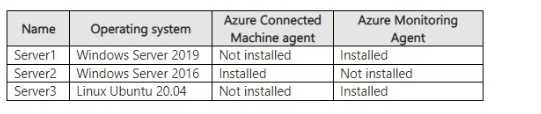
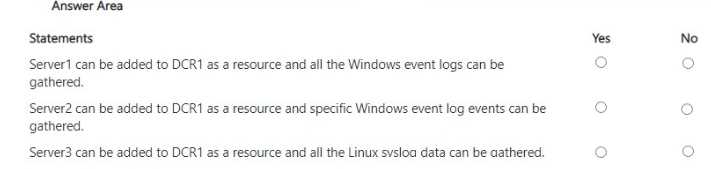
HOTSPOT Your on-premises network contains a Hyper-V cluster. The cluster contains the virtual machines shown in the following table. SC-200 question You have a Microsoft Sentinel workspace named SW1. You have a data collection rule (OCR) that has the following configurations: • Name: DCR1 • Destination: SW1 • Platform type: All • Data collection endpoint: None • Data source: Windows event logs, Linux syslog For each of the following statements, select Yes if the statement is true. Otherwise, select No. . SC-200 question

Your Answer
7 comments in the community discussion
5
I don’t think it’s Yes, No, No. If the DCR is set to “platform type: All”, wouldn’t the Linux VM also get logged as long as it's using syslog? The "No" for Linux is a common trap in these, but here it should be Yes.
4
No doubts here-Yes, No, Yes is the right combo. Platform type set to All means Windows event logs and Linux syslog get pulled if the agent's there, even without a data collection endpoint. Anyone see it differently?
Q: 17
You are investigating an incident in Azure Sentinel that contains more than 127 alerts. You discover eight alerts in the incident that require further investigation. You need to escalate the alerts to another Azure Sentinel administrator. What should you do to provide the alerts to the administrator?
Options
11 comments in the community discussion
2
Option D makes sense here. Assigning the incident is the only way to actually escalate and track who owns it in Sentinel. B is tempting but just lets them view, not take control.
2
Between B and D here, but pretty sure it's D. Assigning the incident in Sentinel is the official way to hand it over for escalation and keeps the workflow clean with proper ownership. Sharing a link (B) just gives them view access but doesn't transfer responsibility. Seen similar advice in the official docs and prac
Q: 18

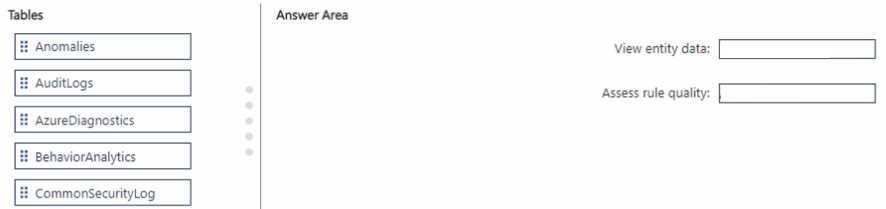
DRAG DROP You have a Microsoft Sentinel workspace named SW1. In SW1. you enable User and Entity Behavior Analytics (UEBA). You need to use KQL to perform the following tasks: • View the entity data that has fields for each type of entity. • Assess the quality of rules by analyzing how well a rule performs. Which table should you use in KQL for each task? To answer, drag the appropriate tables to the correct tasks. Each table may be used once, more than once, or not at all. You may need to drag the split bar between panes or scroll to view content. SC-200 question

Drag & Drop
13 comments in the community discussion
6
BehaviorAnalytics goes to View entity data, Anomalies goes to Assess rule quality. That's what I've seen in Sentinel workbooks.
6
Pretty sure it's BehaviorAnalytics for entity data and Anomalies for rule quality. That lines up with Sentinel docs.
Q: 19

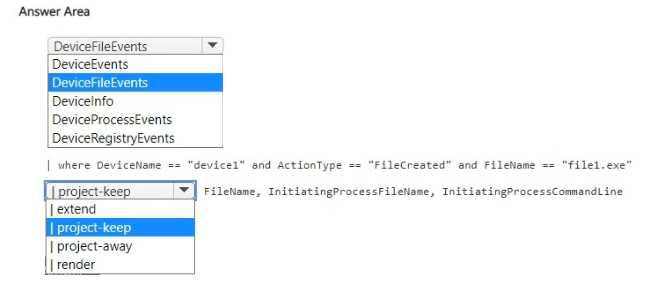
HOTSPOT You have a Microsoft 365 E5 subscription that uses Microsoft Defender XDR. You discover a malicious process that was initiated by a file named File1exe on a device named Device1. You need to create a KQL query that will identify when File1.exe was created. The solution must meet the following requirements: • Return the FileName, InitiatingProcessFileName, and InitiatingProcessCommandLine columns. • Minimize the volume of data returned. How should you complete the query? To answer, select the appropriate options in the answer area. SC-200 question

Your Answer
10 comments in the community discussion
6
Actually, for finding when a file was created, you want FileCreationEvents instead of ProcessEvents. It gives you exactly the info needed and reduces unnecessary data. Pretty sure that's what Microsoft recommends for this scenario, unless I'm missing something?
4
Yeah, ProcessEvents is right for this kind of search. ProcessEvents
Q: 20
Note: This question is part of a series of questions that present the same scenario. Each question in the series contains a unique solution that might meet the stated goals. Some question sets might have more than one correct solution, while others might not have a correct solution. After you answer a question in this section, you will NOT be able to return to it. As a result, these questions will not appear in the review screen. You have Linux virtual machines on Amazon Web Services (AWS). You deploy Azure Defender and enable auto-provisioning. You need to monitor the virtual machines by using Azure Defender. Solution: You manually install the Log Analytics agent on the virtual machines. Does this meet the goal?
Options
9 comments in the community discussion
6
Option B because manually adding the agent skips the required Arc onboarding step for auto-provisioning in Defender for Cloud. I think that's key here since the scenario specifically mentions enabling auto-provisioning. Disagree? Let me know.
1
I don't think A works here, B. The question mentions auto-provisioning, so manual install is a trap option.
Question 1 of 20

What's covered in this practice questions set

1: Mitigate threats using Microsoft Defender XDR · 10 questions

📖 About this Domain

This domain focuses on using the Microsoft Defender XDR portal to mitigate threats across the entire attack chain. It covers the investigation and remediation of security incidents using a unified, cross-domain security platform. You will learn to manage alerts, incidents, and perform advanced hunting.

🎓 What You Will Learn

  • You will learn to manage incidents and alerts within the Microsoft Defender XDR portal, correlating data from multiple workloads.
  • You will learn to conduct evidence and entity investigations to understand the full scope of a security attack.
  • You will learn to use advanced hunting with Kusto Query Language (KQL) to proactively search for threat indicators.
  • You will learn to implement remediation actions and manage automated investigation and response (AIR) playbooks.

🛠️ Skills You Will Build

  • You will build the skill to triage and prioritize security incidents based on severity and asset value.
  • You will build proficiency in writing and executing KQL queries for proactive threat hunting and custom detection rule creation.
  • You will build the ability to configure and manage automated investigation and response (AIR) to contain threats.
  • You will build the capability to analyze threat intelligence and apply it to your organization's security posture within Defender XDR.

💡 Top Tips to Prepare

  • Get hands-on lab experience with a Microsoft 365 E5 trial to navigate the Defender XDR portal and its features.
  • Focus on learning Kusto Query Language (KQL) as it is essential for the advanced hunting and custom detection questions.
  • Understand the signal correlation between Defender for Endpoint, Defender for Identity, Defender for Office 365, and Defender for Cloud Apps.
  • Review the official Microsoft Learn learning paths for SC-200, specifically the modules covering incident response in Microsoft Defender XDR.

3: Mitigate threats using Microsoft Sentinel · 7 questions

📖 About this Domain

This domain covers threat mitigation using Microsoft Sentinel, a cloud-native Security Information and Event Management (SIEM) and Security Orchestration, Automation, and Response (SOAR) solution. You will learn to configure automated responses to security incidents and manage the incident lifecycle within the Sentinel portal.

🎓 What You Will Learn

  • Configure and manage Microsoft Sentinel playbooks for automated threat response actions.
  • Investigate and manage security incidents using the Sentinel incident management interface and investigation graph.
  • Utilize threat intelligence feeds and indicators of compromise (IOCs) for proactive threat detection.
  • Integrate User and Entity Behavior Analytics (UEBA) to identify anomalous activities and potential insider threats.

🛠️ Skills You Will Build

  • Skill in creating and tuning analytics rules to generate high-fidelity alerts and incidents.
  • Ability to design and implement SOAR playbooks using Azure Logic Apps for automated incident remediation.
  • Proficiency in conducting advanced threat hunting using Kusto Query Language (KQL) against collected log data.
  • Competence in managing the full incident lifecycle, including triage, investigation, and entity mapping.

💡 Top Tips to Prepare

  • Gain hands-on experience by deploying a Microsoft Sentinel workspace and connecting various data connectors.
  • Master Kusto Query Language (KQL) as it is critical for analytics rules, hunting queries, and workbooks.
  • Practice building and triggering automation rules and SOAR playbooks to understand their operational logic.
  • Familiarize yourself with the incident investigation experience, including timelines, entities, and the investigation graph.

2: Mitigate threats using Microsoft Defender for Cloud · 3 questions

📖 About this Domain

This domain focuses on using Microsoft Defender for Cloud for threat mitigation across hybrid and multi-cloud environments. You will learn to implement its Cloud Security Posture Management (CSPM) and Cloud Workload Protection Platform (CWPP) capabilities to strengthen your security posture.

🎓 What You Will Learn

  • Configure and manage specific Microsoft Defender for Cloud plans to enable enhanced security features.
  • Assess and remediate security vulnerabilities using the secure score and regulatory compliance dashboards.
  • Connect non-Azure machines and multi-cloud resources to Defender for Cloud using Azure Arc.
  • Remediate security alerts and incidents generated by Defender for Cloud's threat detection capabilities.

🛠️ Skills You Will Build

  • Implement Cloud Security Posture Management (CSPM) to identify and remediate cloud misconfigurations.
  • Deploy Cloud Workload Protection Platform (CWPP) capabilities to protect servers, containers, and databases.
  • Configure Just-In-Time (JIT) VM access to lock down management ports and reduce the attack surface.
  • Automate security responses to alerts by configuring workflow automation with Logic Apps.

💡 Top Tips to Prepare

  • Gain hands-on experience by enabling Defender for Cloud plans in a lab or trial Azure subscription.
  • Master the differences between foundational CSPM and the enhanced protections offered by specific Defender plans.
  • Practice interpreting secure score recommendations and prioritizing remediation actions based on security impact.
  • Understand the role of Azure Arc in onboarding on-premises servers and multi-cloud resources for unified security.

Premium Access Includes

  • Quiz Simulator
  • Exam Mode
  • Progress Tracking
  • Question Saving
  • Flash Cards
  • Drag & Drops
  • 3 Months Access
  • PDF Downloads
Get Premium Access
Scroll to Top