
Q: 18
DRAG DROP You have a Microsoft Sentinel workspace named SW1. In SW1. you enable User and Entity Behavior Analytics (UEBA). You need to use KQL to perform the following tasks: • View the entity data that has fields for each type of entity. • Assess the quality of rules by analyzing how well a rule performs. Which table should you use in KQL for each task? To answer, drag the appropriate tables to the correct tasks. Each table may be used once, more than once, or not at all. You may need to drag the split bar between panes or scroll to view content. 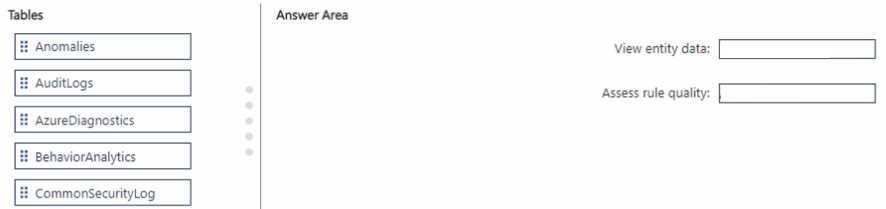
Drag & Drop
Discussion
BehaviorAnalytics goes to View entity data, Anomalies goes to Assess rule quality. That's what I've seen in Sentinel workbooks.
Pretty sure it's BehaviorAnalytics for entity data and Anomalies for rule quality. That lines up with Sentinel docs.
Agreed, BehaviorAnalytics maps to View entity data and Anomalies to Assess rule quality.
BehaviorAnalytics → View entity data, Anomalies → Assess rule quality. Not AzureDiagnostics, that one's a common trap here.
BehaviorAnalytics → View entity data, Anomalies → Assess rule quality. Makes sense since BehaviorAnalytics holds info about users/entities with rich fields you can query, while Anomalies logs detections and rule triggers so you can gauge effectiveness there. I think this matches how Sentinel sets up UEBA. Correct me if anyone's seen it asked differently.
BehaviorAnalytics -> View entity data, Anomalies -> Assess rule quality. Makes sense since BehaviorAnalytics aggregates entity fields and Anomalies tracks alert hits for rules. I think that's right but correct me if I missed a twist in the question.
Be respectful. No spam.