
Q: 6
DRAG DROP You have resources in Azure and Google cloud. You need to ingest Google Cloud Platform (GCP) data into Azure Defender. In which order should you perform the actions? To answer, move all actions from the list of actions to the answer area and arrange them in the correct order. 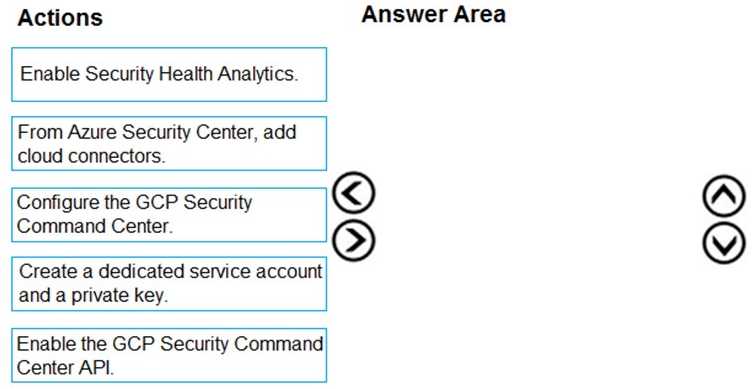
Drag & Drop
Discussion
Matches the Microsoft docs and labs: Configure SCC, then enable Security Health Analytics, SCC API, create service account/key, finally add Azure connector.
I don't think you make Security Health Analytics first, it's after you configure SCC. Map should be: Configure SCC → Enable Security Health Analytics → Enable SCC API → Create service account/key → Add Azure connector. The trap is putting Analytics before SCC itself.
Watch out, the sequence flips if you already have Security Command Center set up. Correct order is: Configure GCP Security Command Center, Enable Security Health Analytics, Enable SCC API, Create service account & key, then add in Azure Security Center.
I don't think you want to put 'Enable Security Health Analytics' before configuring SCC. The setup order is usually: Configure GCP Security Command Center, then Enable Security Health Analytics, then enable SCC API, create the service account/key, finally add the Azure cloud connector. Some guides swap steps 1 and 2 but that's a common trap.
Configure GCP Security Command Center, Enable Security Health Analytics, Enable SCC API, create service account and key, then add cloud connector in Azure. That's the order I'm seeing match Microsoft's documentation for cross-cloud integration. Pretty sure that's correct unless GCP settings were preconfigured already.
Don’t think you want to swap the order of Security Health Analytics and SCC config. Trap here is putting Health Analytics first, but actually you configure GCP SCC, then enable Health Analytics, then SCC API, set up service account/key, and finally add Azure connector.
Configure GCP SCC, then enable Security Health Analytics, enable SCC API, create service account/key, finish by adding Azure cloud connector.
Configure GCP Security Command Center → Enable Security Health Analytics → Enable SCC API → Create service account and private key → Add cloud connector in Azure. That's the main flow for getting GCP data into Azure Defender, since each step unlocks the next. I think this is the expected order unless parts are already set up. Correct me if I'm missing context here.
I see it as: Configure SCC, then Enable Security Health Analytics, next Enable SCC API, then create the service account and key, finally add the Azure connector. This flow lines up with how you have to prep GCP before Azure can connect. Pretty sure that's right from what I've seen in the docs, but open if anyone disagrees.
Configure GCP Security Command Center, then Enable Security Health Analytics, then SCC API, create service account/key, finally add Azure connector.
Be respectful. No spam.