This question always bugs me, Azure's UI never makes it obvious. Pretty sure it's C since Split Data literally does what they're asking for, but if they'd said you need to build a dataset from pieces I'd hesitate. Anyone think B could be right in some edge case?
Free AI-900 Practice Test Questions and Answers (2026) | Cert Empire Practice Questions
Free preview: 20 questions.
AI-900.pdf
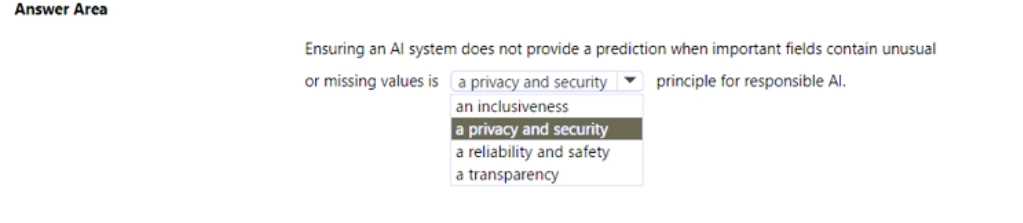
HOTSPOT Select the answer that correctly completes the sentence 
Looks like reliability and safety is the better match here. Privacy/security feels tempting, but for missing or weird data fields these questions usually want the system to avoid unsafe predictions, so safety comes first I think. Anyone see it differently?
Reliability and safety fits best. Privacy/security is tempting but in scenarios with missing or weird data, the exam usually tests for reliability first. I think some might mix it up with privacy, but not here.
Reliability and safety fits best here since the system refuses to predict when inputs are sketchy or incomplete. That prevents bad or harmful results, which is kind of the whole point of that principle. Transparency is important too but doesn't quite cover this specific "fail-safe" behavior, I think. Open to other views though.
Pretty sure it's A and B. Had something like this in a mock and remember needing Enterprise for both GUI-based AutoML (A) and for setting up the compute instance as a workstation (B). C felt more optional, but not 100%. Agree?
I don't think B or D require Enterprise. Historically, only the GUI-based stuff like in A and C (AutoML GUI and the ML Designer) needed an Enterprise workspace. Create compute and upload datasets were always in basic too, even if it feels like they should be advanced. Pretty sure exam questions stick to that old difference, but happy to hear another read on it!
HOTSPOT brectly completes the sentence. 
I've seen a similar question and image classification can sometimes be picked if they're just asking for identifying the type of content, not converting text. Pretty sure that's what they want here but happy to hear if someone got a different result in practice.
HOTSPOT Select the answer that correctly completes the sentence. 
Yep, for showing distributions and stats in the designer, it's Dataset output visualization feature. You right-click the dataset and pick Visualize to see all those summary details. Normalize Data would just change values but not actually show you distributions. I think this is solid, but let me know if anyone's seen different wording elsewhere.
DATASET OUTPUT VISUALIZATION FEATURE
This one specifically lets you right-click and see histograms, counts, unique values etc for each column in the dataset. Normalize Data doesn't show those stats, it just changes the data. Pretty sure this is what they're after here.
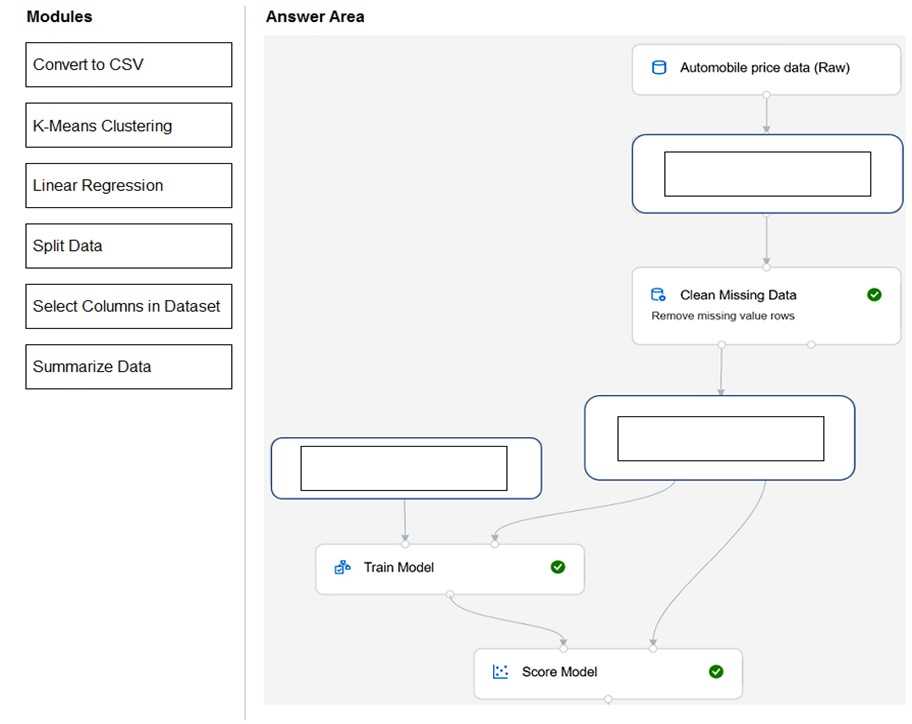
DRAG DROP You need to use Azure Machine Learning designer to build a model that will predict automobile prices. Which type of modules should you use to complete the model? To answer, drag the appropriate modules to the correct locations. Each module may be used once, more than once, or not at all. You may need to drag the split bar between panes or scroll to view content. NOTE: Each correct selection is worth one point. 
I remember a similar scenario from labs, in practice sets. For predicting price (a number), you'd map like this: Select Columns in Dataset to Automobile price data (Raw), Split Data to Clean Missing Data, and Linear Regression to Before Train Model. That's the standard flow for regression models in Azure ML designer. I think this is right but open to correction if anyone spots a better sequence!
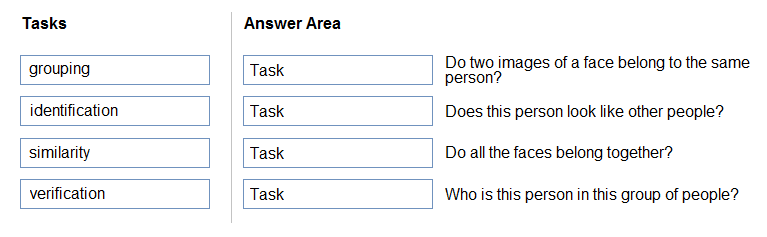
DRAG DROP Match the facial recognition tasks to the appropriate questions. To answer, drag the appropriate task from the column on the left to its question on the right. Each task may be used once, more than once, or not at all. NOTE: Each correct selection is worth one point. 
I'm pretty sure that's right since grouping is clustering (trap is confusing similarity and grouping), but if anyone thinks otherwise let me know.
Seen similar in some practice sets and official docs. It's: verification → Do two images of a face belong to the same person, similarity → Does this person look like other people, grouping → Do all faces belong together, identification → Who is this person in this group. If you're reviewing, check official guide for these terms.
Pretty straightforward if you’ve seen these terms before. "Do two images of a face belong to the same person?" is verification, since it’s checking 1:1. "Does this person look like other people?" maps to similarity. Grouping is clustering unknowns, so that fits with "Do all the faces belong together?". Finally, "Who is this person in this group of people?" is classic identification. I’m fairly sure these are what MS expects here, but open to correction if I missed anything!
- Do two images of a face belong to the same person? → verification
- Does this person look like other people? → similarity
- Do all the faces belong together? → grouping
- Who is this person in this group of people? → identification
I don’t think B is right this time, I’d pick A. Abuse monitoring can flag hateful content as it comes up and block it from being returned. Content filtering is useful too, but abuse monitoring seems more direct here. Anyone see reports where A covers this better?
HOTSPOT To complete the sentence, select the appropriate option in the answer area. 
HOTSPOT Select the answer that correctly completes the sentence. 
Yeah, it's ADDING AND CONNECTING MODULES ON A VISUAL CANVAS. That's the main feature of the Azure ML designer, since you're literally dragging and dropping modules. Pretty sure that's what Microsoft wants here but open to other views.
Yeah, sticking with ADDING AND CONNECTING MODULES ON A VISUAL CANVAS. That’s exactly how the Azure ML designer works, you drag modules into a pipeline visually. AutoML is the one that does algorithm selection for you, so it's not that here. Open to other ideas if I missed something but I think this fits.
ADDING AND CONNECTING MODULES ON A VISUAL CANVAS is the way to go here since the Azure ML designer is all about low-code, drag-and-drop pipeline building. AutoML's more about letting Azure pick models for you, so that's a different thing. Makes sense?
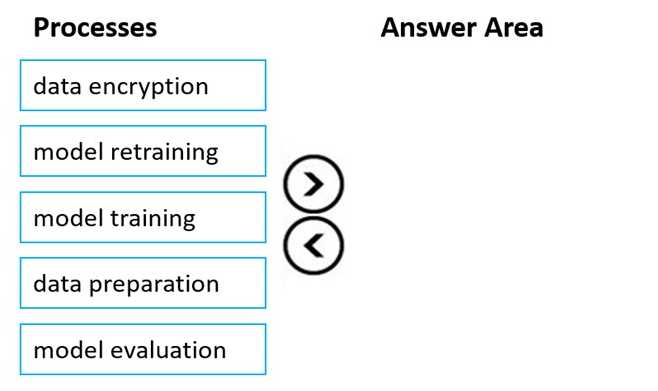
DRAG DROP You plan to deploy an Azure Machine Learning model as a service that will be used by client applications. Which three processes should you perform in sequence before you deploy the model? To answer, move the appropriate processes from the list of processes to the answer area and arrange them in the correct order. 
Don't think data encryption or retraining belong in the initial steps here. Saw a similar question and pretty sure this is the expected order. If anyone disagrees let me know, open to corrections!
Maybe D, since registering the training data might seem helpful if the focus is on input tracking rather than model versions. Would the answer change if the question asked about data lineage instead of model versioning? Official guide and labs cover both topics pretty well.
Anyone check the official material for this? I remember the docs mentioning chit-chat to add things like greetings, but maybe practice tests have a twist?
This is a clear question, matches what I saw in other practice sets.
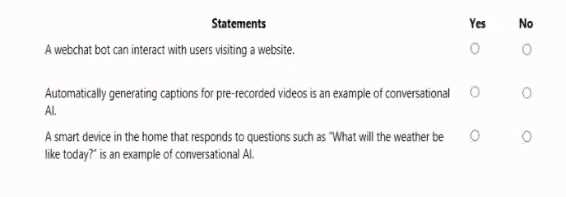
HOTSPOT For each of the following statements, select Yes if the statement is true. Otherwise, select No. NOTE: Each correct selection is worth one point. 
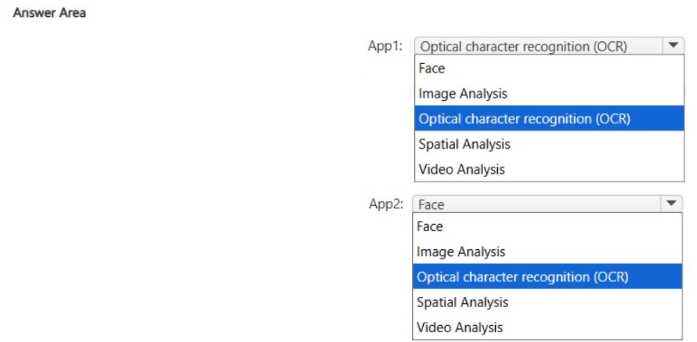
HOTSPOT You have the following apps: • App1: Uses a set of images and photos to extract brand names • App2: Enables touchless access control for buildings Which Azure Al Vision service does each app use? To answer, select the appropriate options in the answer area. NOTE: Each correct selection is worth one point. 
App2: Face
DRAG DROP You plan to deploy an Azure Machine Learning model by using the Machine Learning designer Which four actions should you perform in sequence? To answer, move the appropriate actions from the list of actions to the answer area and arrange them in the correct order.