
Q: 5
HOTSPOT You are informed of an increase in malicious email being received by users. You need to create an advanced hunting query in Microsoft 365 Defender to identify whether the accounts of the email recipients were compromised. The query must return the most recent 20 sign- ins performed by the recipients within an hour of receiving the known malicious email. How should you complete the query? To answer, select the appropriate options in the answer area. 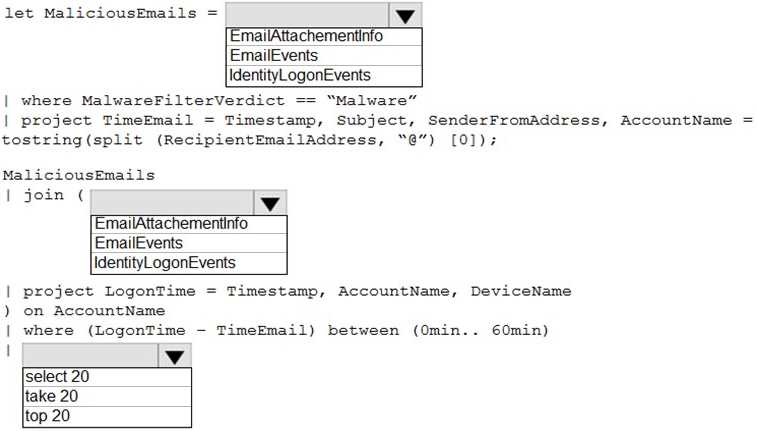
Your Answer
Discussion
Makes sense to use AccountLogonEvents.
AccountLogonEvents
Had something like this in a mock, and for user compromise checks after phishing, AccountLogonEvents always surfaced sign-in attempts best. DeviceLogonEvents is more about the endpoint itself. This lines up with what I've seen reported on other exams too. Think that's right but happy to see other logic.
Had something like this in a mock, and for user compromise checks after phishing, AccountLogonEvents always surfaced sign-in attempts best. DeviceLogonEvents is more about the endpoint itself. This lines up with what I've seen reported on other exams too. Think that's right but happy to see other logic.
Wouldn't AccountLogonEvents be the better pick for tracking user account sign-ins after a phishing attempt? DeviceLogonEvents feels more about endpoint activity rather than user credentials.
AccountLogonEvents. That table gives you user sign-in activity, which matches the question about checking if accounts were compromised after a phishing email. Pretty sure that fits, but feel free to disagree if I missed a catch.
Use official Microsoft docs and run sample queries in the Defender portal lab to get these right.
Noticed some people pick DeviceLogonEvents, but if the malicious email was sent to a shared mailbox and not a user account, AccountLogonEvents wouldn't catch sign-ins by delegated users. Tricky edge case, but still AccountLogonEvents fits best for most scenarios.
Yeah, I'd use AccountLogonEvents here.
DeviceLogonEvents. I thought for sign-in patterns tied to recipients, DeviceLogonEvents works best.
AccountLogonEvents is the right table for user sign-in tracking, especially after phishing attempts. DeviceLogonEvents is about device-level activity, which isn't what they're asking here. Pretty sure that's correct but I get why some folks mix it up.
DeviceLogonEvents. Since the timeline matches the malicious email delivery and we want to see what happened after, monitoring device sign-ins could reveal compromise attempts. AccountLogonEvents is tempting but device logs might show lateral moves. I might be off if they're asking strictly for user logons, open to being corrected.
Be respectful. No spam.