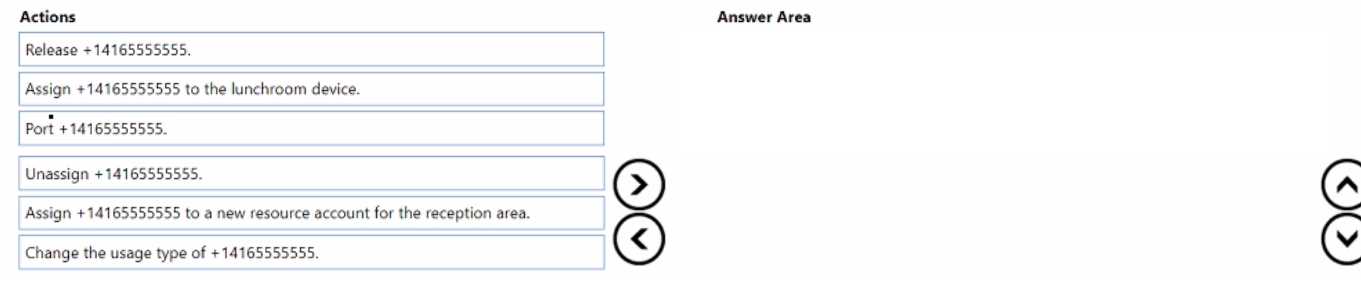
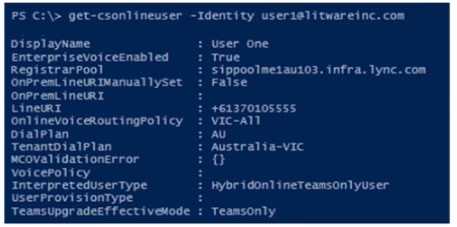
DRAG DROP You need to implement the planned changes for the +14165555555 reception area number. You create a new call queue. Which three actions should you perform in sequence next? To answer, move the appropriate actions from the list of actions to the answer area and arrange them in the correct order. 
Free MS-721 Practice Test Questions and Answers (2026)
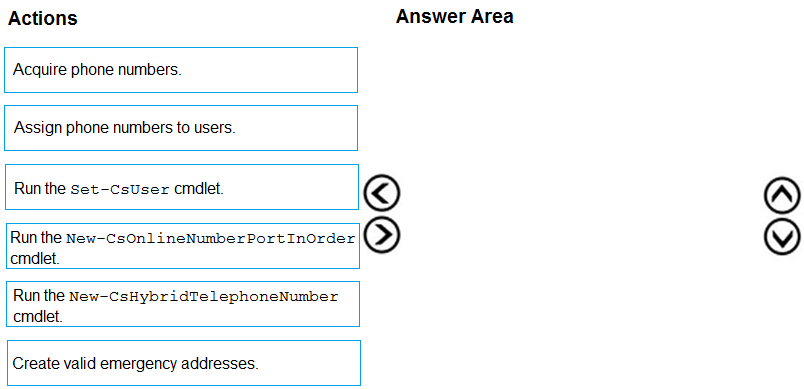
DRAG DROP From Voice in the Microsoft Teams admin center, you select Operators and add an operator. You need to enable users for Microsoft Teams Phone. Which three actions should you perform in sequence? To answer, move the appropriate actions from the list of actions to the answer area and arrange them in the correct order.
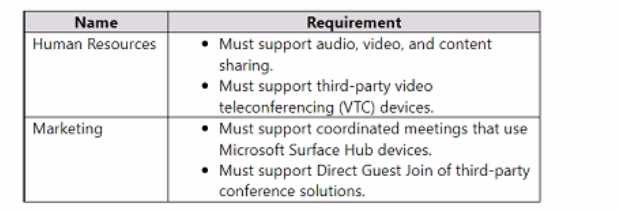
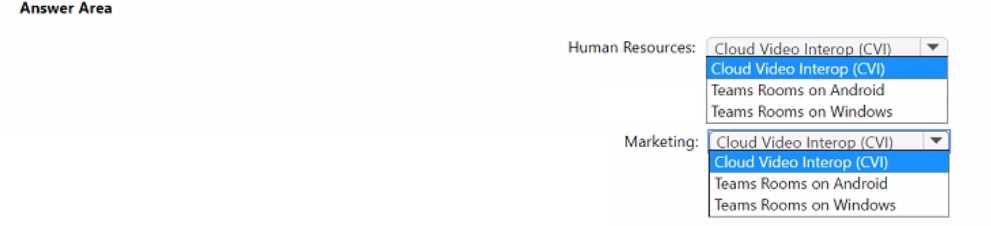
HOTSPOT You have a Microsoft Teams deployment. You have two teams that have meeting room requirements as shown in the following table. 
DRAG DROP You have a Microsoft Teams deployment. You plan to deploy Teams Rooms. The solution must meet the following requirements: • Support one-touch join to third-party online meetings. • Enable users to cast content from their devices. What should you configure for each requirement? To answer, drag the appropriate features to the correct requirements. Each feature may be used once, more than once, or not at all. You may need to drag the split bar between panes or scroll to view content. NOTE: Each correct selection is worth one point.
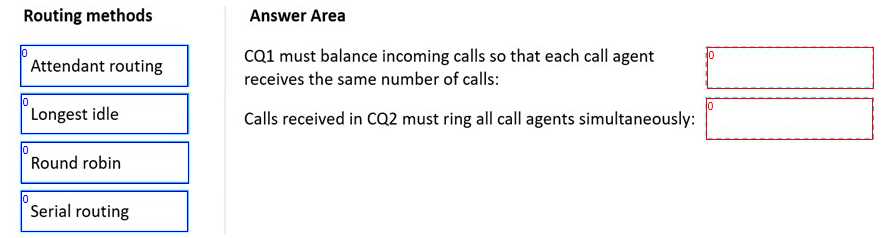
DRAG DROP You have a Microsoft Teams Phone deployment. You need to create two call queues named CQ1 and CQ2. The solution must meet the following requirements: CQ1 must balance incoming calls so that each call agent receives the same number of calls 


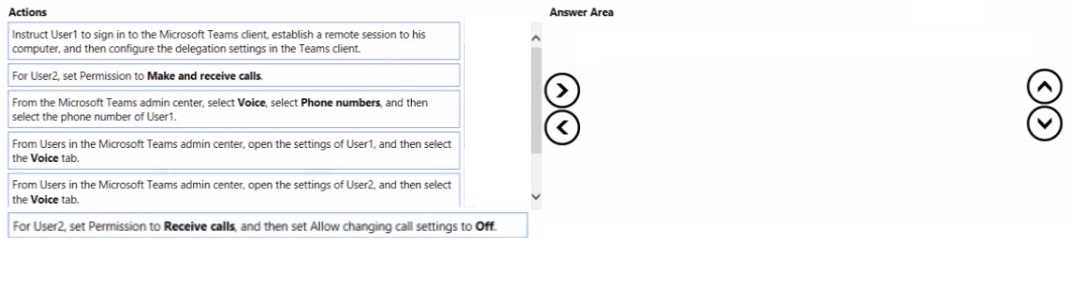
DRAG DROP You have two users named User1 and User2. You need to configure User2 as a call delegate for Uset1. The solution must meet the following requirements: • Minimize disruptions to User1. • Prevent User2 from placing cans on behalf of User1. • Prevent User2 from modifying the settings of User1. Which three actions should you perform in sequence? To answer, move the appropriate actions from the list of actions to the answer area and arrange them in the correct order.
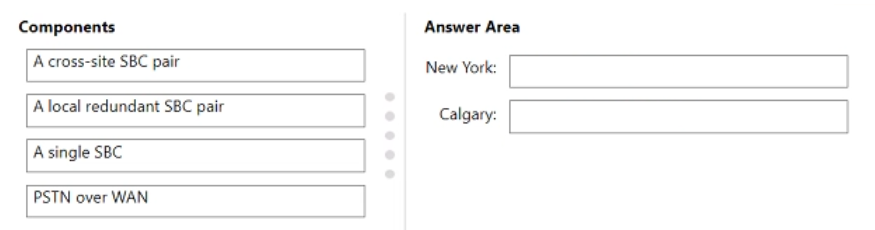
DRAG DROP Your company has a main office in New York and a branch office in Calgary. All offices connect to each other by using a dedicated WAN. You have a Microsoft Teams Phone deployment. You need to recommend a Direct Routing solution that meets the following requirements: • If a Session Border Controller (SBQ fails in the New York office, PSTN services must remain available through a local PSTN egress in New York. The Calgary office must prioritize a local PSTN egress and ensure that PSTN services remain available in the event of a local SBC outage. • The number of SBCs must be minimized. What should you recommend for each office? To answer, drag the appropriate components to the correct offices. Each component may be used once, more than once, or not at all. You may need to drag the split bar between panes or scroll to view content. NOTE: Each correct selection is worth one point.

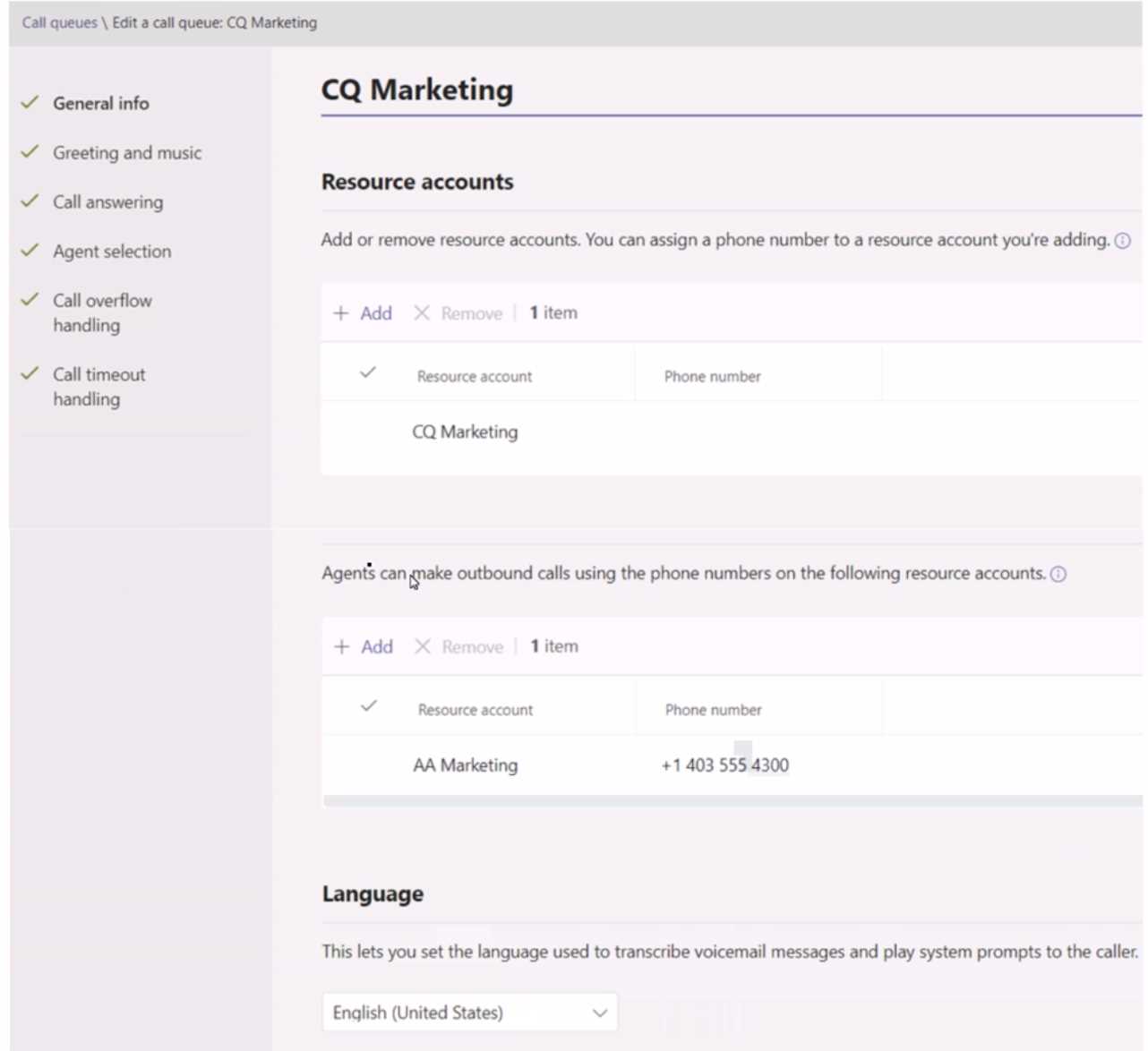
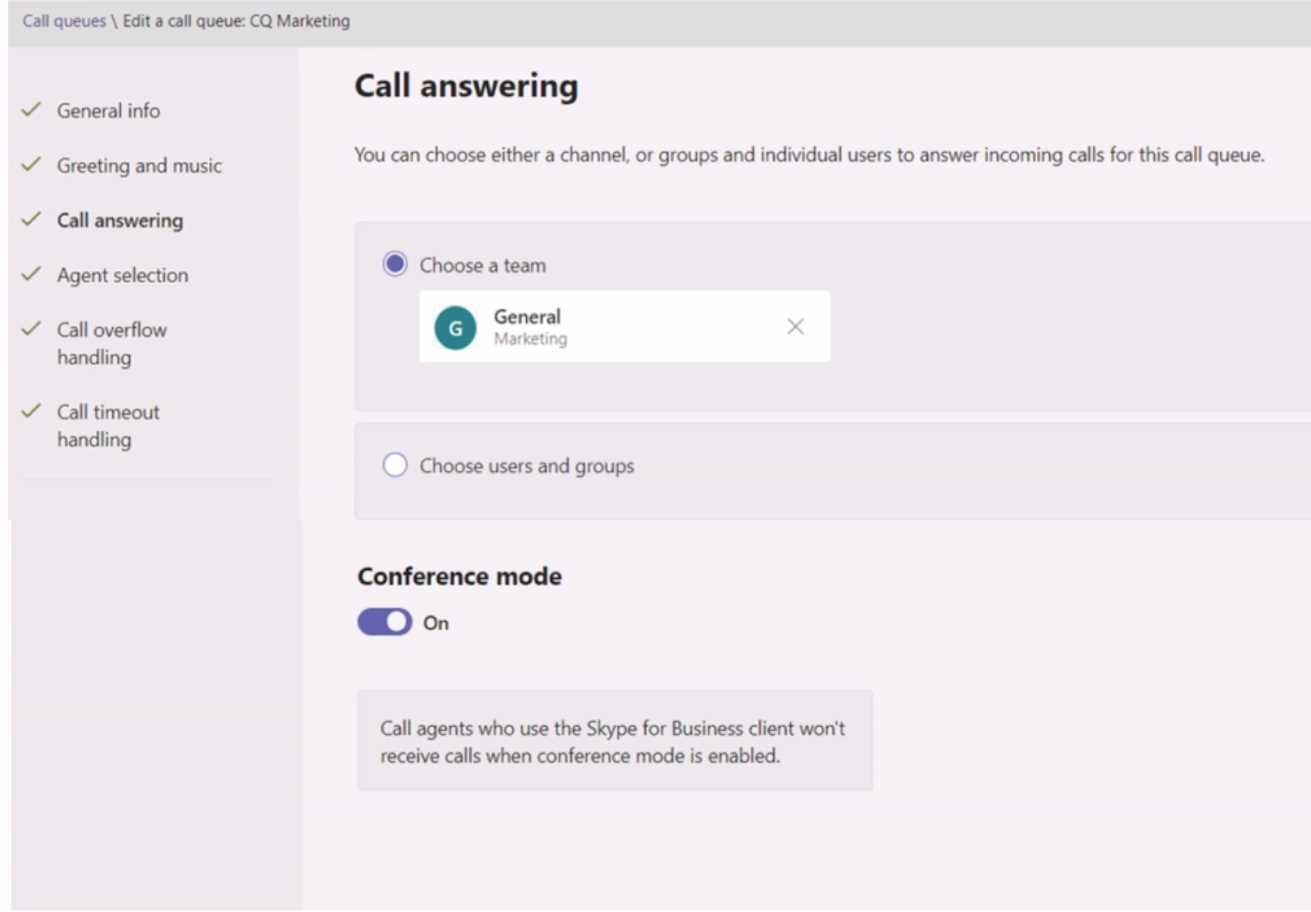
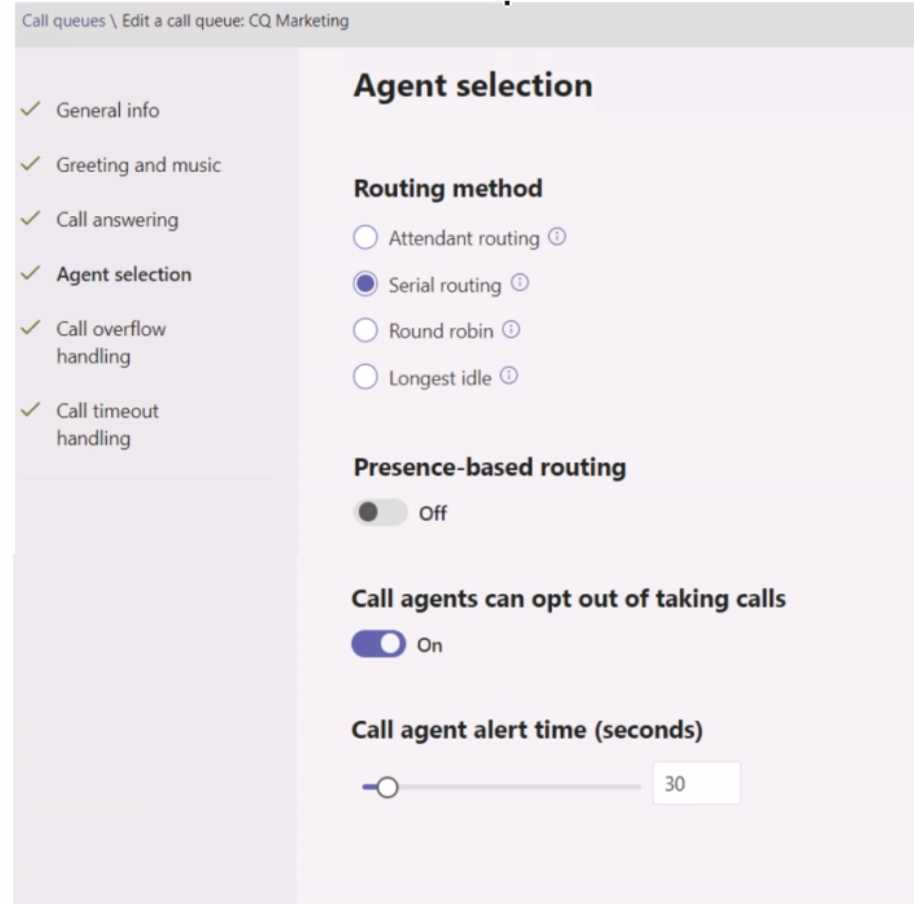
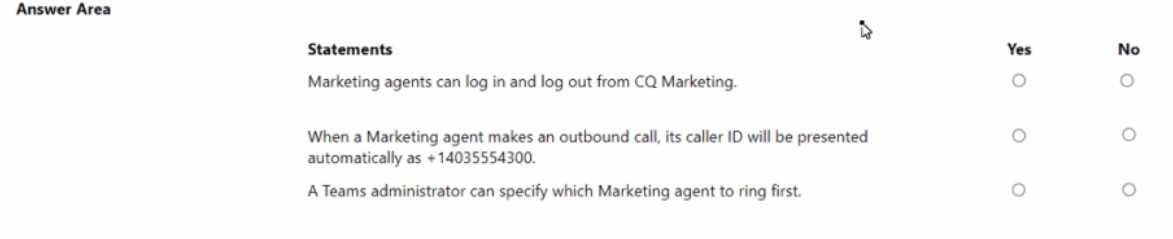
HOTSPOT You have a Microsoft Teams Phone deployment. You create a call queue named CQ Marketing. The General info settings are configured as shown in the CQ Marketing exhibit. (Click the CQ Marketing lab.) 


What's covered in this practice questions set
3: Configure and manage Teams Phone · 7 questions
📖 About this Domain
Constituting the largest portion of the MS-721 exam at 30-35%, the 'Configure and manage Teams Phone' domain is critical for any aspiring Collaboration Communications Systems Engineer. This domain delves deep into the configuration and management of Teams as a complete voice solution. It covers everything from configuring PSTN connectivity and managing phone numbers to setting up advanced calling features like call queues and auto attendants. A thorough understanding of voice routing, calling policies, and emergency calling is paramount for success in this heavily weighted section.
🎓 What You Will Learn
- You will learn the detailed steps to configure and manage various PSTN connectivity options, including Microsoft Calling Plans, Operator Connect, and Direct Routing. This includes the technical setup of Session Border Controllers (SBCs) for Direct Routing.
- You will gain expertise in managing phone numbers for users and services. This covers acquiring new numbers, porting existing numbers, and assigning them to users, call queues, and auto attendants.
- You will learn to create and configure auto attendants and call queues to efficiently route incoming calls. This includes setting up call flows, greetings, and business hours.
- You will understand how to configure and manage a wide range of calling policies. This includes policies for call forwarding, simultaneous ring, voicemail, and caller ID.
- You will learn to implement and manage emergency calling solutions. This involves configuring dynamic emergency calling and ensuring compliance with local regulations.
- You will gain knowledge on how to manage voice-enabled users. This includes assigning licenses, enabling for voice, and configuring user-specific calling settings.
🛠️ Skills You Will Build
- You will build the technical skill to deploy and manage a complete cloud-based phone system using Microsoft Teams. This includes hands-on configuration of all aspects of Teams Phone.
- You will develop the ability to design and implement complex call routing scenarios. This involves creating sophisticated call flows with auto attendants and call queues to meet specific business needs.
- You will acquire the skill to effectively manage your organization's phone number inventory. This includes the entire lifecycle of a phone number from acquisition to assignment and reclamation.
- You will build the expertise to create and enforce granular calling policies. This allows you to control user access to calling features and ensure a consistent and compliant calling experience.
- You will develop the critical skill of configuring and maintaining emergency calling services. This ensures that users can reach emergency services when needed and that accurate location information is provided.
- You will gain the ability to efficiently manage your voice-enabled user base. This includes onboarding new users, modifying existing user settings, and troubleshooting user-specific calling issues.
💡 Top Tips to Prepare
- Master the configuration of Direct Routing, as it is a complex and heavily tested topic. This includes understanding the role of the Session Border Controller (SBC).
- Get hands-on practice with creating and configuring auto attendants and call queues in the Teams admin center.
- Thoroughly understand the different types of calling policies and how they can be applied to users and groups.
- Review the documentation on configuring dynamic emergency calling and be prepared for scenario-based questions on this topic.
4: Configure and manage Teams Rooms and devices · 3 questions
📖 About this Domain
The 'Configure and manage Teams Rooms and devices' domain, weighted at 20-25%, covers the deployment, management, and troubleshooting of Microsoft Teams Rooms (MTRs) and other certified devices. This section of the exam assesses your ability to create a seamless meeting room experience by effectively managing the hardware and software components of Teams Rooms. It includes topics such as device provisioning, configuration profiles, and monitoring device health. A strong understanding of both the Teams admin center and the Teams Rooms Pro Management Portal is essential for this domain.
🎓 What You Will Learn
- You will learn how to plan for and deploy Microsoft Teams Rooms on both Windows and Android platforms. This includes understanding the hardware requirements and deployment processes for each.
- You will gain expertise in configuring and managing Teams Rooms devices. This covers creating and assigning configuration profiles to standardize settings across your rooms.
- You will learn to use the Teams Rooms Pro Management Portal for advanced monitoring and management. This includes proactive issue detection and remote management of your Teams Rooms.
- You will understand how to manage a variety of other Teams-certified devices, such as Teams displays, panels, and IP phones. This includes device provisioning, firmware updates, and policy management.
- You will learn to configure advanced features for Teams Rooms and devices. This includes setting up Coordinated Meetings, Direct Guest Join, and content cameras.
- You will gain knowledge on how to troubleshoot common issues with Teams Rooms and devices. This involves diagnosing problems with hardware, software, and network connectivity.
🛠️ Skills You Will Build
- You will build the practical skill to deploy and commission Microsoft Teams Rooms in various meeting spaces. This includes both the physical installation and the software configuration.
- You will develop the ability to centrally manage and maintain a fleet of Teams Rooms devices. This involves using configuration profiles to ensure consistency and simplify management.
- You will acquire the skill to proactively monitor the health and performance of your Teams Rooms. This allows you to identify and resolve issues before they impact users.
- You will build the expertise to manage the entire lifecycle of Teams-certified devices in your organization. This includes everything from initial deployment to ongoing maintenance and eventual retirement.
- You will develop the ability to enhance the meeting room experience by configuring advanced features. This helps to create a more collaborative and productive meeting environment.
- You will gain the skill to efficiently troubleshoot and resolve issues with Teams Rooms and devices. This minimizes downtime and ensures a reliable meeting experience for your users.
💡 Top Tips to Prepare
- Familiarize yourself with the features and capabilities of the Teams Rooms Pro Management Portal.
- Understand the differences between Teams Rooms on Windows and Teams Rooms on Android, and the management considerations for each.
- Get hands-on experience with creating and assigning configuration profiles for Teams Rooms devices.
- Review the process for provisioning and managing other Teams-certified devices, such as IP phones and Teams displays.