
Q: 3
DRAG DROP From Voice in the Microsoft Teams admin center, you select Operators and add an operator. You need to enable users for Microsoft Teams Phone. Which three actions should you perform in sequence? To answer, move the appropriate actions from the list of actions to the answer area and arrange them in the correct order. 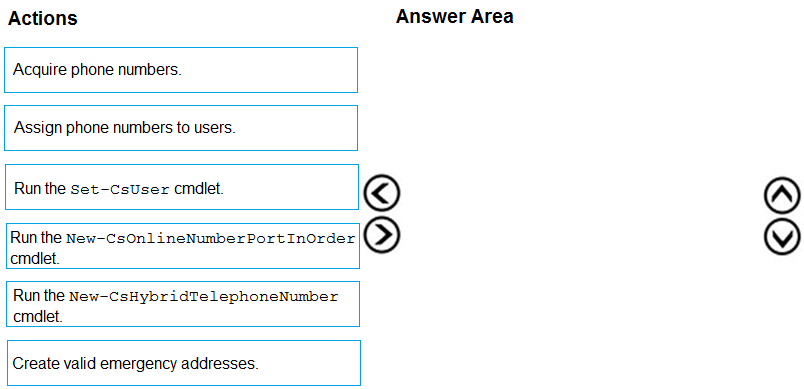
Drag & Drop
Discussion
Makes sense, the order should be Create valid emergency addresses, then Acquire phone numbers, finally Assign phone numbers to users. That's the workflow Teams expects for Operator Connect.
Create valid emergency addresses > acquire phone numbers > assign phone numbers to users. If you try to skip the emergency address step, Teams blocks the rest, so order really matters here for Operator Connect.
Create valid emergency addresses → acquire phone numbers → assign phone numbers to users. Set-CsUser is tempting but that’s for Direct Routing, not Operator Connect. Pretty sure this flow is what MS wants here, correct me if I’m missing something.
Edge case here-if you don't create the emergency addresses first, Teams won't let you acquire or assign numbers at all. So mapping is: Create valid emergency addresses, acquire phone numbers, assign to users.
Create valid emergency addresses → acquire phone numbers → assign phone numbers to users. That’s the standard flow for enabling Teams Phone with Operator Connect. Set-CsUser and the porting cmdlets aren’t part of this admin center process, pretty sure. Anybody see it different?
Create valid emergency addresses, then acquire phone numbers, then assign numbers to users. Set-CsUser is a trap here.
Create valid emergency addresses → acquire phone numbers → assign phone numbers to users. I don’t think Set-CsUser applies unless you’re scripting or doing Direct Routing, so that’s a trap option here. Operator Connect flow wants you to get the emergency location in place before numbers. Pretty sure that’s right but open to correction if anyone’s seeing it differently.
Create valid emergency addresses, acquire phone numbers, assign phone numbers to users. Saw this on a practice test too.
Create valid emergency addresses, acquire phone numbers, assign phone numbers to users. That's the usual sequence for Teams Operator Connect.
Be respectful. No spam.