Free MS-721 Practice Test Questions and Answers (2026)

Last Update Check
View Mode
Q: 1

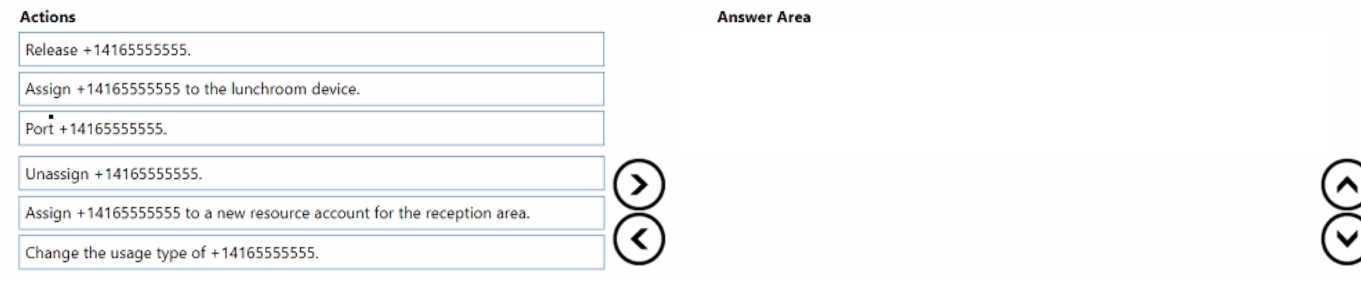
DRAG DROP You need to implement the planned changes for the +14165555555 reception area number. You create a new call queue. Which three actions should you perform in sequence next? To answer, move the appropriate actions from the list of actions to the answer area and arrange them in the correct order. MS-721 question

Drag & Drop
24 comments in the community discussion
8
Really clear question. Unassign +14165555555, change its usage type, then assign it to a new resource account for reception area.
6
Unassign +14165555555, change usage type, assign to new resource account. Has to be unassigned first so you can convert it, then you link it to the call queue using the resource account. Pretty sure that's how MS Teams wants it done, unless I missed something?
Q: 2
You have a Microsoft Teams Phone deployment You assign a Microsoft 365 E5 license lo a user named User1. You need to enable User1 for Direct Routing. Which PowerShell cmdlet should you run?
Options
10 comments in the community discussion
6
Option B is what you want here. Set-CsUser is used to enable Teams Direct Routing and assign the phone number via PowerShell. The other cmdlets don't actually enable the user for Direct Routing. Pretty sure on this, but if someone has a different use case let me know.
Its B for enabling Direct Routing via PowerShell since only Set-CsUser lets you set both the phone number (LineURI) and Enterprise Voice. The other options don't handle both at once from what I remember-unless Microsoft changed something recently? Open to corrections if rules have shifted.
Q: 3

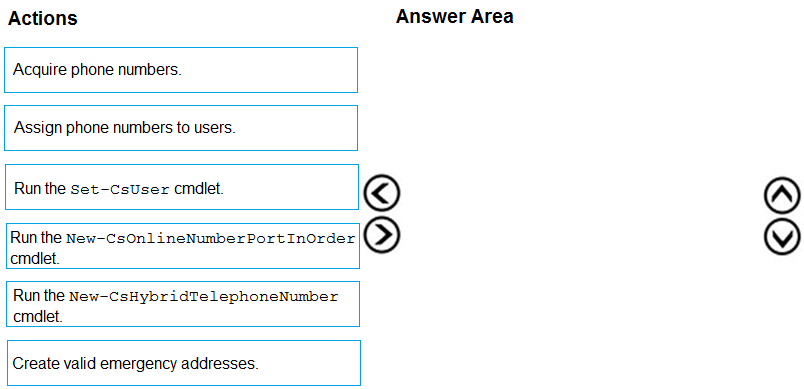
DRAG DROP From Voice in the Microsoft Teams admin center, you select Operators and add an operator. You need to enable users for Microsoft Teams Phone. Which three actions should you perform in sequence? To answer, move the appropriate actions from the list of actions to the answer area and arrange them in the correct order. MS-721 question

Drag & Drop
15 comments in the community discussion
9
Makes sense, the order should be Create valid emergency addresses, then Acquire phone numbers, finally Assign phone numbers to users. That's the workflow Teams expects for Operator Connect.
6
Create valid emergency addresses > acquire phone numbers > assign phone numbers to users. If you try to skip the emergency address step, Teams blocks the rest, so order really matters here for Operator Connect.
Q: 4

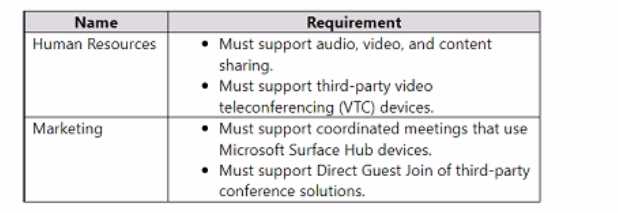
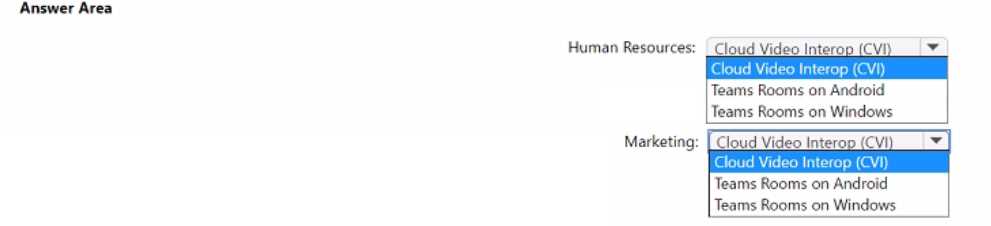
HOTSPOT You have a Microsoft Teams deployment. You have two teams that have meeting room requirements as shown in the following table. MS-721 question You need to recommend a meeting room solution for the teams. What should you include in the recommendation for each team? To answer, select the appropriate options in the answer area. NOTE: Each correct selection is worth one point. MS-721 question
Your Answer
14 comments in the community discussion
5
Nah, gotta disagree a bit here. HR needs Cloud Video Interop since they have to support third-party VTC gear, not Teams Rooms. For Marketing, Teams Rooms on Windows is the way because it supports coordinated meetings with Surface Hub. Pretty sure that's exactly what MS expects, unless I'm missing a trick with the requi
5
CVI for HR, Teams Rooms on Windows for Marketing, but only if HR still has those legacy VTCs in play.
Q: 5

DRAG DROP You have a Microsoft Teams deployment. You plan to deploy Teams Rooms. The solution must meet the following requirements: • Support one-touch join to third-party online meetings. • Enable users to cast content from their devices. What should you configure for each requirement? To answer, drag the appropriate features to the correct requirements. Each feature may be used once, more than once, or not at all. You may need to drag the split bar between panes or scroll to view content. NOTE: Each correct selection is worth one point. MS-721 question

Drag & Drop
19 comments in the community discussion
6
Direct Guest Join for third-party join, Proximity join for casting content. This fits the requirements best as far as I know.
5
If the casting piece required users to already be in a Teams meeting, I'd say Companion mode might fit. But since it's just about casting content from their devices generally, Proximity join is the correct one for that. Direct Guest Join is definitely for third-party meeting one-touch access. Anyone see a scenario wher
Q: 6

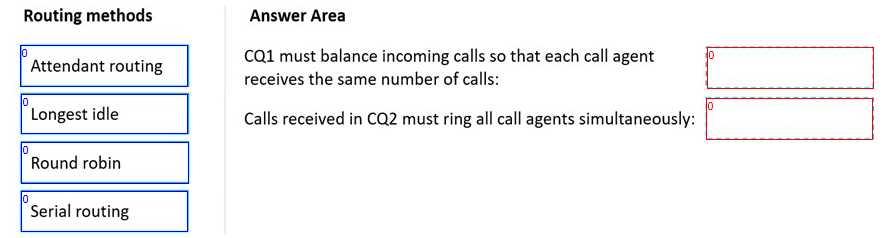
DRAG DROP You have a Microsoft Teams Phone deployment. You need to create two call queues named CQ1 and CQ2. The solution must meet the following requirements: CQ1 must balance incoming calls so that each call agent receives the same number of calls MS-721 question Calls received by CQ2 must ring all call agents simultaneously MS-721 question What should you configure for each requirement? To answer, drag the appropriate routing methods to the correct requirements. Each routing method may be used once, more than once, or not at all. You may need to drag the split bar between panes or scroll to view content. NOTE: Each correct selection is worth one point. MS-721 question

Drag & Drop
18 comments in the community discussion
5
CQ1: Round robin, CQ2: Attendant routing. Round robin splits calls evenly, which is what "balance" means here. Attendant is the only one that rings all agents at once. Pretty sure this is correct, but I know some confuse longest idle for CQ1.
4
Nah, I think it's CQ1: Round robin and CQ2: Attendant routing. Serial routing is a trap here, since it doesn't ensure balanced distribution. Pretty sure this lines up with how Teams works, but let me know if you see it differently.
Q: 7

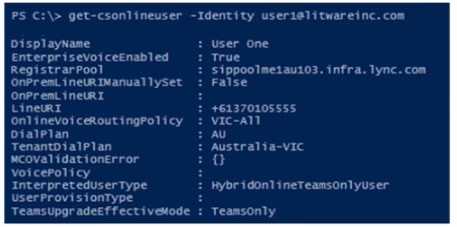
MS-721 question You have a Microsoft Teams Phone deployment. The 613 7010 5XXX phone number range is allocated to the Session Border Controller (SBC). A user named User1 is configured as shown in the following exhibit. User1 reports that when an external caller attempts to call the phone number of User1, the external caller receives an error message. User1 can make outbound calls, but no caller ID appears. Which two commands should you run to resolve the issues? Each correct answer presents part of the solution. NOTE: Each correct selection is worth one point. A) MS-721 question B) MS-721 question C) MS-721 question D) MS-721 question E) MS-721 question

Options
12 comments in the community discussion
1
Option B and E, saw a similar question in exam reports. Both needed for full fix.
1
B, E
Q: 8

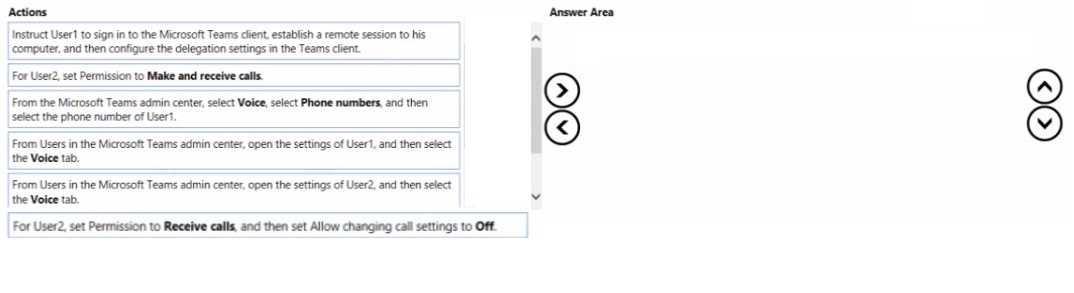
DRAG DROP You have two users named User1 and User2. You need to configure User2 as a call delegate for Uset1. The solution must meet the following requirements: • Minimize disruptions to User1. • Prevent User2 from placing cans on behalf of User1. • Prevent User2 from modifying the settings of User1. Which three actions should you perform in sequence? To answer, move the appropriate actions from the list of actions to the answer area and arrange them in the correct order. MS-721 question

Drag & Drop
16 comments in the community discussion
4
Right, it's D (User1 in TAC), then F (User2 receive-only and no change rights), then A (User1 finishes in Teams client). Starts with admin config, limits User2's permissions, then minimal client disruption at the end. I think this matches least privilege and workflow. Anyone disagree?
3
Minimal disruption only works if admin sets up in TAC first, then configures User2’s receive-only and settings block, then has User1 confirm as delegate in client.
Q: 9

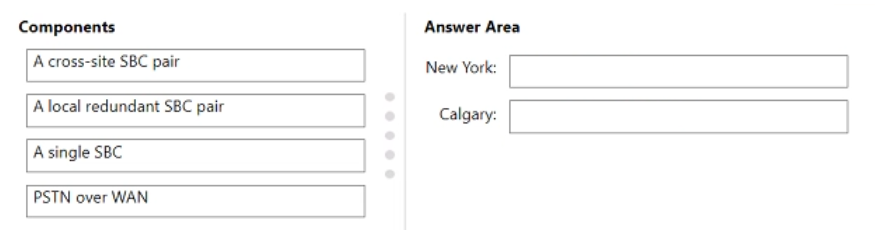
DRAG DROP Your company has a main office in New York and a branch office in Calgary. All offices connect to each other by using a dedicated WAN. You have a Microsoft Teams Phone deployment. You need to recommend a Direct Routing solution that meets the following requirements: • If a Session Border Controller (SBQ fails in the New York office, PSTN services must remain available through a local PSTN egress in New York. The Calgary office must prioritize a local PSTN egress and ensure that PSTN services remain available in the event of a local SBC outage. • The number of SBCs must be minimized. What should you recommend for each office? To answer, drag the appropriate components to the correct offices. Each component may be used once, more than once, or not at all. You may need to drag the split bar between panes or scroll to view content. NOTE: Each correct selection is worth one point.

Drag & Drop
16 comments in the community discussion
5
New York: A local redundant SBC pair, Calgary: PSTN over WAN. This setup lets NY handle its own failover locally, while Calgary leverages the existing New York SBC for backup and keeps hardware counts low.
4
New York: local redundant SBC pair, Calgary: PSTN over WAN. That's the only way to keep local PSTN failover in NY and still minimize total SBCs, since Calgary can use the WAN for backup if its local SBC goes down. Pretty sure this covers all the requirements, but open to other ideas.
Q: 10

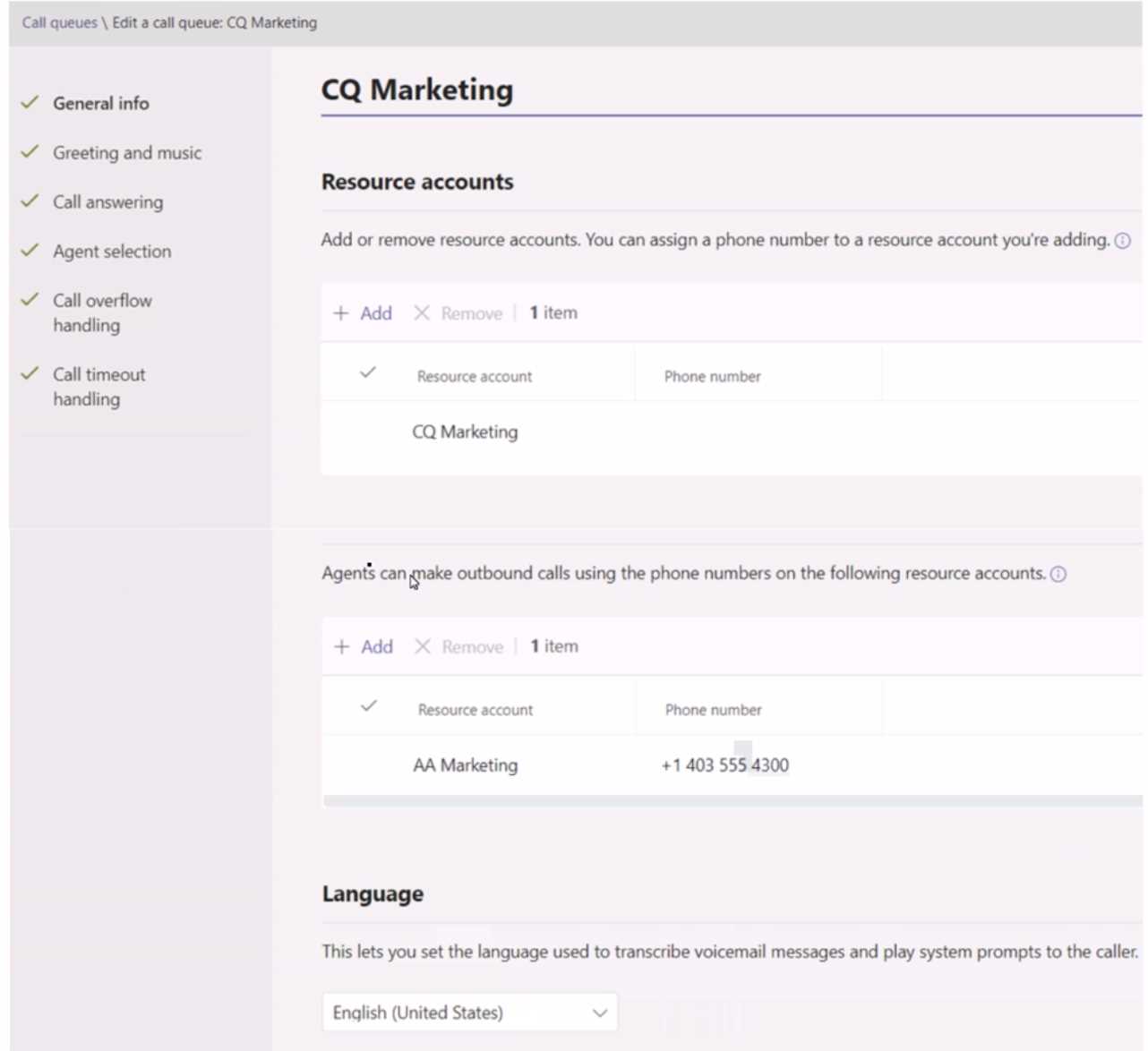
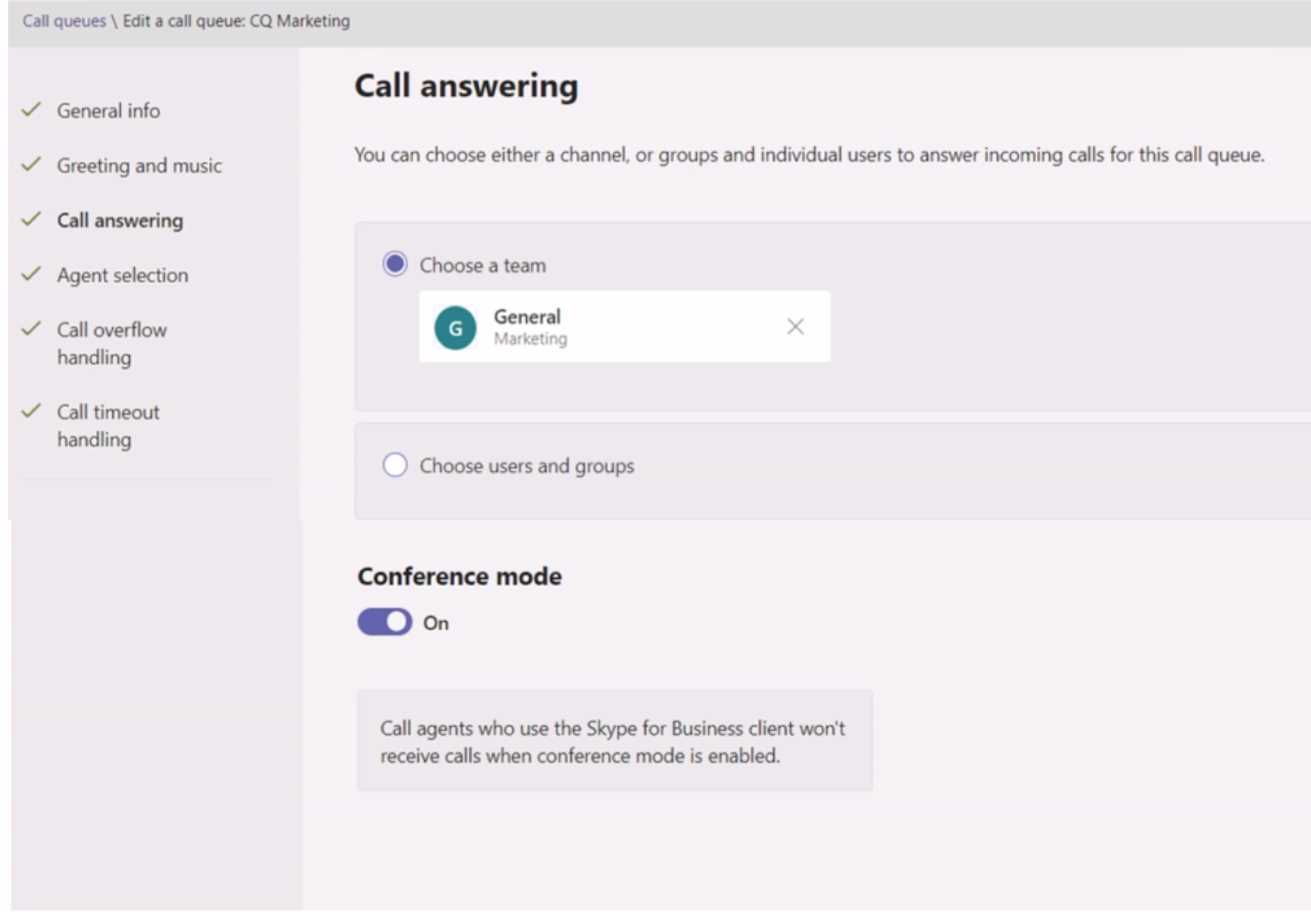
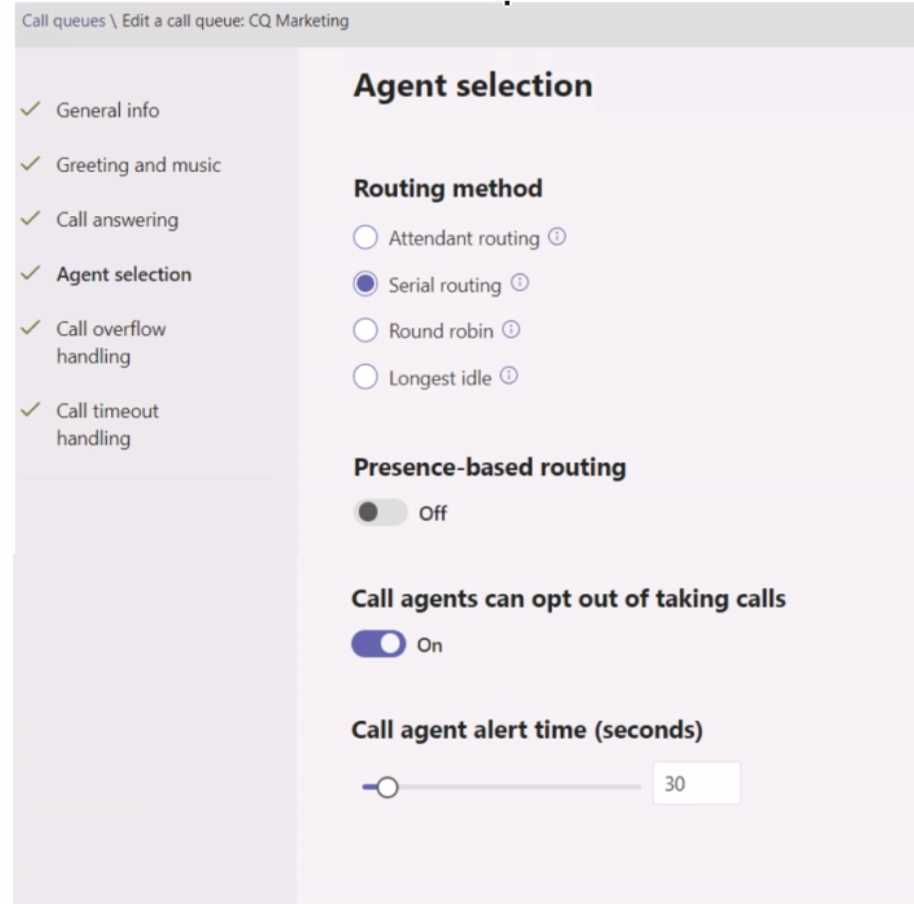
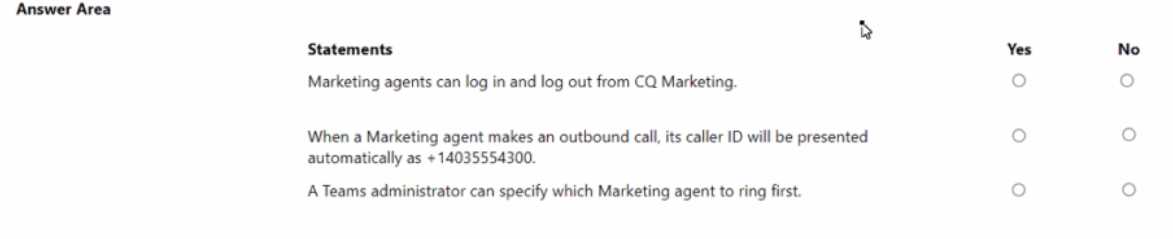
HOTSPOT You have a Microsoft Teams Phone deployment. You create a call queue named CQ Marketing. The General info settings are configured as shown in the CQ Marketing exhibit. (Click the CQ Marketing lab.) MS-721 question The Call answering settings are configured as shown in the Call answering exhibit. (Click the Call answering tab.) MS-721 question The Agent selection settings are configured as shown in the Agent selection exhibit (Click the Agent selection tab.) MS-721 question For each of the following statements, select Yes if the statement is true. Otherwise, select No. MS-721 question

Your Answer
19 comments in the community discussion
6
Marketing agents can log in and out, so Yes for that. Outbound caller ID isn't forced unless a caller ID policy is applied, which is missing here, so No. For the order, admin can't specify who gets called first when using Team-based serial routing (rings alphabetically), so that's also No. Pretty sure about these-fe
6
Yes, No, No. That's what I picked too, matches the way agent opt-in and serial routing work in Teams.
Q: 11
Note: This question is part of a series of questions that present the same scenario. Each question in the series contains a unique solution that might meet the stated goals. Some question sets might have more than one correct solution, while others might not have a correct solution. After you answer a question in this section, you will NOT be able to return to it. As a result, these questions will not appear in the review screen. Your company uses configuration profiles to manage Microsoft Teams-certified IP phones. The Standard configuration profile is applied to the IP phones. The help desk receives reports that several user phones fail to lock automatically after the timeout period. You need to verify whether the configuration profile is applied to the problematic phones. Solution: From Device in the Microsoft Teams admin center, you select IP Phones, select the Configuration profiles tab, select Standard Phone Policy, and select Assigned devices. Does this meet the goal?
Options
4 comments in the community discussion
1
B tbh, the steps don't match how Teams admin actually works for phone config. Question's clear on what it's testing.
Definitely not A, it's B. Had something like this in a mock and you have to check user or group assignment not "Assigned devices" for config profiles in Teams admin. Pretty sure the solution doesn't meet the goal.
Q: 12

HOTSPOT You need to assign a phone number to User1 to meet the technical requirements. How should you complete the command? To answer, select the appropriate options in the answer area. NOTE: Each correct selection is worth one point. MS-721 question

Your Answer
5 comments in the community discussion
7
Nice, clear scenario. Set-CsUser with -LineURI fits here.
4
Yeah, this lines up with how Teams voice is managed. The command should be Set-CsUser and use -LineURI to assign the number. Pretty sure that's what they want for direct phone number assignments.
Q: 13

You have a Teams Phone deployment. When you review the Server - Client summary reports in Teams, you discover that Wired inside data is unavailable as shown in the following exhibit. MS-721 question You need to review the monthly and daily trends in the reports. What should you do?

Options
5 comments in the community discussion
1
Option CLove how clear the scenario is, feels just like what I’ve seen in recent practice exams.
B , had something similar pop up in a mock exam and configuring the network topology from Teams admin center was the fix there. It links subnets so you can see inside/outside network data. Pretty sure it's B but open to correction if someone knows for sure.
Q: 14

HOTSPOT You need to troubleshoot the issues reported by the New York and London office users. What should you use for each office? To answer, select the appropriate options in the answer area. NOTE: Each correct selection is worth one point. MS-721 question

Your Answer
7 comments in the community discussion
4
Why pick Remote Connectivity Analyzer for London but not New York? Is it because London's issue is external/exchange related while New York is something admin-side with Teams presence or chat? Feels like the question is about troubleshooting scope, but just want to be sure.
3
Self-help diagnostics for Teams admins (New York) and Microsoft Remote Connectivity Analyzer (London). Nice, clear question format for practice!
Q: 15

HOTSPOT You have a Microsoft Teams Phone deployment that contains a user named User1. A company policy states that all users must have voicemail configured so that callers can record a message or be transferred to reception. You need to verify the voicemail configuration of User1 to ensure that it meets the requirements of the company policy. How should you complete the command? To answer select the appropriate options in the answer area. NOTE: Each correct selection is worth one point. MS-721 question
Your Answer
5 comments in the community discussion
9
Makes sense here to use Get-CsUserCallingSettings and look for UnansweredTarget. That's what actually checks the forwarding or voicemail config.
2
Nah, Get-CsOnlineUser catches folks out here. You need Get-CsUserCallingSettings and UnansweredTarget.
Q: 16

You need to recommend a solution for the new United Kingdom retail site. The solution must meet the technical requirements. Which three actions should you include in the recommendation? Each correct answer presents part of the solution. NOTE Each correct selection is worth one point.
Options
3 comments in the community discussion
1
C D E, tbh the dial-out config is easy to overlook when it's Calling Plan for UK. Routing policy not needed here.
Option C D, and E look right here. Teams Calling Plan for new UK users means you have to order numbers in Teams admin center (E), then assign those numbers (D), and set dial-out settings for domestic calling (C). Nice question, the steps are clear if you know how Calling Plan works.
Q: 17
You have a PBX phone system that contains 100 handsets. The handsets support SIP registration. You implement a new Microsoft Teams Phone deployment that has SIP Gateway configured. You need to register the handsets with Teams. What should you do?
Options
5 comments in the community discussion
D
C/D? D needs the provisioning URL for Teams SIP Gateway, C is a common trap for config-only scenarios.
Q: 18

You have a Microsoft Teams deployment. You have the users shown in the following table. MS-721 question You need to identify which users meet the following requirements: • Can assign watermarks to meetings. • Can configure end-to-end meeting encryption. Which users should you identify?

Options
9 comments in the community discussion
4
Option B
1
C or D, since E5 has lots of security features but maybe missing those Premium-only settings. Not totally sure between these two.
Q: 19

DRAG DROP You need to implement the planned change for the Intelligent Speaker in the Rome office. Which three actions should you perform in sequence? To answer, move the appropriate actions from the list of actions to the answer area and arrange them in the correct order. MS-721 question

Drag & Drop
3 comments in the community discussion
4
Makes sense: Instruct user to set up voice profile, then assign policy, then start transcription in the meeting.
2
Had something like this in a mock. Start with user configuring digital voice profile, then assign meeting policy, finally start transcription.
Q: 20
You are evaluating the implementation of the technical requirements for the sales team. After the implementation of the requirements, which meeting feature will the sales team be able to use during Teams meetings?
Options
5 comments in the community discussion
Probably D for this. I had exactly this on my exam and enabling the Whiteboard option was the specific technical requirement for Teams meetings. The other features are usually on by default, but Whiteboard needs to be explicitly enabled in some orgs.
Question 1 of 20

What's covered in this practice questions set

3: Configure and manage Microsoft Teams Phone · 12 questions

📖 About this Domain

This domain covers the configuration of Microsoft Teams Phone for Public Switched Telephone Network (PSTN) connectivity. You will manage phone numbers, voice policies, and call routing components. It is a critical part of enabling enterprise voice in Microsoft Teams.

🎓 What You Will Learn

  • Learn to acquire and manage phone numbers for users and services using Calling Plans, Direct Routing, or Operator Connect.
  • Understand how to configure calling policies, caller ID policies, and dial plans to control user voice capabilities.
  • Learn to implement and manage Auto Attendants and Call Queues for automated call handling and distribution.
  • Discover how to configure Session Border Controllers (SBCs) and PSTN gateways for Direct Routing and integrate with third-party operators.

🛠️ Skills You Will Build

  • You will build the skill to provision and assign phone numbers to users, resource accounts, and voice applications.
  • You will be able to implement complex call routing logic using Auto Attendants, Call Queues, and resource accounts.
  • You will gain proficiency in configuring and troubleshooting PSTN connectivity via Direct Routing, including SBC configuration and health checks.
  • You will develop the ability to enforce granular control over user calling features through the creation and assignment of custom calling policies.

💡 Top Tips to Prepare

  • Gain hands-on experience in the Teams admin center by creating and assigning various voice policies and number types.
  • Master PowerShell cmdlets for Teams Phone management, as they are essential for bulk operations and advanced configurations.
  • Understand the key differences and use cases for Calling Plans, Direct Routing, and Operator Connect for PSTN connectivity.
  • Practice troubleshooting common voice issues, such as call quality problems, call routing failures, and SBC connectivity errors.

4: Configure and manage Microsoft Teams Rooms and devices · 4 questions

📖 About this Domain

This domain covers the deployment, configuration, and management of Microsoft Teams Rooms (MTR) systems and certified Teams devices. It focuses on creating resource accounts, applying configuration profiles, and monitoring device health. This area represents 15-20% of the exam.

🎓 What You Will Learn

  • You will learn to deploy Microsoft Teams Rooms on Windows and Android, including the creation and configuration of resource accounts.
  • You will learn to manage device settings and peripherals by creating and assigning configuration profiles in the Teams admin center.
  • You will learn to use the Teams Rooms Pro Management portal for device monitoring, update management, and incident resolution.
  • You will learn to provision and manage Teams Phones, Teams displays, and common area phones, including various user sign-in modes.

🛠️ Skills You Will Build

  • You will build proficiency in provisioning resource accounts for MTR systems using PowerShell cmdlets and admin center interfaces.
  • You will build the ability to enforce standardized device settings across your MTR fleet using configuration profiles.
  • You will build skills in proactive monitoring and lifecycle management of MTR devices using the Teams Rooms Pro Management service.
  • You will build expertise in administering the full lifecycle of Teams-certified IP phones, panels, and displays.

💡 Top Tips to Prepare

  • Master the PowerShell cmdlets for creating and configuring MTR resource accounts and assigning required licenses.
  • Gain hands-on experience creating and applying configuration profiles in the Teams admin center to understand their impact.
  • Familiarize yourself with all dashboards and features within the Teams Rooms Pro Management portal, especially incident management.
  • Understand the key configuration and management differences between MTR on Windows and MTR on Android platforms.

2: Configure and manage Microsoft Teams meetings, webinars, and town halls · 2 questions

📖 About this Domain

This domain covers the configuration of meeting experiences within the Microsoft Teams admin center. It focuses on policies, settings, and templates for meetings, webinars, and large-scale town halls to manage the entire event lifecycle.

🎓 What You Will Learn

  • You will learn to configure meeting policies to control features like recording, transcription, and content sharing for users.
  • You will learn to manage settings for webinars, including registration forms, presenter roles, and attendee reporting.
  • You will learn to set up and manage town halls, focusing on producer roles, Q&A moderation, and event management.
  • You will learn to create and apply meeting templates and customization policies to standardize meeting experiences.

🛠️ Skills You Will Build

  • You will build the skill to implement granular control over meeting features using the Teams Admin Center and PowerShell cmdlets.
  • You will build the skill to manage the end-to-end lifecycle of webinars, from setup and registration to post-event analytics.
  • You will build the skill to orchestrate large-scale broadcast events like town halls, managing production and attendee interaction.
  • You will build the skill to configure audio conferencing and PSTN integration for dial-in capabilities in Teams meetings.

💡 Top Tips to Prepare

  • Gain hands-on experience in the Teams Admin Center by creating and modifying meeting, webinar, and town hall policies.
  • Understand the distinct capabilities and configuration options for standard meetings, webinars, and town halls.
  • Practice using PowerShell cmdlets like Get-CsTeamsMeetingPolicy and Set-CsTeamsMeetingPolicy for policy management.
  • Review official Microsoft Learn documentation on meeting templates, customization, and event lifecycle management.

5: Monitor, report on, and troubleshoot collaboration and communication solutions · 1 questions

📖 About this Domain

This domain focuses on maintaining the operational health of Microsoft Teams and related collaboration services. You will leverage built-in monitoring tools, generate usage and quality reports, and apply systematic troubleshooting methodologies for common issues.

🎓 What You Will Learn

  • Use the Teams Admin Center and Microsoft 365 admin center to monitor service health and analyze usage reports.
  • Diagnose and resolve call quality problems using the Call Quality Dashboard (CQD) and per-user call analytics.
  • Troubleshoot external access and federation configuration issues with other Microsoft 365 tenants and Skype for Business.
  • Identify and resolve common integration problems between Microsoft Teams, SharePoint Online, and OneDrive for Business.

🛠️ Skills You Will Build

  • Analyze Teams usage reports and Microsoft 365 adoption metrics to assess service utilization.
  • Interpret Call Quality Dashboard (CQD) data and call analytics to pinpoint network and device-related call failures.
  • Validate DNS records and external access policies to resolve federation and guest access connectivity issues.
  • Troubleshoot file sharing and permissions by examining SharePoint site and OneDrive configurations linked to Teams.

💡 Top Tips to Prepare

  • Gain hands-on experience with the Call Quality Dashboard (CQD) to differentiate between poor and good call streams.
  • Practice interpreting Microsoft Teams client logs to identify root causes for sign-in, media, and connectivity problems.
  • Master the Microsoft 365 Service Health dashboard for tracking service incidents and advisories.
  • Utilize diagnostic tools in the Teams Admin Center, like the Network testing companion, for proactive issue identification.

1: Plan and design collaboration and communication solutions · 1 questions

📖 About this Domain

This domain covers the foundational planning and design of a Microsoft Teams environment. You will focus on translating business needs into technical specifications for governance, security, and network readiness. It establishes the architectural blueprint for a successful Teams deployment.

🎓 What You Will Learn

  • Plan and design governance for Teams, including naming conventions, lifecycle management, and guest access policies.
  • Design security and compliance solutions by configuring sensitivity labels, retention policies, and data loss prevention (DLP).
  • Assess network readiness for Teams voice and video by using the Network Planner tool and configuring Quality of Service (QoS).
  • Develop a deployment strategy for Teams clients and manage Teams-certified devices and endpoints.

🛠️ Skills You Will Build

  • Architecting a comprehensive Teams governance model that includes team creation, expiration, and access reviews.
  • Implementing security controls like Conditional Access policies and information barriers to secure Teams communications.
  • Optimizing network infrastructure for real-time media traffic to ensure high-quality Teams calls and meetings.
  • Managing the end-to-end lifecycle of Teams clients and devices, from deployment to updates and retirement.

💡 Top Tips to Prepare

  • Master the use of the Network Planner and Call Quality Dashboard (CQD) for network assessment and troubleshooting.
  • Deeply understand the interaction between Teams and other Microsoft 365 services like SharePoint, OneDrive, and Azure AD.
  • Focus on governance controls in the Teams admin center, including policies for messaging, meetings, and app permissions.
  • Practice designing security solutions by applying sensitivity labels and DLP policies to Teams chats and channel messages.

Premium Access Includes

  • Quiz Simulator
  • Exam Mode
  • Progress Tracking
  • Question Saving
  • Flash Cards
  • Drag & Drops
  • 3 Months Access
  • PDF Downloads
Get Premium Access
Scroll to Top