Free PL-500 Practice Test Questions and Answers (2026)

Last Update Check
View Mode
Q: 1
Note: This question is part of a series of questions that present the same scenario. Each question in the series contains a unique solution that might meet the stated goals. Some question sets might have more than one correct solution, while others might not have a correct solution. After you answer a question in this section, you will NOT be able to return to it. As a result, these questions will not appear in the review screen. You are creating a cloud flow that will use two Update Row actions to interact with Microsoft Dataverse. Neither of these actions are dependent on each other. You must minimize the amount of processing time require to complete the flow. You need to implement the actions in the cloud flow. Solution: Create a parallel branch for the two Update Row actions. Does the solution meet the goal?
Options
37 comments in the community discussion
5
Option A, saw a similar setup in exam reports and parallel branches are the way to minimize time here.
3
Option A here. Parallel branches let both Update Row actions run simultaneously, which is the best way to save time if they aren't linked. Some might pick B thinking about possible data locks, but with no dependencies mentioned A fits. Let me know if you disagree.
Q: 2

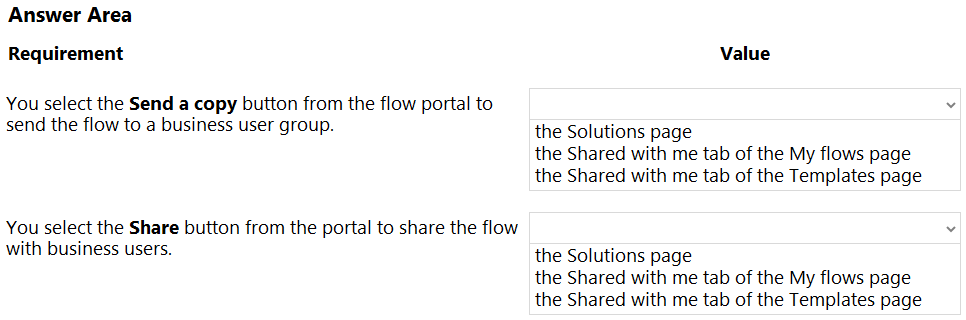
HOTSPOT You develop Power Automate flows for a company. You need to help users locate and run the flows. Where should you direct users to find the flows? To answer NOTE: Each correct selection is worth one point. PL-500 question

Your Answer
25 comments in the community discussion
4
Definitely seen this in official practice tests, and the guide spells it out: Templates > Shared with me and My flows > Shared with me.
4
Yep, Templates Shared with me for Send a copy, and My flows Shared with me tab for Share.
Q: 3

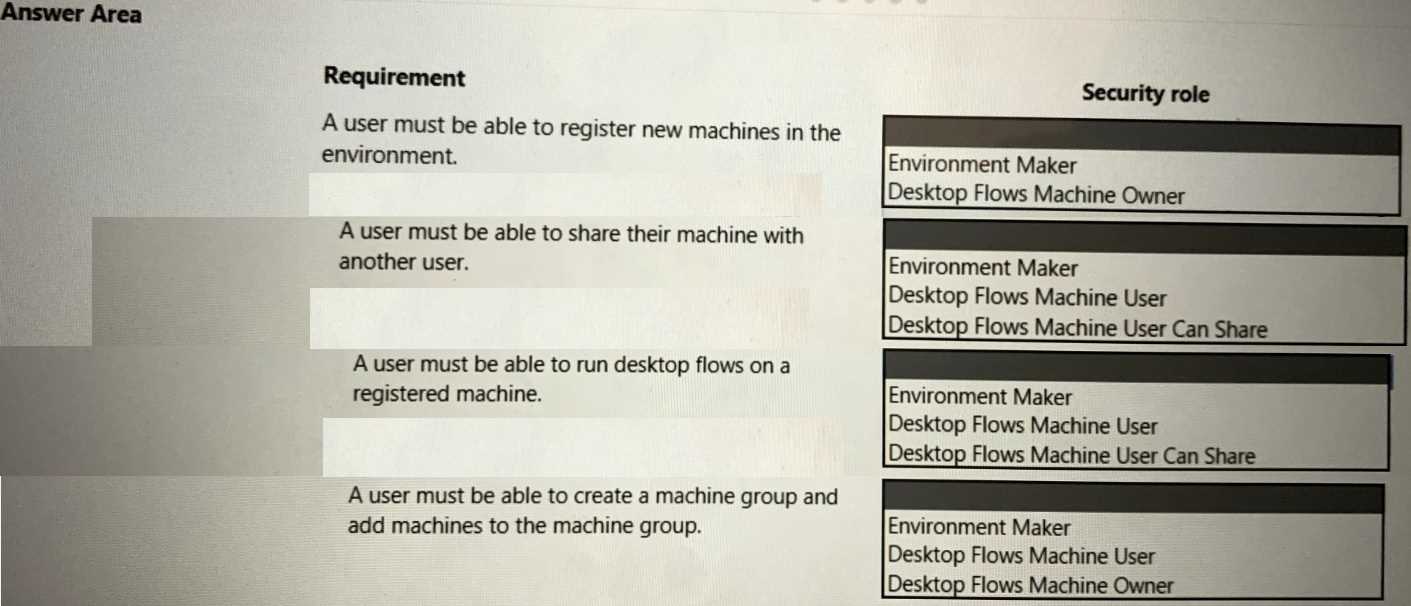
HOTSPOT You create an environment for a company. You need to configure security to meet the company's requirements and follow the principle of least privilege. Which security roles should you assign? To answer, select the appropriate options in the answer area. NOTE: Each correct selection is worth one point. PL-500 question

Your Answer
31 comments in the community discussion
6
Makes sense, I agree with Environment Maker, Desktop Flows Machine User Can Share, Desktop Flows Machine User, and Desktop Flows Machine Owner.
6
Why would just Environment Maker and Owner be enough if least privilege is key? Wouldn’t splitting run/share roles reduce unnecessary access?
Q: 4

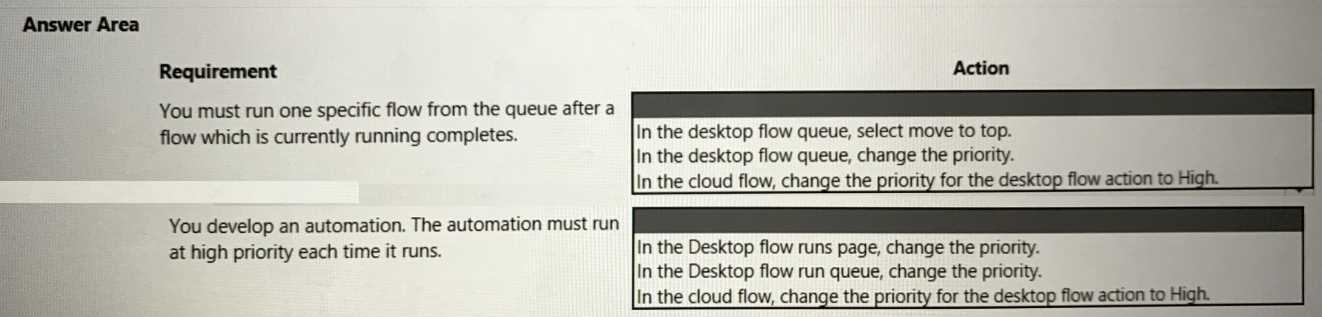
HOTSPOT A company develops an automation solution. You need to manage the flows. To answer, select the appropriate options in the answer area. NOTE: Each correct selection is worth one point. PL-500 question

Your Answer
21 comments in the community discussion
6
Move to top for desktop flow queue, set high priority in cloud flow.
6
I remember a similar scenario from labs on a practice. Move to top for the desktop queue, set priority to high in cloud flow.
Q: 5
You are developing a solution for a medical practice. The solution must use an artificial intelligence (Al) model to evaluate medical X-ray images and detect broken bones. You need to create the Al model for the solution. Solution: Use Azure machine learning to create the model. Does the solution meet the goal?
Options
20 comments in the community discussion
1
Gotta be B, since PL-500 wants you to use AI Builder for Power Platform solutions, not Azure ML. I get that Azure ML can technically do the job but platform alignment matters on this exam. Pretty sure that's what they're testing here. Someone correct me if that doesn't fit what you know.
I don’t think it’s A. B is the better pick here. For PL-500, they expect you to use AI Builder for image classification tasks like this, especially since it’s built for Power Platform integration and requires less data science background. Azure ML is great but not the go-to in this context. Pretty sure that's how Mi
Q: 6

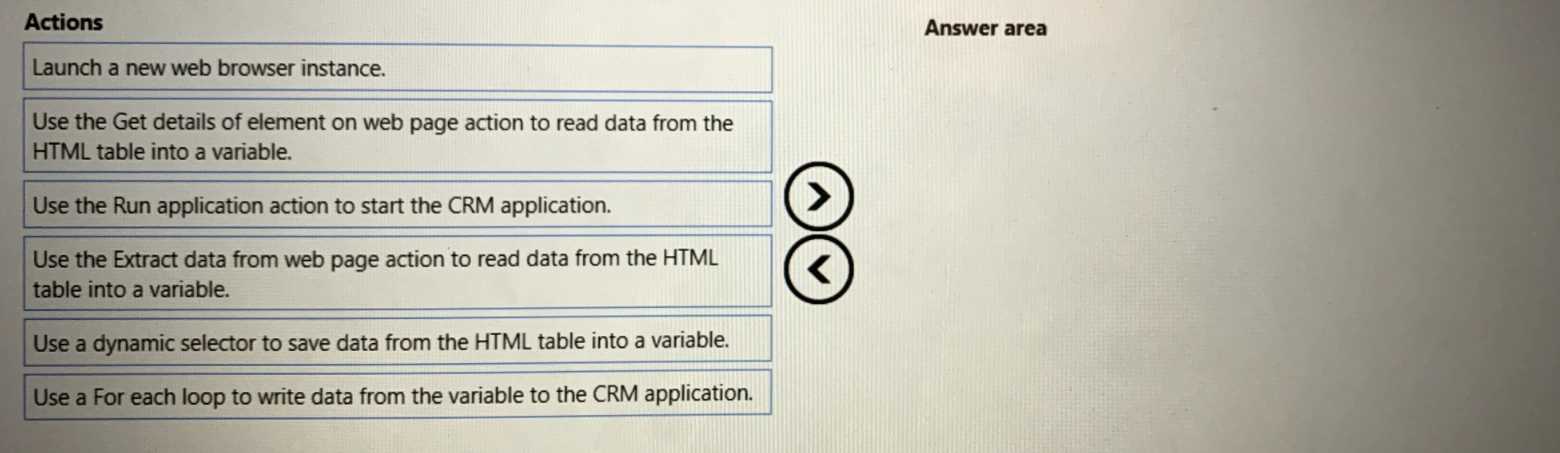
DRAG DROP A company publishes a list of contacts each day as an HTML table on a web page. The company has a customer relationship management (CRM) application that runs on employee desktop devices. You need to implement an RPA solution that reads data from the HTML table and create records in the CRM application. Which four actions should you perform in sequence? To answer, move the appropriate actions from the list of actions to the answer area and arrange them in the correct order. PL-500 question

Drag & Drop
35 comments in the community discussion
7
Launch web browser, Extract data from web page, Run application, For each loop to CRM. This matches typical RPA process order.
6
Launch browser instance → Extract data from web page → Run application → For each loop. Pretty confident this is the ideal flow in Power Automate since 'Extract data from web page' handles HTML tables as a dataset, which makes looping way easier than trying 'Get details'. The catch here is the trap with 'Get details'-
Q: 7
You need to configure the RailStatusUpdater cloud flow. What should you do?
Options
34 comments in the community discussion
4
Option B makes the most sense, since using an environment variable lets you change the config in one place instead of editing every step. Official docs and practice questions push this pattern for maintainability. Pretty sure B is best here, but open to correction.
3
Option B makes sense, environment variables mean you only update in one spot instead of every action. Saw this approach recommended on practice tests. Pretty sure that's what Microsoft wants for maintainability, but open if anyone disagrees.
Q: 8

DRAG DROP You design an attended Power Automate desktop flow that updates orders in an older enterprise resource planning (ERP) system. A warehouse supervisor enters the order status and fulfilment date when an order is fulfilled. The flow must be installed on a desktop computer in the warehouse and triggered by using a shortcut. You need to configure the flow to deploy and run. Which four actions should you perform in sequence? To answer, move the appropriate actions from the list of actions to the answer area and arrange them in the correct order. PL-500 question

Drag & Drop
36 comments in the community discussion
6
Create run URL, make desktop shortcut, launch with shortcut, enter order details. Saw similar order on my last exam.
6
Pretty sure the right order is: Create run URL, create desktop shortcut, launch the shortcut, enter the values when prompted. The environment URL step is a bit of a trap here since you actually need the run URL for the shortcut. Agree?
Q: 9
You are creating a cloud flow that will use two Update Row actions to interact with Microsoft Dataverse. Neither of these actions are dependent on each other. You must minimize the amount of processing time required to complete the flow. You need to implement the actions in the cloud flow. Solution: Create a switch condition. Does the solution meet the goal?
Options
26 comments in the community discussion
1
It’s B, pretty typical Microsoft trick question. Switch just decides conditional logic, won’t make the two updates run faster since they’re not parallel. You’d want parallel branches for that. I’ve seen similar gotchas on practice sets too but feel free to disagree if you see otherwise.
1
Option B If both updates need to run and not just one based on a condition, switch isn't the right fit here.
Q: 10

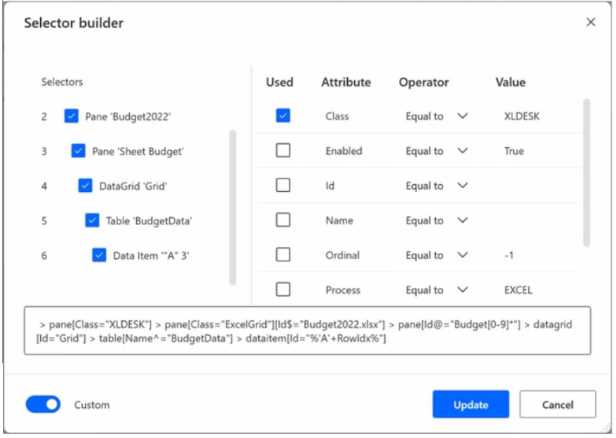
HOTSPOT You are creating a custom selector for a Microsoft Excel workbook by using a Power Automate desktop flow. PL-500 question Use the dropdown menus to select the answer choice that answers each question based on the information presented in the graphic. NOTE: Each correct selection is worth one point.
Your Answer
29 comments in the community discussion
5
Nah, "CELL REFERENCE WITH 'A' PREFIX" isn't quite right. It's about the value of any cell in column A defined by RowIdx, not just something starting with 'A'. Trap is thinking it's just A1 or a hardcoded address. Pretty sure about this from similar exam practice.
5
YES, YES, THE VALUE OF ANY CELL DEFINED BY ROWIDX VARIABLE IN COLUMN A, UPDATE THE TABLE NAME IN LINE 5
Q: 11
You create a custom connector outside of a solution in your development environment. The custom connector includes custom code. You plan to deploy the custom connector to another environment by first adding it to a solution. When you deploy the solution, the custom code is not deployed successfully. You need to resolve the issue with the custom code. What should you do?
Options
13 comments in the community discussion
2
Its A, saw a similar thing in mock exams. Unmanaged lets you update with CLI in the target. Agree?
1
B , since managed solutions are usually for prod environments and help lock things down so configs don't get changed. I think deploying as managed would ensure the custom connector gets carried over securely. Could be missing something though.
Q: 12

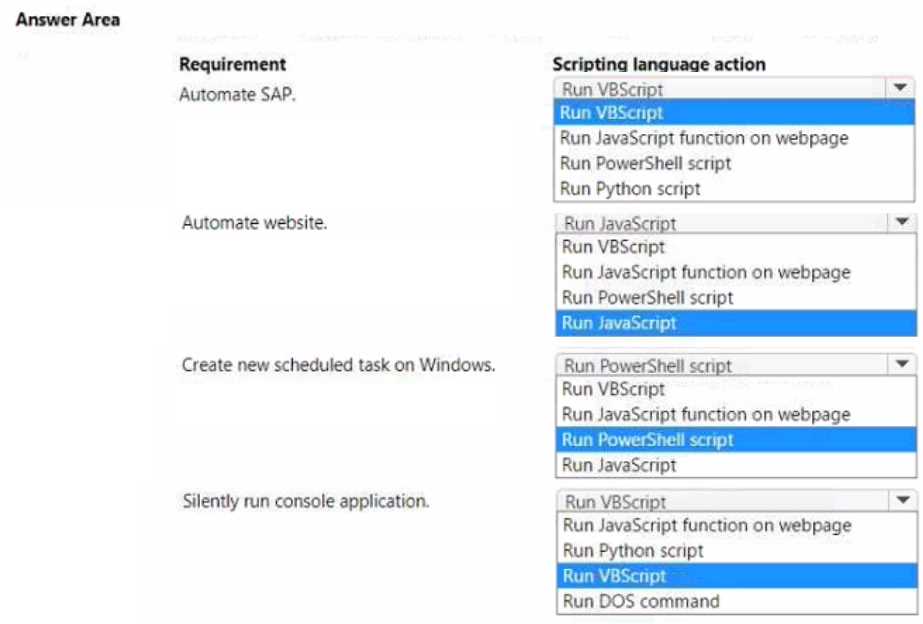
HOTSPOT You are developing automation for an application. You plan to use the application on legacy desktop applications and browser applications. You need to select the appropriate scripting language based on the requirements. Which scripting language action should you use? To answer, select the appropriate options in the answer area. NOTE Each correct selection is worth one point. PL-500 question
Your Answer
14 comments in the community discussion
6
Not PowerShell for the silent console part, it's VBScript there. Easy to mix up since PowerShell feels more modern, but for this use case PAD needs VBScript's WScript.Shell. Pretty sure about the rest: SAP with VBScript, website with JS, scheduled tasks with PowerShell. Disagree?
5
Not PowerShell for the silent run, it's VBScript there (trap since PS feels right). Rest checks out.
Q: 13

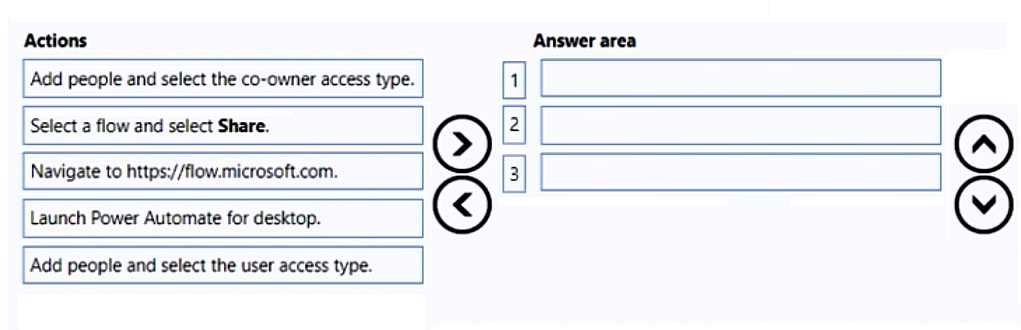
DRAG DROP You develop a desktop flow for a company. You need to ensure that another user can modify the flow. Which three actions should you perform in sequence? To answer, move the appropriate actions from the order. PL-500 question

Drag & Drop
7 comments in the community discussion
1
Navigate to flow.microsoft.com → Select a flow and select Share → Add people and select the co-owner access type. Had something like this in a mock, looked the same.
Launch Power Automate for desktop → Select a flow and select Share → Add people and select the user access type. I think this matches how you grant others access on desktop flows, since launching PAD is usually first. Not totally sure about "user" vs "co-owner"-the wording is confusing. Agree?
Q: 14
You need to resolve the issue with the DataCollector flow. What are two possible ways to achieve the goal? Each correct answer presents a complete solution. NOTE: Each correct selection is worth one point
Options
9 comments in the community discussion
1
Makes sense to pick B and E here. Error handling with continue on error covers intermittent issues, and fixing selectors is usually key for web automation flows. Seen similar on practice sets.
Why does MS keep changing how web automation works? Probably C, Send keys usually helps when Populate fails.
Q: 15

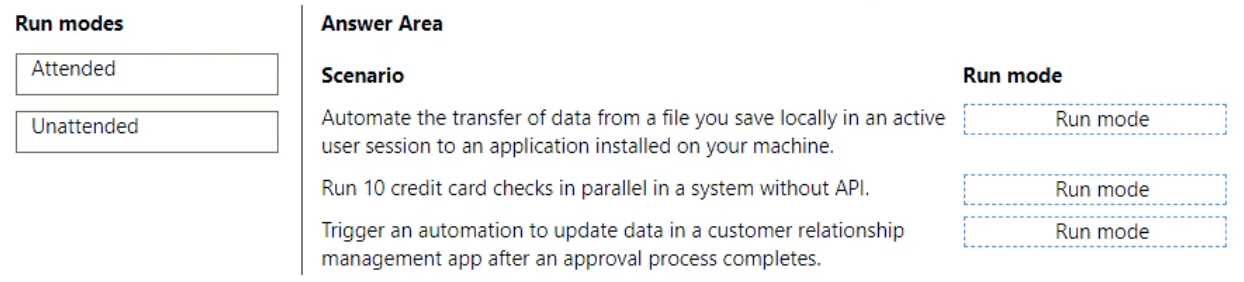
DRAG DROP You are designing automation processes. You need to configure the run mode for each automation scenario. Which run modes should you use? To answer, drag the appropriate run modes to the correct scenarios. Each run mode may be used once, more than once, or not at all. You may need to drag the split bar between panes or scroll to view content. NOTE: Each correct selection is worth one point. PL-500 question
Drag & Drop
20 comments in the community discussion
2
I'm pretty sure it's Attended for the local file transfer (since it says "active user session"), and Unattended for both the parallel card checks and CRM update. Parallel/background jobs and automated triggers don't need user presence, so Unattended fits. The trick is not getting th
1
Automate data transfer (active session) → Attended, credit card checks + CRM update → Unattended. Had something like this in a mock, confident on the mapping.
Q: 16
You have an automation solution that uses a desktop flow. The flow reads data from a file that is stored on UserA’s machine and writes data to an application. You import the solution to an environment that is connected to UserA’s machine. UseerB report that the flow fails. An alert indicated that the path to thee the file does not exist. You conform that the file is present on userB’s desktop. You need to resolve the issue. What should UserB Do?
Options
11 comments in the community discussion
5
Option C makes sense here. Since the original flow used a hardcoded path on UserA's desktop, when UserB runs it, that path won't exist on their profile even if the correct file is on their own desktop. Putting the file somewhere like C:\Automation\InputFiles\ and updating the flow should fix it. I think
C vs B, but I'm leaning more towards C. File path is likely hardcoded to UserA's profile, so just fixing permissions (B) wouldn't solve it if the path on UserB's machine is totally different. Not 100 percent sure, but C makes the flow work across accounts. Disagree?
Q: 17

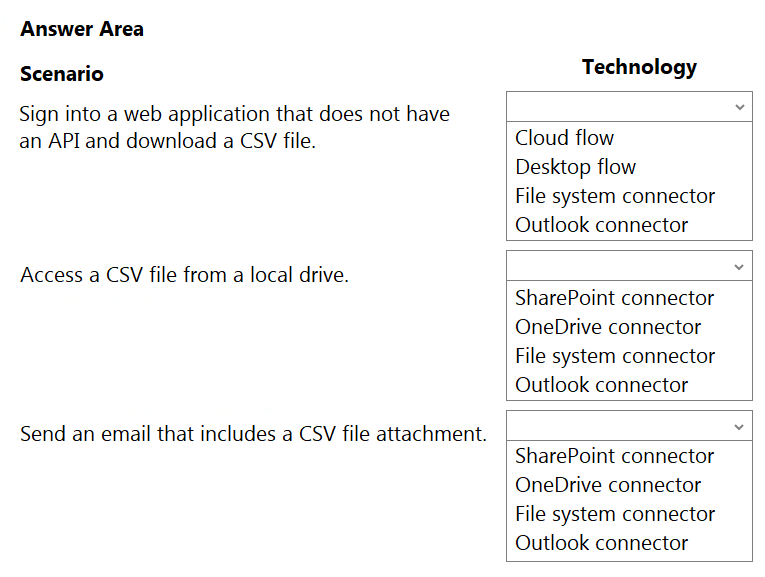
HOTSPOT You need to design automation solutions for a company. What should you implement? To answer, select the appropriate configuration in the answer area. NOTE: Each correct selection is worth one point. PL-500 question
Your Answer
13 comments in the community discussion
4
Desktop flow, file system connector, Outlook connector. That covers UI automation, local files, and email attachment handling in Power Automate.
4
Desktop flow, file system connector, Outlook connector. That's the right combo for this one.
Q: 18

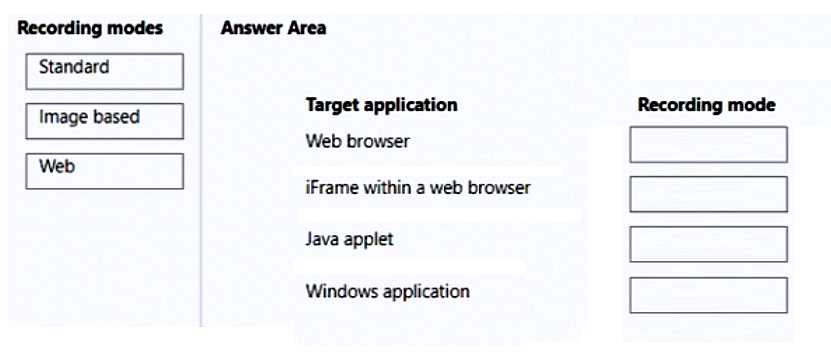
DRAG DROP You are developing desktop flows for a company. You need to use Recorder to record steps that you are performing in target applications. Which recording modes will Recorder use? To answer, drag the appropriate recording modes to the correct target applications. Each recording mode may be used once, more than once, or not at all. You may need to drag the split bar between panes or scroll to view content. NOTE: Each correct selection is worth one point. PL-500 question

Drag & Drop
16 comments in the community discussion
6
Web browser to Web, iFrame within web browser to Web, Java applet to Image based, Windows app to Standard
6
Yeah, this lines up with what I've seen. Web browser and iFrame both go to Web since they're HTML-based, Java applet to Image based (can't read controls natively), and Windows application uses Standard. Pretty sure this matches how Power Automate Desktop handles UI access.
Q: 19

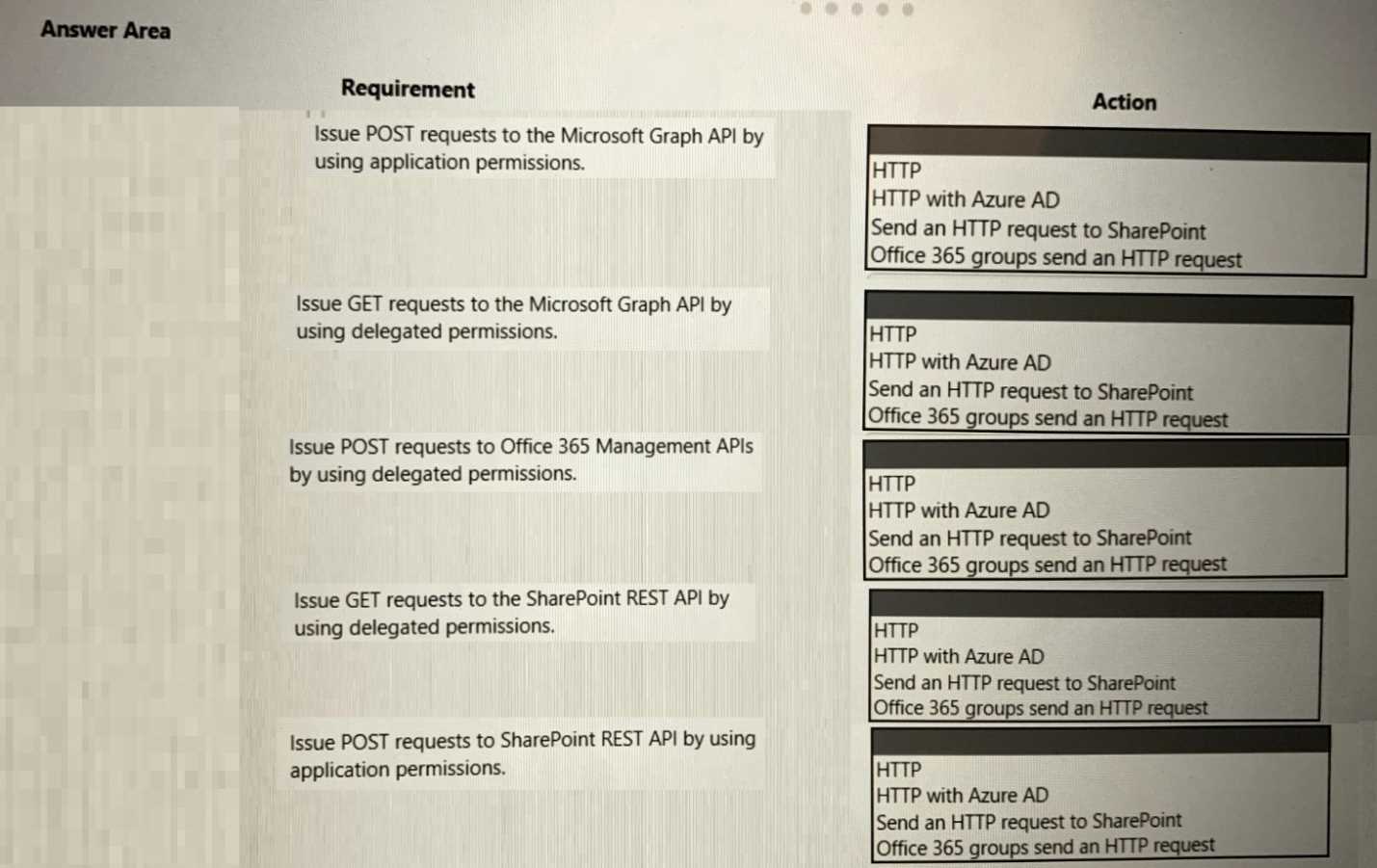
HOTSPOT You are developing a cloud flow. The flow must be able to query several Azure endpoints and must use standard actions where possible. You need to configure the flow. Which actions should you use? To answer, select the appropriate options in the answer area. NOTE: Each correct selection is worth one point. PL-500 question

Your Answer
14 comments in the community discussion
7
HTTP with Azure AD for app permissions, Office 365 Groups send an HTTP request for delegated permissions, and Send an HTTP request to SharePoint for delegated SharePoint calls is the right way. The standard actions here streamline authentication so you don't have to custom-build the token part. Nice clear scenario,
5
Shouldn't the SharePoint GET with delegated permissions be "Send an HTTP request to SharePoint" not just the generic HTTP action?
Q: 20
You need to install Windows updates on the desktop flow machines. What should you do?
Options
14 comments in the community discussion
6
Its A for all machines at once. Single machine would be D, but here it's about the group so go with A.
5
Option A
Question 1 of 20

What's covered in this practice questions set

2: Develop solutions · 15 questions

📖 About this Domain

This domain covers the implementation of automation solutions using Power Automate. It focuses on building robotic process automation (RPA) with desktop flows, analyzing processes with process advisor, and extending connectivity with custom connectors. You will also implement business rules to enforce logic within Power Platform apps.

🎓 What You Will Learn

  • You will learn to develop and configure desktop flows for UI and web automation, including robust error handling and integration with cloud flows.
  • You will learn to prepare data, create process advisor reports, and use insights from process mining to optimize business processes.
  • You will understand how to create, secure, and consume custom connectors to integrate Power Platform with non-native APIs and services.
  • You will discover how to implement business rules and decision tables in both canvas and model-driven apps to enforce data validation and process logic.

🛠️ Skills You Will Build

  • You will build the skill to automate legacy systems and web applications using Power Automate for desktop actions and UI element selectors.
  • You will gain the ability to analyze process maps and identify automation opportunities and bottlenecks using the process advisor feature.
  • You will develop the capability to extend Power Automate's reach by building and configuring custom connectors for external REST APIs.
  • You will master implementing complex business logic declaratively using business rules within Power Apps, reducing the need for custom script.

💡 Top Tips to Prepare

  • Gain hands-on experience by creating desktop flows that interact with various applications, focusing on selectors and exception handling.
  • Use the process advisor with sample data to understand how to interpret process maps and identify key performance indicators (KPIs).
  • Follow Microsoft Learn labs to create a custom connector from an OpenAPI (Swagger) definition to understand security and configuration options.
  • Create both a canvas app and a model-driven app to practice applying business rules for field visibility, validation, and locking.

3: Deploy and manage solutions · 4 questions

📖 About this Domain

This domain covers Application Lifecycle Management (ALM) for Power Automate. It focuses on packaging solution components, including flows and connection references, for deployment. You will manage the entire process of moving solutions between development, test, and production environments.

🎓 What You Will Learn

  • You will learn to package flows, connection references, and environment variables into solutions for transport.
  • You will learn to implement automated deployment strategies using CI/CD pipelines with tools like Azure DevOps.
  • You will learn to manage solution layers, dependencies, and upgrades in target environments.
  • You will learn to use the solution checker to identify issues and monitor solution health post-deployment.

🛠️ Skills You Will Build

  • You will build the skill to implement a complete ALM strategy using managed and unmanaged solutions.
  • You will build proficiency in configuring Power Platform Build Tools for automated solution export and import.
  • You will build the ability to manage environment-specific configurations using connection references and environment variables.
  • You will build troubleshooting skills for diagnosing and resolving solution import errors and dependency issues.

💡 Top Tips to Prepare

  • Master the distinction between managed and unmanaged solutions and their roles in the ALM process.
  • Gain hands-on experience creating a CI/CD pipeline in Azure DevOps to automate solution deployment.
  • Practice configuring connection references and environment variables before exporting a solution to ensure portability.
  • Regularly use the solution checker on your development solutions to proactively find and fix issues.

1: Design solutions · 1 questions

📖 About this Domain

This domain covers the foundational planning and architecture for Power Platform solutions. You will focus on selecting correct components, designing data and security models, and creating a governance strategy. It is the blueprint for robotic process automation (RPA) and digital process automation (DPA) projects.

🎓 What You Will Learn

  • You will learn to design a solution architecture by selecting the right mix of Power Apps, Power Automate flows, Power BI, and Dataverse.
  • You will learn to design a Dataverse data model, including tables, columns, and relationships, and plan the user interface (UI).
  • You will learn to design a security model using business units, security roles, and field-level security to protect solution assets.
  • You will learn to formulate a strategy for licensing, capacity planning, and governance using tools like the CoE Starter Kit.

🛠️ Skills You Will Build

  • You will build the skill to map business requirements to specific Power Platform components like desktop flows and cloud flows.
  • You will build the skill to architect a scalable and secure Dataverse data model for model-driven and canvas apps.
  • You will build the skill to configure granular security permissions for users, teams, and business units within an environment.
  • You will build the skill to plan for application lifecycle management (ALM) and determine appropriate licensing models for a solution.

💡 Top Tips to Prepare

  • Master the use cases for different Power Platform components, such as when to use a model-driven app over a canvas app.
  • Focus on the Dataverse security hierarchy, including business units, security roles, access teams, and field security profiles.
  • Review the official Microsoft Power Platform licensing guide to understand per-user, per-app, and pay-as-you-go options.
  • Understand the purpose and components of the Center of Excellence (CoE) Starter Kit for establishing governance and ALM.

Premium Access Includes

  • Quiz Simulator
  • Exam Mode
  • Progress Tracking
  • Question Saving
  • Flash Cards
  • Drag & Drops
  • 3 Months Access
  • PDF Downloads
Get Premium Access
Scroll to Top