
HOTSPOT You are creating a custom selector for a Microsoft Excel workbook by using a Power Automate desktop flow. 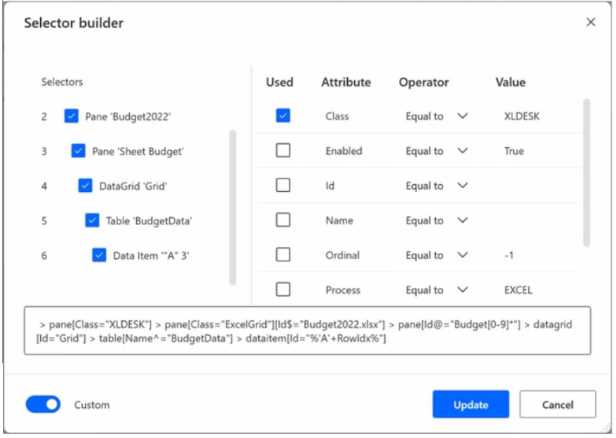 Use the dropdown menus to select the answer choice that answers each question based on the information presented in the graphic. NOTE: Each correct selection is worth one point.
YES, YES, THE VALUE OF ANY CELL DEFINED BY ROWIDX VARIABLE IN COLUMN A, UPDATE THE TABLE NAME IN LINE 5
RowIdx lets you target any cell in col A, not just A1. Table name change needs to be handled manually in the selector. Seen similar logic in other MS practice flows so I'm pretty sure that's right.
Doesn't the table selector on line 5 use Name^="BudgetData"? If the table is renamed to Budget2022, wouldn't we need to update that part so Power Automate can match it?