
Q: 2
HOTSPOT You develop Power Automate flows for a company. You need to help users locate and run the flows. Where should you direct users to find the flows? To answer NOTE: Each correct selection is worth one point. 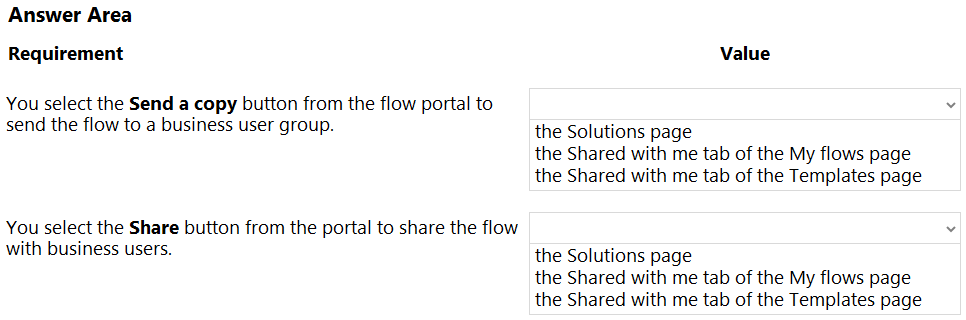
Your Answer
Discussion
Definitely seen this in official practice tests, and the guide spells it out: Templates > Shared with me and My flows > Shared with me.
Yep, Templates Shared with me for Send a copy, and My flows Shared with me tab for Share.
I don’t think both end up in Templates. Send a copy drops it in Templates > Shared with me, but Share puts it under My flows > Shared with me. Easy to pick the wrong spot since names are so close.
Templates Shared with me for Send a copy, My flows Shared with me for Share.
Seen lots of confusion on this, but if you select Send a copy it goes to Templates > Shared with me. If you use Share, it's My flows > Shared with me. Pretty sure that's how Microsoft splits them, unless something new just changed.
Had something like this in a mock: Send a copy ends up in Templates > Shared with me, while Share goes to My flows > Shared with me. The names are confusing, but I think that's right.
Just to clarify, does "Send a copy" always put the flow into Templates > Shared with me for recipients, or does it ever show up under My flows depending on user role or permissions?
Nah, not both show up under Templates. Send a copy goes to Templates Shared with me, but Share lands in My flows on Shared with me. Lots of folks mix that up because the wording is similar.
Not both on Templates-"Share" puts it under My flows in Shared with me, while "Send a copy" goes to Templates Shared with me. Common trap is mixing those up!
Pretty sure both show up under Templates > Shared with me for this, since "Send a copy" is basically sharing a template and regular "Share" feels similar. I might be mixing them up, though, since sometimes flows show in My flows if you co-own. Open to corrections here!
Be respectful. No spam.