Free MD 102 Practice Test Questions and Answers (2026)

Last Update Check

View Mode
Q: 1

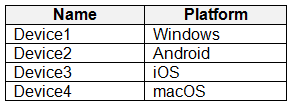
You have devices enrolled in Microsoft Intune as shown in the following table. MD 102 - Endpoint Administrator Associate question For which devices can you manage updates by using Intune?

Options
29 comments in the community discussion
8
Pretty sure the order is: Purchase an Azure subscription, then create a Log Analytics workspace, then add diagnostic settings. You need that pipeline set before you can run any queries or custom reports. Makes sense based on how Intune sends data out. If anyone's seen it done differently let me know.
6
Makes sense to me, the order should be: Purchase Azure subscription, then Create Log Analytics workspace, then Add diagnostic settings. That’s the needed pipeline for Intune raw data reporting. Not 100 percent sure if there's been a recent platform change, but this matches what I’ve seen. Agree?
Q: 2

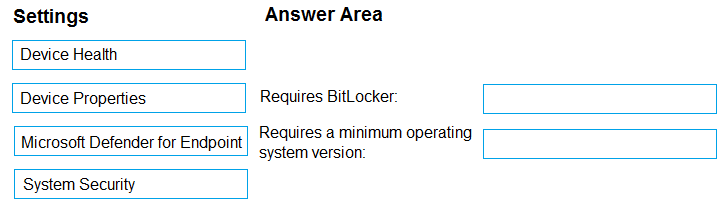
DRAG DROP - You have a Microsoft 365 subscription. The subscription contains computers that run Windows 11 and are enrolled in Microsoft Intune. You need to create a compliance policy that meets the following requirements: Requires BitLocker Drive Encryption (BitLocker) on each device Requires a minimum operating system version Which setting of the compliance policy should you configure for each requirement? To answer, drag the appropriate settings to the correct requirements. Each setting may be used once, more than once, or not at all. You may need to drag the split bar between panes or scroll to view content. MD 102 - Endpoint Administrator Associate question

Drag & Drop
35 comments in the community discussion
4
B. not C. macOS is tempting since Edge runs on it, but Baseline only supports Windows devices. Agree?
2
Its B, Edge Baseline in Intune only covers Windows 10/11 not macOS or Android.
Q: 3

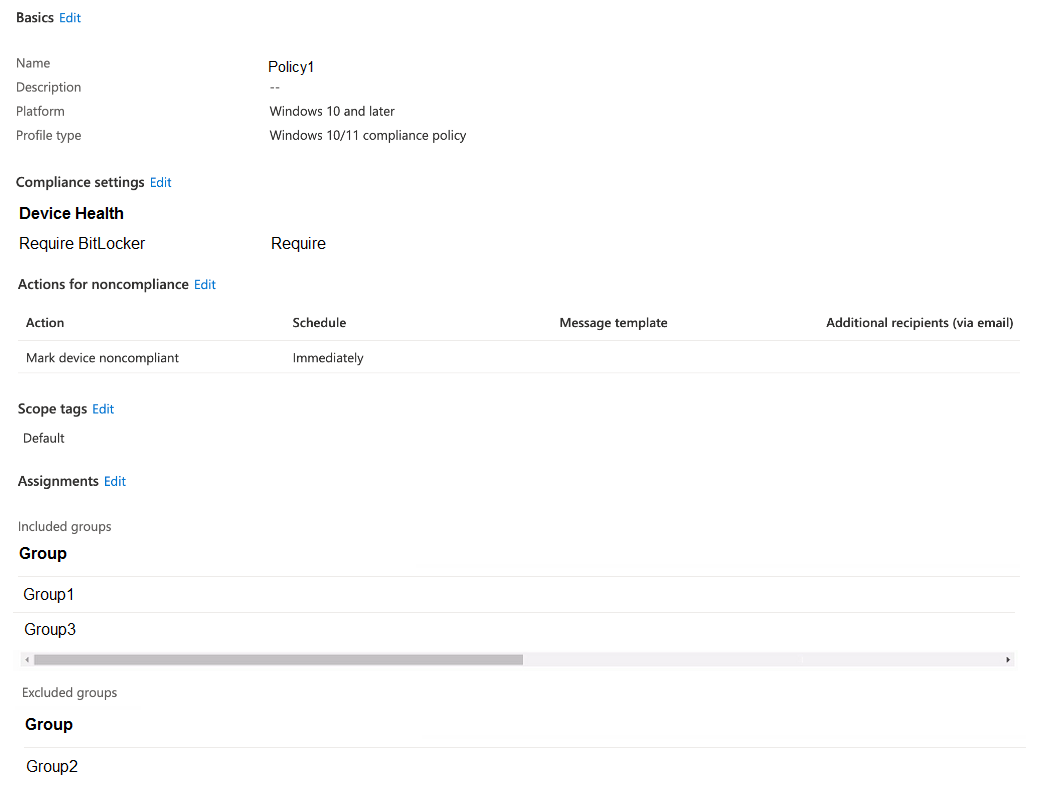
HOTSPOT - You have a Microsoft 365 E5 subscription that uses Microsoft Intune. You have the Windows 11 devices shown in the following table. MD 102 - Endpoint Administrator Associate question You deploy the device compliance policy shown in the exhibit. (Click the Exhibit tab.) MD 102 - Endpoint Administrator Associate question For each of the following statements, select Yes if the statement is true. Otherwise, select No. MD 102 - Endpoint Administrator Associate question
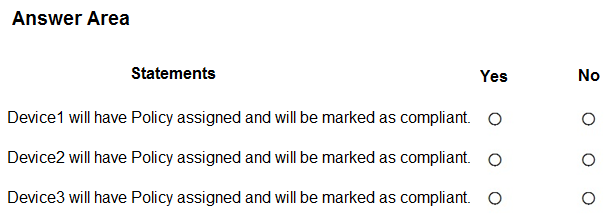
Your Answer
29 comments in the community discussion
1
For me, B since account protection policy is made for local group changes like removing users from Administrators. Compliance and app config don’t handle that directly, at least not in Intune. Pretty confident here but let me know if I’m missing something.
Probably B. Only account protection policies let you directly manage local group membership through Intune, so that's how you'd remove User1 from Administrators. Compliance policies (A) only check, not enforce. Not 100% sure but this lines up with what I've seen in Intune docs. Agree?
Q: 4
You have a Microsoft Azure subscription that contains an Azure Log Analytics workspace. You deploy a new computer named Computer1 that runs Windows 10. Computer1 is in a workgroup. You need to ensure that you can use Log Analytics to query events from Computer1. What should you do on Computer1?
Options
29 comments in the community discussion
1
I don’t think C fits, B is right since .ipa is for iOS apps.
1
Its D, pretty sure practice exams mention .appx for app deployment. Official guide and some labs cover packaging formats so maybe worth double checking which platform supports what.
Q: 5

DRAG DROP - You have a Microsoft Deployment Toolkit (MDT) deployment share named DS1. You import a Windows 11 image to DS1. You have an executable installer for an application named App1. You need to ensure that App1 will be installed for all the task sequences that deploy the image. Which three actions should you perform in sequence? To answer, move the appropriate actions from the list of actions to the answer area and arrange them in the correct order. MD 102 - Endpoint Administrator Associate question

Drag & Drop
39 comments in the community discussion
6
BitLocker goes with System Security, and minimum OS version is under Device Properties. That’s how it works in the Intune compliance policy options-encryption settings live in System Security, version checks in Properties. I’m pretty sure this is standard but let me know if anyone’s seen it handled differently.
5
System Security → Requires BitLocker, Device Properties → Requires a minimum OS version. That's how Intune compliance policies break out these controls, at least from what I've seen. Pretty sure about this mapping but chime in if you disagree.
Q: 6

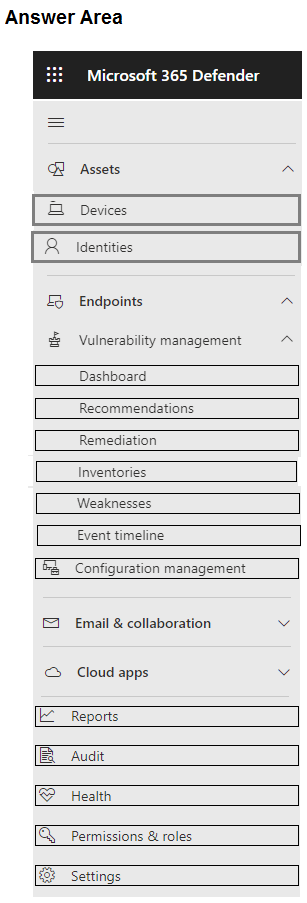
HOTSPOT - You have a Microsoft 365 E5 subscription. You need to review and implement Microsoft 365 Defender device onboarding. The solution must meet the following requirements: View onboarded devices that have the Chromium-based version for Microsoft Edge installed. Download an onboarding package for a Windows 11 device. Minimize administrative effort. Which two settings should you use in the Microsoft 365 Defender portal? To answer, select the appropriate settings in the answer area. MD 102 - Endpoint Administrator Associate question

Your Answer
38 comments in the community discussion
1
Its B, so tired of Microsoft renaming Entra roles every year.
1
B fits what the question asks for. Assigning the Entra Joined Device Local Administrator role is mentioned in both the official study guide and practice questions for this scenario. Not 100 percent but pretty confident here, anyone think otherwise?
Q: 7

You have a Microsoft 365 subscription that uses Microsoft Intune Suite. You use Intune to manage all devise. Users have iOS devices with Microsoft apps installed. You need to prevent users from cutting, copying, and pasting data between Microsoft Excel and other apps installed on the devices. What should you configure?

Options
40 comments in the community discussion
6
Totally agree, just Android should be selected in device platforms for this one.
6
Yeah, just create a Conditional Access policy for sg-Legal, target only Android under Conditions, require device compliance, apply to Office 365.
Q: 8

Your company has an Azure AD tenant named contoso.com that contains several Windows 10 devices. When you join new Windows 10 devices to contoso.com, users are prompted to set up a four-digit pin. You need to ensure that the users are prompted to set up a six-digit pin when they join the Windows 10 devices to contoso.com. Solution: From the Microsoft Entra admin center, you modify the User settings and the Device settings. Does this meet the goal?

Options
26 comments in the community discussion
4
Do official Intune docs cover the exact steps for using Configuration profiles and the Trusted certificate template? Or should I check practice labs as well?
4
Official Intune docs and some practice sets cover this combo: use Configuration profiles with the Trusted certificate template for root CA deployment.
Q: 9

You have a Microsoft 365 E5 subscription that contains 100 iOS devices enrolled in Microsoft Intune. You need to deploy a custom line-of-business (LOB) app to the devices by using Intune. Which extension should you select for the app package file?

Options
32 comments in the community discussion
6
Create configuration profile → Configure Administrative Templates settings → Assign the profile. Importing ADMX looks tempting but that's really only needed for non-standard policies. Pretty sure this is what Microsoft expects for built-in Office settings, but open to correction if someone has done it differently!
5
Create a configuration profile, then configure Administrative Templates settings, then assign the profile. Import ADMX is tricky but not needed here.
Q: 10

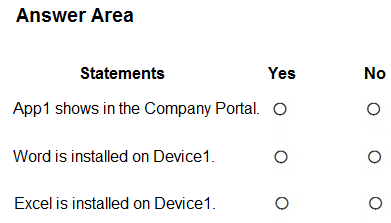
HOTSPOT - You have a Microsoft 365 E5 subscription that uses Microsoft Intune. The subscription contains the resources shown in the following table. MD 102 - Endpoint Administrator Associate question User1 is the owner of Device1. You deploy Microsoft 365 Apps Windows 10 and later app types to Intune as shown in the following table. MD 102 - Endpoint Administrator Associate question The next day you review the results of the app deployments. For each of the following statements, select Yes if the statement is true. Otherwise, select No. MD 102 - Endpoint Administrator Associate question
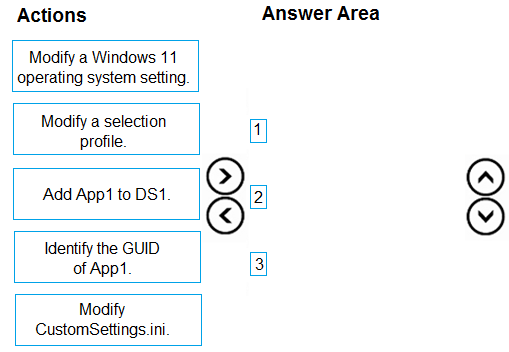
Your Answer
40 comments in the community discussion
7
Device1 is NOT just in Group1, right? Device2 shouldn't be in both groups. Device3 only in Group2?
6
Device1 No, Device2 No, Device3 Yes. Saw a similar question on a practice, looks like matching join type is key here.
Q: 11

You have a Microsoft 365 E5 subscription. You purchase the following types of devices: • Windows • Android • iOS You plan to enroll the devices in Microsoft Intune. You need to configure enrollment restrictions. For which device types can you configure device manufacturer restrictions?

Options
9 comments in the community discussion
6
Looks right, I’d map Device 1 to Secure Boot, Device2 to prevent jailbroken, Device3 to prevent rooted.
4
Device 1: Require Secure Boot, Device2: Prevent jailbroken devices, Device3: Prevent rooted devices. Saw a similar mapping on practice-fits the trusted build requirement.
Q: 12

You have an on-premises server named Server1 that hosts a Microsoft Deployment Toolkit (MDT) deployment share named MDT1. You need to ensure that MDT1 supports multicast deployments. What should you install on Server1?

Options
11 comments in the community discussion
2
Is the keyword here "assign" or "target individually"? If direct user assignment is needed, would Admin1 become valid?
C
Q: 13
You have a Microsoft 365 subscription that uses Microsoft Intune Suite. You use Microsoft Intune to manage devices. All devices are in the same time zone. You create an update rings policy and assign the policy to all Windows devices. On the November 1, you pause the update rings policy. All devices remain online. Without further modification to the policy, on which date will the devices next attempt to update?
Options
7 comments in the community discussion
5
2 for both Device1 and Device2. Some miss Connection2 thinking GroupB exclusion applies, but User1 isn't in GroupB so both VPNs get assigned. Seen this catch folks out on similar practice questions.
Need to confirm, is the answer supposed to change if GroupB was included or excluded for either VPN profile? That would definitely impact which profiles get assigned.
Q: 14
You have following types of devices enrolled in Microsoft Intune: • Windows 10 • Android • iOS. For which types of devices can you create VPN profiles in Microsoft Intune admin center?
Options
4 comments in the community discussion
1
Had something like this in a mock. Pretty sure it's B, since dsregcmd /status actually shows AzureAdPrt and device join info. The other options won't give you PRT details. Happy to discuss if anyone thinks otherwise!
Its B. Official docs and practice tests both mention dsregcmd /status for checking PRT status, seen this on multiple prep guides.
Q: 15
Your network contains an Active Directory domain named contoso.com. The domain contains two computers named Computer1 and Computer2 that run Windows 10. On Computer1, you need to run the Invoke-Command cmdlet to execute several PowerShell commands on Computer2. What should you do first?
Options
10 comments in the community discussion
1
No, it's B for this one.
1
Its B, Entra can't control PIN length for Hello, you need Intune policy for that.
Q: 16

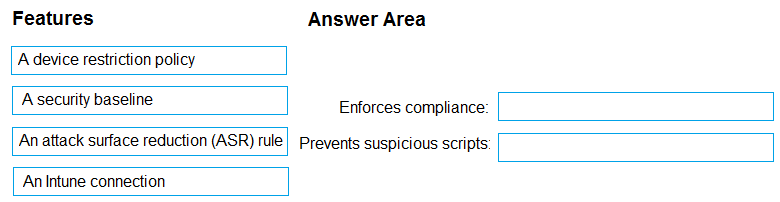
DRAG DROP - You have a Microsoft 365 subscription that includes Microsoft Intune. You need to implement a Microsoft Defender for Endpoint solution that meets the following requirements: Enforces compliance for Defender for Endpoint by using Conditional Access Prevents suspicious scripts from running on devices What should you configure? To answer, drag the appropriate features to the correct requirements. Each feature may be used once, more than once, or not at all. You may need to drag the split bar between panes or scroll to view content. MD 102 - Endpoint Administrator Associate question

Drag & Drop
7 comments in the community discussion
7
No for all three, since the Intune Controlled Folder Access blocks Notepad, local admins can't edit managed settings, and PowerShell's not allowed either. Pretty sure that's correct but happy to hear other takes.
5
No for all three statements.
Q: 17

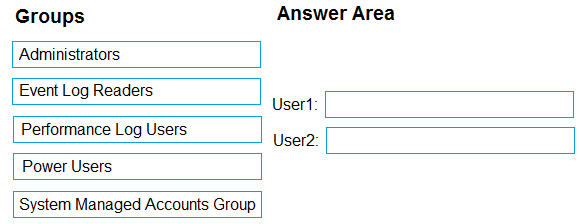
DRAG DROP - You have a computer that runs Windows 10 and contains two local users named User1 and User2. You need to ensure that the users can perform the following actions: User1 must be able to adjust the date and time. User2 must be able to clear Windows logs. The solution must use the principle of least privilege. To which group should you add each user? To answer, drag the appropriate groups to the correct users. Each group may be used once, more than once, or not at all. You may need to drag the split bar between panes or scroll to view content. MD 102 - Endpoint Administrator Associate question

Drag & Drop
10 comments in the community discussion
6
Makes sense here. Device and Resource Redirection for clipboard control, Security node for enforcing NLA requirement.
2
Device and Resource Redirection and Security is the right combo. Clipboard redirection gets blocked under Device and Resource Redirection, and NLA is enforced from the Security node in GPMC. Saw similar format on other MD-102 practice sets, but let me know if anyone's seen a different GPO grouping.
Q: 18

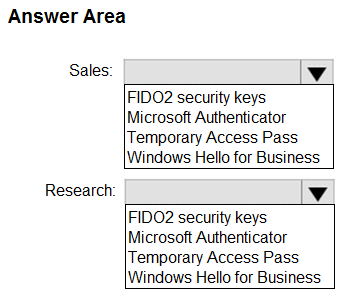
HOTSPOT - You have a Microsoft 365 subscription. You need to enable passwordless authentication for all users. The solution must meet the following requirements: Users in the research department cannot use mobile devices and must authenticate from unmanaged Linux devices by using an alternative method. To access services, users in the sales department must authenticate by using their mobile phone. Administrative effort must be minimized. Which authentication method should you use for each department? To answer, select the appropriate options in the answer area. MD 102 - Endpoint Administrator Associate question

Your Answer
9 comments in the community discussion
9
App1: Required assignment to a user group, App2: Available assignment to a user group
6
Is it safe to say App1 needs Required for the marketing user group so installs auto on any device, and App2 just Available for HR users since their devices aren't enrolled? Saw similar setup in other exam reports.
Q: 19

SIMULATION - Username and password - Use the following login credentials as needed: To enter your username, place your cursor in the Sign in box and select the username below. To enter your password, place your cursor in the Enter password box and select the password below. Microsoft 365 Username: [email protected] Microsoft 365 Password: i7A4$3o^HGD3L~=c[9xuOhM%^4:s11Ai If the Microsoft Edge browser or Microsoft 365 portal does not load successfully, select the Microsoft Edge browser icon from the task bar, type the URL “https://portal.office.com”, and press Enter. The following information is for technical support purposes only: Lab Instance: 48262079 - You need to join your computer to the Microsoft Entra tenant.

Your Answer
10 comments in the community discussion
6
Seen similar on practice exams. Official MS docs and the Intune admin guide cover these enrollment types pretty well.
5
Corporate-owned dedicated device for the shared kiosk, fully-managed profile for company phone, and work-profile for personal. I've seen people confuse the first two since both are corp devices, but only dedicated device fits the no user affinity/kiosk case. The trap is picking fully-managed for shared single-use. L
Q: 20

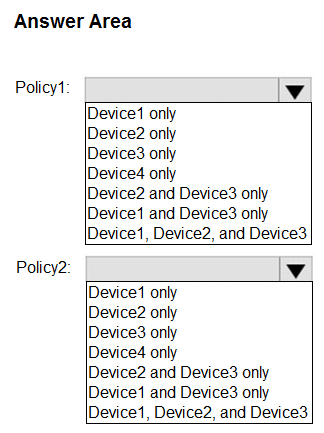
HOTSPOT - Case study - Overview - Contoso, Ltd. is a consulting company that has a main office in Montreal and two branch offices in Seattle and New York. Contoso has the users and computers shown in the following table. MD 102 - Endpoint Administrator Associate question The company has IT, human resources (HR), legal (LEG), marketing (MKG), and finance (FIN) departments. Contoso recently purchased a Microsoft 365 subscription. The company is opening a new branch office in Phoenix. Most of the users in the Phoenix office will work from home. Existing Environment - The network contains an Active Directory domain named contoso.com that is synced to Azure AD. All member servers run Windows Server 2016. All laptops and desktop computers run Windows 10 Enterprise. The computers are managed by using Microsoft Configuration Manager. The mobile devices are managed by using Microsoft Intune. The naming convention for the computers is the department acronym, followed by a hyphen, and then four numbers, for example FIN-6785. All the computers are joined to the on-premises Active Directory domain. Each department has an organizational unit (OU) that contains a child OU named Computers. Each computer account is in the Computers OU of its respective department. Intune Configuration - The domain has the users shown in the following table. MD 102 - Endpoint Administrator Associate question User2 is a device enrollment manager (DEM) in Intune. The devices enrolled in Intune are shown in the following table. MD 102 - Endpoint Administrator Associate question The device compliance policies in Intune are configured as shown in the following table. MD 102 - Endpoint Administrator Associate question The device compliance policies have the assignments shown in the following table. MD 102 - Endpoint Administrator Associate question The device limit restrictions in Intune are configured as shown in the following table. MD 102 - Endpoint Administrator Associate question Requirements - Planned changes - Contoso plans to implement the following changes: • Provide new computers to the Phoenix office users. The new computers have Windows 10 Pro preinstalled and were purchased already. • Implement co-management for the computers. Technical Requirements - Contoso must meet the following technical requirements: • Ensure that the users in a group named Group4 can only access Microsoft Exchange Online from devices that are enrolled in Intune. • Deploy Windows 10 Enterprise to the computers of the Phoenix office users by using Windows Autopilot. • Create a provisioning package for new computers in the HR department. • Block iOS devices from sending diagnostic and usage telemetry data. • Use the principle of least privilege whenever possible. • Enable the users in the MKG department to use App1. • Pilot co-management for the IT department. To which devices do Policy1 and Policy2 apply? To answer, select the appropriate options in the answer area. MD 102 - Endpoint Administrator Associate question

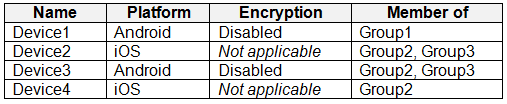

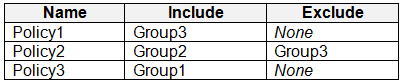

Your Answer
10 comments in the community discussion
4
Generate CSV, upload via Intune, then reset. I don't think azcopy is right here, it's easy to confuse for bulk.
2
Generate CSV, upload to Intune, then reset. Matches what I've seen before, nice clear sequence here.
Question 1 of 20

What's covered in this practice questions set

3: Manage, maintain, and protect devices · 11 questions

📖 About this Domain

This domain focuses on the day-to-day operational tasks for endpoint lifecycle management. It covers device configuration, software update servicing, endpoint monitoring, and implementing security controls using Microsoft Intune and related services.

🎓 What You Will Learn

  • How to manage device configuration by using configuration profiles, settings catalog, and Group Policy analytics in Microsoft Intune.
  • The process for managing the Windows update lifecycle using Windows Update for Business deployment rings and feature update policies.
  • Methods to monitor device health and compliance using Intune reports, Endpoint analytics, and Azure Monitor.
  • Techniques to protect endpoints by deploying security baselines, BitLocker disk encryption, and Microsoft Defender policies.

🛠️ Skills You Will Build

  • Deploying and troubleshooting device configuration profiles to enforce organizational standards across diverse endpoints.
  • Implementing a robust update servicing strategy for Windows devices to ensure timely patching and feature adoption.
  • Analyzing endpoint health and performance data to proactively identify and remediate device issues.
  • Hardening device security posture by applying and managing endpoint protection policies through the Intune admin center.

💡 Top Tips to Prepare

  • Practice creating and assigning configuration profiles and compliance policies in a Microsoft 365 developer tenant.
  • Memorize the different servicing channels and deferral settings for Windows Update for Business.
  • Navigate the Endpoint analytics and Intune reports to understand key metrics like startup performance and app reliability.
  • Understand the relationship between Intune, Microsoft Defender for Endpoint, and Conditional Access for enforcing device compliance.

1: Deploy Windows client · 4 questions

📖 About this Domain

This domain covers Windows client OS deployment and configuration. It emphasizes modern deployment methods like Windows Autopilot and traditional methods like Microsoft Deployment Toolkit (MDT). You will also manage device activation and subscriptions.

🎓 What You Will Learn

  • Assess infrastructure readiness and select deployment tools like MDT or Windows Autopilot.
  • Configure Windows Autopilot deployment profiles, enrollment status pages (ESP), and manage device registration.
  • Create and manage OS images, task sequences, and deployment shares using MDT for bare-metal deployments.
  • Enable and configure remote management tools including Windows Admin Center and PowerShell Remoting.

🛠️ Skills You Will Build

  • Perform zero-touch provisioning of Windows devices using Windows Autopilot profiles and device hashes.
  • Execute image-based deployments by creating, capturing, and deploying custom WIM files with MDT and DISM.
  • Manage Windows Enterprise subscriptions and implement subscription activation policies for endpoint licensing.
  • Remotely administer endpoints post-deployment using Windows Admin Center and WinRM.

💡 Top Tips to Prepare

  • Gain hands-on lab experience registering device hashes and testing various Autopilot deployment profiles.
  • Deconstruct and build MDT task sequences to understand driver injection, application installation, and USMT integration.
  • Memorize the differences between KMS, MAK, and subscription-based activation for licensing scenarios.
  • Complete the official Microsoft Learn modules for MD-102 focusing on operating system deployment and updates.

2: Manage identity and compliance · 3 questions

📖 About this Domain

This domain covers managing device and user identities in Microsoft Entra ID. It focuses on implementing compliance policies and security baselines using Microsoft Intune. You will also configure core endpoint security features to protect organizational data.

🎓 What You Will Learn

  • You will learn to manage Microsoft Entra device identities, including registration and join processes for Windows endpoints.
  • You will learn to implement Conditional Access policies to enforce access controls based on user, device, and location signals.
  • You will learn to configure and deploy device compliance policies in Microsoft Intune to validate endpoint health and configuration.
  • You will learn to manage endpoint security profiles, including BitLocker disk encryption and Microsoft Defender Antivirus settings.

🛠️ Skills You Will Build

  • You will build skills to join devices to Microsoft Entra ID and configure local user and group policies.
  • You will build skills to create and assign Conditional Access policies that require multifactor authentication (MFA) or compliant devices.
  • You will build skills to deploy Intune compliance policies and configure notifications and actions for noncompliance.
  • You will build skills to enforce disk encryption using BitLocker policies and manage security baselines for endpoints.

💡 Top Tips to Prepare

  • Practice configuring Microsoft Entra join and Microsoft Entra hybrid join in a test tenant to understand the prerequisites.
  • Master the components of a Conditional Access policy, specifically the relationship between assignments, conditions, and access controls.
  • Understand the integration between Intune compliance policies and Conditional Access to block noncompliant devices from resources.
  • Get hands-on experience in the Microsoft Intune admin center deploying security baselines and endpoint protection profiles.

4: Manage applications · 2 questions

📖 About this Domain

This domain covers the lifecycle management of applications on endpoints. You will focus on deploying, updating, and securing applications using Microsoft Intune and Microsoft 365 services. Key areas include application deployment strategies, policy enforcement, and application control.

🎓 What You Will Learn

  • Learn to deploy various application types, including Win32 apps and Microsoft 365 Apps, using Microsoft Intune.
  • Understand how to configure and assign Application Protection Policies (APP) and Application Configuration Policies (ACP) to protect corporate data.
  • Explore managing Microsoft 365 Apps deployments and updates through the dedicated Microsoft 365 Apps admin center.
  • Discover how to implement application control using Microsoft Defender Application Control and AppLocker to restrict application execution.

🛠️ Skills You Will Build

  • You will build proficiency in packaging, deploying, and troubleshooting Win32 applications and LOB apps with Intune.
  • You will gain skills in creating and targeting app protection and configuration policies to manage app behavior and data security.
  • You will develop the ability to create and enforce AppLocker and Microsoft Defender Application Control policies for endpoint hardening.
  • You will learn to manage update channels, servicing profiles, and inventory for Microsoft 365 Apps across the enterprise.

💡 Top Tips to Prepare

  • Gain hands-on experience by packaging a Win32 app with the Microsoft Win32 Content Prep Tool and deploying it via Intune.
  • Clearly differentiate between Application Protection Policies (APP) for data protection and Application Configuration Policies (ACP) for app settings.
  • Study the differences, use cases, and implementation methods for AppLocker versus Microsoft Defender Application Control.
  • Familiarize yourself with the Microsoft 365 Apps admin center dashboard, focusing on inventory, security updates, and servicing profiles.

Premium Access Includes

  • Quiz Simulator
  • Exam Mode
  • Progress Tracking
  • Question Saving
  • Flash Cards
  • Drag & Drops
  • 3 Months Access
  • PDF Downloads
Get Premium Access
Scroll to Top