
Q: 1
You have devices enrolled in Microsoft Intune as shown in the following table. 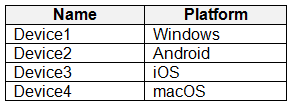 For which devices can you manage updates by using Intune?
Options
Discussion
Pretty sure the order is: Purchase an Azure subscription, then create a Log Analytics workspace, then add diagnostic settings. You need that pipeline set before you can run any queries or custom reports. Makes sense based on how Intune sends data out. If anyone's seen it done differently let me know.
Makes sense to me, the order should be: Purchase Azure subscription, then Create Log Analytics workspace, then Add diagnostic settings. That’s the needed pipeline for Intune raw data reporting. Not 100 percent sure if there's been a recent platform change, but this matches what I’ve seen. Agree?
Purchase Azure subscription → Create Log Analytics workspace → Add diagnostic settings. Power BI is a common trap here but not part of the actual pipeline setup, seen this sequence in similar exam reports. Disagree if you think visuals come first?
Purchase Azure subscription → Create Log Analytics workspace → Add diagnostic settings. That’s the right flow. You need the Azure subscription first or nothing else works, then the workspace is where logs go, then diagnostic settings push Intune data over. Power BI is a common trap but it comes after for reporting, not setup. Pretty sure this is it unless they already had an Azure sub in place.
Totally agree, the order should be: Purchase Azure subscription, Create Log Analytics workspace, Add diagnostic settings. That's how you prep Intune for advanced reporting with raw data. Power BI only connects after the pipeline's built. Unless I've missed something recent, this matches what's needed.
Purchase Azure subscription → Create Log Analytics workspace → Add diagnostic settings. That's the setup order for getting Intune data into a workspace for custom queries. Power BI comes later if you want visuals from that data. Makes sense to me, unless something's changed.
Purchase Azure subscription → Create Log Analytics workspace → Add diagnostic settings, not Power BI-lots of people fall for that trap.
Nah, Power BI first is a trick-start with Purchase Azure subscription, then Create Log Analytics workspace, then Add diagnostic settings.
Purchase Azure subscription, then Log Analytics workspace, then diagnostic settings. Saw this same order on a practice test elsewhere.
Purchase Azure subscription → Create Log Analytics workspace → Add diagnostic settings. Power BI is a distractor here, since visuals come after the pipeline setup. Seen similar on practice sets-this sequence is needed for Intune raw data reporting.
Be respectful. No spam.