Free SC-401 Practice Test Questions and Answers (2026)
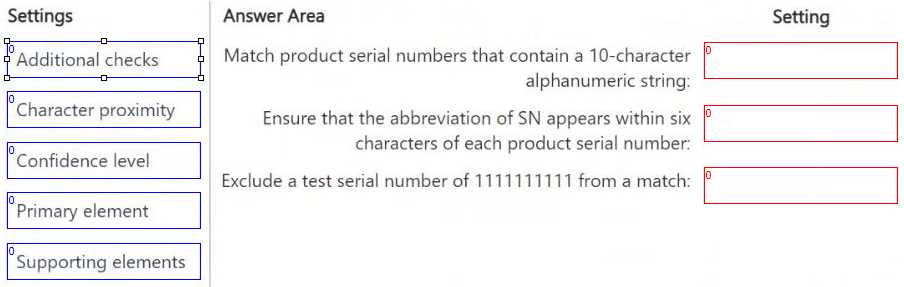
DRAG DROP You have a Microsoft 365 E5 subscription that has data loss prevention (DLP) implemented. You need to create a custom sensitive info type. The solution must meet the following requirements: ● Match product serial numbers that contain a 10-character alphanumeric string. ● Ensure that the abbreviation of SN appears within six characters of each product serial number. ● Exclude a test serial number of 1111111111 from a match. Which pattern settings should you configure for each requirement? To answer, drag the appropriate settings to the correct requirements. Each setting may be used once, more than once, or not at all. You may need to drag the split bar between panes or scroll to view content. NOTE: Each correct selection is worth one point.
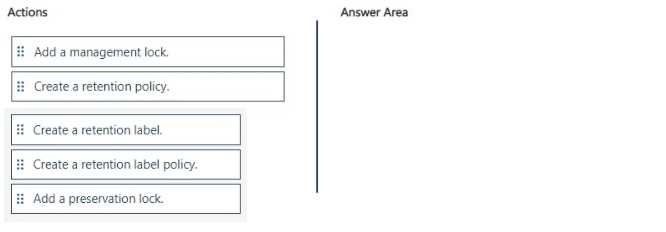
DRAG DROP You have a Microsoft 365 tenant. A new regulatory requirement states that all documents containing a patent ID be labeled, retained for 10 years, and then deleted. The policy used to apply the retention settings must never be disabled or deleted by anyone. You need to implement the regulatory requirement. Which three actions should you perform in sequence? To answer, move the appropriate actions from the list of actions to the answer area and arrange them in the correct order.
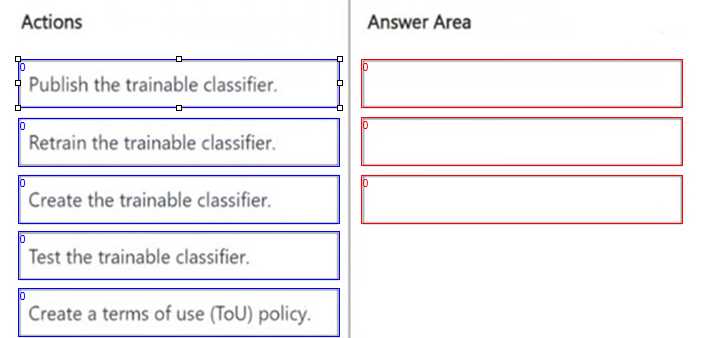
DRAG DROP You need to create a trainable classifier that can be used as a condition in an auto-apply retention label policy. Which three actions should you perform in sequence? To answer, move the appropriate actions from the list of actions to the answer area and arrange them in the correct order.
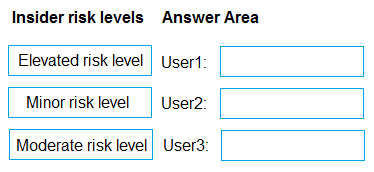
DRAG DROP You have a Microsoft 365 E5 subscription that uses Microsoft Purview insider risk management and contains three users named User1, User2, and User3. All insider risk management policies have adaptive protection enabled and the default conditions for insider risk levels configured. The users perform the following activities, which trigger insider risk policy alerts: User1 performs at least one data exfiltration activity that results in a high severity risk score. User2 performs at least three risky user activities within seven days, that each results in a high severity risk score. User3 performs at least bwo data exfiltration activities within seven days, that each results in a high severity risk score. Which insider risk level is assigned to each user? To answer, drag the appropriate levels to the correct users. Each level may be used once, more than once, or not at all. You may need to drag the split bar between panes or seroll to view content. NOTE: Each correct selection is worth one point.
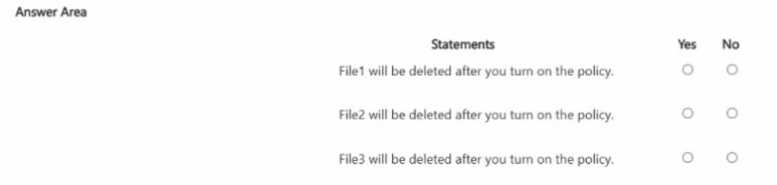
You configure a retention policy as shown >n the exhibit. (Click the Exhibit lab.)
The start of the retention period is based on when items are created. The current date is January 01.
207S.
For each of the following statements, select Yes if the statement is true. Otherwise, select No.
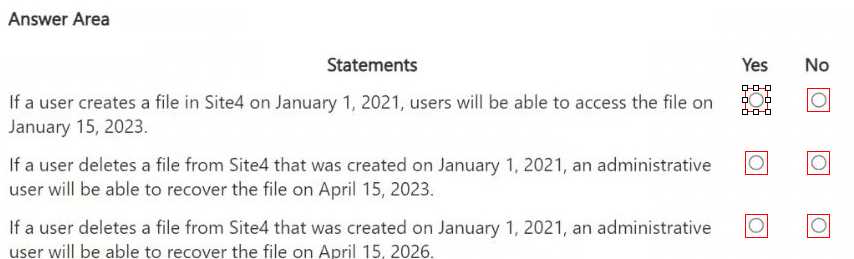
HOTSPOT You are reviewing policies for the SharePoint Online environment. For each of the following statements, select Yes if the statement is true. Otherwise, select No. NOTE: Each correct selection is worth one point.
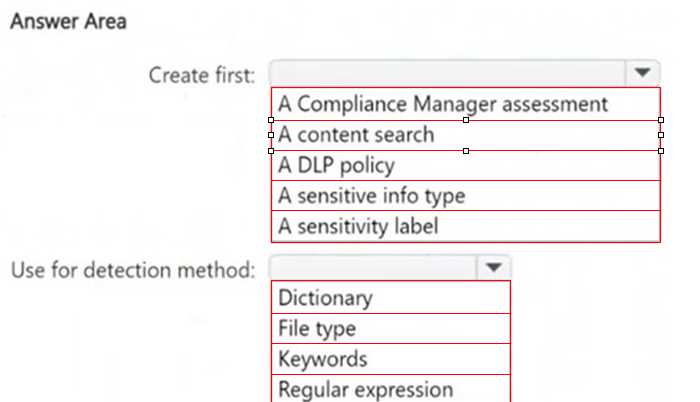
HOTSPOT You need to meet the technical requirements for the confidential documents. What should you create first, and what should you use for the detection method? To answer, select the appropriate options in the answer area. NOTE: Each correct selection is worth one point.
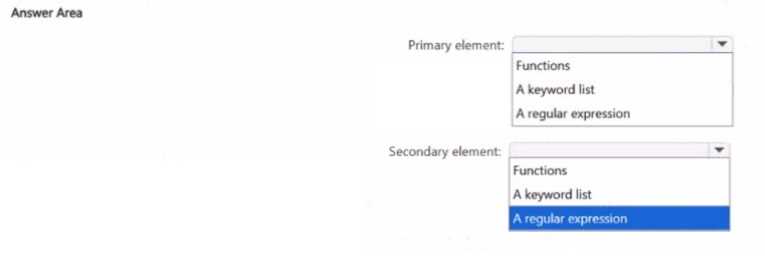
HOTSPOT You have a Microsoft 365 tenant You need to create a new sensitive into type for items that contain the following: • An employee ID number that consists of the hire date of the employee followed by a three digit number • The words "Employee", "ID", or "Identification" within 300 characters of the employee ID number What should you use for the primary and secondary elements? To answer, select the appropriate options m the answer area NOTE: Each correct selection is worth one point
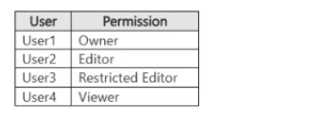
You have a Microsoft 365 E5 subscription that contains four users named User1. User2, User3, and User4 and a file named File1.docx. File1 has a sensitivity label applied. The label is configured as shown in the following table. 
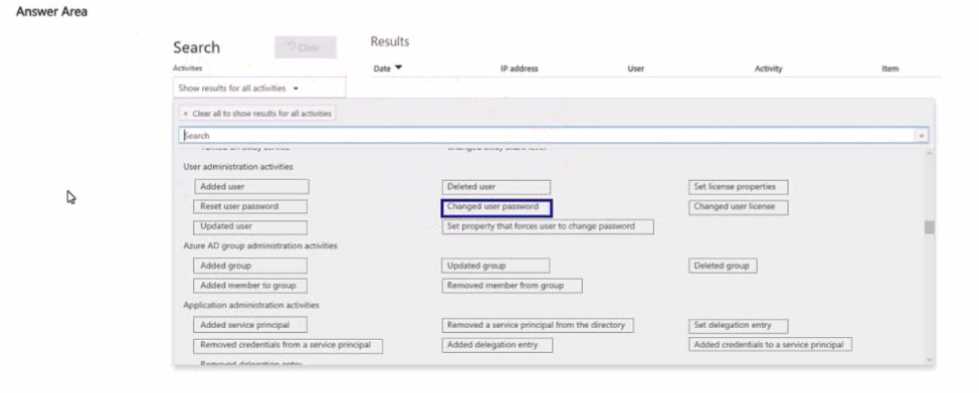
HOTSPOT You have a Microsoft 365 subscription. Auditing is enabled. A user named User1 is a member of a dynamic security group named Group1. You discover that User1 is no longer a member of Group1. You need to search the audit log to identify why User1 was removed from Group1. Which two activities should you use in the search? To answer, select the appropriate activities in the answer area. NOTE: Each correct selection is worth one point.
What's covered in this practice questions set
1: Implement information protection · 7 questions
📖 About this Domain
This domain covers the configuration of data classification and protection capabilities in Microsoft Purview. You will learn to implement sensitivity labels and policies to protect data across Microsoft 365 workloads and endpoints.
🎓 What You Will Learn
- You will learn to create and manage sensitive information types (SITs), including custom SITs, Exact Data Match (EDM), and document fingerprinting.
- You will learn to implement and manage trainable classifiers to identify specific categories of content.
- You will learn to create, configure, and publish sensitivity labels to apply encryption, content marking, and access controls.
- You will learn to apply information protection in Microsoft 365 services, including SharePoint Online, and with Microsoft Defender for Cloud Apps.
🛠️ Skills You Will Build
- You will build the skill to design and implement a data classification schema using built-in and custom classifiers.
- You will gain proficiency in configuring sensitivity label policies, including client-side and service-side auto-labeling.
- You will master the deployment and management of the Microsoft Purview Information Protection client and scanner.
- You will develop the ability to enforce data protection policies for data at rest and data in transit across the M365 ecosystem.
💡 Top Tips to Prepare
- Gain hands-on experience in the Microsoft Purview compliance portal creating custom SITs with regular expressions and keyword dictionaries.
- Practice the end-to-end process of creating, publishing, and applying sensitivity labels to documents and emails.
- Understand the specific use cases and prerequisites for implementing Exact Data Match and trainable classifiers.
- Review the differences between protection settings within a sensitivity label, such as encryption, content marking, and permissions.
2: Implement data loss prevention · 7 questions
📖 About this Domain
This domain covers configuring Microsoft Purview Data Loss Prevention policies to protect sensitive information. You will create and manage policies to identify, monitor, and prevent data exfiltration across Microsoft 365 workloads. The focus is on implementing granular controls to enforce data handling requirements.
🎓 What You Will Learn
- You will learn to create and manage unified DLP policies for locations including Exchange, SharePoint, OneDrive, Teams, and on-premises repositories.
- You will learn to configure DLP rules using conditions, exceptions, and actions to control the flow of sensitive data.
- You will learn to implement Endpoint DLP to monitor and control user activities on Windows devices.
- You will learn to manage DLP alerts, view reports, and use activity explorer to investigate policy matches.
🛠️ Skills You Will Build
- You will build the skill to deploy custom DLP policies using sensitive information types, sensitivity labels, and trainable classifiers.
- You will build the ability to fine-tune policy behavior with user notifications, policy tips, and user override options.
- You will build competence in configuring advanced DLP settings, including incident reports and alert aggregation.
- You will build proficiency in scoping policies to specific users, groups, or sites to minimize business disruption.
💡 Top Tips to Prepare
- Practice configuring DLP policies in test mode first to understand their impact before enforcing them.
- Understand the precedence and priority of DLP policies and rules, as this determines which rule is applied.
- Focus on the specific capabilities and limitations of Endpoint DLP, including onboarding methods and monitored activities.
- Memorize the different actions available within a DLP rule, such as restricting access or encrypting content.
3: Implement information governance · 3 questions
📖 About this Domain
This domain covers data lifecycle management and records management within the Microsoft Purview compliance portal. You will configure retention policies and retention labels to govern data across Microsoft 365 workloads. The focus is on meeting compliance requirements and managing organizational data risk.
🎓 What You Will Learn
- Learn to configure and manage retention policies and retention labels for content in Exchange, SharePoint, and Teams.
- Learn to implement a records management solution using file plans and event-based retention triggers.
- Learn to manage inactive mailboxes and apply retention for Microsoft Teams messages and private channels.
- Learn to configure policy scopes, including adaptive scopes and static scopes, for targeted policy application.
🛠️ Skills You Will Build
- You will build skills to implement data lifecycle management by configuring retention policies that automatically retain or delete content.
- You will build skills to deploy records management solutions, including configuring disposition reviews and proof of disposal.
- You will build skills to manage retention settings for specific Microsoft 365 workloads like SharePoint Online and Exchange Online.
- You will build skills to troubleshoot retention policy application using tools like Policy Lookup in the compliance portal.
💡 Top Tips to Prepare
- Master the principles of retention, understanding the hierarchy of which policy action wins in conflict scenarios.
- Get hands-on practice creating and applying adaptive scopes for dynamic policy targeting.
- Clearly differentiate the functionality and application of retention labels versus retention policies.
- Focus on records management specifics like immutability, disposition review processes, and file plan configuration.
1: Implement information protection · 3 questions
📖 About this Domain
This domain focuses on the core principles and practices of protecting information within the Microsoft 365 ecosystem. It covers the entire lifecycle of data classification, from identifying sensitive information to applying protective measures that travel with the data wherever it goes. You will learn how to translate organizational data protection requirements into a technical implementation using Microsoft Purview Information Protection. This involves creating and managing various types of classifiers to identify sensitive data, and then using sensitivity labels to apply encryption, content marking, and access restrictions. The goal is to ensure that sensitive data is appropriately protected against unauthorized access and leakage, both inside and outside the organization.
🎓 What You Will Learn
- How to identify and classify sensitive data using a variety of methods. You will learn to create and manage custom sensitive information types, implement document fingerprinting for unique forms, use exact data match (EDM) for structured data, and leverage trainable classifiers for more complex content.
- The fundamentals of creating and managing a sensitivity label taxonomy. This includes designing a hierarchical labeling scheme that reflects your organization's data classification policy and configuring labels with appropriate protection settings such as encryption and content markings.
- The process of publishing and applying sensitivity labels to content. You will learn how to create and configure sensitivity label policies to make labels available to users and services, and how to implement auto-labeling policies to automatically apply labels based on detected sensitive information.
- How to protect sensitive information in Microsoft 365 apps and services. This involves understanding how sensitivity labels are surfaced and enforced in applications like Outlook, Word, Excel, PowerPoint, and in services like SharePoint, OneDrive, and Microsoft Teams.
- The capabilities of the Microsoft Purview Information Protection client. You will learn about the unified labeling client and its role in extending information protection to on-premises environments and enabling manual labeling for users.
- How to monitor and report on data classification and label usage. You will learn to use tools like Content Explorer and Activity Explorer to gain insights into where sensitive data is located, how it is being labeled, and what activities are being performed on it.
- The importance of optical character recognition (OCR) in data classification. You will understand how to configure OCR to scan images for sensitive text, extending your data protection capabilities to non-textual content.
🛠️ Skills You Will Build
- The ability to translate business requirements for data protection into a technical data classification strategy. You will be able to design and implement a comprehensive data classification scheme using the various classifiers available in Microsoft Purview.
- Proficiency in creating and managing sensitivity labels to enforce protection policies. You will be able to configure labels for encryption, access control, and visual markings, and then deploy them to your organization through label policies.
- The skill to automate the application of sensitivity labels to data at scale. You will be able to create and fine-tune auto-labeling policies that accurately and efficiently apply labels to sensitive content across Microsoft 365.
- Expertise in monitoring and analyzing the effectiveness of your information protection strategy. You will be able to use the reporting and analytics tools in Microsoft Purview to track label usage, identify mislabeled content, and investigate risky activities.
- The capability to extend information protection beyond the Microsoft 365 cloud. You will understand how to use the Microsoft Purview Information Protection scanner to discover, classify, and protect sensitive data residing in on-premises file shares and SharePoint servers.
- The ability to troubleshoot common issues related to sensitivity labels and policies. You will be able to diagnose and resolve problems with label application, policy distribution, and user access to protected content.
- A deep understanding of how information protection integrates with other Microsoft Purview solutions. You will be able to see how sensitivity labels provide a foundation for data loss prevention policies, insider risk management, and other compliance and security controls.
💡 Top Tips to Prepare
- Focus on understanding the different types of classifiers and when to use each one. The exam will likely present scenarios where you need to choose the most appropriate method (e.g., custom SIT, EDM, trainable classifier) for identifying specific types of sensitive data.
- Get hands-on experience with creating and configuring sensitivity labels and policies in a lab environment. Practical application will solidify your understanding of how the different settings for encryption, content marking, and auto-labeling work.
- Pay close attention to the nuances of label priority and how it affects the application of labels, especially in auto-labeling scenarios. Understanding the 'winner' when multiple labels could apply is a key concept.
- Review the capabilities of the Content Explorer and Activity Explorer. Be prepared to answer questions about how to use these tools to investigate where sensitive data is stored and what actions users are taking with it.