
Q: 6
DRAG DROP You have a Microsoft 365 tenant. A new regulatory requirement states that all documents containing a patent ID be labeled, retained for 10 years, and then deleted. The policy used to apply the retention settings must never be disabled or deleted by anyone. You need to implement the regulatory requirement. Which three actions should you perform in sequence? To answer, move the appropriate actions from the list of actions to the answer area and arrange them in the correct order. 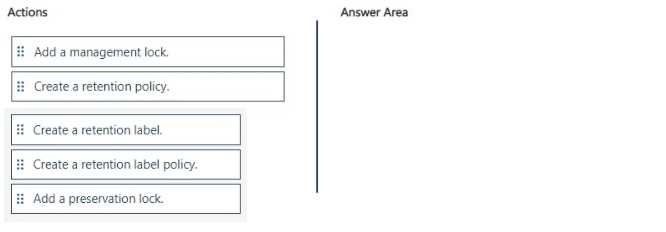
Drag & Drop
Discussion
Create retention label > create retention label policy > add preservation lock. Management lock is just for Azure, easy trap.
Nah, it's create retention label, then retention label policy, then add a preservation lock. Management lock is more for Azure resources, preservation lock is what actually blocks admin changes to retention policies. Seen similar on practice, pretty sure this is the sequence. There's a trap on management lock here.
Create a retention label → retention label policy → add preservation lock. Preservation lock is the one that enforces no disabling or deleting, so it's needed for strict compliance. Pretty sure management lock only applies to Azure, not M365 compliance policies. Disagree?
Create retention label → retention label policy → preservation lock. This matches the "never be disabled or deleted by anyone" part, since only preservation lock fully enforces that in M365. Pretty sure this is right.
Order looks solid to me: create retention label, then retention label policy, finally add preservation lock. That last step is what really locks it down so no admin can delete or turn off the policy in M365. I'm almost certain management lock isn't relevant here since that's for Azure resources. Agree?
Create retention label > retention label policy > add preservation lock. If this was Azure storage, management lock would apply, but here only preservation lock guarantees nobody can remove or disable the policy. I think this flips the answer if regulatory asks for "never disabled by anyone" versus a softer requirement.
Create a retention label, then a retention label policy, then add a management lock.
I thought management lock was the right control here to stop any changes or deletions on the policy. Pretty sure that's closer to Azure admin restrictions but the wording in the requirement about never being disabled made me pick that. If I missed something, let me know.
I thought management lock was the right control here to stop any changes or deletions on the policy. Pretty sure that's closer to Azure admin restrictions but the wording in the requirement about never being disabled made me pick that. If I missed something, let me know.
Retention label, then retention label policy, then add a management lock. I thought management lock was enough to prevent changes but maybe that's not as strict as preservation lock. Not 100 percent sure but that was my logic here. Agree?
Create a retention policy, create a retention label, add a management lock
Create retention label, retention label policy, add preservation lock. Management lock is Azure only, easy trap here.
Be respectful. No spam.