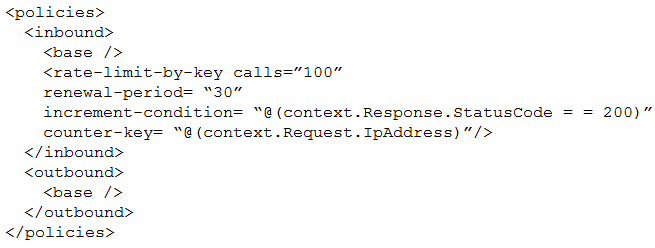
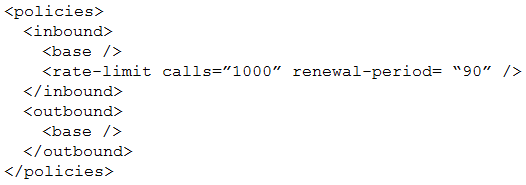
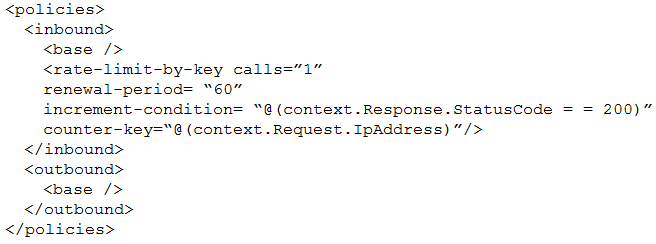
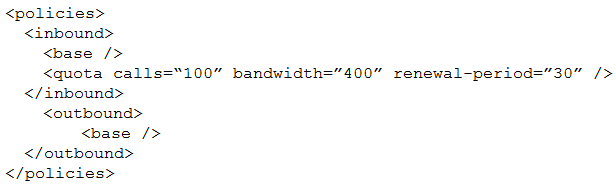
You need to reduce the number of Azure consumption API calls for User2. Which markup segment should you use? A)
B)
C)
D) 
Free PL-400 Practice Test Questions and Answers (2026) | Cert Empire Practice Questions
Free preview: 20 questions.
PL-400.pdf
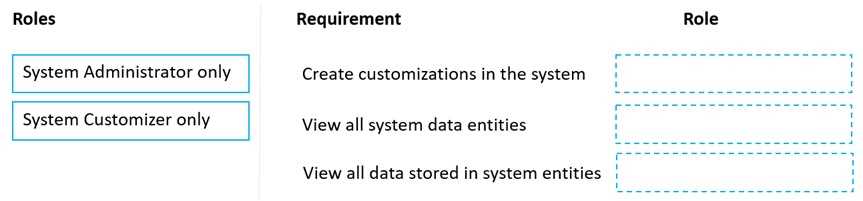
DRAG DROP You have several model-driven apps. You must ensure that app creators and system administrators can customize the apps. You must follow the principle of least privilege. You need to assign the permissions that are needed for app creators and system administrators. Which security roles should you assign? To answer, drag the appropriate roles to the correct requirements. Each role may be used once, more than once, or not at all. You may need to drag the split bar between panes or scroll to view content. NOTE: Each correct selection is worth one point 
System Customizer lets you create customizations and see the metadata/entities but not all the stored data. System Administrator is needed for full data visibility. Mapping should be: create customizations and view entities = System Customizer only, view all stored data = System Administrator only. Pretty sure that fits least privilege best, agree?
System Customizer is enough for creating customizations and viewing the entity list or schema, since that's their main purpose-they just can't access every record in all tables. System Administrator is needed when you actually have to view all data stored, which requires higher privileges. So it's Create customizations & View data entities = System Customizer only, View all stored data = System Administrator only. Pretty sure that's right but let me know if I missed something obvious.
Yeah, System Customizer for creating customizations and viewing entities, but only System Administrator should see all the actual stored data. So mapping is: create customizations and view entities -> System Customizer only, view all stored data -> System Administrator only. That sticks to least privilege. Anyone see it differently?
Both B and D use formContext.ui.refreshRibbon, which is needed to re-evaluate button visibility tied to business rules. The others don’t refresh the ribbon, so wouldn’t work in this scenario. I think that's right, correct me if I missed something.
Pretty sure it's A because a Teams notification pops up instantly for the whole group, making it much easier to spot emails right away. That fits the "reduce response time" part. The other options are more about tracking or storage, not fast action. Let me know if anyone's got a different take.
Anyone used the official practice tests or labs for PL-400 to prep for scenarios like this? I remember the Microsoft docs and some hands-on with Power Automate flows really helped clarify how notifications can improve team response times. Curious if others found similar value or focused more on reading guides?
For reducing response time, wouldn't the key thing be to get people notified instantly when an info email comes in? Dashboards like B still mean someone has to watch for updates. With A, the Teams notification pops up right away and anyone can jump on the reply. I’m pretty sure that’s what they want here but open to hearing if anyone sees a use-case for something else!
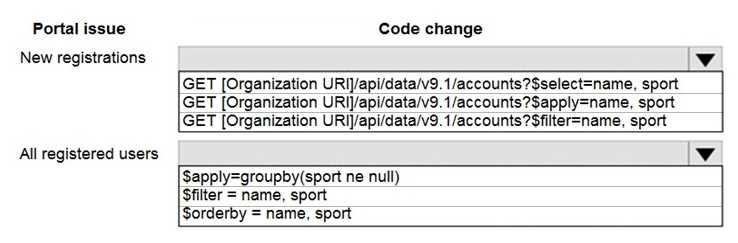
HOTSPOT You need to correct the portal query issues. Which code should you use? To answer, select the appropriate options in the answer area. NOTE: Each correct selection is worth one point. 
GET [ORG URI]/api/data/v9.1/accounts?$select=name,sport for new registrations, $orderby=name,sport for all registered users. $select picks fields, $orderby sorts the records. Pretty sure that's what they want unless they were asking for date-based filtering.
If the requirement is interactive, real-time access in an app UI then A fits. Canvas apps with custom connectors let you call the Web API directly from the interface. Pretty sure that's what they're looking for here, unless there's some hidden detail.
I don’t think it’s D. Canvas app (A) feels right here since it gives direct UI access to the API and custom connectors work natively. Webhook’s more for async stuff, so A is my pick unless I missed something crucial.
A is the way to go here. Canvas apps let you use custom connectors right in the UI for real-time Web API calls, which fits what the question’s after. Plug-ins and webhooks are more back-end. Unless there’s a detail I missed, A makes sense. Agree?
Probably D based on exam reports, but is this asking for the primary cause if interns are customizing components, or just using the app? That changes things a lot. The official guide breaks this down by specific role permissions.
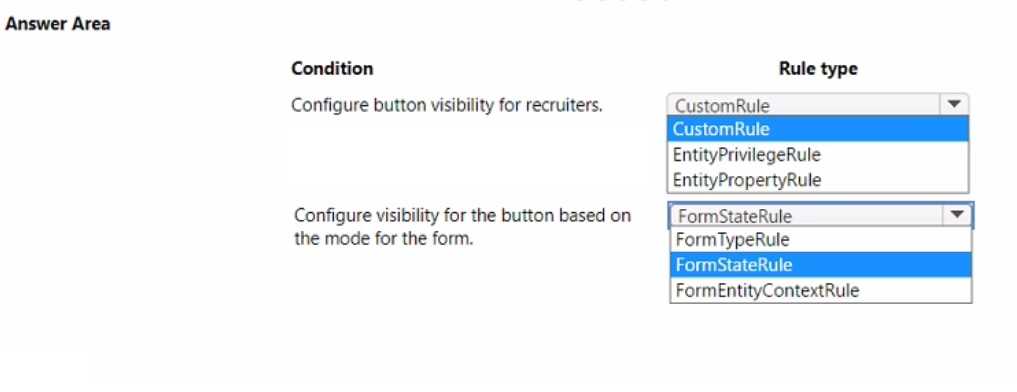
HOTSPOT You need to implement ribbon display rules to control availability for the scoring command button. Which rule types should you use? To answer, select the appropriate options in the answer area. NOTE: Each correct selection is worth one point. 
EntityPrivilegeRule and FormStateRule. The key detail is they want to control the button by user permissions (so EntityPrivilegeRule) and whether the form is new or existing (FormStateRule), not a specific field's value. If they asked about a certain field value, then ValueRule would matter. I think that's what flips some people up here, agree?
Is this asking for rules to check both the user's rights and if the form is new or not? Just want to confirm if ValueRule applies or not here.
Is the display based on just user permissions and form mode, or does it depend on a field value too? If you only want to show the button for users with certain privileges and in certain form states, I'd think EntityPrivilegeRule and FormStateRule fit better.
Modern way is definitely C and D since Power Automate handles most automation now, and Azure Functions with listeners cover any custom needs. B is legacy, barely see that anymore. Pretty sure C and D are what exam wants, but open to counterpoints if I'm off.
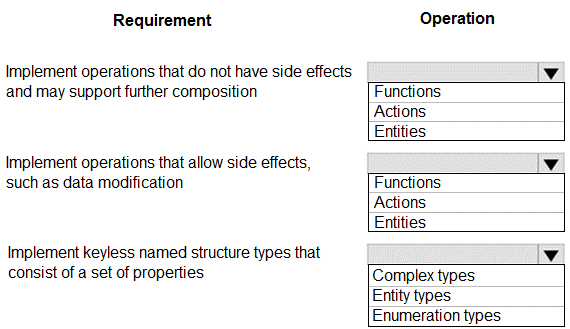
HOTSPOT You need to develop a set of Web API’s for a company. What should you implement? To answer, select the appropriate options in the answer area. NOTE: Each correct selection is worth one point. 
Functions, Actions, and Complex Types make sense for OData web APIs. Functions are for read-only ops, Actions can have side effects, Complex Types hold properties but no key. Pretty sure that's what Microsoft wants here. Disagree?
Pretty sure it's Functions, Actions, Complex Types. Functions are stateless and side-effect free, actions can change data, and complex types don't need keys. The question doesn’t mention unique IDs, so Entity Types seems off here. Let me know if I missed something.
Functions, Actions, and Complex Types.
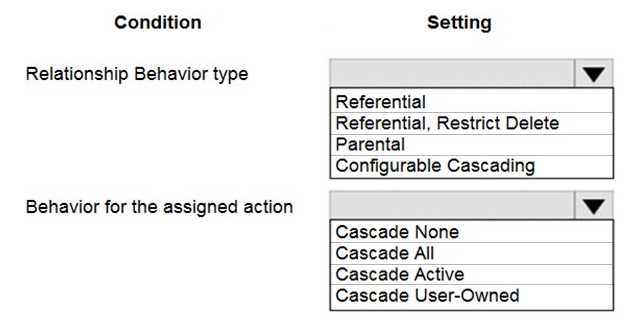
HOTSPOT A company has a Common Data Service (CDS) environment. The following conditions must apply when accounts are reassigned: Ownership for completed tasks that are associated with the account must not change. Outstanding tasks must be reassigned to the new owner of the account. You need to configure the relationship to meet the requirements. Which settings should you use? To answer, select the appropriate options in the answer area. NOTE: Each correct selection is worth one point. 
Configurable Cascading and Cascade Active are the right choices. Had something like this in a mock, where completed (inactive) tasks weren't reassigned but open ones were. Pretty sure that's what they're testing for here.
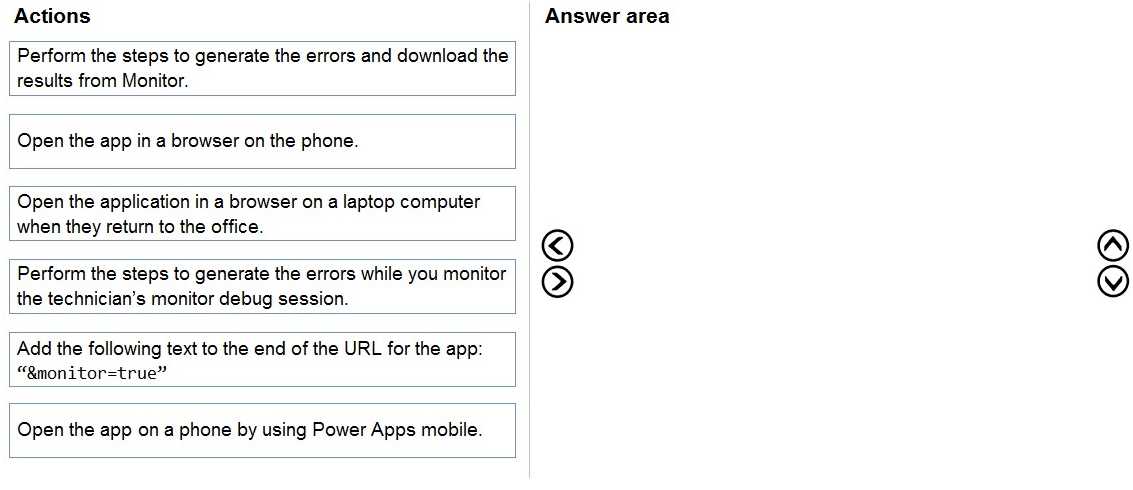
DRAG DROP Technicians for a company use a model-driven app on their phones to record information about service visits. Users do not have permissions to the Power Apps maker portal to create or update apps. Technicians report issues with the model-driven app. You are unable to reproduce the issues in a development environment. You need to provide instructions to the technicians to gather more details about the errors. Which four actions should you recommend be performed in sequence? To answer, move the appropriate actions from the list of actions to the answer area and arrange them in the correct order. 
This one is pretty clear compared to some matching questions. I'd do: Open the app in a browser on the phone, then add &monitor=true to the URL, perform the error steps while you monitor, finally download results from Monitor. Easy to follow if you've tried Power Platform Monitor before.
You are developing a Power Platform solution. The solution connects to a third-party accounting system by using a Web API through a Power Apps app that automatically exchanges contacts with the sales data. You have the following code: (Line numbers are included for reference only.)
You need to ensure that the code only synchronizes data that was not previously synchronized. Which code segment should you insert at line 02?
I don't think it's C. The question's looking for a mechanism to sync only unsynced data, and that's exactly what the odata.track-changes header (A) is designed for-it gets you a delta token so you only pull changes since your last call. Option C is more about entity references, not change tracking. Pretty sure A is right here, but open if someone has a counterpoint.
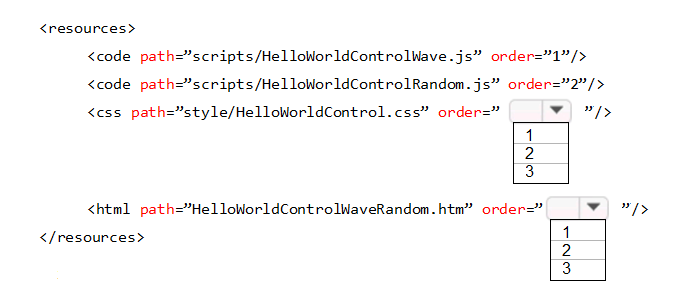
HOTSPOT You need to complete a PowerApps component framework (PCF) control. How should you define the order in the manifest? To answer, select the appropriate options in the answer area. NOTE: Each correct selection is worth one point. 
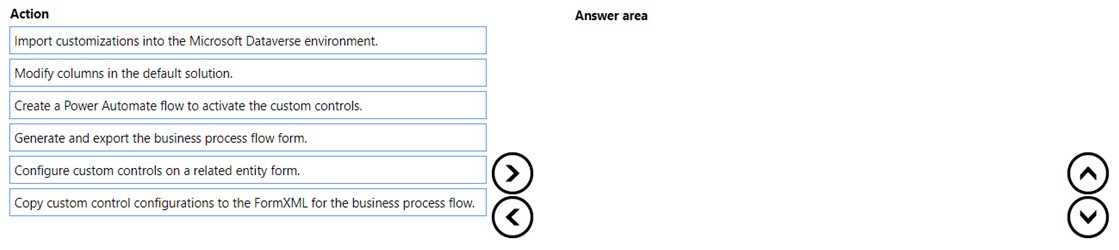
DRAG DROP You are developing a Power Platform solution. You must add a custom control slider to a specific step in a business process flow. You need to add the custom control. Which four actions should you perform in sequence? To answer, move the appropriate actions from the list of actions to the answer area and arrange them in the correct order. 
Yeah, you set up the custom control on a normal entity form first so it generates the right XML. Then export the BPF form, copy over the control config inside FormXML, and finally import back to Dataverse. Just tweaking the BPF in the UI won’t cut it. Pretty confident in this order but chime in if there’s a catch I missed.
- Configure controls on related form → Generate/export BPF form → Copy to FormXML → Import customizations
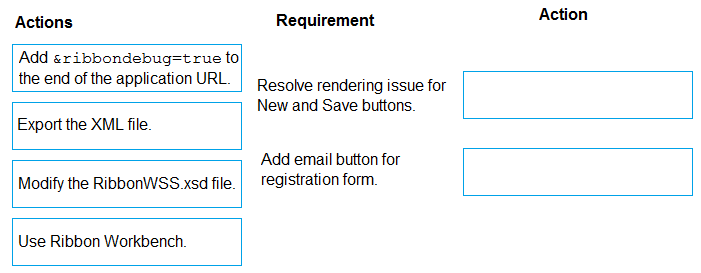
DRAG DROP You need to address the user interface issues. What should you do? To answer, drag the appropriate actions to the correct issues. Each action may be used once, more than once, or not at all. You may need to drag the split bar between panes or scroll to view content. NOTE: Each correct selection is worth one point. 
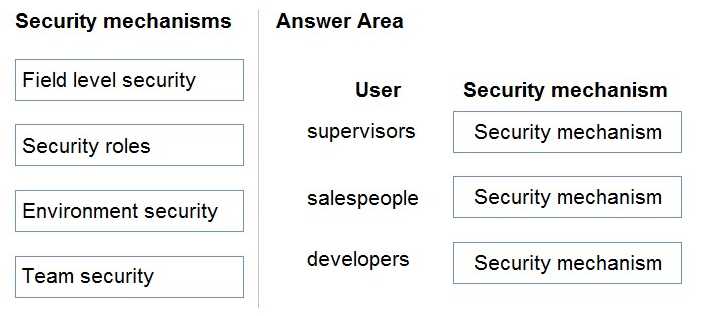
DRAG DROP You need to set up security to meet the requirements. How should you configure security? To answer, drag the appropriate security mechanisms to the correct users. Each security mechanism may be used once, more than once, or not at all. You may need to drag the split bar between panes or scroll to view content. NOTE: Each correct selection is worth one point. 
Not quite sure but I'd put Field level security for supervisors, Team security for salespeople, and leave developers with Environment security. I picked team for sales since they're usually grouped by region or territory, so managing them as teams makes sense. Pretty sure that's how I've seen it done, but let me know if I'm missing something with the field security part.
- supervisors: Field level security
- salespeople: Team security
- developers: Environment security
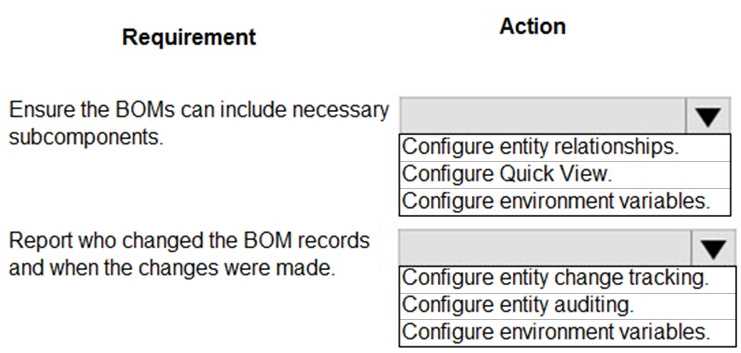
HOTSPOT You create a Power Platform solution to track purchasing requirements for bills of material (BOMs) and their subcomponents. The solution must meet the following requirements: Ensure that the BOMs are enabled to include the necessary subcomponents. Report changes to the BOMs or their sub-components that are made by engineers. You need to configure the solution. What should you do to meet each requirement? To answer, select the appropriate options in the answer area. NOTE: Each correct selection is worth one point. 
Wouldn't enabling change tracking instead of auditing help here for reporting changes? I thought change tracking was more about seeing updates, so not sure if auditing is really required for this scenario.