
Q: 18
DRAG DROP You need to address the user interface issues. What should you do? To answer, drag the appropriate actions to the correct issues. Each action may be used once, more than once, or not at all. You may need to drag the split bar between panes or scroll to view content. NOTE: Each correct selection is worth one point. 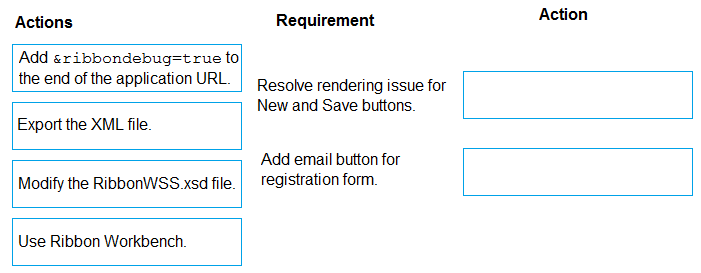
Drag & Drop
Discussion
Add &ribbondebug=true for the button render issue, Ribbon Workbench to add the email button.
Yeah, same mapping: &ribbondebug=true for the rendering issue, Ribbon Workbench for adding the email button.
Resolve rendering issue for New and Save buttons: Add &ribbondebug=true. Add email button for registration form: Use Ribbon Workbench. I’ve seen similar mapping on practice tests, &ribbondebug enables diagnostics while Ribbon Workbench is the cleanest way to add custom buttons. Exporting XML or editing XSD would be overkill here. Pretty sure this is right, unless someone’s seen a trick question.
Resolve rendering: &ribbondebug=true, add email button: Ribbon Workbench. Saw this mapping in a similar exam.
Makes sense to me, but just to check: mapping is &ribbondebug=true for resolving button rendering and Ribbon Workbench for the email button?
Add &ribbondebug=true to fix rendering for New/Save, use Ribbon Workbench for the email button. Only catch I see is if custom JS is involved, then might need deeper troubleshooting, but this should be correct per usual guidance.
Be respectful. No spam.