Free N10-009 Practice Test Questions and Answers (2026)

View Mode
Q: 1
A small business is deploying new phones, and some of the phones have full HD videoconferencing features. The Chief Information Officer (CIO) is concerned that the network might not be able to handle the traffic if it reaches a certain threshold. Which of the following can the network engineer configure to help ease these concerns?
Options
30 comments in the community discussion
6
Option D. Full duplex will help with simultaneous voice and video streams, especially with HD calls. The others don’t directly tackle bandwidth or collision issues for video traffic. Pretty sure about this, let me know if you disagree.
2
C/D? Saw something like this in official practice, and the answer focused on increasing port efficiency. Probably full duplex (D) is what helps with HD video traffic, but honestly recommend double-checking with the CompTIA objectives or network lab scenarios to see how bandwidth and collision handling play in real-worl
Q: 2
Early in the morning, an administrator installs a new DHCP server. In the afternoon, some users report they are experiencing network outages. Which of the following is the most likely issue?
Options
29 comments in the community discussion
3
Makes sense to go with A for this one
3
Option A here. If the DHCP pool runs out of available IP addresses, only users trying to connect later get hit with outages. Doesn't matter if the gateway or routes are wrong, as that would break it for everyone right away. Happened in a similar practice question, too.
Q: 3
Which of the following troubleshooting steps would provide a change advisory board with the information needed to make a decision?
Options
26 comments in the community discussion
5
My pick: D here, since the CAB wants to see a documented plan before they approve anything. The earlier steps are all groundwork, but only the plan of action has what they really need. Pretty sure about this, correct me if I missed something.
3
C is tempting but go with D here, matches what the official guide and exam practice questions focus on for CAB decisions.
Q: 4
A network administrator needs to fail over services to an off-site environment. This process will take four weeks to become fully operational. Which of the following DR (Disaster Recovery) concepts does this describe?
Options
24 comments in the community discussion
5
Option C - that timeline fits a cold site, since it usually has just the basics ready and takes weeks to get everything else up. Pretty sure about this but open to other views.
2
C imo, had something like this in a mock and four weeks matches cold site delay.
Q: 5
Which of the following is the best way to reduce the likelihood of electrostatic discharge?
Options
30 comments in the community discussion
1
Option D makes sense here. Proper temperature and humidity control helps prevent static buildup in the air, which is what usually causes ESD problems, especially in server rooms or data centers. A, B and C are about power management, not static. Pretty sure D is the best pick for overall ESD risk reduction but open
1
I don’t think it’s D, I’d pick B. Surge protectors are for electrical issues and that feels like ESD protection compared to just humidity. Maybe D is more indirect but surge protection is what I think of first. Static electricity is an electrical problem, right?
Q: 6
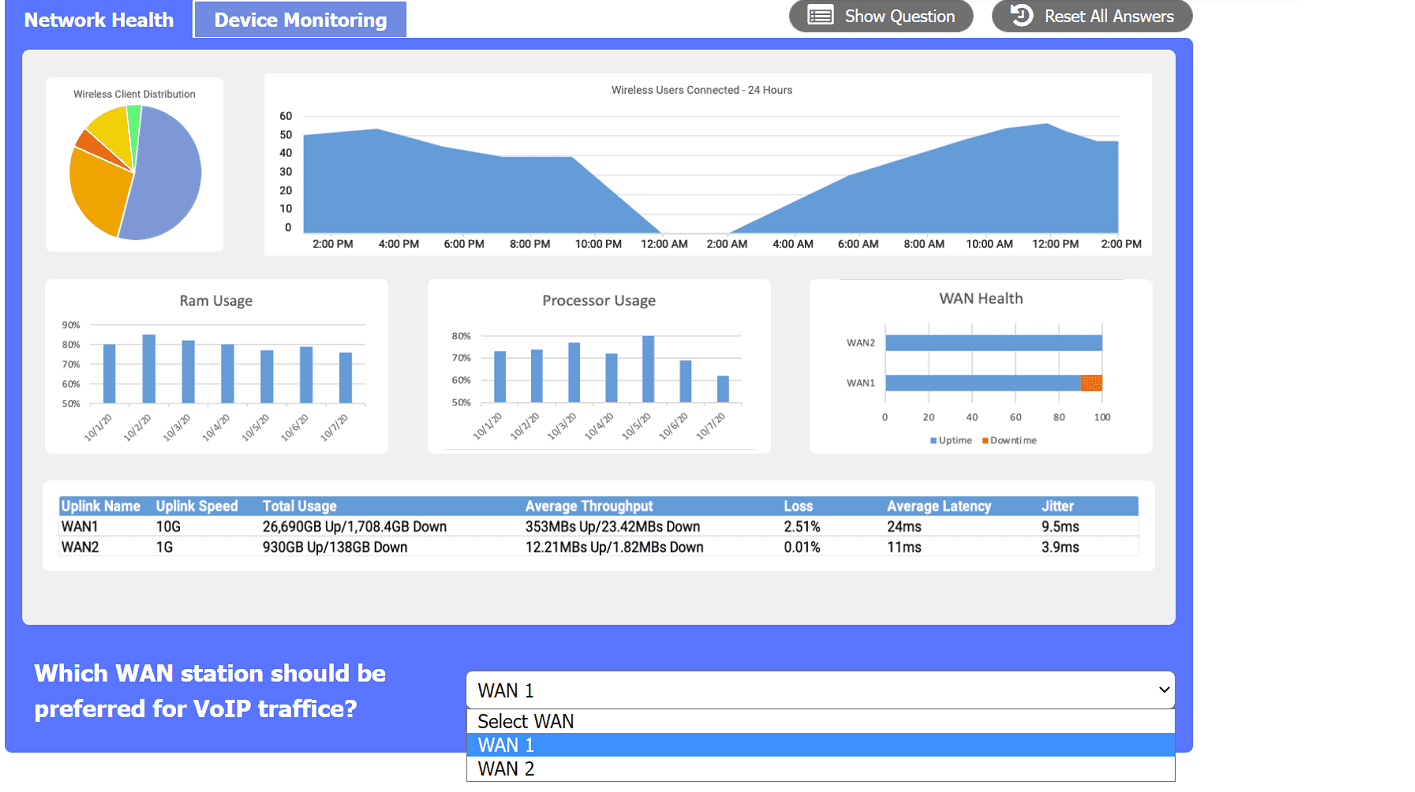
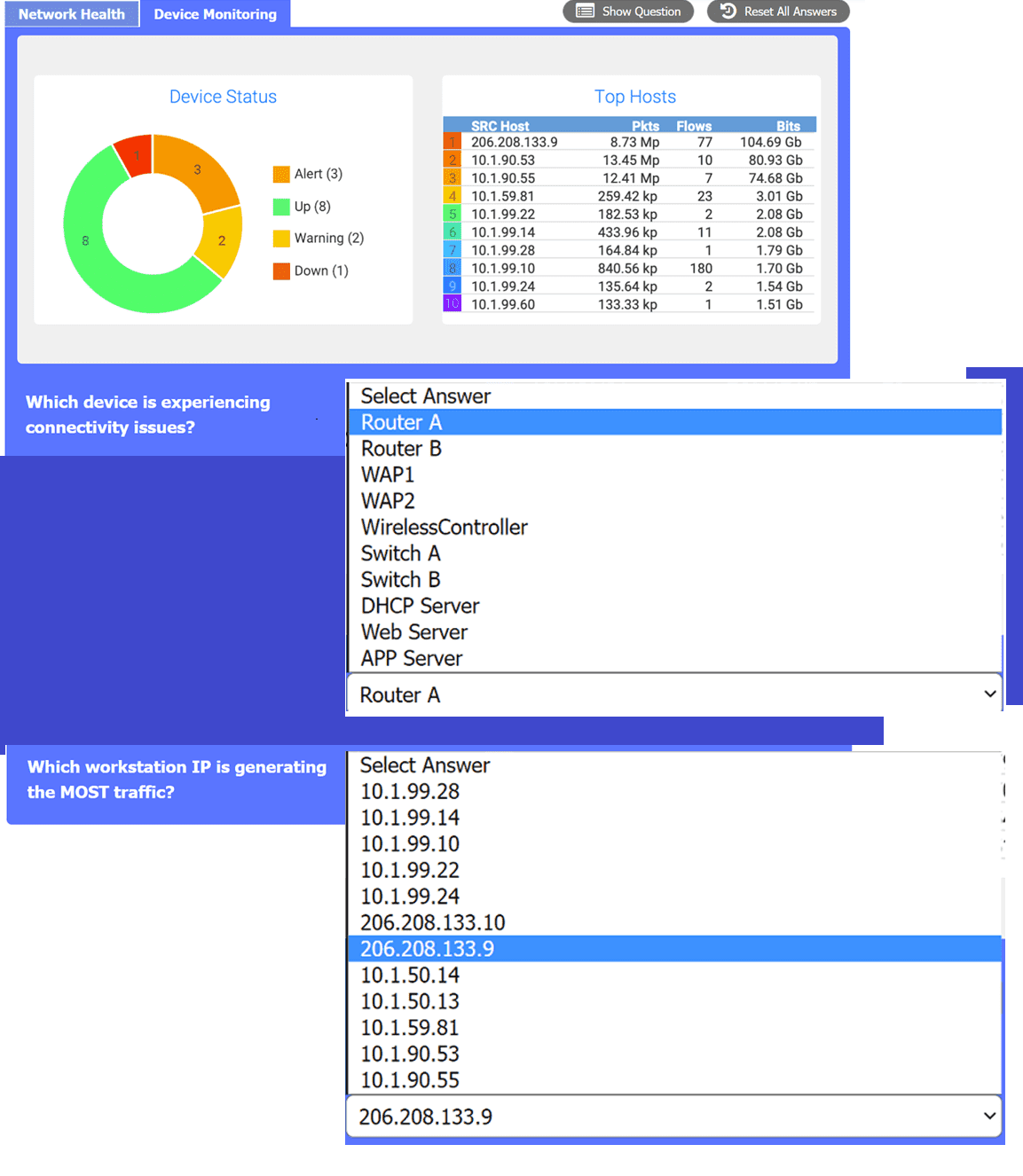
SIMULATION After a recent power outage, users are reporting performance issues accessing the application servers. Wireless users are also reporting intermittent Internet issues. INSTRUCTIONS Click on each tab at the top of the screen. Select a widget to view information, then use the drop-down menus to answer the associated questions. If at any time you would like to bring back the initial state of the simulation, please click the Reset All button. CompTIA Network+ N10-009 question CompTIA Network+ N10-009 question
Your Answer
19 comments in the community discussion
5
Does anyone know if the "Device Status" for Router A being down could explain both server access and wireless internet issues?
4
Makes sense to pick Router A, 206.208.133.9, and WAN 2 here. Router A being down fits the outage symptoms, that IP is at the top for traffic, and WAN 2 has better VoIP stats if I'm reading those charts right.
Q: 7
Users are reporting issues with mobile phone connectivity after a cellular repeater was recently installed. Users also note that the phones are rapidly losing battery charge. Which of the following should the technician check first to troubleshoot the issue?
Options
28 comments in the community discussion
6
Don’t think it's C for the first thing to check. Rapid battery drain and poor connectivity usually points at weak signal so I'd go with B. Checking signal strength right away shows if the repeater’s causing RF issues, while channel stuff is more specific to settings. Saw a similar question in practice-signal level was
2
Not sure about focusing on channel frequency here, wouldn't checking B (signal strength) show the actual symptom first?
Q: 8
After a security incident, a technician reveals that company data was stolen. During the investigation, it is discovered that a host disguised itself as a switch. Which of the following best describes the attack that occurred?
Options
32 comments in the community discussion
1
A imo. Only VLAN hopping needs the attacker to pretend to be a switch, it's a weird edge scenario you barely see outside exam questions.
1
A here. Host acting as a switch points straight to VLAN hopping, since that's all about trunk negotiation/tagged frames. ARP spoofing (D) is just about intercepting traffic, not pretending to be a switch. Pretty sure on this but let me know if you see it different.
Q: 9
A junior network administrator gets a text message from a number posing as the domain registrar of the firm. The administrator is tricked into providing global administrator credentials. Which of the following attacks is taking place?
Options
22 comments in the community discussion
2
Maybe D. It's a text message, so feels like classic smishing, but I get why some might think C since there's social engineering involved. Not totally sure though, since the terms can get mixed up sometimes.
2
Text message as the attack method basically screams D. Smishing is the SMS phishing one, vishing is for voice calls. Pretty sure about this but open if someone sees it differently.
Q: 10
Which of the following should a company implement in order to share a single IP address among all the employees in the office?
Options
28 comments in the community discussion
6
C. had something like this in a mock. PAT is the one for sharing a single IP with multiple users.
1
It’s C here. PAT lets multiple devices on a private network access the internet using just one public IP, which is exactly what's described. STP and BGP are for switching/routing, not address sharing. VXLAN's more about network segmentation between sites. Seen similar in practice questions, pretty sure it's not a trick
Q: 11
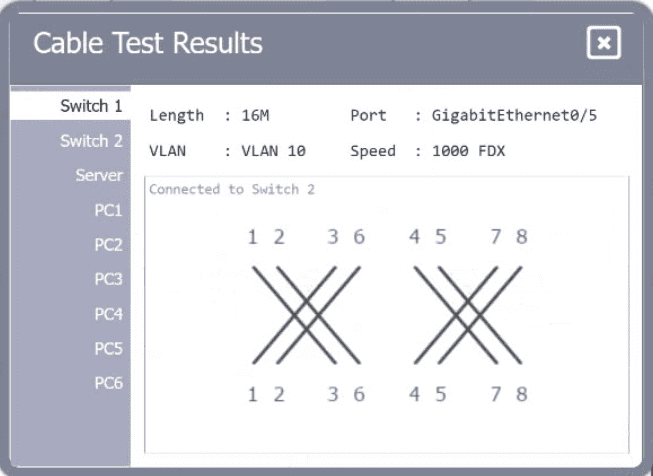
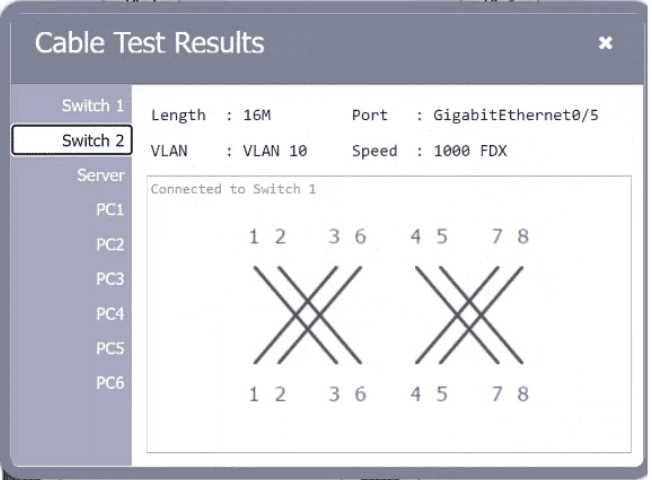
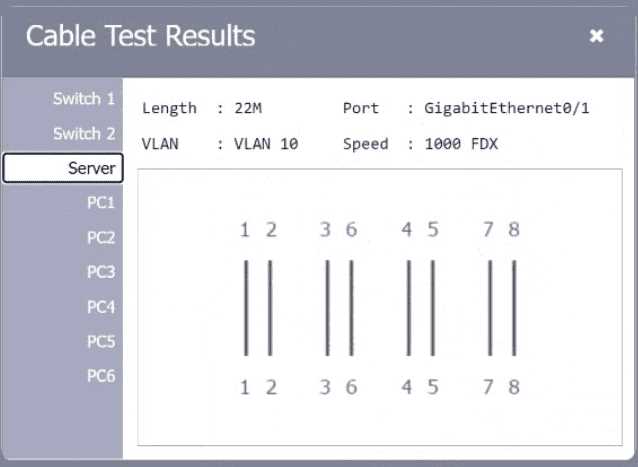
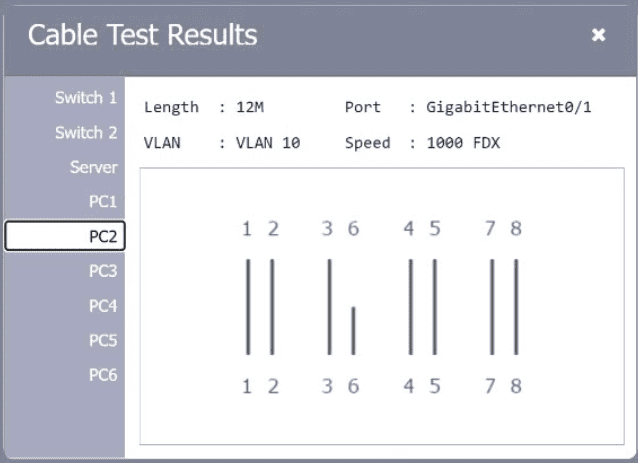
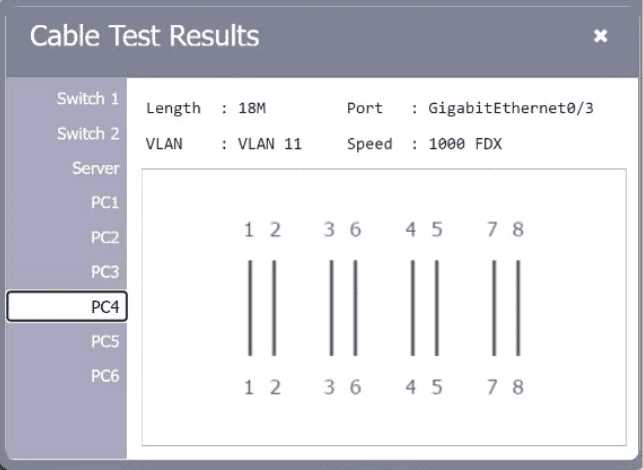
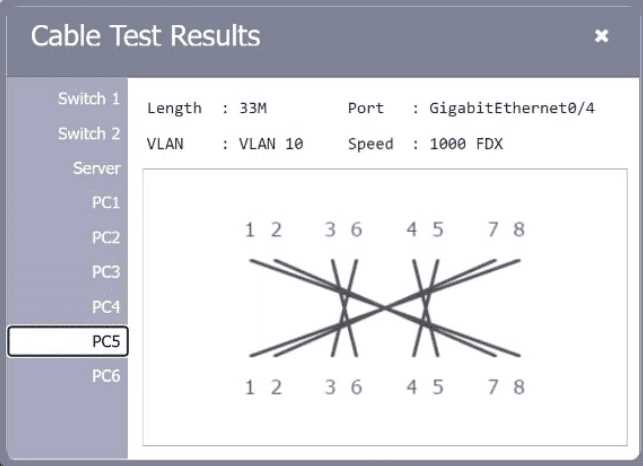
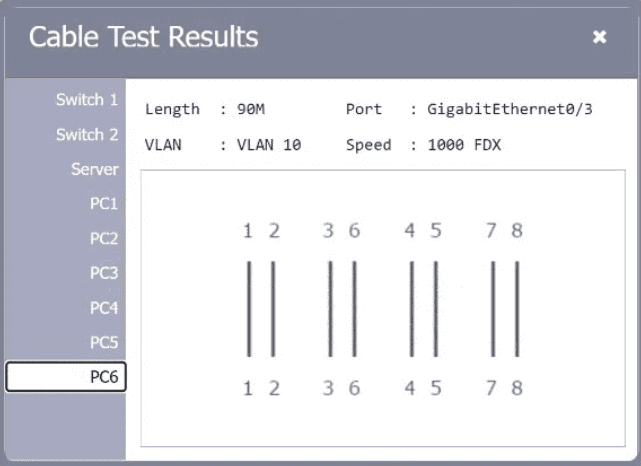
SIMULATION A network technician needs to resolve some issues with a customer's SOHO network. The customer reports that some of the PCs are not connecting to the network, while others appear to be working as intended. INSTRUCTIONS Troubleshoot all the network components. Review the cable test results first, then diagnose by clicking on the appropriate PC, server, and Layer 2 switch. Identify any components with a problem and recommend a solution to correct each problem. If at any time you would like to bring back the initial state of the simulation, please click the Reset All button. CompTIA Network+ N10-009 question CompTIA Network+ N10-009 question CompTIA Network+ N10-009 question CompTIA Network+ N10-009 question CompTIA Network+ N10-009 question CompTIA Network+ N10-009 question CompTIA Network+ N10-009 question
Your Answer
7 comments in the community discussion
6
PC2 has an open/short in the cable so swap that patch cable. PC4 is on VLAN 11 but needs to be in VLAN 10, just reassign it on the switch. For PC5, the pin-out's wrong, so a new properly terminated patch cable is needed. Saw super similar troubleshooting on a mock, these fixes worked for me. Pretty confident but cor
5
PC2 open/short, swap the patch cable. PC4 VLAN is wrong, needs to be on VLAN 10 not 11. PC5 has bad pin-out, so that patch cable has to go too. Pretty sure some miss that pin-out one since it's a common trap with custom cables.
Q: 12
A systems administrator is investigating why users cannot reach a Linux web server with a browser but can ping the server IP. The server is online, the web server process is running, and the link to the switch is up. Which of the following commands should the administrator run on the server first?
Options
7 comments in the community discussion
7
Option B. First thing I'd check is which services/ports are listening, so netstat makes sense here. Pings work, so it's not a basic connectivity or ARP issue. Pretty sure that's the right move.
1
Makes sense to use B since you need to confirm the web service is actually listening on 80 or 443. Ping only checks ICMP, not the application layer. Not 100% but that's usually my first move here.
Q: 13
A network technician is attempting to harden a commercial switch that was recently purchased. Which of the following hardening techniques best mitigates the use of publicly available information?
Options
4 comments in the community discussion
I don’t think it’s D. A is correct-changing the default password tackles the published vendor info that attackers use most. Blocking SSH or removing gateways aren’t really about public info exposure. Agree?
Its A. Default passwords are public knowledge so changing them is the first move when hardening any new switch.
Q: 14

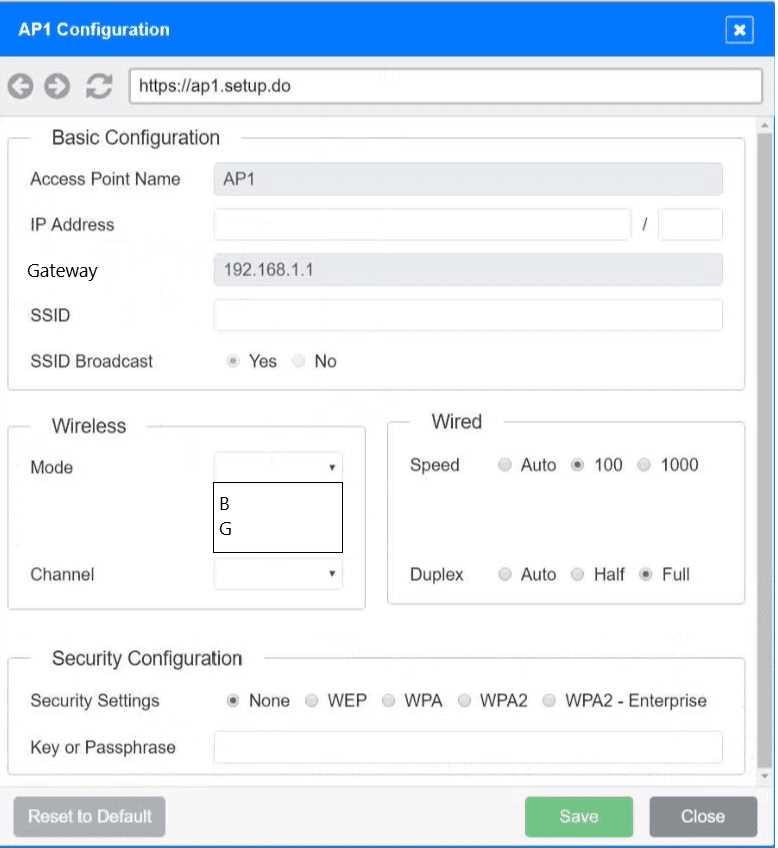
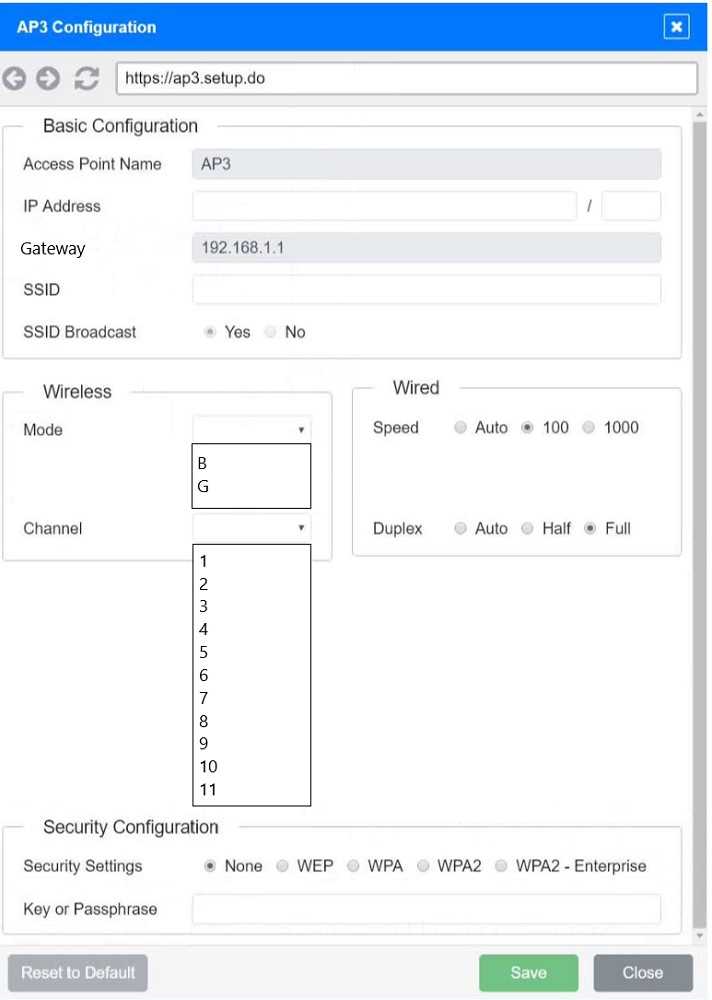
SIMULATION SIMULATION You have been tasked with setting up a wireless network in an office. The network will consist of 3 Access Points and a single switch. The network must meet the following parameters: The SSIDs need to be configured as CorpNet with a key of S3cr3t! The wireless signals should not interfere with each other The subnet the Access Points and switch are on should only support 30 devices maximum The Access Points should be configured to only support TKIP clients at a maximum speed INSTRUCTONS Click on the wireless devices and review their information and adjust the settings of the access points to meet the given requirements. If at any time you would like to bring back the initial state of the simulation, please click the Reset All button. CompTIA Network+ N10-009 question CompTIA Network+ N10-009 question

Your Answer
8 comments in the community discussion
2
Makes sense to use WPA with TKIP since the question says TKIP only, and /27 subnet for exactly 30 clients. Don’t need WPA2 or /24 here, pretty sure about that.
2
WPA with TKIP, not WPA2 here, and subnet should be /27 for the 30 device limit.
Q: 15
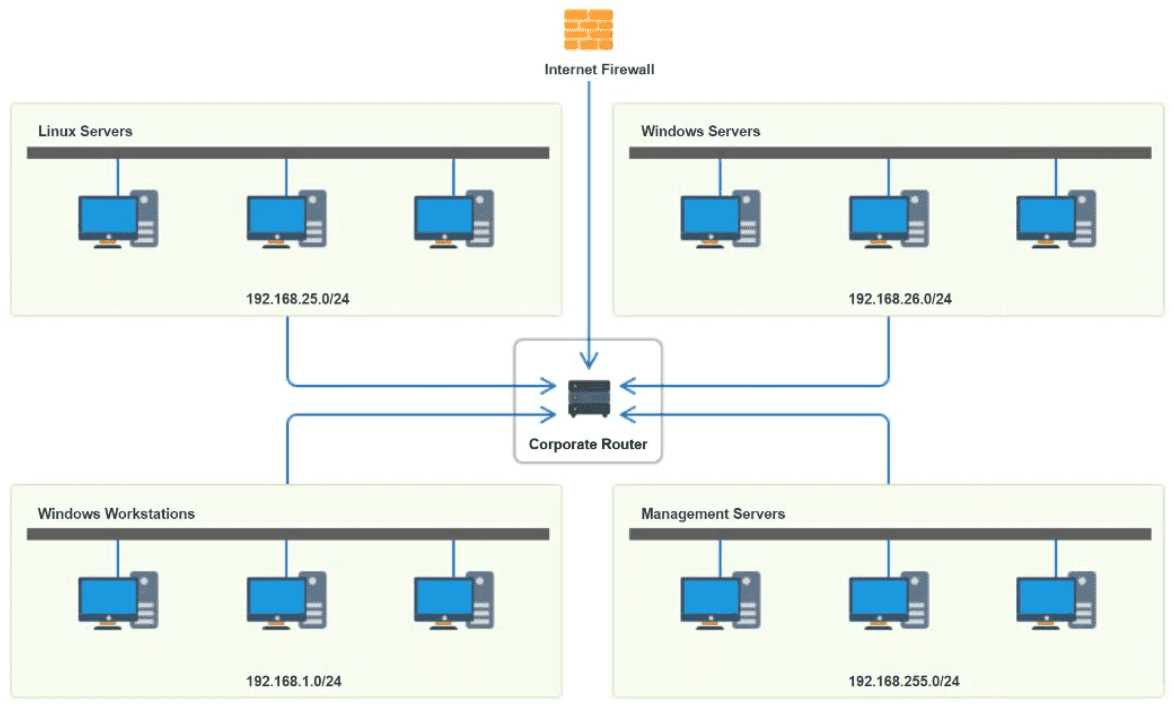
SIMULATION You have been tasked with implementing an ACL on the router that will: 1. Permit the most commonly used secure remote access technologies from the management network to all other local network segments 2. Ensure the user subnet cannot use the most commonly used remote access technologies in the Linux and Windows Server segments. 3. Prohibit any traffic that has not been specifically allowed. INSTRUCTIONS Use the drop-downs to complete the ACL If at any time you would like to bring back the initial state of the simulation, please click the Reset All button. CompTIA Network+ N10-009 question
Your Answer
6 comments in the community discussion
5
Yeah, it's mostly about controlling SSH (22) and RDP (3389) flows. Permit those from 192.168.255.0/24, deny them for 192.168.1.0/24 hitting the servers, and end with deny all rule. Covers least privilege well imo-anyone disagree?
4
Permit SSH and RDP from the management network only, block those same ports for user subnet to servers, then deny everything else. The trap is thinking you should allow all IP from management, but it's just those two ports.
Q: 16
Following a fire in a data center, the cabling was replaced. Soon after, an administrator notices network issues. Which of the following are the most likely causes of the network issues? (Select two).
Options
8 comments in the community discussion
1
Probably D and E, since physical cabling issues like using unshielded cables (D) or wrong transceiver types (E) often show up right after maintenance. Both can cause connection drops or weird errors super fast. Makes more sense than the other options in this context, I think-anyone see it differently?
D imo, also E. Saw something like this on a practice test. Physical layer issues happen fast if you swap to unshielded cables or use the wrong transceiver. Category mismatch (F) wouldn't cause problems, and config stuff (C) isn't as likely right after cabling work. Anyone else think differently?
Q: 17
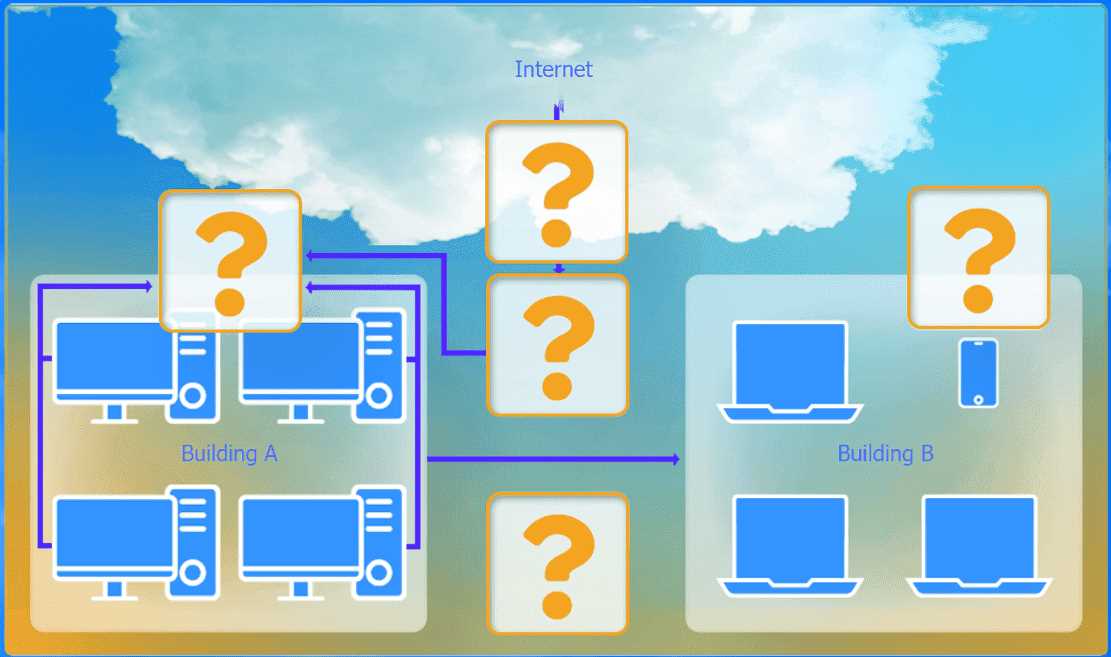
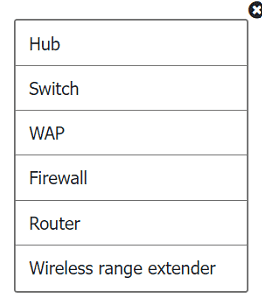
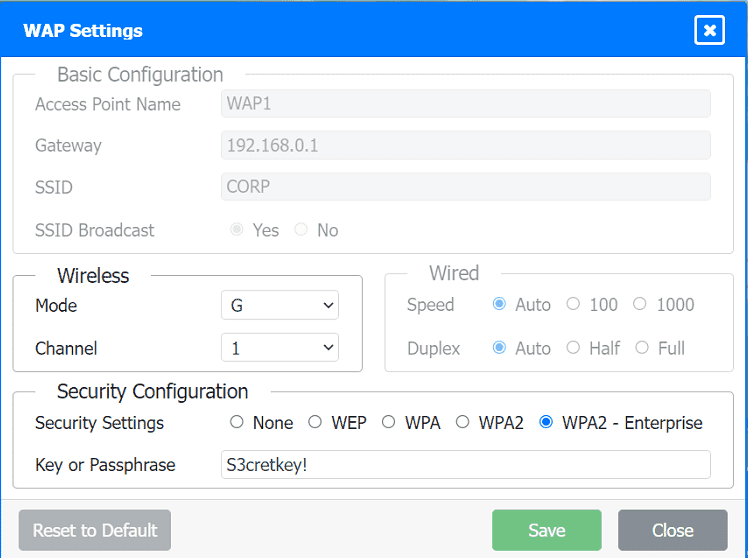
SIMULATION A network administrator has been tasked with configuring a network for a new corporate office. The office consists of two buildings, separated by 50 feet with no physical connectivity. The configuration must meet the following requirements: . Devices in both buildings should be able to access the Internet. . Security insists that all Internet traffic be inspected before entering the network. . Desktops should not see traffic destined for other devices. INSTRUCTIONS Select the appropriate network device for each location. If applicable, click on the magnifying glass next to any device which may require configuration updates and make any necessary changes. Not all devices will be used, but all locations should be filled. If at any time you would like to bring back the initial state of the simulation, please click the Reset All button. CompTIA Network+ N10-009 question CompTIA Network+ N10-009 question CompTIA Network+ N10-009 question CompTIA Network+ N10-009 question
Your Answer
9 comments in the community discussion
7
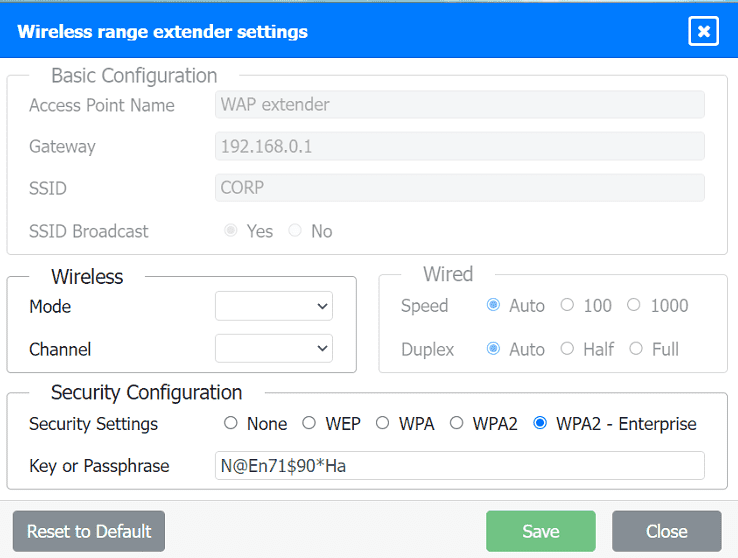
Firewall at the top for inspection, then router, switch, WAP linking to a wireless range extender in building B. Gotta change the key on the extender to S3CRETKEY! Matching practice test labs and official objectives.
4
Firewall, router, switch, WAP, then wireless range extender for the far building. Update the extender’s passphrase to S3CRETKEY! That matches exam guides.
Q: 18
Which of the following can also provide a security feature when implemented?
Options
5 comments in the community discussion
1
Its A
A for sure. NAT gives some basic protection since it hides internal IPs. Anyone disagree?
Q: 19
A network technician is troubleshooting a faulty NIC and tests the theory. Which of the following should the technician do next?
Options
8 comments in the community discussion
6
Option B is the CompTIA approved next step in the troubleshooting process. You always plan before making changes. Agree?
1
Why not C though? Isn't implementing the fix next after you confirm your theory is right?
Q: 20

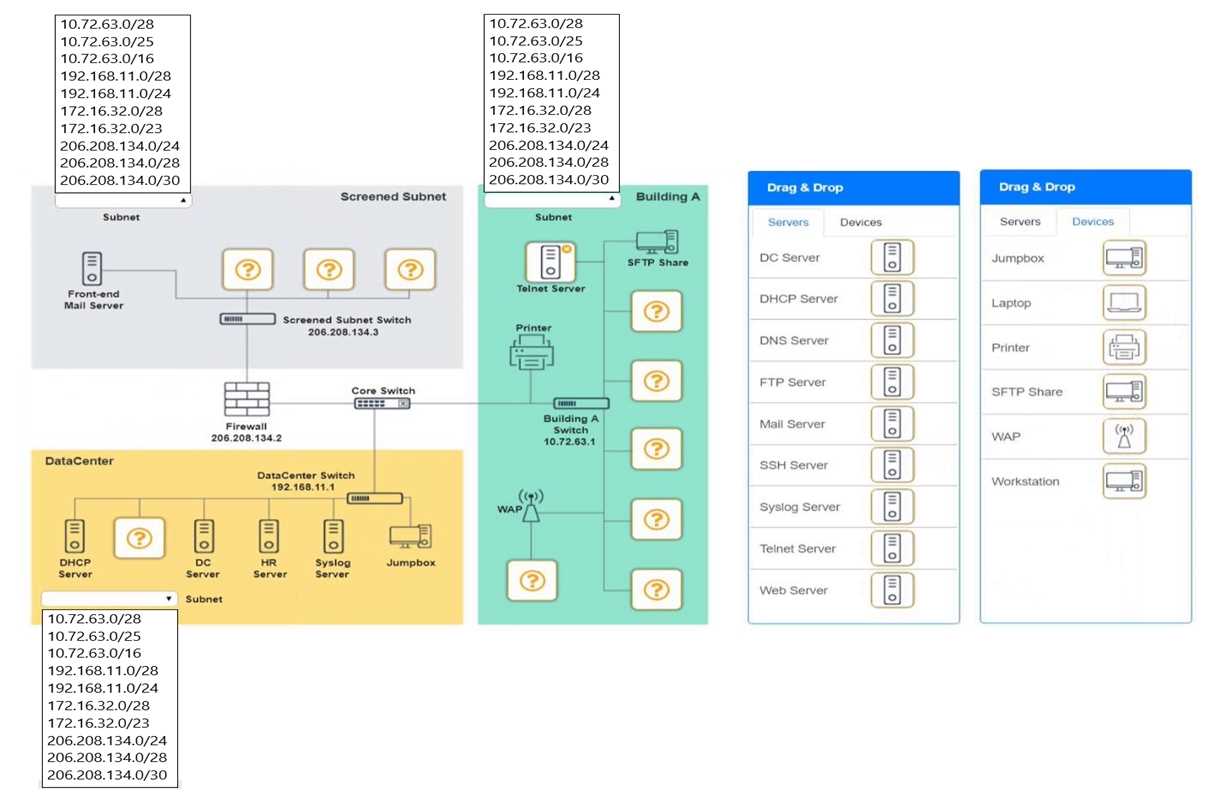
SIMULATION You are tasked with verifying the following requirements are met in order to ensure network security. Requirements: Datacenter Ensure network is subnetted to allow all devices to communicate properly while minimizing address space usage Provide a dedicated server to resolve IP addresses and hostnames correctly and handle port 53 traffic Building A Ensure network is subnetted to allow all devices to communicate properly while minimizing address space usage Provide devices to support 5 additional different office users Add an additional mobile user Replace the Telnet server with a more secure solution Screened subnet Ensure network is subnetted to allow all devices to communicate properly while minimizing address space usage Provide a server to handle external 80/443 traffic Provide a server to handle port 20/21 traffic INSTRUCTIONS Drag and drop objects onto the appropriate locations. Objects can be used multiple times and not all placeholders need to be filled. Available objects are located in both the Servers and Devices tabs of the Drag & Drop menu. If at any time you would like to bring back the initial state of the simulation, please click the Reset All button. CompTIA Network+ N10-009 question

Your Answer
8 comments in the community discussion
6
I see Nathan mentioned the subnet sizes and which devices to use, but just to double check: you need /28 subnets for both the Datacenter and Building A, then /24 for the screened subnet (since nothing else fits all those servers). Also, be sure Telnet gets swapped for SSH due to security. T
5
That feels right, but careful on the screened subnet! The question only gives you one subnet big enough for all those servers (the /24), not the /30. Also for Building A, don't forget to put a laptop, not another workstation, or you'll miss the mobile user requirement. Pretty sure that's all the nitpicky bits.
Question 1 of 20

What's covered in this practice questions set

1: Networking Fundamentals · 6 questions

📖 About this Domain

This domain covers foundational networking concepts, protocols, and infrastructure components. It establishes the core knowledge of the OSI and TCP/IP models, IP addressing, and network topologies. Understanding these fundamentals is critical for all other networking domains.

🎓 What You Will Learn

  • You will learn to compare the layers of the OSI and TCP/IP models, including the process of data encapsulation and decapsulation.
  • You will learn to configure IPv4 and IPv6 addressing schemes, perform subnetting calculations, and understand CIDR notation.
  • You will learn to differentiate between network topologies like star and mesh, and network types such as LAN, WAN, and SAN.
  • You will learn the functions of core network services like DNS and DHCP, and the purpose of routing protocols like OSPF and BGP.

🛠️ Skills You Will Build

  • You will build the skill to map network devices, protocols, and PDUs to the correct OSI or TCP/IP layer.
  • You will build the skill to design and implement logical IP addressing schemes for a given network requirement using subnetting.
  • You will build the skill to select appropriate cabling, such as UTP or fiber, and determine the optimal placement of network devices.
  • You will build the skill to explain fundamental cloud concepts like IaaS, PaaS, SaaS, and software-defined networking (SDN).

💡 Top Tips to Prepare

  • Master the seven layers of the OSI model and the corresponding PDUs, as this concept is applied in many scenario-based questions.
  • Practice IPv4 subnetting and CIDR calculations daily to ensure speed and accuracy during the exam.
  • Memorize the well-known port numbers for common protocols like HTTP, HTTPS, FTP, SSH, and RDP.
  • Utilize network diagrams to visualize traffic flow, device placement, and the implementation of different network topologies.

2: Network Implementations · 6 questions

📖 About this Domain

This domain covers the practical implementation of network solutions. It focuses on deploying network hardware, configuring devices, and setting up network services. You will move from network theory to hands-on application of networking concepts.

🎓 What You Will Learn

  • You will learn to deploy cabling solutions, including copper and fiber, using termination standards like T568A and T568B.
  • You will learn to implement wireless networks by configuring WAPs, selecting 802.11 standards, and managing channels.
  • You will learn to configure routing and switching solutions, including VLANs, 802.1Q trunking, and dynamic routing protocols like OSPF.
  • You will learn to implement network services like DHCP and DNS, and deploy cloud models such as IaaS and SaaS.

🛠️ Skills You Will Build

  • You will build the skill to physically install and configure network devices like routers, switches, and firewalls in a rack.
  • You will build the skill to segment networks logically using subnetting, VLANs, and virtualization techniques.
  • You will build the skill to deploy and configure wireless infrastructure, including access point placement and security settings.
  • You will build the skill to implement cloud networking solutions, such as configuring a Virtual Private Cloud (VPC).

💡 Top Tips to Prepare

  • Master subnetting calculations as they are fundamental to network implementation and troubleshooting scenarios.
  • Memorize the characteristics of different cable types, connectors, and 802.11 wireless standards.
  • Understand the configuration steps for key network services like DHCP, DNS, and NTP.
  • Practice configuring VLANs and trunk ports in a lab environment to solidify your understanding of network segmentation.

4: Network Security · 5 questions

📖 About this Domain

This domain covers critical network security concepts required to protect networks from unauthorized access and threats. You will explore network hardening, security components, and the fundamentals of network access control. The focus is on implementing and maintaining a secure network infrastructure against common vulnerabilities.

🎓 What You Will Learn

  • You will learn to summarize network security fundamentals, including the CIA triad and AAA concepts like RADIUS and TACACS+.
  • You will learn to explain the function of network security components such as firewalls, IDS/IPS, and SIEM systems.
  • You will learn to implement network hardening techniques like disabling unused ports, patch management, and configuring access control lists (ACLs).
  • You will learn to compare common network vulnerabilities and threats, including DoS attacks, malware, and man-in-the-middle attacks.

🛠️ Skills You Will Build

  • You will build the skill to implement network access control using methods like 802.1X and port security.
  • You will build the skill to apply device hardening techniques, such as changing default credentials and applying firmware updates.
  • You will build the skill to recognize and differentiate between various network attacks and vulnerabilities to aid in mitigation.
  • You will build the skill to configure and deploy security solutions like VPN concentrators and firewalls based on security requirements.

💡 Top Tips to Prepare

  • Memorize security acronyms like CIA, AAA, RADIUS, TACACS+, and understand their specific functions in network security.
  • Focus on scenario-based questions that require you to apply hardening techniques to switches, routers, and wireless access points.
  • Clearly differentiate between similar security tools, such as an Intrusion Detection System (IDS) versus an Intrusion Prevention System (IPS).
  • Practice configuring and interpreting Access Control Lists (ACLs), understanding the logic of permit/deny statements and implicit deny.

3: Network Operations · 3 questions

📖 About this Domain

Domain 3, Network Operations, focuses on the critical tasks of managing and maintaining network infrastructure. It emphasizes the use of monitoring tools, proper documentation, and ensuring business continuity to maintain network uptime and performance.

🎓 What You Will Learn

  • Utilize network monitoring tools like SNMP, syslog, and packet analyzers to assess network health and traffic patterns.
  • Implement configuration management, including network diagramming, documentation, and formal change control procedures.
  • Understand business continuity and disaster recovery concepts such as high availability (HA), fault tolerance, and data backup strategies.
  • Analyze key performance metrics like latency, jitter, and bandwidth to troubleshoot and optimize network performance.

🛠️ Skills You Will Build

  • Proactively monitor network infrastructure using tools like SNMP traps and syslog messages to detect anomalies.
  • Create and interpret network topology diagrams and maintain accurate configuration documentation.
  • Execute network changes following established change management workflows to minimize service disruption.
  • Develop and implement disaster recovery plans, including backup and restoration of network configurations.

💡 Top Tips to Prepare

  • Gain practical experience with packet capture tools like Wireshark to analyze protocol data units (PDUs).
  • Learn the standard symbols and layouts for logical and physical network diagrams.
  • Differentiate clearly between high availability, fault tolerance, and disaster recovery scenarios.
  • Memorize the purpose of common performance metrics and the tools used to measure them, such as iperf.

5: Network Troubleshooting

📖 About this Domain

This domain covers the structured methodology for network troubleshooting. It focuses on using appropriate tools to identify and resolve common network connectivity and performance issues. You will learn to diagnose problems from the physical layer up to the application layer.

🎓 What You Will Learn

  • You will learn the CompTIA 7-step troubleshooting methodology to systematically approach and resolve network faults.
  • You will learn to use network and security tools like packet sniffers, protocol analyzers, and command-line utilities such as ping, traceroute, and ipconfig.
  • You will learn to identify and resolve common wired issues like cable problems, port configurations, and VLAN mismatches.
  • You will learn to troubleshoot common wireless issues including signal loss, incorrect SSID, and mismatched encryption settings.

🛠️ Skills You Will Build

  • You will build the skill to isolate network problems by analyzing symptoms and applying the OSI model.
  • You will build proficiency in interpreting the output from diagnostic tools to pinpoint root causes of network failures.
  • You will build the ability to differentiate between physical, data link, and network layer issues based on evidence.
  • You will build the skill to document troubleshooting steps and implement solutions according to best practices.

💡 Top Tips to Prepare

  • Memorize the CompTIA troubleshooting methodology steps in order, as scenario questions will test this process.
  • Get hands-on practice with command-line tools like ping, tracert, nslookup, and ipconfig to understand their outputs.
  • Focus on common misconfigurations like incorrect subnet masks, default gateways, DNS settings, and VLAN assignments.
  • Understand which tool is best for a specific scenario, such as using a cable tester for physical layer issues or a packet analyzer for traffic problems.

Premium Access Includes

  • Quiz Simulator
  • Exam Mode
  • Progress Tracking
  • Question Saving
  • Flash Cards
  • Drag & Drops
  • 3 Months Access
  • PDF Downloads
Get Premium Access
Scroll to Top

FLASH OFFER

Days
Hours
Minutes
Seconds

avail 10% DISCOUNT on YOUR PURCHASE