Free PL-400 Practice Test Questions and Answers (2026)

Last Update Check
View Mode
Q: 1

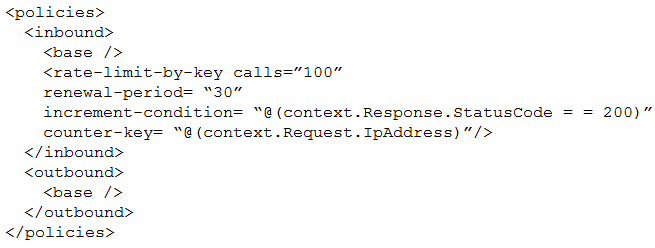
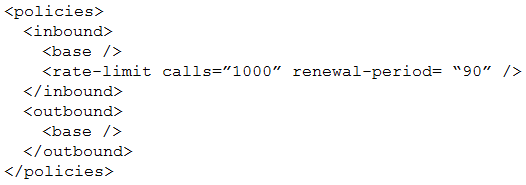
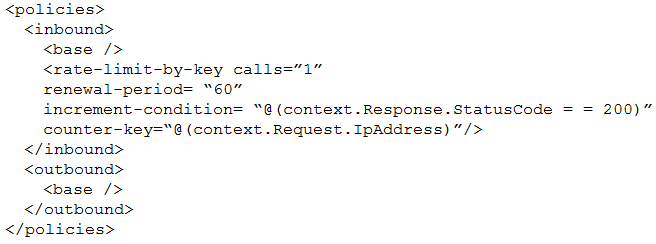
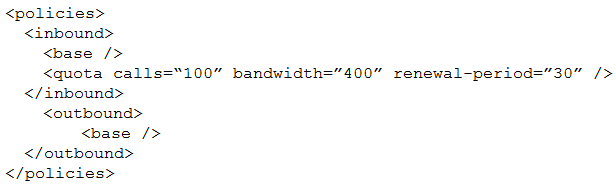
You need to reduce the number of Azure consumption API calls for User2. Which markup segment should you use? A) PL-400 question B) PL-400 question C) PL-400 question D) PL-400 question

Options
37 comments in the community discussion
6
Option C, saw a similar question on a practice set, it matches the user-specific caching requirement.
6
C . B looks close but that's a common trap, since it would affect all users not just User2.
Q: 2

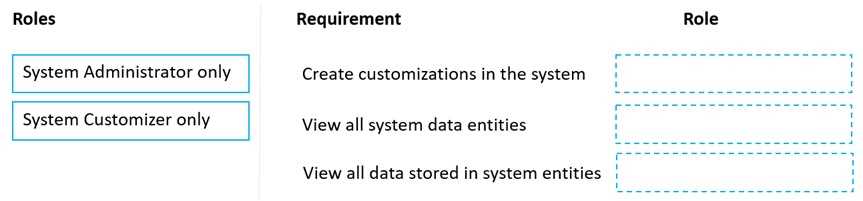
DRAG DROP You have several model-driven apps. You must ensure that app creators and system administrators can customize the apps. You must follow the principle of least privilege. You need to assign the permissions that are needed for app creators and system administrators. Which security roles should you assign? To answer, drag the appropriate roles to the correct requirements. Each role may be used once, more than once, or not at all. You may need to drag the split bar between panes or scroll to view content. NOTE: Each correct selection is worth one point PL-400 question

Drag & Drop
24 comments in the community discussion
8
System Customizer for customization tasks, System Admin for viewing all data. Seen similar mapping in official Microsoft docs and practice exams.
6
Create/modify customizations: System Customizer only, view all data: System Administrator only. It's easy to mix up since both roles can customize, but only admins have full data access. Seen this trick in practice sets.
Q: 3
An organization uses Dynamics 365 Sales. You plan to add a custom button to the app ribbon. You need to ensure that the button displays only when conditions specified by business rules are met. Which two code segments can you use? Each correct answer presents a complete solution. NOTE: Each correct selection is worth one point.
Options
29 comments in the community discussion
2
Would C ever update the ribbon if called right after a save event?
1
B and D, encountered exactly similar question in my exam. Only those two will actually refresh the ribbon for business rule changes.
Q: 4
You need to reduce response time for the information email on the website. What should you create?
Options
35 comments in the community discussion
2
Pretty sure it's A because a Teams notification pops up instantly for the whole group, making it much easier to spot emails right away. That fits the "reduce response time" part. The other options are more about tracking or storage, not fast action. Let me know if anyone's got a different take.
2
Anyone used the official practice tests or labs for PL-400 to prep for scenarios like this? I remember the Microsoft docs and some hands-on with Power Automate flows really helped clarify how notifications can improve team response times. Curious if others found similar value or focused more on reading guides?
Q: 5

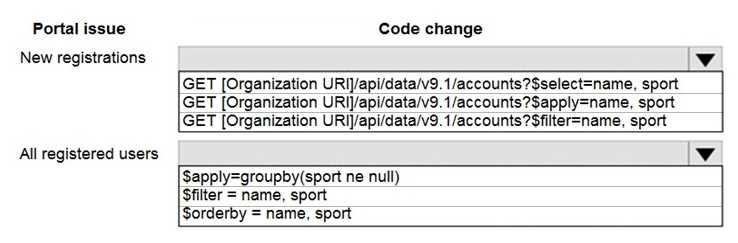
HOTSPOT You need to correct the portal query issues. Which code should you use? To answer, select the appropriate options in the answer area. NOTE: Each correct selection is worth one point. PL-400 question

Your Answer
37 comments in the community discussion
6
Seen similar in the official guide, you'd use $select for picking columns, $orderby for sorting.
6
Yeah, that's right. $select for new registrations, $orderby for all registered users
Q: 6
You need to choose a technology to access the Web API. Which technology should you select?
Options
29 comments in the community discussion
1
A or C here. Leaning A since custom connector plus canvas app gets you real-time API calls from the UI, but C (a flow) is tempting if they wanted background processing. Option B is a trap because plug-ins can't show user results directly. Not fully sure, anyone see it picked as C elsewhere?
1
A imo is best if you need users to access the Web API right from the UI. Canvas apps let you use custom connectors for real-time calls, so users get immediate responses. Plug-ins and flows are more about backend or automation, not direct interaction. Might pick C if they asked for background automation but here A fits
Q: 7
You need to determine the primary cause of the issue reported by interns when they use the app. What is the primary cause?
Options
41 comments in the community discussion
6
D. because customizations like editing system tables or forms need System Customizer. Just Environment Maker isn't enough for that. If the interns are trying to do more than basic use, D fits best I think. Anyone see it differently?
4
D . System Customizer is needed for full customization rights, interns with just Environment Maker can't change core system stuff. Not 100% but this lines up with what I've seen in similar scenarios.
Q: 8

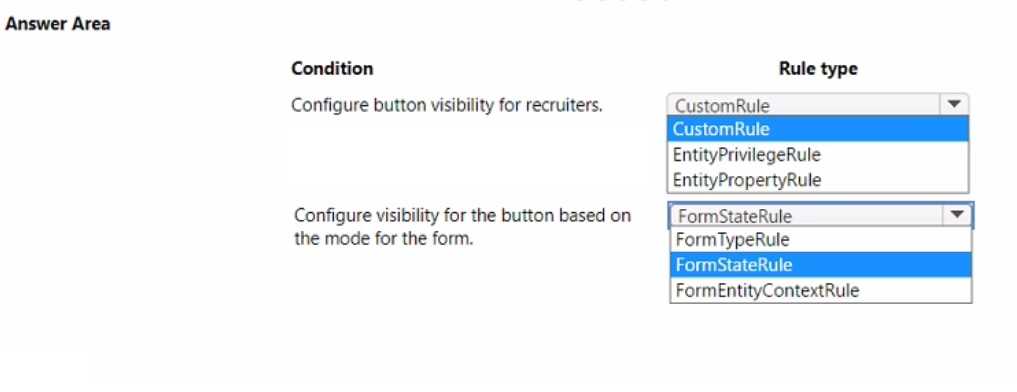
HOTSPOT You need to implement ribbon display rules to control availability for the scoring command button. Which rule types should you use? To answer, select the appropriate options in the answer area. NOTE: Each correct selection is worth one point. PL-400 question

Your Answer
38 comments in the community discussion
6
EntityPrivilegeRule and FormStateRule. The key detail is they want to control the button by user permissions (so EntityPrivilegeRule) and whether the form is new or existing (FormStateRule), not a specific field's value. If they asked about a certain field value, then ValueRule would matter. I think that's what flip
5
Yep, pretty sure it's EntityPrivilegeRule and FormStateRule. Button availability has to do with what permissions the user has and whether the form is in create or edit mode. Only use ValueRule if a specific field value is mentioned, which isn't the case here. Disagree?
Q: 9
You need to configure the system to support automation for referrals. What are two possible ways to achieve the goal? Each correct selection presents a complete solution. NOTE: Each correct selection is worth one point.
Options
34 comments in the community discussion
1
Nah, pretty sure B is a trap since workflow extensions are considered legacy now. C and D.
1
C/D tbh, Power Automate and Azure Function listener all the way for automation here.
Q: 10

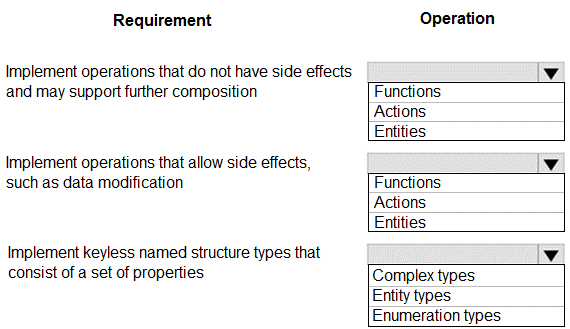
HOTSPOT You need to develop a set of Web API’s for a company. What should you implement? To answer, select the appropriate options in the answer area. NOTE: Each correct selection is worth one point. PL-400 question

Your Answer
26 comments in the community discussion
6
Not seeing any need for Entity Types here. Functions, Actions, Complex Types. The key thing trips people up on these.
6
Functions, Actions, and Complex Types make sense for OData web APIs. Functions are for read-only ops, Actions can have side effects, Complex Types hold properties but no key. Pretty sure that's what Microsoft wants here. Disagree?
Q: 11

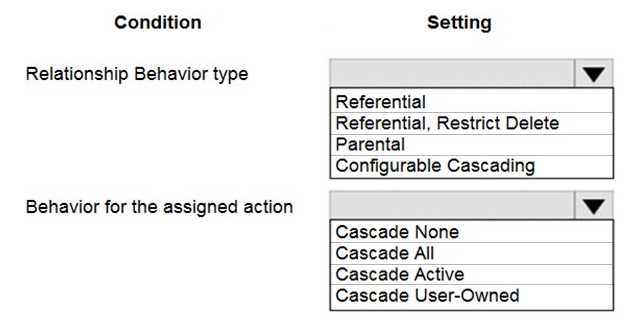
HOTSPOT A company has a Common Data Service (CDS) environment. The following conditions must apply when accounts are reassigned: Ownership for completed tasks that are associated with the account must not change. Outstanding tasks must be reassigned to the new owner of the account. You need to configure the relationship to meet the requirements. Which settings should you use? To answer, select the appropriate options in the answer area. NOTE: Each correct selection is worth one point. PL-400 question

Your Answer
5 comments in the community discussion
5
Not B, it's definitely Configurable Cascading with Cascade Active. The trap here is picking Parental which would reassign everything, including completed tasks you want left alone.
5
Configurable Cascading and Cascade Active are the right choices. Had something like this in a mock, where completed (inactive) tasks weren't reassigned but open ones were. Pretty sure that's what they're testing for here.
Q: 12

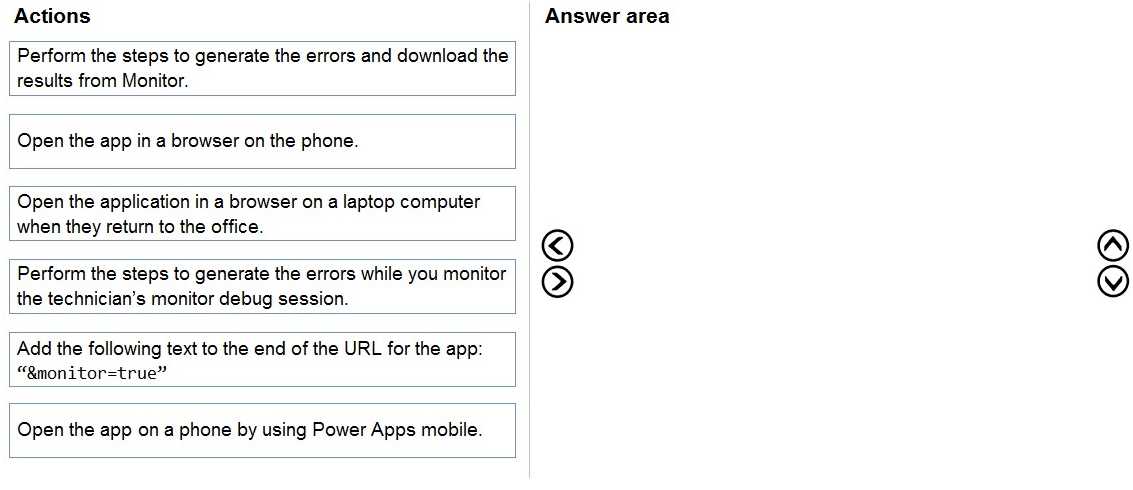
DRAG DROP Technicians for a company use a model-driven app on their phones to record information about service visits. Users do not have permissions to the Power Apps maker portal to create or update apps. Technicians report issues with the model-driven app. You are unable to reproduce the issues in a development environment. You need to provide instructions to the technicians to gather more details about the errors. Which four actions should you recommend be performed in sequence? To answer, move the appropriate actions from the list of actions to the answer area and arrange them in the correct order. PL-400 question

Drag & Drop
12 comments in the community discussion
4
Open app in browser on phone → add &monitor=true to the URL → perform error steps while monitoring → download results from Monitor. That's the right flow, since only a browser lets you inject that URL param and connect a debug session. The mobile app can't do it. Pretty sure that's what exam guides expect, but corr
3
Got a nitpick for this one. The answer only works if techs have browser access on their phones; some companies lock that down and only allow the mobile app, which would break step 2 (&monitor=true can't be added in native app). So this order is correct based on the prompt, but watch out for that detail if you're se
Q: 13

You are developing a Power Platform solution. The solution connects to a third-party accounting system by using a Web API through a Power Apps app that automatically exchanges contacts with the sales data. You have the following code: (Line numbers are included for reference only.) PL-400 question You need to ensure that the code only synchronizes data that was not previously synchronized. Which code segment should you insert at line 02?
Options
12 comments in the community discussion
A tbh, I remember seeing a similar question and that's what worked.
Why do Microsoft options always try to trick you with similar-sounding headers? A
Q: 14

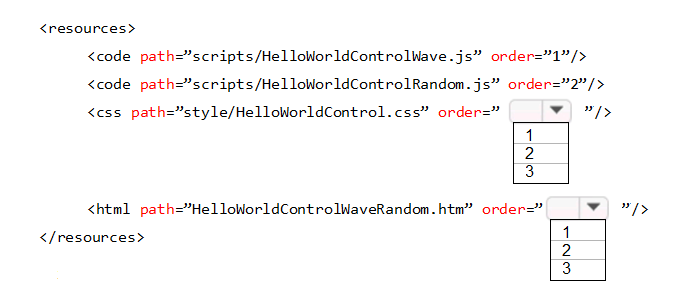
HOTSPOT You need to complete a PowerApps component framework (PCF) control. How should you define the order in the manifest? To answer, select the appropriate options in the answer area. NOTE: Each correct selection is worth one point. PL-400 question

Your Answer
11 comments in the community discussion
8
Makes sense to me-CSS and HTML both get order 1 since they’re each the only one of their type in the manifest. There’s no need to increment order unless you have multiple resources of the same kind. Pretty sure that’s what MS docs say too.
4
So why not set CSS and HTML to order 2 as well if there are JS scripts at 1 and 2?
Q: 15
You need to handle errors in UpdateRecord.js. Which code segment should you add at line UR06?
Options
7 comments in the community discussion
5
Option A, This matches what you’d see in both the official docs and Power Platform practice tests.
1
A imo, because that's the standard try...catch structure in JavaScript. D looks like async handler syntax, which doesn't fit here. Pretty sure A is what the question wants but open to other thoughts.
Q: 16
A company implements Dynamics 365 Sales. An email notification must be sent automatically to the sales manager when a business process completes. You need to ensure that emails are sent. What should you create on the process completed trigger?
Options
9 comments in the community discussion
5
Option A
2
A , classic workflows can be tied directly to the business process flow completed trigger. Power Automate is more flexible these days but not for this specific automation point, I think. Anyone see different in recent exams?
Q: 17

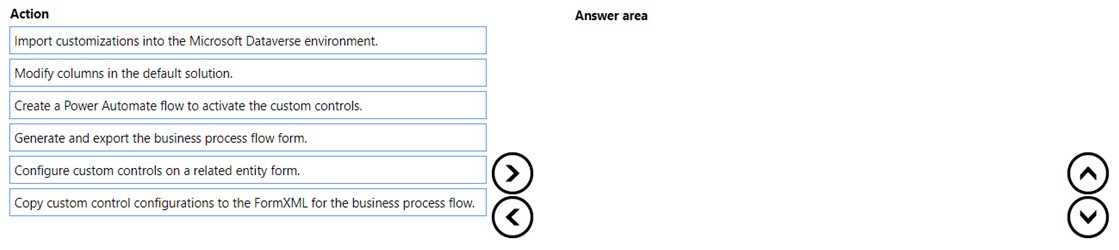
DRAG DROP You are developing a Power Platform solution. You must add a custom control slider to a specific step in a business process flow. You need to add the custom control. Which four actions should you perform in sequence? To answer, move the appropriate actions from the list of actions to the answer area and arrange them in the correct order. PL-400 question

Drag & Drop
7 comments in the community discussion
3
Yeah, you set up the custom control on a normal entity form first so it generates the right XML. Then export the BPF form, copy over the control config inside FormXML, and finally import back to Dataverse. Just tweaking the BPF in the UI won’t cut it. Pretty confident in this order but chime in if there’s a catch I
3
E, D, F, A pretty sure but I get confused with these steps. Can someone confirm if that's right?
Q: 18

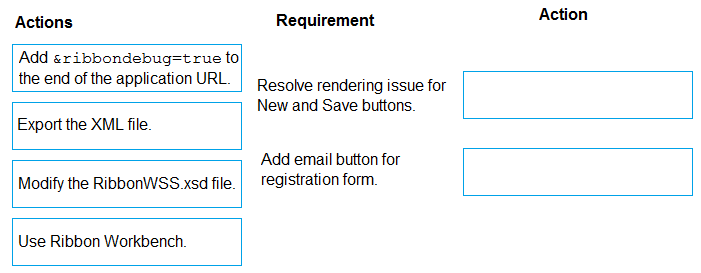
DRAG DROP You need to address the user interface issues. What should you do? To answer, drag the appropriate actions to the correct issues. Each action may be used once, more than once, or not at all. You may need to drag the split bar between panes or scroll to view content. NOTE: Each correct selection is worth one point. PL-400 question

Drag & Drop
10 comments in the community discussion
5
Add &ribbondebug=true for the button render issue, Ribbon Workbench to add the email button.
4
Yeah, same mapping: &ribbondebug=true for the rendering issue, Ribbon Workbench for adding the email button.
Q: 19

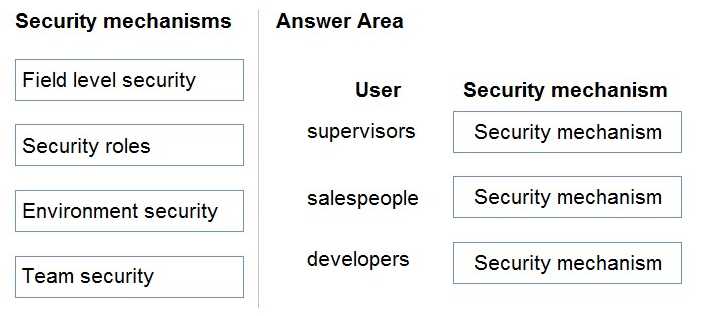
DRAG DROP You need to set up security to meet the requirements. How should you configure security? To answer, drag the appropriate security mechanisms to the correct users. Each security mechanism may be used once, more than once, or not at all. You may need to drag the split bar between panes or scroll to view content. NOTE: Each correct selection is worth one point. PL-400 question

Drag & Drop
5 comments in the community discussion
9
supervisors -> Security roles, salespeople -> Field level security, developers -> Environment security
Not quite sure but I'd put Field level security for supervisors, Team security for salespeople, and leave developers with Environment security. I picked team for sales since they're usually grouped by region or territory, so managing them as teams makes sense. Pretty sure that's how I've seen it done, but let me kno
Q: 20

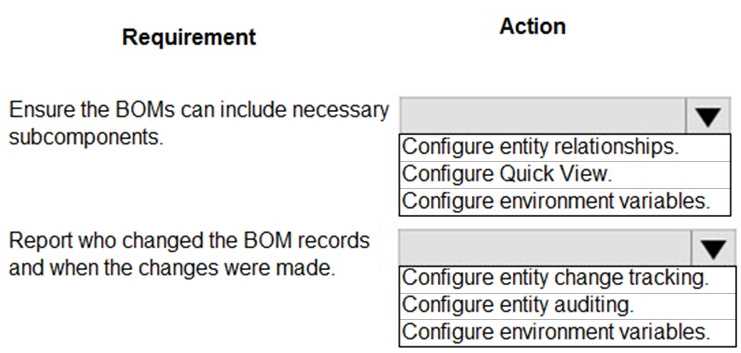
HOTSPOT You create a Power Platform solution to track purchasing requirements for bills of material (BOMs) and their subcomponents. The solution must meet the following requirements: Ensure that the BOMs are enabled to include the necessary subcomponents. Report changes to the BOMs or their sub-components that are made by engineers. You need to configure the solution. What should you do to meet each requirement? To answer, select the appropriate options in the answer area. NOTE: Each correct selection is worth one point. PL-400 question

Your Answer
9 comments in the community discussion
6
Looks right from what I've seen in official docs and practice exams. Setting up entity relationships is how you'd allow BOMs to have subcomponents, and enabling auditing gives you the needed change tracking. If anyone found a better way, let me know.
6
Configure entity relationships for nesting subcomponents in BOMs, that's the only way to let you include subcomponents directly in Dataverse. For reporting changes by engineers, I think enabling auditing is the way to go since it captures who changed what and when. Change tracking won't give you this level of detail. P
Question 1 of 20

What's covered in this practice questions set

6: Extend the platform · 8 questions

📖 About this Domain

This domain focuses on pro-developer extensibility options within the Microsoft Power Platform. It covers creating custom code components and connectors to enhance platform functionality and integrate with external systems.

🎓 What You Will Learn

  • You will learn to create, deploy, and debug Dataverse plug-ins to implement custom business logic on the server-side.
  • You will learn to develop Power Apps Component Framework (PCF) controls for model-driven and canvas apps.
  • You will learn to build custom connectors to integrate Power Apps and Power Automate with external APIs.
  • You will learn to use platform APIs, including the Web API and Organization Service, for programmatic data operations.

🛠️ Skills You Will Build

  • You will build the skill to implement server-side logic using plug-ins and custom workflow activities.
  • You will build the skill to design and develop reusable UI components with the Power Apps Component Framework (PCF).
  • You will build the skill to define and configure custom connectors for proprietary or third-party RESTful APIs.
  • You will build the skill to interact with Dataverse data and metadata programmatically using the Web API.

💡 Top Tips to Prepare

  • Master the plug-in event execution pipeline, including stages and modes, for effective server-side logic implementation.
  • Practice creating a custom connector from scratch using an OpenAPI definition or from a blank template.
  • Gain hands-on experience with the PAC CLI for initializing, building, and deploying PCF components.
  • Understand the authentication mechanisms for custom connectors, such as API Key and OAuth 2.0.

3: Create and configure Power Apps · 6 questions

📖 About this Domain

This domain covers the technical skills required to build and configure Power Apps. You will focus on the development of both model-driven and canvas apps. Key topics include app structure, business logic implementation with Power Fx, and security configuration.

🎓 What You Will Learn

  • Configure model-driven apps by creating sitemaps, forms, views, and custom pages.
  • Build canvas apps, implement Power Fx formulas, and manage state using collections and variables.
  • Integrate canvas apps with Power Automate flows to trigger automated processes.
  • Manage app security by configuring and assigning security roles for both app types.

🛠️ Skills You Will Build

  • Proficiency in using the modern app designer to structure model-driven applications.
  • The ability to write and debug Power Fx formulas for complex business logic in canvas apps.
  • Competency in troubleshooting app issues using the App Checker and resolving identified errors.
  • The skill to implement a granular security model by configuring security roles for app and data access.

💡 Top Tips to Prepare

  • Gain hands-on experience building a multi-screen canvas app that utilizes collections and variables.
  • Practice configuring a model-driven app sitemap to control navigation and user experience.
  • Focus on understanding the differences between global, context, and component variables in canvas apps.
  • Create a custom security role and apply it to a model-driven app to restrict access to specific components.

4: Implement Power Automate flows · 3 questions

📖 About this Domain

This domain covers the implementation of business process automation using Power Automate. You will learn to create and configure cloud flows, which are triggered by events, and desktop flows for robotic process automation (RPA). The focus is on building robust automation solutions that integrate with Dataverse and other services.

🎓 What You Will Learn

  • Configure various cloud flow triggers, utilize standard and custom connectors, and implement actions to process data.
  • Develop Power Automate for desktop flows to automate legacy systems and user interface-based tasks.
  • Implement complex logic using expressions, configure error handling with try-catch blocks, and use flow control actions.
  • Manage flows within solutions for application lifecycle management (ALM) and troubleshoot flow execution failures.

🛠️ Skills You Will Build

  • Building end-to-end automated workflows using event-driven, scheduled, or instant cloud flows.
  • Integrating disparate systems and data sources using connectors, HTTP requests, and custom connectors.
  • Implementing resilient automation by configuring retry policies, scopes, and analyzing flow run history for debugging.
  • Creating robotic process automation (RPA) solutions that interact with UI elements in desktop applications.

💡 Top Tips to Prepare

  • Get practical experience building complex cloud and desktop flows in a development environment.
  • Understand the distinction between standard, premium, and custom connectors and the role of connection references in solutions.
  • Practice writing expressions using Workflow Definition Language (WDL) functions for dynamic content and data transformation.
  • Master error handling patterns and understand how to package flows within solutions for deployment across environments.

2: Configure Microsoft Dataverse · 2 questions

📖 About this Domain

This domain focuses on the foundational configuration of the Microsoft Dataverse data platform. You will manage the core components of the data model, including tables, columns, and relationships. It also covers implementing security and business logic directly within the data layer.

🎓 What You Will Learn

  • You will learn to manage Dataverse tables, including configuring table properties and ownership.
  • You will learn to create and configure columns, understanding data types, formats, and behaviors like calculated and rollup fields.
  • You will learn to establish and configure table relationships, including 1:N, N:1, and N:N, and their associated cascade behaviors.
  • You will learn to implement business rules to enforce data validation and automate UI logic without custom code.

🛠️ Skills You Will Build

  • You will build the skill to design and implement a relational data model within Dataverse to support complex business applications.
  • You will build the ability to configure field-level security profiles to control user access to sensitive column data.
  • You will build proficiency in applying business rules with specific scopes (entity, all forms, specific form) to enforce business logic.
  • You will build the capability to manage Dataverse schema components within solutions for effective application lifecycle management (ALM).

💡 Top Tips to Prepare

  • Focus on the different types of relationship behaviors, such as parental, referential, and restricted, and their impact on record operations.
  • Gain hands-on experience with all column data types, especially choices, lookups, and formula columns using Power Fx.
  • Practice creating business rules with multiple conditions and actions, and understand the difference between server-side and client-side execution.
  • Understand the implications of managed versus unmanaged properties for Dataverse components when working within solutions.

5: Extend the user experience · 1 questions

📖 About this Domain

This domain covers client-side logic to modify the Power Platform user experience. You will implement form scripts, build custom controls with the Power Apps Component Framework (PCF), and create custom connectors for external API integration. It focuses on front-end development and extending native UI capabilities.

🎓 What You Will Learn

  • You will learn to apply business logic using the JavaScript object model and attach functions to form events like OnLoad and OnChange.
  • You will understand how to initialize, build, and deploy custom PCF controls to extend native UI capabilities in model-driven and canvas apps.
  • You will learn the process of creating a custom connector from an OpenAPI definition or from blank, including configuring security and actions.

🛠️ Skills You Will Build

  • You will build the skill to debug JavaScript code within browser developer tools to troubleshoot form scripts and command bar logic.
  • You will gain proficiency in using the Power Platform CLI to manage the entire lifecycle of a PCF component from creation to solution deployment.
  • You will build the ability to configure custom connector security using OAuth 2.0 or API Keys and define operations for external services.

💡 Top Tips to Prepare

  • Focus on the formContext and executionContext object models, as they are critical for manipulating record data and form controls.
  • Use the pac pcf init and pac solution commands frequently to build muscle memory for the component development and packaging process.
  • Before building a custom connector, validate the API endpoints, headers, and authentication flow using a tool like Postman.
  • Practice using the Ribbon Workbench tool to configure command button visibility rules and actions that trigger your JavaScript web resources.

1: Create a technical design

📖 About this Domain

This domain focuses on translating functional requirements into a technical specification for a Power Platform solution. You will validate requirements and design the core components, including the data model and security architecture. It is the blueprinting phase before any low-code development or pro-code extension occurs.

🎓 What You Will Learn

  • You will learn to validate solution requirements and design the overall technical architecture using Power Platform components.
  • You will learn to design a Dataverse data model, including tables, columns, and relationships to support business processes.
  • You will learn to map business needs to specific solution components like model-driven apps, canvas apps, and Power Automate cloud flows.
  • You will learn to design a comprehensive security model, configuring security roles, business units, and data loss prevention (DLP) policies.

🛠️ Skills You Will Build

  • You will build the skill to architect scalable and maintainable Power Platform solutions by creating detailed technical design documents.
  • You will build proficiency in Dataverse data modeling, including defining table relationships, alternate keys, and column types.
  • You will build expertise in designing a granular security model using role-based access control (RBAC) and environment-level configurations.
  • You will build the ability to design integration patterns using custom connectors, Azure services, and dataflows.

💡 Top Tips to Prepare

  • Master the differences between Dataverse relationship behaviors like Referential, Parental, and Custom to design effective data models.
  • Practice creating technical design documents for sample case studies, detailing the data model, security roles, and component breakdown.
  • Deeply understand the Power Platform security hierarchy, from environment security to row-level and field-level security in Dataverse.
  • Review the application lifecycle management (ALM) strategy and how solution architecture impacts deployment across environments.

Premium Access Includes

  • Quiz Simulator
  • Exam Mode
  • Progress Tracking
  • Question Saving
  • Flash Cards
  • Drag & Drops
  • 3 Months Access
  • PDF Downloads
Get Premium Access
Scroll to Top