Free D-PST-OE-2 Practice Test Questions and Answers (2026)

Last Update Check

View Mode
Q: 1
Which component is hot-swappable?
Options
10 comments in the community discussion
A B C tbh. That matches how PowerStore handles it per Dell docs, D is usually not hot-swappable.
A B C tbh. D only counts if docs explicitly say hot-swap without reboot, which is rare.
Q: 2
What does the output of the PSTCLI command “nas_server show” display from a Dell PowerStore T?
Options
10 comments in the community discussion
1
Option C Seen similar in exam reports, output shows which NAS servers exist and if they’re Started or Degraded, not detailed stats.
Nah, I don’t think it’s D. C matches what the command actually shows on PowerStore T, not AD details like SIDs.
Q: 3
What is the protocol used for the storage network?
Options
10 comments in the community discussion
I think I'd pick A for this one. Fibre Channel (FC) is pretty standard for traditional SAN environments and gets used a lot in enterprise setups for storage networks. NFS and SMB are more about file-level access, right? Maybe iSCSI is common now, but my labs still used FC as the protocol for storage networks. Someon
Guessing D . FC can be a trap here since it's also for SANs, but iSCSI is the main protocol in IP-based storage networks like PowerStore, from what I remember on recent exam reports.
Q: 4
When planning for a Dell PowerStore T implementation, how many IP addresses are required for the storage network?
Options
10 comments in the community discussion
8
Option A Standard dual-node setup needs 2 IPs, one per node for redundancy. Pretty sure that's right for PowerStore T.
2
Makes sense, I'd pick A too since each node in a PowerStore T needs its own IP for active-active access and failover. Haven't seen it require more than 2 in the default setup. Let me know if you’ve seen otherwise!
Q: 5
What describes the SAS cabling when adding an expansion enclosure to a Dell PowerStore, for each node and expansion enclosure side?
Options
10 comments in the community discussion
1
Makes sense to me, it's C for the cross-connect B to A path on expansion.
COfficial guide diagrams show B-to-A path for expansion cabling, with return to alternate node for redundancy. If you want to double-check, the Dell deployment guide covers this. Pretty sure that's what most practice exams show too.
Q: 6
A Storage Administrator notices a Major alert present in Dell PowerStore Manager relating to data protection. What action within the alert details slide-out panel is helpful in troubleshooting the data protection problem?
Options
10 comments in the community discussion
1
Maybe D. is what you want for actual troubleshooting. Repair Flow in PowerStore walks you through fixes and gets Dell support involved if needed. Saw similar direction in the official guide.
1
DAccessing the Repair Flow link is usually the most helpful step on PowerStore for troubleshooting big issues. It guides you through diagnostics and, if needed, sets up a support case. Pretty sure that's the intention here, unless I'm missing something.
Q: 7
The “svc_rescue_state list” shows a node in service mode. How can the node be returned to normal mode?
Options
10 comments in the community discussion
5
Option B is right. From what I've seen in practice and on similar exam questions, svc_rescue_state clear is the command to reset the node back to normal. Pretty sure about this, but open to corrections.
B tbh
Q: 8
During an emergency event an ESD-Kit is unavailable for FRU replacement. How can the work proceed?
Options
10 comments in the community discussion
2
C, exams and Dell docs mention following emergency procedures if ESD kit is missing. See official guide for these scenarios.
Its D, I had something like this in a mock and picked using package material as a workaround.
Q: 9
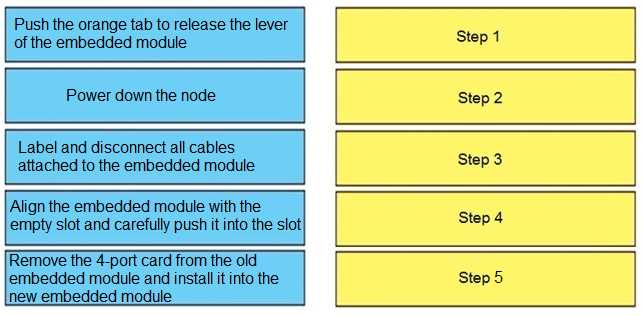
DRAG DROP Correctly order the steps of the embedded module replacement procedure. DELL D PST OE 23 question
Your Answer
10 comments in the community discussion
6
Power down, disconnect cables, release lever, move 4-port card, insert new module. Exact Dell order from field guide.
5
Power down node > label and disconnect cables > release lever with orange tab > move 4-port card to new module > align and insert new module. Pretty sure that's the OEM procedure from Dell doc. Order matters for safety and not messing up ports.
Q: 10
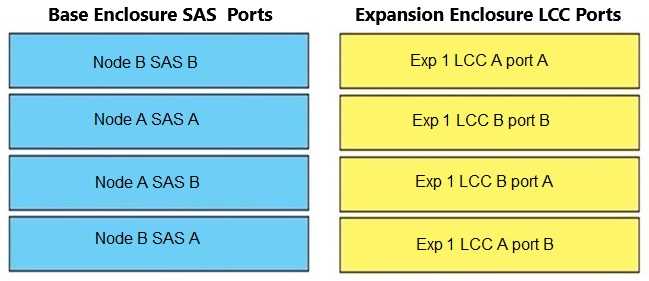
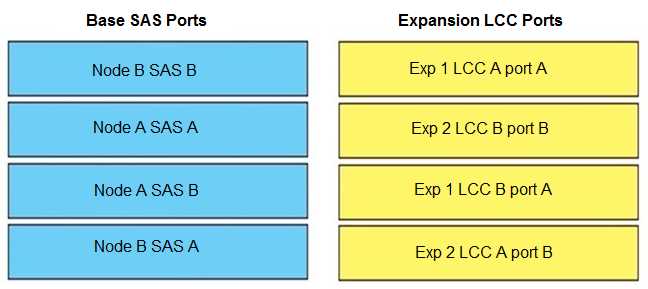
DRAG DROP Match the base enclosure SAS ports in column A to their corresponding expansion LCC ports in column B; when connecting a PowerStore base enclosure to a single expansion enclosure. DELL D PST OE 23 question
Your Answer
10 comments in the community discussion
8
A to A, B to B, C to C, D to D. Super clear mapping, nice visual in the question.
4
Yup, just follow A to A, B to B, C to C, D to D when connecting PowerStore base SAS ports to the expansion LCC. That's how Dell diagrams show it and I haven't seen exceptions for single enclosure setups.
Q: 11
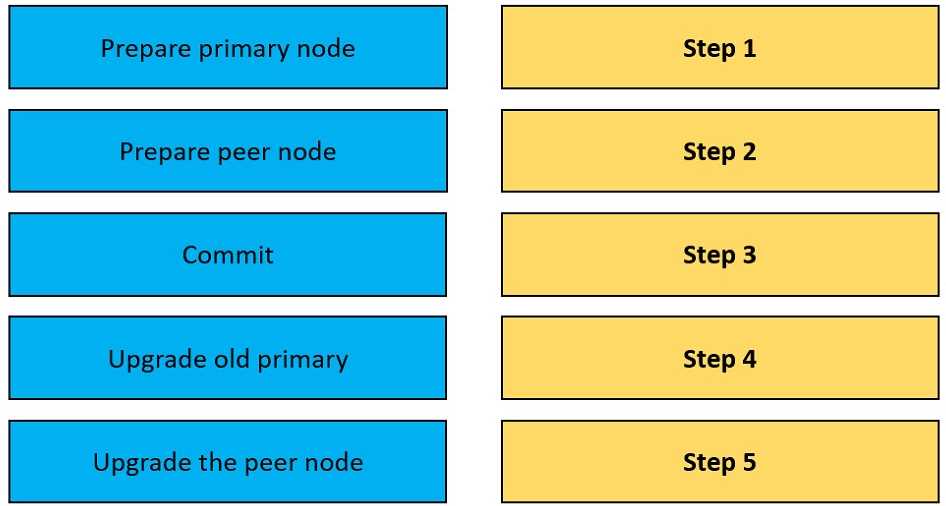
DRAG DROP Order the NDU operational steps. DELL D PST OE 23 question
Your Answer
10 comments in the community discussion
8
Pre-checks, health check, initiate NDU, monitor progress, validate completion. Had something like this in a mock exam and this sequence matched.
3
Pre-checks → health check → initiate NDU → monitor progress → validate completion is the right order. Some might swap pre-checks and health check but that’s a common trap. Pretty sure this matches the official docs.
Q: 12
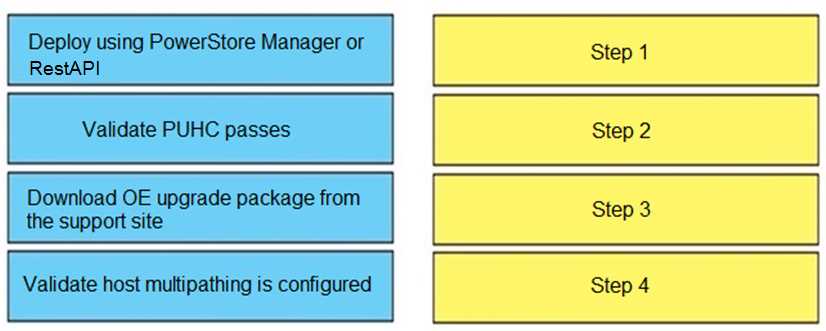
DRAG DROP Order the steps to prepare for an NDU process. DELL D PST OE 23 question
Your Answer
10 comments in the community discussion
6
Pretty sure you want to start with review release notes, then schedule the maintenance window, check the system health, and finally backup config. That way you know what might go wrong before you even touch the system. Order: review release notes → schedule maintenance → check system health → backup config. I think
5
Review release notes → schedule maintenance → check system health → backup config. That's how I've seen it and it's what Dell usually lists. Makes sense to understand the changes before touching anything. Open to corrections if someone has a Dell doc saying otherwise.
Q: 13
DRAG DROP When connecting a PowerStore base enclosure to 2 expansion enclosures, match the base SAS ports in column A to their corresponding expansion LCC ports in column B. DELL D PST OE 23 question
Your Answer
10 comments in the community discussion
6
Seen this on a few practice sets, official diagrams help a lot for these. B B → B A, A A → B B, A B → A A, B A → A B matches what’s in the reference guide. If you’ve got access to Dell’s manual or their setup videos, those really clarify the port mapping. Anyone using the official guide for confirmation?
4
Pretty sure the order is: A A to B B, A B to A A, B A to A B, B B to B A. Looks like Dell tries to trip people up by switching the port letters around. Similar pattern showed up in practice questions.
Q: 14
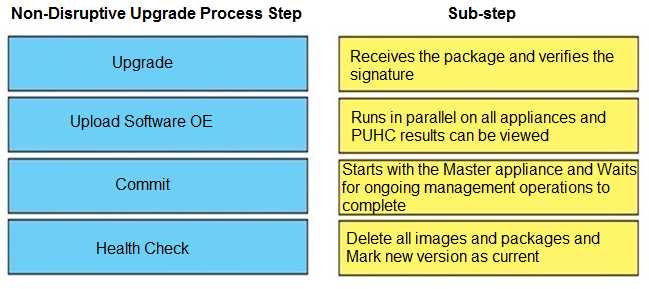
DRAG DROP Match the correct non-disruptive upgrade process step (answer column) with the correct sub-step (match column). DELL D PST OE 23 question
Your Answer
10 comments in the community discussion
8
Upload: receives the package, Health check: run in parallel on all appliances, Upgrade: starts with the master appliance, Commit: delete and mark the new version as current. Pretty sure this is right because it's the typical upgrade flow for non-disruptive Dell EMC operations. Anyone see it done differently?
4
Upload receives the package, Health check runs in parallel on all appliances, Upgrade starts with the master appliance, Commit deletes and makes new version current. That's the standard Dell EMC non-disruptive upgrade flow from what I've seen. If someone's seen a different order for legacy models, let me know.
Q: 15
Which component is a CRU?
Options
10 comments in the community discussion
B or C here? Expansion enclosure seems like something a customer could swap too but not 100% sure.
Looks like A fits too since base enclosures are sometimes listed as CRU in older docs, so I'd go with C and A. Saw similar logic on one official practice test but could be wrong.
Question 1 of 20

Premium Access Includes

  • Quiz Simulator
  • Exam Mode
  • Progress Tracking
  • Question Saving
  • Flash Cards
  • Drag & Drops
  • 3 Months Access
  • PDF Downloads
Get Premium Access
Scroll to Top