Free CCST-NETWORKING Practice Test Questions and Answers (2026)

Last Update Check
View Mode
Q: 1
A support technician examines the front panel of a Cisco switch and sees 4 Ethernet cables connected in the first four ports. Ports 1, 2, and 3 have a green LED. Port 4 has a blinking green light. What is the state of the Port 4?
Options
18 comments in the community discussion
1
C tbh, Cisco's LED logic is always inconsistent across models but blinking green is activity every time I see it.
1
Maybe B on this one. I always thought a blinking green LED could hint at some link instability or issues, especially if it’s not specified that the blink is regular. Some docs use blinking to show both activity and errors. Not 100 percent, but curious if anyone’s seen B in practice.
Q: 2
A Cisco switch is not accessible from the network. You need to view its running configuration. Which out-of-band method can you use to access it?
Options
27 comments in the community discussion
6
Option B is it. Console access is classic out-of-band since you’re not going over the network at all. If the switch isn’t reachable on the network, things like SSH and Telnet won’t work anyway. Pretty sure that’s what Cisco expects here. Disagree?
5
Option B had something like this in a mock and console was the answer.
Q: 3
Which address is included in the 192.168.200.0/24 network?
Options
30 comments in the community discussion
4
B . Only 192.168.200.13 actually fits in the 192.168.200.0/24 range since that subnet covers .200.0 up to .200.255. Seen similar questions in official guides and labs, so pretty confident here.
3
Hard to say, B, since only 192.168.200.13 fits the .200.0/24 network. A is easy to pick by accident if you aren't double-checking that third octet-classic exam trap. Let me know if you think differently.
Q: 4
Which two pieces of information should you include when you initially create a support ticket? (Choose 2.)
Options
26 comments in the community discussion
1
C or D? Initial info usually means A and C since you need to describe the fault and when it occurs, but sometimes support wants to know what steps you've tried too. I think AC is right, unless they expect troubleshooting already started.
1
Initial info should always be about what the problem is and when it happens, so A and C.
Q: 5

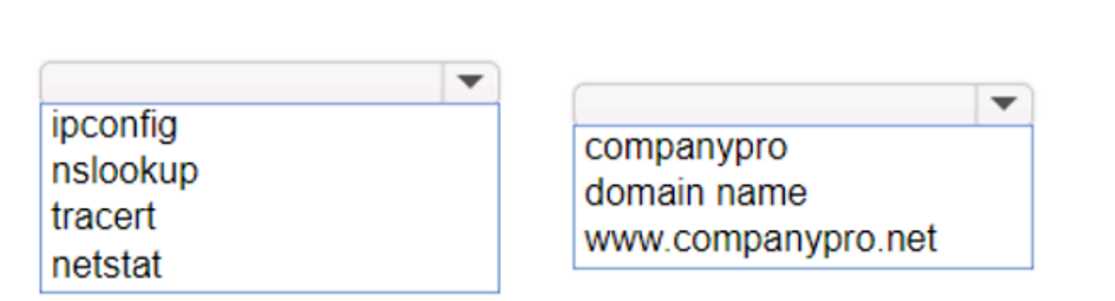
HOTSPOT You want to list the IPv4 addresses associated with the host name www.companypro.net. Complete the command by selecting the correct option from each drop-down list. CISCO CCST-NETWORKING 100-150 question

Your Answer
21 comments in the community discussion
9
nslookup www.companypro.net
6
Not dig, that's often where people slip up. nslookup www.companypro.net is correct for CCST.
Q: 6

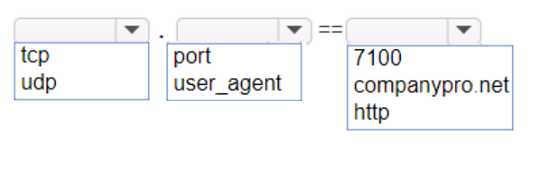
HOTSPOT An app on a user's computer is having problems downloading dat a. The app uses the following URL to download data: https://www.companypro.net:7100/api You need to use Wireshark to capture packets sent to and received from that URL. Which Wireshark filter options would you use to filter the results? Complete the command by selecting the correct option from each drop-down list. Note: You will receive partial credit for each correct selection. CISCO CCST-NETWORKING 100-150 question

Your Answer
25 comments in the community discussion
4
I don't think you'd want "https" as the protocol here, since Wireshark works at the TCP level for ports like 7100. The trap is assuming protocol = https, but it's actually just tcp with port 7100. Anyone disagree?
3
Nah, not protocol https here, it should be tcp port 7100. Common trap is picking https since it's in the URL.
Q: 7

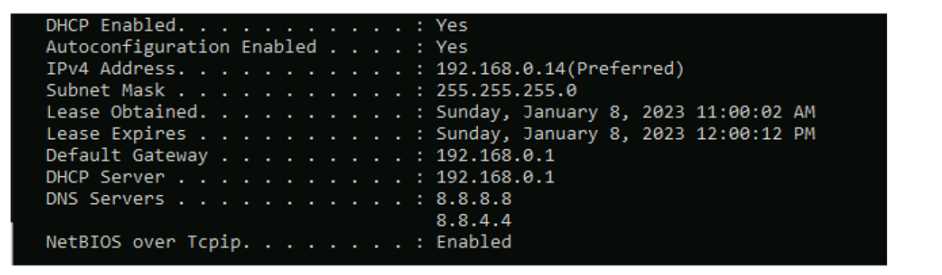
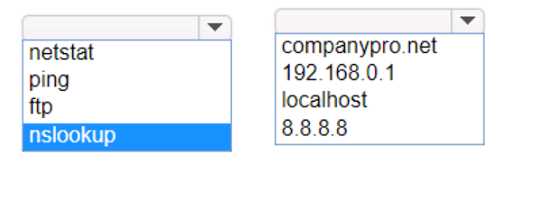
HOTSPOT Computers in a small office are unable to access companypro.net. You run the ipconfig command on one of the computers. The results are shown in the exhibit. You need to determine if you can reach the router. CISCO CCST-NETWORKING 100-150 question Which command should you use? Complete the command by selecting the correct options from each drop-down lists. CISCO CCST-NETWORKING 100-150 question
Your Answer
26 comments in the community discussion
7
ping 192.168.0.1Had something like this in a mock, just need to ping the default gateway to check router reachability.
6
ping 192.168.0.1This checks if you have basic IP connectivity to the gateway router, ignoring any possible DNS issues. Pretty sure that's the intent since reaching the default gateway rules out a local network problem first. Agree with others here but open to other views.
Q: 8

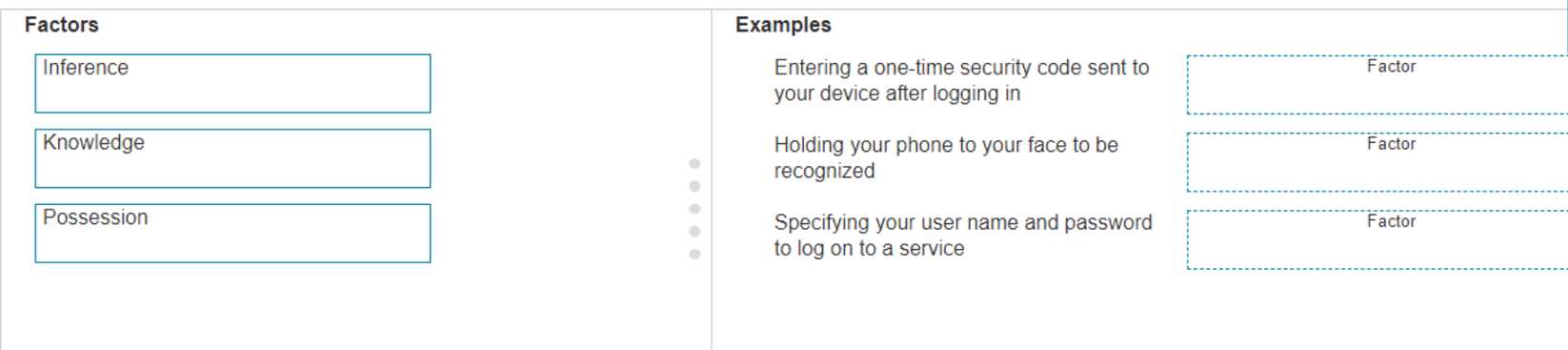
DRAG DROP Move the MFA factors from the list on the left to their correct examples on the right. You may use each factor once, more than once, or not at all. Note: You will receive partial credit for each correct selection. CISCO CCST-NETWORKING 100-150 question

Drag & Drop
27 comments in the community discussion
6
Nah, it's Entering code → Possession, Phone to face → Inference, Username/password → Knowledge. The tricky part is 'Inference' (usually 'Inherence').
5
Entering a one-time security code → Possession, holding your phone to your face → Inference (biometrics), specifying username/password → Knowledge. That fits the standard MFA factors-something you have, something you are, something you know. Cisco sometimes uses 'Inference' instead of 'Inherence' for biometrics but it'
Q: 9

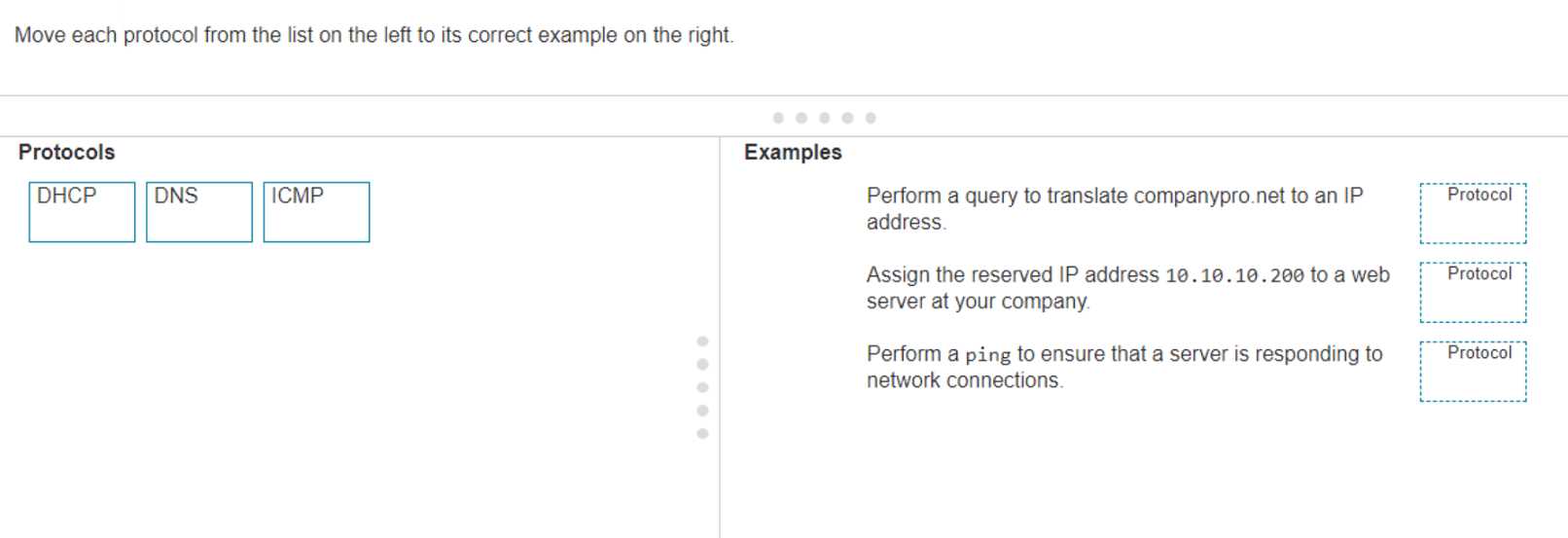
DRAG DROP Move each protocol from the list on the left to its correct example on the right. CISCO CCST-NETWORKING 100-150 question

Drag & Drop
23 comments in the community discussion
6
DHCP → Assign the reserved IP address 10.10.10.200 to a web server, DNS → Translate companypro.net to an IP address, ICMP → Perform a ping to check if server responds.Pretty straightforward if you know how each protocol functions. DHCP is for dynamic IP assignment, DNS does name resolution, and ping uses ICMP f
5
DHCP → Assign reserved IP, DNS → Translate companypro.net, ICMP → Ping server. The main trap is folks sometimes confuse DHCP with DNS for address stuff, but pretty sure this is how it lines up. If you think differently let me know.
Q: 10

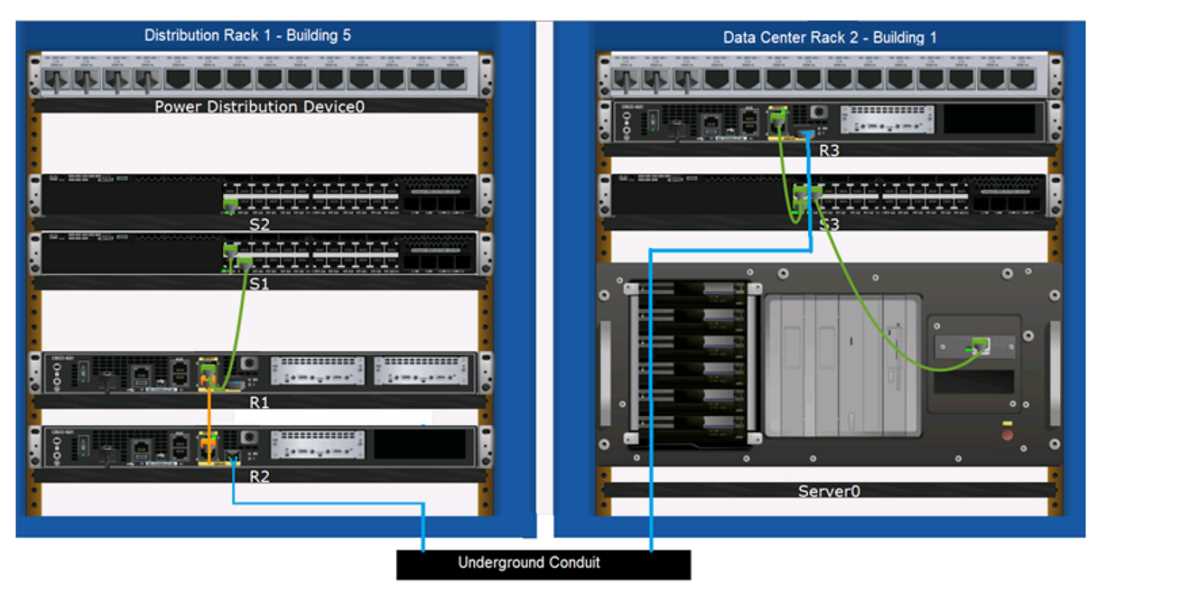
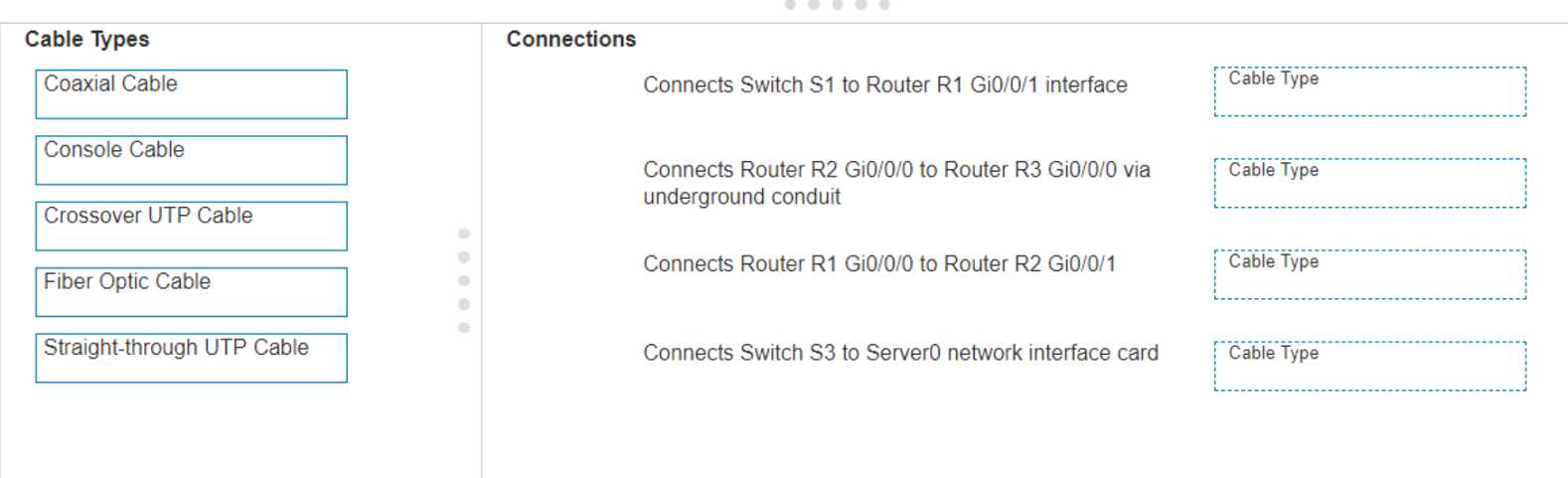
DRAG DROP Examine the connections shown in the following image. Move the cable types on the right to the appropriate connection description on the left. You may use each cable type more than once or not at all. CISCO CCST-NETWORKING 100-150 question CISCO CCST-NETWORKING 100-150 question

Drag & Drop
24 comments in the community discussion
5
Pretty textbook cabling for these types of connections. Switch to router and switch to server both use straight-through UTP, routers underground get fiber, and router-to-router is crossover. Can't see another way unless they're hiding a trick.
5
S1 to R1: Straight-through, R2 to R3 (underground): Fiber Optic, R1 to R2: Crossover, S3 to Server0: Straight-through. These follow Cisco standard wiring rules-straight-through for switch-to-router/server, crossover for router-to-router. Pretty sure that's it but let me know if you spot something off.
Question 1 of 20

What's covered in this practice questions set

5: Diagnosing Problems · 4 questions

📖 About this Domain

This domain focuses on fundamental network troubleshooting methodologies and the use of common command-line interface (CLI) tools. You will learn to diagnose connectivity issues from the physical layer up to the application layer using systematic approaches.

🎓 What You Will Learn

  • Learn to use the ping command to verify end-to-end IP connectivity and check for latency or packet loss.
  • Understand how tracert/traceroute maps the path packets take across an internetwork to identify routing issues.
  • Master using ipconfig, ifconfig, and ip commands to verify a host's IP configuration, including its IP address, subnet mask, and default gateway.
  • Utilize nslookup to query the Domain Name System (DNS) and troubleshoot name resolution problems.

🛠️ Skills You Will Build

  • You will build the skill to systematically isolate network faults using a layered troubleshooting model.
  • You will develop proficiency in using command-line utilities to gather critical network diagnostic data from endpoints.
  • You will gain the ability to interpret the output of tools like ping and traceroute to pinpoint connectivity failures.
  • You will learn to differentiate between physical layer issues, IP configuration errors, and DNS resolution failures.

💡 Top Tips to Prepare

  • Practice using ping, ipconfig, tracert, and nslookup in a command prompt or terminal on your own machine.
  • Memorize the specific function of each troubleshooting tool and the common scenarios where it is most effective.
  • Understand the typical output for each command when the network is functioning correctly versus when there is a problem.
  • Use network simulation tools like Cisco Packet Tracer to create and troubleshoot common network problems like incorrect IP addressing.

1: Standards and Concepts · 3 questions

📖 About this Domain

This domain covers the foundational building blocks of networking. It introduces the conceptual models, standards, and protocols that govern data communication. You will explore how different network components and topologies work together.

🎓 What You Will Learn

  • You will learn to compare the OSI and TCP/IP models, detailing the function of each layer from physical to application.
  • You will learn the roles of network devices, including hosts, switches, routers, and wireless access points.
  • You will learn the purpose of core protocols like TCP, UDP, IP, ICMP, and ARP in network operations.
  • You will learn the fundamentals of Ethernet, MAC addresses, IPv4, IPv6, and subnet masks for device addressing.

🛠️ Skills You Will Build

  • You will build the skill to identify network device functions within a given network diagram.
  • You will build the ability to map specific protocols to their corresponding layer in the TCP/IP or OSI model.
  • You will build the skill to differentiate between network types such as LAN, WAN, and WLAN.
  • You will build the foundational skill to interpret an IPv4 address and its subnet mask to identify the network.

💡 Top Tips to Prepare

  • Memorize the layers of the OSI and TCP/IP models and a key protocol or function for each layer.
  • Use flashcards to drill the differences between TCP (connection-oriented) and UDP (connectionless) protocols.
  • Draw out simple star, mesh, and hybrid topologies to visualize data paths and single points of failure.
  • Practice basic subnetting problems to master the relationship between IP addresses, subnet masks, and network IDs.

2: Addressing and Subnetting · 2 questions

📖 About this Domain

This domain covers IP addressing fundamentals, a core component for device communication on a network. You will learn about IPv4 and IPv6 address structures and the process of subnetting. Understanding these concepts is essential for network segmentation and efficient address allocation.

🎓 What You Will Learn

  • Differentiate between public vs. private IP addresses and compare the structures of IPv4 vs. IPv6.
  • Explain the difference between static IP assignment and dynamic IP assignment via DHCP.
  • Describe how subnet masks, CIDR notation, and Variable Length Subnet Masking (VLSM) are used to partition networks.
  • Identify the roles of unicast, broadcast, and multicast addresses, and the function of a default gateway.

🛠️ Skills You Will Build

  • You will build the skill to classify IP addresses and identify their components, such as the network and host portions.
  • You will be able to perform subnet calculations to determine network addresses, valid host ranges, and broadcast addresses.
  • You will develop the ability to apply VLSM for efficient IP address space management in a given network topology.
  • You will learn to identify the correct default gateway configuration required for hosts to access external networks.

💡 Top Tips to Prepare

  • Master binary-to-decimal and decimal-to-binary conversions for fast and accurate subnetting calculations.
  • Memorize a CIDR chart that maps prefix lengths to subnet masks and the number of available hosts.
  • Use practice labs and subnetting calculators to repeatedly solve problems involving different network requirements.
  • Focus on understanding the purpose of the default gateway in routing packets outside the local subnet.

4: Infrastructure · 1 questions

📖 About this Domain

This domain covers the foundational physical and logical components of network infrastructure. You will explore network media, hardware devices, and the addressing schemes that enable communication. It establishes the core building blocks of any computer network.

🎓 What You Will Learn

  • Compare and contrast twisted-pair, coaxial, and fiber-optic cabling types, including their specific connectors and use cases.
  • Differentiate between wireless networking standards like Wi-Fi, Bluetooth, and cellular based on their operational features.
  • Describe the purpose and function of core networking devices such as routers, switches, access points, and firewalls.
  • Explain IPv4 and IPv6 addressing schemes, including concepts like subnetting, public vs. private IP, and DHCP.

🛠️ Skills You Will Build

  • You will build the skill to select appropriate network media based on requirements for bandwidth, distance, and EMI.
  • You will build the skill to identify network devices within a topology and explain their role in data forwarding.
  • You will build the skill to interpret IP addressing information to determine network and host assignments.
  • You will build the skill to recognize fundamental network security components and their purpose in infrastructure protection.

💡 Top Tips to Prepare

  • Memorize the specifications for UTP cable categories and fiber-optic connector types like LC and SC.
  • Create a chart to map networking devices (hub, switch, router) to their corresponding OSI model layer.
  • Practice basic IPv4 subnetting to quickly identify network, host, and broadcast addresses.
  • Focus on the key differences between Wi-Fi standards, particularly their frequency bands and maximum data rates.

Premium Access Includes

  • ✓Quiz Simulator
  • ✓Exam Mode
  • ✓Progress Tracking
  • ✓Question Saving
  • ✓Flash Cards
  • ✓Drag & Drops
  • ✓3 Months Access
  • ✓PDF Downloads
Scroll to Top