Free AZ-140 Practice Test Questions and Answers (2026)

Last Update Check
View Mode
Q: 1

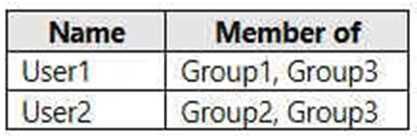
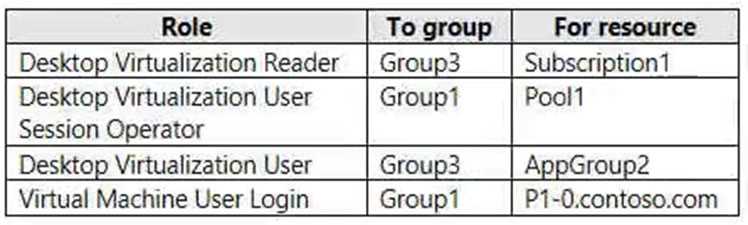
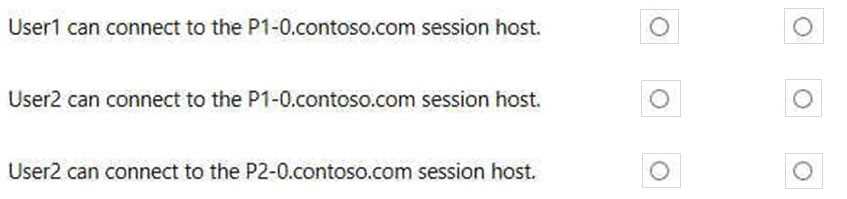
HOTSPOT - You have an Azure subscription named Subscription1 that contains the users shown in the following table. AZ-140 question Subscription1 contains the Azure Virtual Desktop host pools shown in the following table. AZ-140 question Subscription1 contains the Azure Virtual Desktop application groups shown in the following table. AZ-140 question You perform the role assignments shown in the following table. AZ-140 question For each of the following statements, select Yes if the statement is true. Otherwise, select No. NOTE: Each correct selection is worth one point. Hot Area: AZ-140 question


Your Answer
32 comments in the community discussion
7
NO NO NO. Statement 3 looks like it could be Yes, but missing the VM login permission is the catch here, seen similar tricks in other practice sets.
6
NO NO NO. You always need both the App Group assignment and VM login permission, and that's missing for each statement here.
Q: 2
You have an Azure subscription named Subscription that contains an Azure Virtual Desktop host pool named HostPool1. HostPool1 is managed by using Microsoft Intune. Subscription1 contains 50 users that connect to HostPool1 by using computers that run Windows 10. You need to prevent the users from copying files between an Azure Virtual Desktop session and the computers. The solution must minimize administrative effort. What should you do?
Options
32 comments in the community discussion
6
storage1 in Bucket 1, storage5 in Bucket 2, storage2 in Bucket 3. Saw the same order in the official study guide.
5
A . Editing the RDP properties at the host pool level is the standard way to stop clipboard and drive redirection for all sessions, so users can't copy files between their devices and AVD. Intune config profiles are for managing endpoints but don't affect AVD session controls like this. Pretty sure this is what Microso
Q: 3

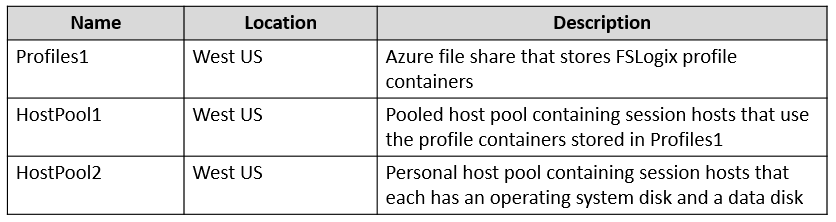
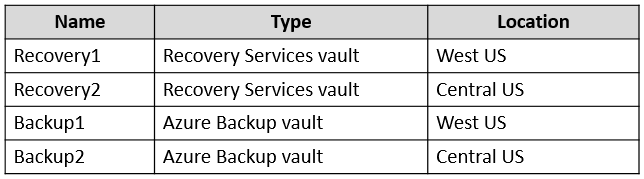
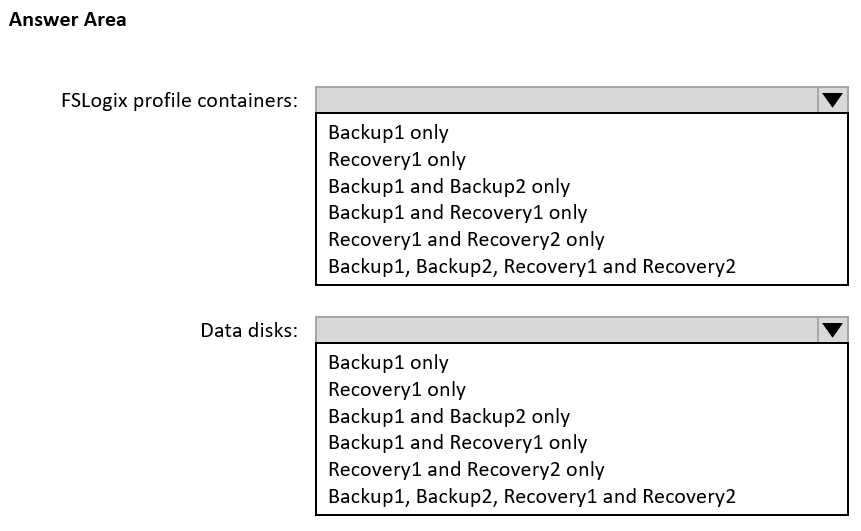
HOTSPOT You have an Azure Virtual Desktop deployment that contains the resources shown in the following table. AZ-140 question You create the resources shown in the following table. AZ-140 question You need to meet following requirements: • Back up the FSLogix profile containers used by HostPool1. • Backup the data disks in HostPool2. To which resources can you back up the profile containers and the data disks? To answer, select the appropriate options in the answer area. NOTE: Each correct selection is worth one point. AZ-140 question

Your Answer
26 comments in the community discussion
6
FSLogix profile containers: Recovery1 only, data disks: Backup1 only. Similar question came up in official labs.
6
Nah, I don’t think both should be per-user. User1 gets Per-user access pricing, User2 is RDS CAL. Always check if Host2 is set up for classic RDS-that’s the catch exam writers use here.
Q: 4

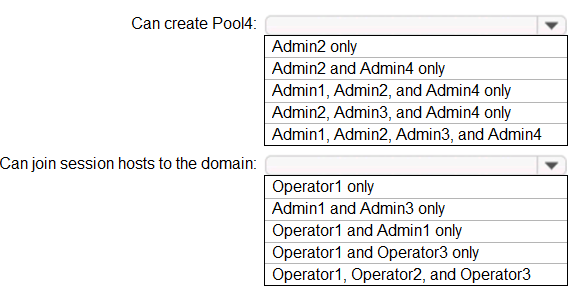
HOTSPOT Which users can create Pool4, and which users can join session hosts to the domain? To answer, select the appropriate options in the answer area. NOTE: Each correct selection is worth one point. AZ-140 question

Your Answer
35 comments in the community discussion
6
Admin2 only for Pool4, Operator1 only for domain join. Saw something similar in recent exam reports, safer to stick with these picks.
6
Is it possible Operator2 could join hosts if the environment hasn't removed default Account Operators rights? Or does the question assume strict RBAC like most exam scenarios where only Domain Admin (Operator1) is allowed? Curious how strict we should be interpreting this.
Q: 5

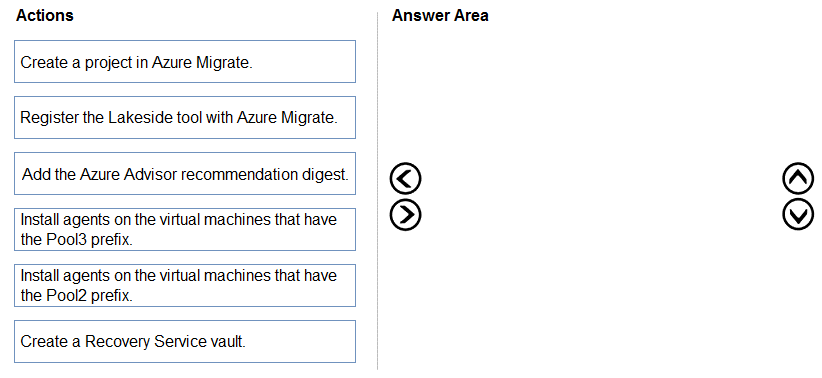
DRAG DROP You need to evaluate the RDS deployment in the Seattle office. The solution must meet the technical requirements. Which three actions should you perform in sequence? To answer, move the appropriate actions from the list of actions to the answer area and arrange them in the correct order. AZ-140 question

Drag & Drop
35 comments in the community discussion
6
Create a project in Azure Migrate → Register Lakeside tool → Install agents on Pool2 VMs. I see why some go for Pool3 but the question targets Pool2 specifically, so that's the safe sequence. Anyone disagree?
6
Create a project in Azure Migrate → Register Lakeside tool → Install agents on Pool2 VMs. Saw similar in exam reports recently.
Q: 6

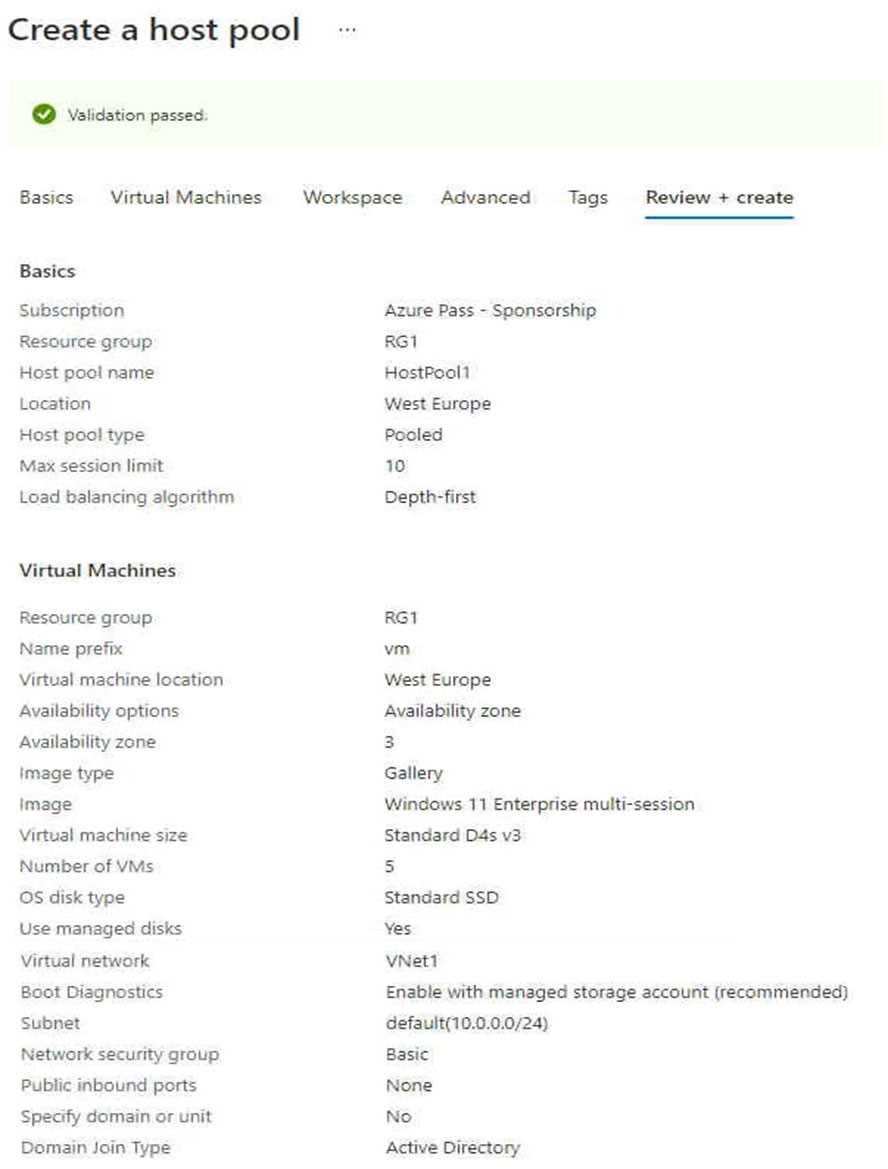
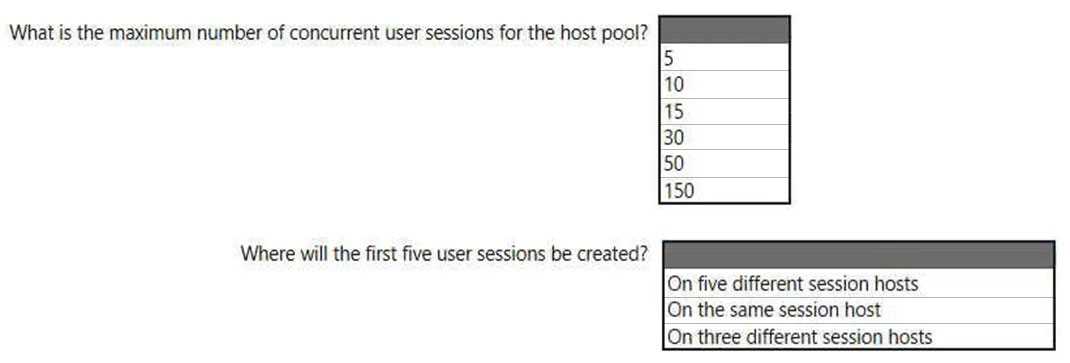
HOTSPOT - You create an Azure Virtual Desktop host pool as shown in the following exhibit. img0 Use the drop-down menus to select the answer choice that answers each question based on the information presented in the graphic. NOTE: Each correct selection is worth one point. Hot Area:
Your Answer
28 comments in the community discussion
6
50, on the same session host.Depth-first is the key trap here, since it fills up one VM before moving to the next. Some might pick "across multiple hosts" but that's not how depth-first works in AVD. Let me know if you see it differently.
6
What's the exact session limit per VM here? Do they expect us to multiply it by number of hosts for the total?
Q: 7

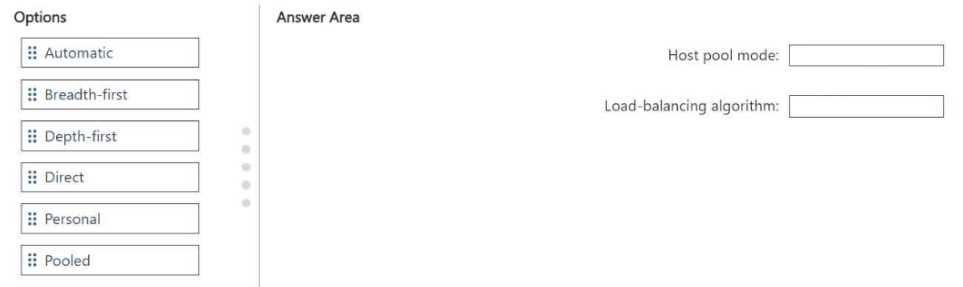
DRAG DROP You have an Azure Virtual Desktop deployment. You plan to create a new host pool that meets the following requirements: • Supports up to 25 user connections • Contains 10 Windows 11 multi-session hosts • Evenly distributes user sessions across the session hosts You need to recommend which type of host pool and load-balancing algorithm to use. What should you recommend? To answer, drag the appropriate options to the correct targets. Each option may be used once, more than once, or not at all. You may need to drag the split bar between panes or scroll to view content. NOTE: Each correct selection is worth one point. AZ-140 question

Drag & Drop
38 comments in the community discussion
6
Pooled for host pool mode, Breadth-first for load-balancing. Official guide and labs mention this setup.
5
Host pool mode: Pooled, Load-balancing: Breadth-first. That matches the even distribution requirement with multi-session hosts. Pretty confident that's what's needed.
Q: 8

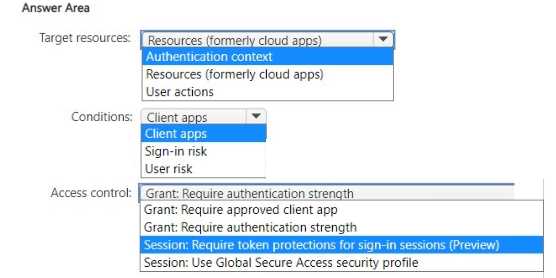
HOTSPOT You need to create a Conditional Access policy to meet the security require-ments. How should you configure the policy? To answer, select the appropriate options in the answer area. AZ-140 question

Your Answer
35 comments in the community discussion
6
Authentication context, Client apps, Require token protections for sign-in sessions (preview). One line only per instructions.
6
Authentication context, Client apps, and Require token protections for sign-in sessions (preview) is the combo here. The key is targeting sensitive actions with authentication context, not just blanketing all access. Pretty sure that's what MS is going for with these Conditional Access questions. If anyone thinks Re
Q: 9
Note: This question is part of a series of questions that present the same scenario. Each question in the series contains a unique solution that might meet the stated goals. Some question sets might have more than one correct solution, while others might not have a correct solution. After you answer a question in this section, you will NOT be able to return to it. As a result, these questions will not appear in the review screen. You have an Azure Virtual Desktop host pool that runs Windows 10 Enterprise multi-session. User sessions are load-balanced between the session hosts. Idle session timeout is 30 minutes. You plan to shut down a session host named Host1 to perform routine maintenance. You need to prevent new user sessions to Host1 without disconnecting active user sessions. Solution: you change the Drain mode of Host1. Does this meet the goal?
Options
28 comments in the community discussion
6
storage1 for image, storage4 for profiles. If profile load wasn't a concern, storage3 might work too.
3
Option A here. Drain mode is specifically for blocking new sessions but lets active users stay on, so it fits the scenario. B is a trap because it ignores that nuance. Pretty sure, but correct me if I missed any trick in the wording.
Q: 10

You have an Azure Virtual Desktop deployment that contains the host pools shown in the following table. AZ-140 question You need to create a disaster recovery environment in the West US region. The solution must minimize costs and administrative effort. What should you do?

Options
38 comments in the community discussion
6
Generate a signing certificate, create MSIX package, create MSIX image, upload image to Share1. Official guide covers this process.
5
Yeah that's the right order: signing cert first, then MSIX package, then image, finally upload image to Share1.
Q: 11

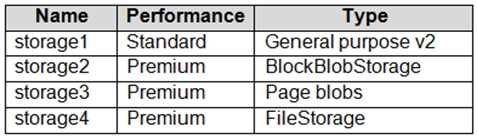
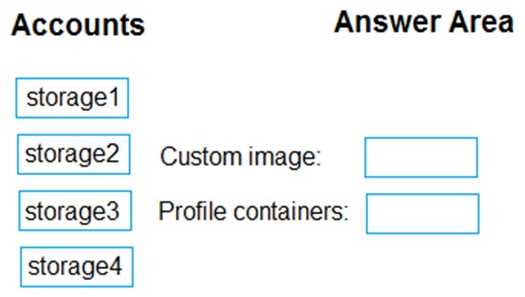
DRAG DROP You have an Azure subscription that contains the storage accounts shown in the following table. AZ-140 question You have a custom generalized Windows 10 image. You plan to deploy an Azure Virtual Desktop host pool that will use the custom image and FSLogix profile containers. You need to recommend which storage accounts to use for the custom image and the profile containers. The solution must meet the following requirements: Minimize costs to store the image. Maximize performance of the profile containers. Which account should you recommend for each type of content? To answer, drag the appropriate accounts to the correct content type. Each account may be used once, more than once, or not at all. You many need to drag the split bar between panes or scroll to view content. NOTE: Each correct selection is worth one point. AZ-140 question

Drag & Drop
8 comments in the community discussion
5
storage1 → Custom image, storage4 → Profile containers. This matches the cost/perf requirements since storage1 is Standard (cheap) and storage4 is Premium FileStorage (SSD, fastest for FSLogix). I think this fits most exam scenarios unless the image access pattern changes.
3
I don't think storage2 is right for the image, since it's Premium and drives up cost. For performance on FSLogix, storage4 makes sense because it's Premium FileStorage. So: Custom image - storage1 (cheapest), Profile containers - storage4 (fastest SSD). Seen this on practice sets.
Q: 12
You have an Azure Virtual Desktop deployment. You plan to use FSLogix profile containers. You need to recommend a solution that will be used to store the containers. The solution must meet the following requirements: * The containers must be stored on solid-state drives (SSDs) * Minimize administrative effort * Minimize cost the What should you recommend?
Options
6 comments in the community discussion
4
Makes sense to use Pooled for host pool mode and Breadth-first for load balancing.
Hard to say, B, Azure Files Standard, since it's cheaper and still integrates with FSLogix. I know it doesn't use SSDs but I'm not sure if the performance difference is huge for smaller deployments. Correct me if I'm missing something.
Q: 13
You have an Azure Virtual Desktop deployment. You plan to deploy Update Management to manage automated updates for server-based session hosts. You need to configure the prerequisites for Update Management. Which two actions should you perform? Each correct answer presents part of the solution. NOTE: Each correct selection is worth one point.
Options
8 comments in the community discussion
9
Managed identity: Host1 and Host2. Clipboard redirection: Pool1.
1
If the hosts are server-based, it's gotta be A and B. Log Analytics plus Automation account is required, not D.
Q: 14

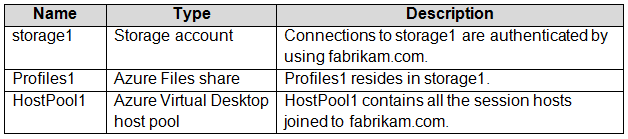
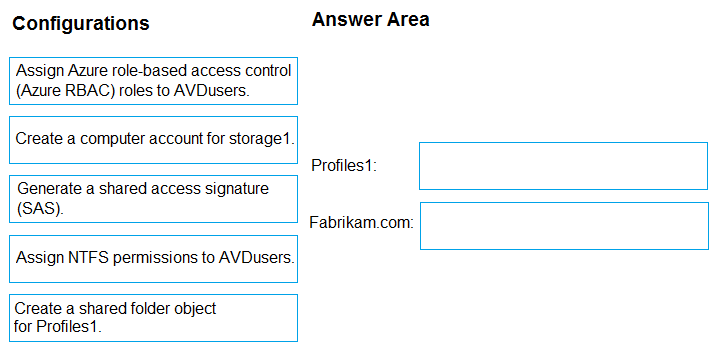
DRAG DROP - Your on-premises network contains an Active Directory domain named fabrikam.com that syncs with Azure Active Directory (Azure AD). The domain contains a global group named AVDusers. You have an Azure subscription that contains the resources shown in the following table. AZ-140 question All Azure Virtual Desktop users are members of the AVDusers group. You plan to create FSLogix profile containers in Profiles1. You need to configure Profiles1 and fabrikam.com to ensure that the HostPool1 sessions hosts can access the FSLogix profile containers. What should you do? To answer, drag the appropriate configurations to the correct targets. Each configuration may be used once, more than once, or not at all. You may need to drag the split bar between panes or scroll to view content. AZ-140 question
Drag & Drop
8 comments in the community discussion
6
Windows 10 Enterprise multi-session. Official docs and practice labs really help for these types of deployment matrix questions.
Create a shared folder object for Profiles1, create a computer account for storage1 in fabrikam.com. NTFS permissions is a trap here.
Q: 15
You have an Azure Virtual Desktop deployment. You need to add a new application for a RemoteApp application group. The application must be available only during a user session. What should you use as an application source?
Options
4 comments in the community discussion
8
Policy1 needs Access controls: Grant since you have to enforce MFA for Group1. For Policy2, pick Access controls: Session to set the reauth interval for Group2. Pretty sure this matches how Conditional Access works from what I’ve seen on practice tests.
I saw a similar question on a practice set and B (app attach) was the right approach. MSIX app attach delivers apps per session, so the app is only active during user login. Correct me if I missed something, but that fits the scenario pretty well!
Q: 16

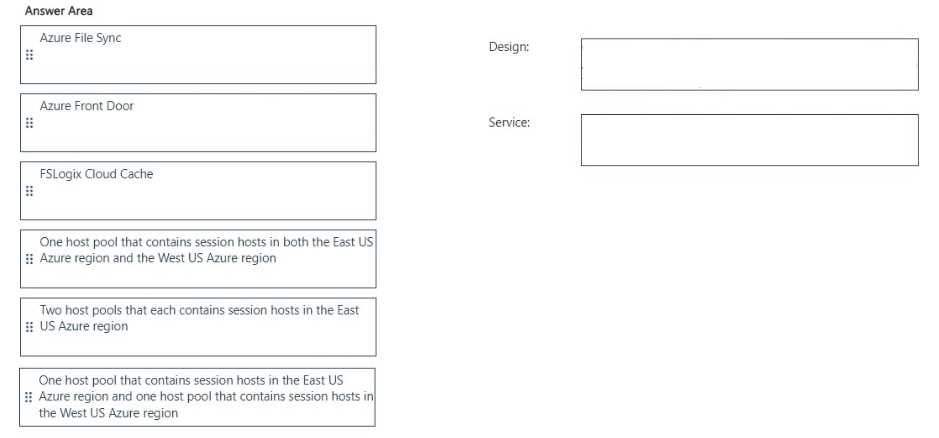
DRAG DROP Which host pool design and which service should you configure to meet the disaster recovery requirements? To answer, drag the appropriate solution to the correct requirements. Each solution may be used once, more than once, or not at all. You may need to drag the split bar between panes or scroll to view content NOTE: Each correct selection is worth one point. AZ-140 question
Drag & Drop
7 comments in the community discussion
5
Pretty sure the right setup is one host pool per region (East US and West US) for DR because you want isolation if a whole region goes offline. For the profile service, FSLogix Cloud Cache handles replication between regions so user profiles are always available even if DR kicks in. Seen similar questions in practic
Design: Two host pools that each contains session hosts in the East US Azure regionService: Azure File Sync
Q: 17
You need to deploy the session hosts to meet the deployment requirements Which PowerShell cmdlel should you run first?
Options
5 comments in the community discussion
3
Do they specify if VM1 needs to be generalized or kept specialized? That changes the capture step completely.
Q: 18
Note: This question is part of a series of questions that present the same scenario. Each question in the series contains a unique solution that might meet the stated goals. Some question sets might have more than one correct solution, while others might not have a correct solution. After you answer a question in this section, you will NOT be able to return to it. As a result, these questions will not appear in the review screen. You have the following: A Microsoft 365 E5 tenant An on-premises Active Directory domain A hybrid Azure Active Directory (Azure AD) tenant An Azure Active Directory Domain Services (Azure AD DS) managed domain An Azure Virtual Desktop deployment The Azure Virtual Desktop deployment contains personal desktops that are hybrid joined to the on- premises domain and enrolled in Microsoft Intune. You need to configure the security settings for the Microsoft Edge browsers on the personal desktops. Solution: You configure a compliance policy in Intune. Does this meet the goal?
Options
12 comments in the community discussion
7
Device 1 is Yes, Device 2 is Yes, Device 3 is No. Device OS support matters here since macOS and iOS can't natively run Remote Desktop client for Windows Virtual Desktop like Windows or Android. Pretty sure that's what the table shows, but open to correction.
4
Option B. Compliance policies in Intune just check if settings are compliant, they don't actually push Edge browser configs to the desktops. We'd need a device configuration profile for that. If I'm missing something let me know.
Q: 19

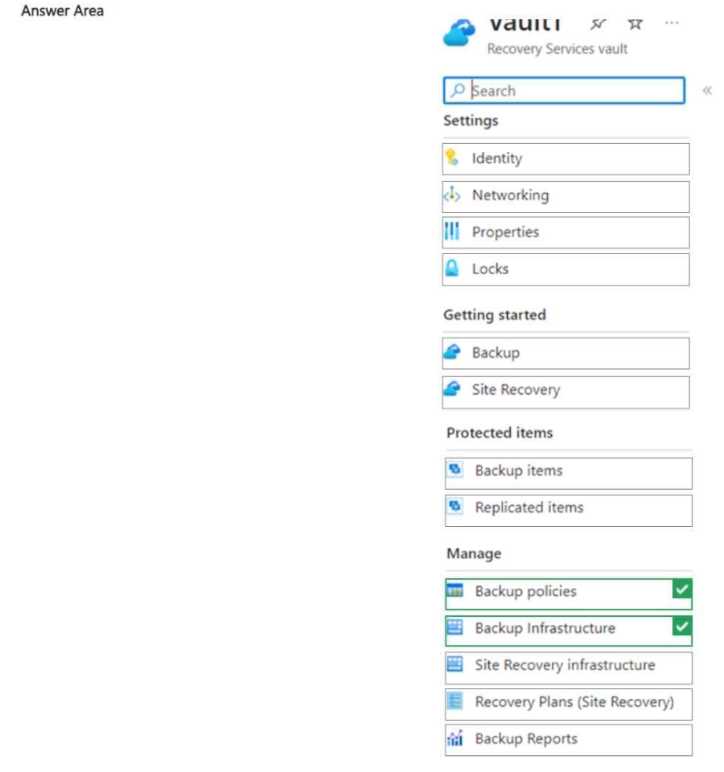
HOTSPOT You have an Azure subscription that contains the resources shown in the following table. AZ-140 question Share1 stores FSLogix profile containers and is backed up daily to Vault1. You need to change the backup location of share1 to Vault2. Which two settings should you modify for Vault1 to prepare for the change? To answer, select the appropriate settings in the answer area. NOTE: Each correct selection is worth one point. AZ-140 question
Your Answer
8 comments in the community discussion
4
Backup items and backup policies are right here. You have to stop backup for the share in Vault1 (from backup items) and make sure any policy association is cleaned up. Pretty standard for Azure file share migrations, let me know if you saw another way.
3
Backup items and backup policies are the two you need to touch for Vault1 before switching vaults. You stop backup on the item, then clean up or adjust policies if needed. Seen this come up in a few labs, pretty sure that's how it works. If someone tried just moving the vault link directly, let me know if it worked
Q: 20
You have an Azure Active Directory Domain Services (Azure AD D5) domain named contoso.com. You have an Azure Storage account named storage1. Storage1 hosts a file share named share1 that has share and file system permissions configured. Share1 is configured to use contoso.com for authentication, You create an Azure Virtual Desktop host pool named Pool1. Pool1 contains two session hosts that use the Windows 10 multi-session + Microsoft 365 Apps image. You need to configure an FSLogix profile container for Pool1. What should you do next?
Options
15 comments in the community discussion
6
B. that's the move here. No FSLogix agent on the default multi-session image, so install comes first.
6
Custom script extension in Azure Storage. Saw this setup in some exam reports and the official Microsoft guide covers it too.
Question 1 of 20

What's covered in this practice questions set

2: Implement an Azure Virtual Desktop infrastructure · 8 questions

📖 About this Domain

This domain covers the creation and configuration of core Azure Virtual Desktop components. You will deploy host pools, configure networking, and provision session hosts. It establishes the foundational infrastructure for AVD.

🎓 What You Will Learn

  • You will learn to create and manage host pools, including type, load-balancing algorithm, and RDP properties.
  • You will learn to implement networking for AVD, including VNet creation, subnet configuration, and NSG rules.
  • You will learn to configure storage for FSLogix profile containers using Azure Files or Azure NetApp Files.
  • You will learn to deploy session hosts using Azure Marketplace images, custom images, and ARM templates for automation.

🛠️ Skills You Will Build

  • You will build skills to deploy AVD infrastructure using Azure Resource Manager (ARM) templates and Bicep.
  • You will build proficiency in automating AVD tasks using PowerShell modules and Azure CLI commands.
  • You will build the ability to create and manage golden images for session hosts using the Azure Compute Gallery.
  • You will build skills in configuring network security groups and Azure DNS to secure and resolve AVD resources.

💡 Top Tips to Prepare

  • Gain hands-on experience by deploying a host pool, session hosts, and a workspace using the Azure portal.
  • Practice creating session hosts from a custom image stored in an Azure Compute Gallery.
  • Master the configuration of FSLogix profile containers on an Azure Files share with Active Directory authentication.
  • Study ARM template syntax for AVD resources to understand automated deployment processes.

4: Manage user environments and apps · 5 questions

📖 About this Domain

This domain covers the configuration of user profiles and application delivery in Azure Virtual Desktop. You will manage user settings using FSLogix Profile Containers and deploy applications using MSIX app attach. Core tasks involve configuring storage for user profiles and managing RemoteApp application groups.

🎓 What You Will Learn

  • You will learn to implement and manage FSLogix components like Profile Containers, Office Containers, and Cloud Cache.
  • You will learn to configure user experience settings using Group Policy Objects (GPOs) and Microsoft Intune policies.
  • You will learn to install and configure applications on a session host image for a host pool.
  • You will learn to create and manage MSIX packages and configure MSIX app attach for dynamic application delivery.

🛠️ Skills You Will Build

  • You will build skills to deploy and troubleshoot FSLogix Profile Containers on Azure Files or Azure NetApp Files shares.
  • You will build skills to create RemoteApp application groups and publish applications to AVD users.
  • You will build skills to package applications using the MSIX Packaging Tool and stage them for app attach.
  • You will build skills to configure Universal Print to provide print services for AVD session hosts.

💡 Top Tips to Prepare

  • Gain hands-on experience configuring FSLogix registry settings, such as VHDLocations and Redirections.xml.
  • Practice the end-to-end MSIX app attach process, from packaging an app to assigning it to an application group.
  • Understand the specific NTFS and Share-Level Permissions required for FSLogix profile shares to function correctly.
  • Review how to configure session timeouts and other user experience settings via GPOs or Intune configuration profiles.

3: Manage access and security · 4 questions

📖 About this Domain

This domain covers securing the Azure Virtual Desktop infrastructure. You will manage user access with Role-Based Access Control and implement security controls for session hosts and network traffic.

🎓 What You Will Learn

  • You will learn to configure and assign built-in Azure Virtual Desktop RBAC roles to users and administrative groups.
  • You will learn to implement Azure AD security features like Conditional Access policies and multi-factor authentication (MFA) for AVD.
  • You will learn to use Microsoft Defender for Cloud to monitor session host security posture and apply security baselines.
  • You will learn to manage security for FSLogix profile containers by configuring storage permissions.

🛠️ Skills You Will Build

  • Assigning AVD-specific RBAC roles like Desktop Virtualization User and Desktop Virtualization Host Pool Contributor.
  • Creating and applying Conditional Access policies that require MFA for connections to the AVD service.
  • Configuring security alerts and vulnerability assessments for session hosts within Microsoft Defender for Cloud.
  • Implementing Just-in-Time (JIT) VM access to secure administrative access to session host VMs.

💡 Top Tips to Prepare

  • Practice assigning least-privilege RBAC roles for different AVD administrative scenarios in the Azure portal.
  • Build and test Conditional Access policies targeting the Azure Virtual Desktop cloud apps to understand sign-in flow.
  • Review the security recommendations for AVD session hosts in Microsoft Defender for Cloud to understand common vulnerabilities.
  • Master the permissions required on storage accounts or file shares for FSLogix Profile Containers to function securely.

1: Plan an Azure Virtual Desktop architecture · 2 questions

📖 About this Domain

This domain covers the design principles for an Azure Virtual Desktop infrastructure. You will focus on planning for user identities, virtual networks, and host pool configurations. It emphasizes assessing existing environments and requirements to build a scalable AVD solution.

🎓 What You Will Learn

  • Learn to design the AVD architecture, including control plane components and host pool configurations.
  • Understand how to plan for user identities using Azure AD and manage user profiles with FSLogix.
  • Discover how to design network connectivity for AVD session hosts, including hub-spoke models and Azure Firewall integration.
  • Grasp the design of a business continuity and disaster recovery (BCDR) strategy for AVD components.

🛠️ Skills You Will Build

  • You will build the skill to assess on-premises VDI environments for migration to AVD.
  • You will be able to recommend appropriate AVD host pool types, like personal or pooled, based on user requirements.
  • You will develop the ability to design FSLogix profile container solutions on Azure Files or Azure NetApp Files.
  • You will gain proficiency in planning network security using Network Security Groups (NSGs) and Azure Firewall for AVD traffic.

💡 Top Tips to Prepare

  • Master the differences between personal and pooled host pools and their respective load-balancing algorithms.
  • Focus on understanding FSLogix architecture, including Cloud Cache and profile container storage options.
  • Study Azure AD integration, including conditional access policies and multi-factor authentication (MFA) for AVD.
  • Review the Azure Virtual Desktop landing zone accelerator to understand Microsoft's recommended architecture patterns.

5: Monitor and maintain an Azure Virtual Desktop infrastructure · 1 questions

📖 About this Domain

This domain covers the operational aspects of an Azure Virtual Desktop (AVD) environment. It focuses on using Azure native tools to monitor the health and performance of the infrastructure. You will learn to proactively manage and maintain session hosts, host pools, and user sessions.

🎓 What You Will Learn

  • You will learn to configure and use Azure Monitor for AVD to collect and analyze diagnostic data from session hosts and services.
  • You will learn to implement alerting rules based on performance counters and event logs to proactively identify issues.
  • You will learn to manage session host availability, including patching and updates using Azure Automation Update Management.
  • You will learn to monitor user experience metrics and troubleshoot issues related to FSLogix profile containers and session connectivity.

🛠️ Skills You Will Build

  • You will build skills in deploying and configuring Log Analytics workspaces to centralize AVD diagnostic logs.
  • You will build the ability to write Kusto Query Language (KQL) queries to investigate performance and connection issues.
  • You will build proficiency in automating routine maintenance tasks for session hosts, such as image updates and scaling.
  • You will build the capability to diagnose and resolve common AVD problems by analyzing metrics and logs.

💡 Top Tips to Prepare

  • Gain hands-on experience by deploying the Azure Monitor for AVD workbook and exploring its various tabs and visualizations.
  • Practice writing and running KQL queries against AVD diagnostic tables like WVDConnections and WVDCheckpoints in a lab environment.
  • Implement an Azure Automation account to configure Update Management for a test host pool to understand the patching process.
  • Review official Microsoft documentation on troubleshooting common FSLogix issues, such as profile lockouts and storage performance.

Premium Access Includes

  • Quiz Simulator
  • Exam Mode
  • Progress Tracking
  • Question Saving
  • Flash Cards
  • Drag & Drops
  • 3 Months Access
  • PDF Downloads
Get Premium Access
Scroll to Top