
Q: 5
DRAG DROP You need to evaluate the RDS deployment in the Seattle office. The solution must meet the technical requirements. Which three actions should you perform in sequence? To answer, move the appropriate actions from the list of actions to the answer area and arrange them in the correct order. 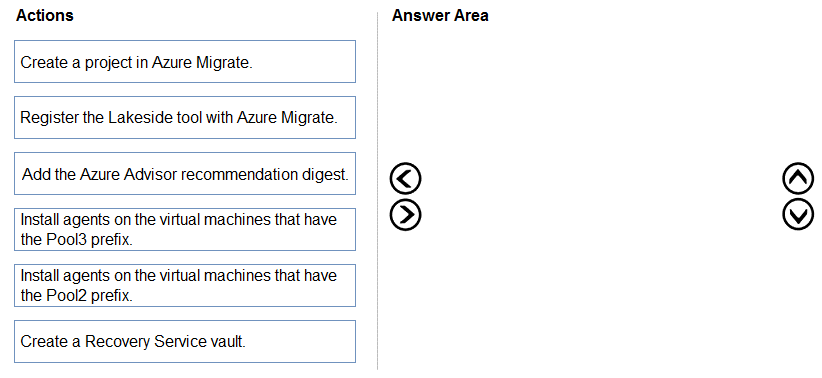
Drag & Drop
Discussion
Create a project in Azure Migrate → Register Lakeside tool → Install agents on Pool2 VMs. I see why some go for Pool3 but the question targets Pool2 specifically, so that's the safe sequence. Anyone disagree?
Create a project in Azure Migrate → Register Lakeside tool → Install agents on Pool2 VMs. Saw similar in exam reports recently.
Create a project in Azure Migrate → Register Lakeside tool → Install agents on Pool2 VMs. I don't think it's Pool3, since the technical requirements point to Pool2 as the evaluation target. Easy to pick the wrong pool if you go too fast.
Pretty standard migration assessment steps, seen similar in official guides. Mapping: Create a project in Azure Migrate, then Register the Lakeside tool with Azure Migrate, then Install agents on the virtual machines with the Pool2 prefix. If someone spots a reason to go with Pool3 instead let me know.
Create a project in Azure Migrate → Register Lakeside tool → Install agents on Pool2 VMs. This order matches the migration assessment process for RDS and fits the scenario since Pool2 is the specified group to evaluate. Pretty sure that's what Microsoft expects here, but chime in if you see it different.
Create a project in Azure Migrate → Register the Lakeside tool → Install agents on Pool2 VMs. Saw something similar on a practice set, pretty sure this is the usual order for RDS discovery unless the pools change.
Create a project in Azure Migrate → Register the Lakeside tool → Install agents on Pool2 VMs. Saw a similar question in exam reports and this seems to be the required order for RDS evaluation, assuming Pool2 is still the technical requirement. Let me know if I'm missing something.
Is "meet the technical requirements" about evaluating only Pool2 VMs, or all pools? If all, then agents might go on more servers.
Create a project in Azure Migrate → Register Lakeside tool → Install agents on Pool2 VMs. That's what I've got, since the scenario wants to assess Pool2 specifically. Pretty sure this is right but let me know if you see a catch.
Create a project in Azure Migrate → Register Lakeside tool → Install agents on Pool2 VMs. Easy to mix up Pool2/Pool3, but Pool2 meets the stated requirements here. Trap is picking Pool3 just by habit!
Be respectful. No spam.