Free CCST-NETWORKING Practice Test Questions and Answers (2026)

View Mode
Q: 1
A support technician examines the front panel of a Cisco switch and sees 4 Ethernet cables connected in the first four ports. Ports 1, 2, and 3 have a green LED. Port 4 has a blinking green light. What is the state of the Port 4?
Options
18 comments in the community discussion
1
C tbh, Cisco's LED logic is always inconsistent across models but blinking green is activity every time I see it.
1
Maybe B on this one. I always thought a blinking green LED could hint at some link instability or issues, especially if it’s not specified that the blink is regular. Some docs use blinking to show both activity and errors. Not 100 percent, but curious if anyone’s seen B in practice.
Q: 2
A Cisco switch is not accessible from the network. You need to view its running configuration. Which out-of-band method can you use to access it?
Options
27 comments in the community discussion
6
Option B is it. Console access is classic out-of-band since you’re not going over the network at all. If the switch isn’t reachable on the network, things like SSH and Telnet won’t work anyway. Pretty sure that’s what Cisco expects here. Disagree?
5
Option B had something like this in a mock and console was the answer.
Q: 3
Which address is included in the 192.168.200.0/24 network?
Options
30 comments in the community discussion
4
B . Only 192.168.200.13 actually fits in the 192.168.200.0/24 range since that subnet covers .200.0 up to .200.255. Seen similar questions in official guides and labs, so pretty confident here.
3
Hard to say, B, since only 192.168.200.13 fits the .200.0/24 network. A is easy to pick by accident if you aren't double-checking that third octet-classic exam trap. Let me know if you think differently.
Q: 4
Which two pieces of information should you include when you initially create a support ticket? (Choose 2.)
Options
26 comments in the community discussion
1
C or D? Initial info usually means A and C since you need to describe the fault and when it occurs, but sometimes support wants to know what steps you've tried too. I think AC is right, unless they expect troubleshooting already started.
1
Initial info should always be about what the problem is and when it happens, so A and C.
Q: 5

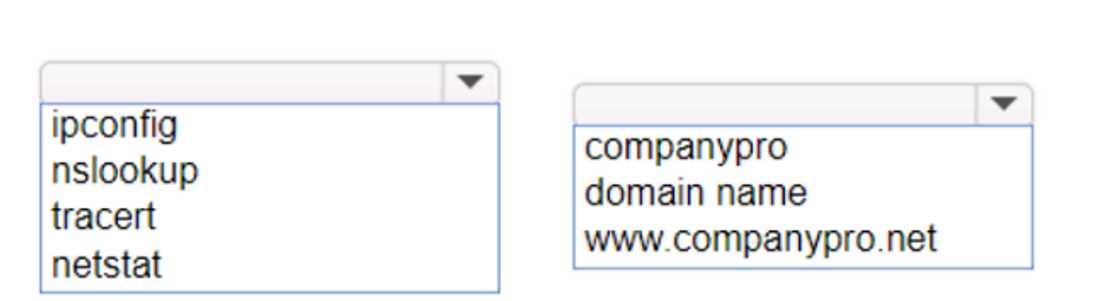
HOTSPOT You want to list the IPv4 addresses associated with the host name www.companypro.net. Complete the command by selecting the correct option from each drop-down list. CISCO CCST-NETWORKING 100-150 question

Your Answer
21 comments in the community discussion
9
nslookup www.companypro.net
6
Not dig, that's often where people slip up. nslookup www.companypro.net is correct for CCST.
Q: 6

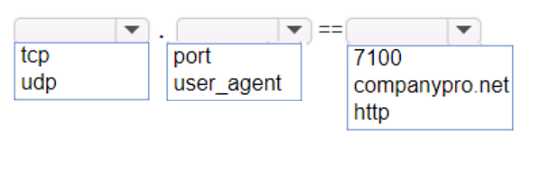
HOTSPOT An app on a user's computer is having problems downloading dat a. The app uses the following URL to download data: https://www.companypro.net:7100/api You need to use Wireshark to capture packets sent to and received from that URL. Which Wireshark filter options would you use to filter the results? Complete the command by selecting the correct option from each drop-down list. Note: You will receive partial credit for each correct selection. CISCO CCST-NETWORKING 100-150 question

Your Answer
25 comments in the community discussion
4
I don't think you'd want "https" as the protocol here, since Wireshark works at the TCP level for ports like 7100. The trap is assuming protocol = https, but it's actually just tcp with port 7100. Anyone disagree?
3
Nah, not protocol https here, it should be tcp port 7100. Common trap is picking https since it's in the URL.
Q: 7

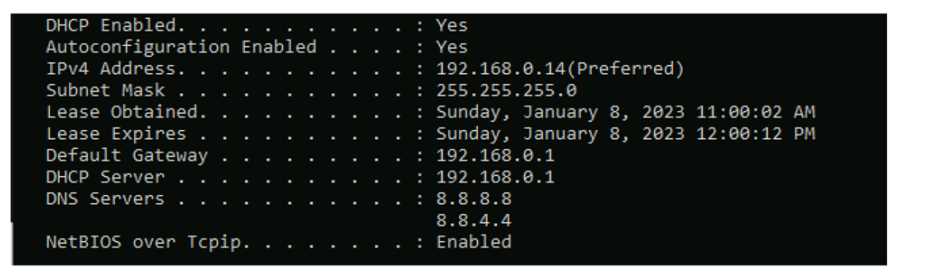
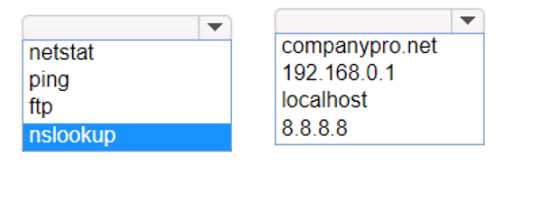
HOTSPOT Computers in a small office are unable to access companypro.net. You run the ipconfig command on one of the computers. The results are shown in the exhibit. You need to determine if you can reach the router. CISCO CCST-NETWORKING 100-150 question Which command should you use? Complete the command by selecting the correct options from each drop-down lists. CISCO CCST-NETWORKING 100-150 question
Your Answer
26 comments in the community discussion
7
ping 192.168.0.1Had something like this in a mock, just need to ping the default gateway to check router reachability.
6
ping 192.168.0.1This checks if you have basic IP connectivity to the gateway router, ignoring any possible DNS issues. Pretty sure that's the intent since reaching the default gateway rules out a local network problem first. Agree with others here but open to other views.
Q: 8

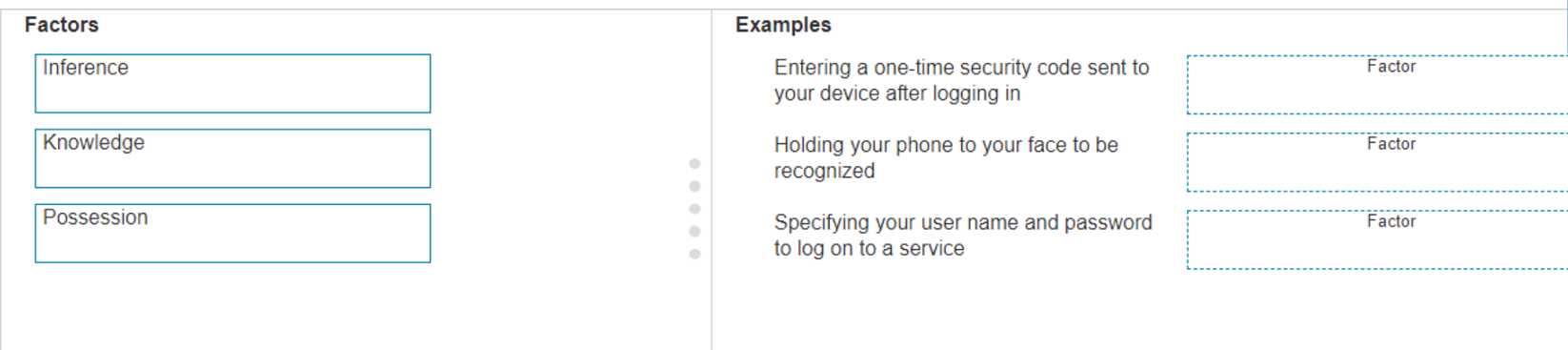
DRAG DROP Move the MFA factors from the list on the left to their correct examples on the right. You may use each factor once, more than once, or not at all. Note: You will receive partial credit for each correct selection. CISCO CCST-NETWORKING 100-150 question

Drag & Drop
27 comments in the community discussion
6
Nah, it's Entering code → Possession, Phone to face → Inference, Username/password → Knowledge. The tricky part is 'Inference' (usually 'Inherence').
5
Entering a one-time security code → Possession, holding your phone to your face → Inference (biometrics), specifying username/password → Knowledge. That fits the standard MFA factors-something you have, something you are, something you know. Cisco sometimes uses 'Inference' instead of 'Inherence' for biometrics but it'
Q: 9

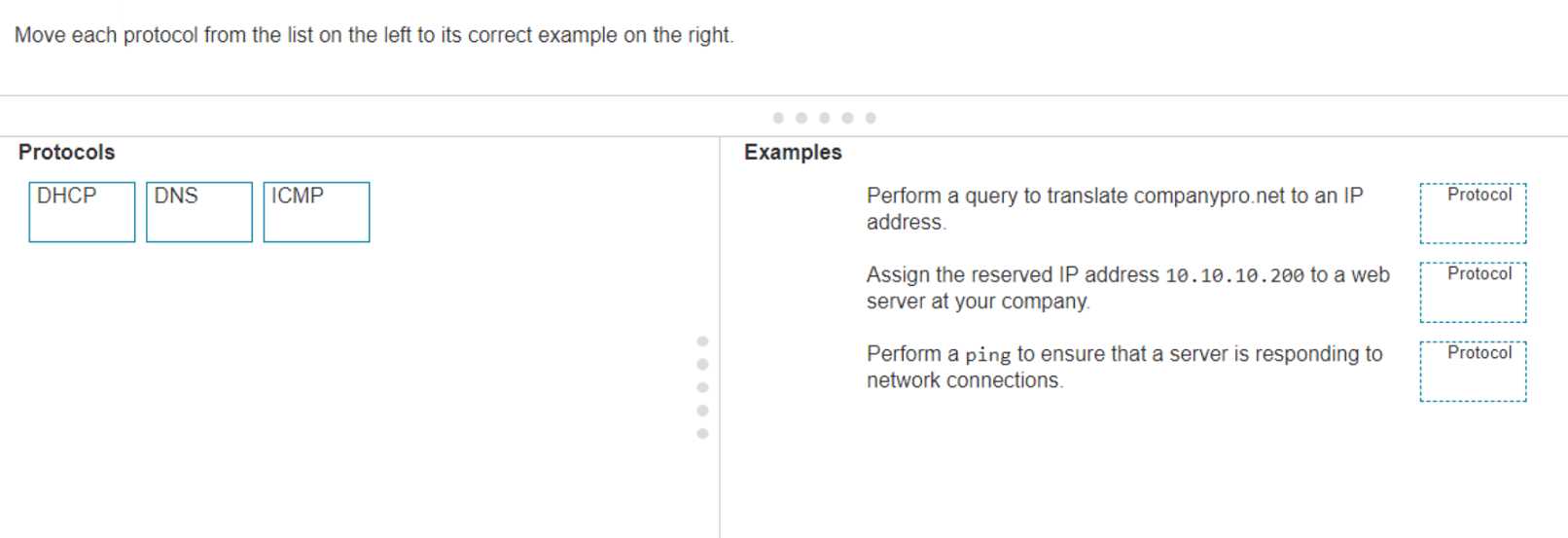
DRAG DROP Move each protocol from the list on the left to its correct example on the right. CISCO CCST-NETWORKING 100-150 question

Drag & Drop
23 comments in the community discussion
6
DHCP → Assign the reserved IP address 10.10.10.200 to a web server, DNS → Translate companypro.net to an IP address, ICMP → Perform a ping to check if server responds.Pretty straightforward if you know how each protocol functions. DHCP is for dynamic IP assignment, DNS does name resolution, and ping uses ICMP f
5
DHCP → Assign reserved IP, DNS → Translate companypro.net, ICMP → Ping server. The main trap is folks sometimes confuse DHCP with DNS for address stuff, but pretty sure this is how it lines up. If you think differently let me know.
Q: 10

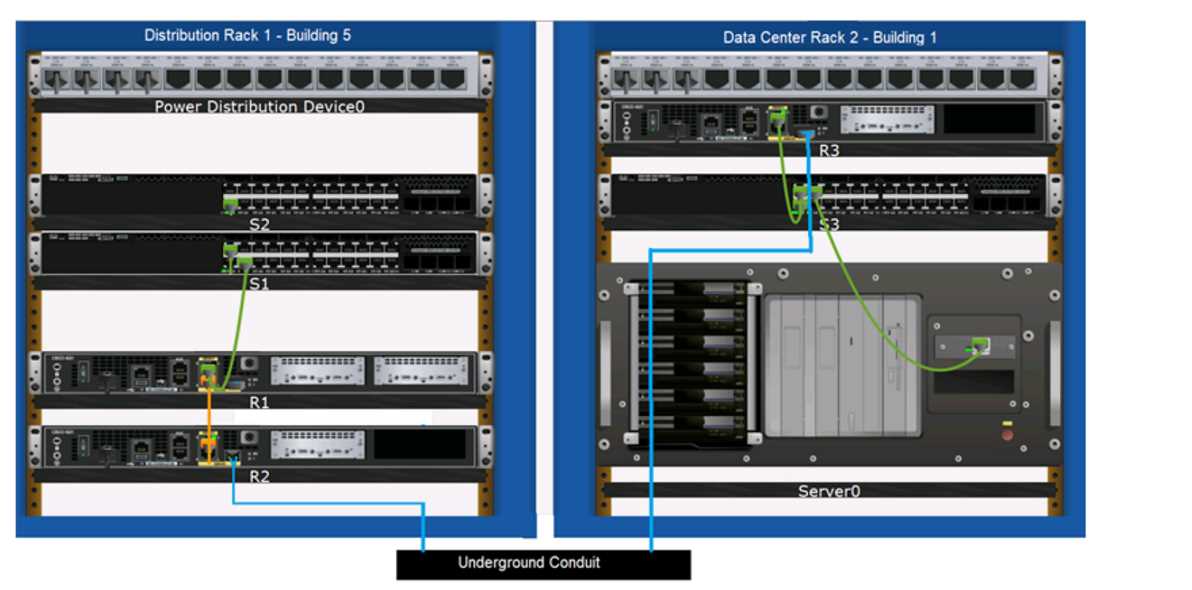
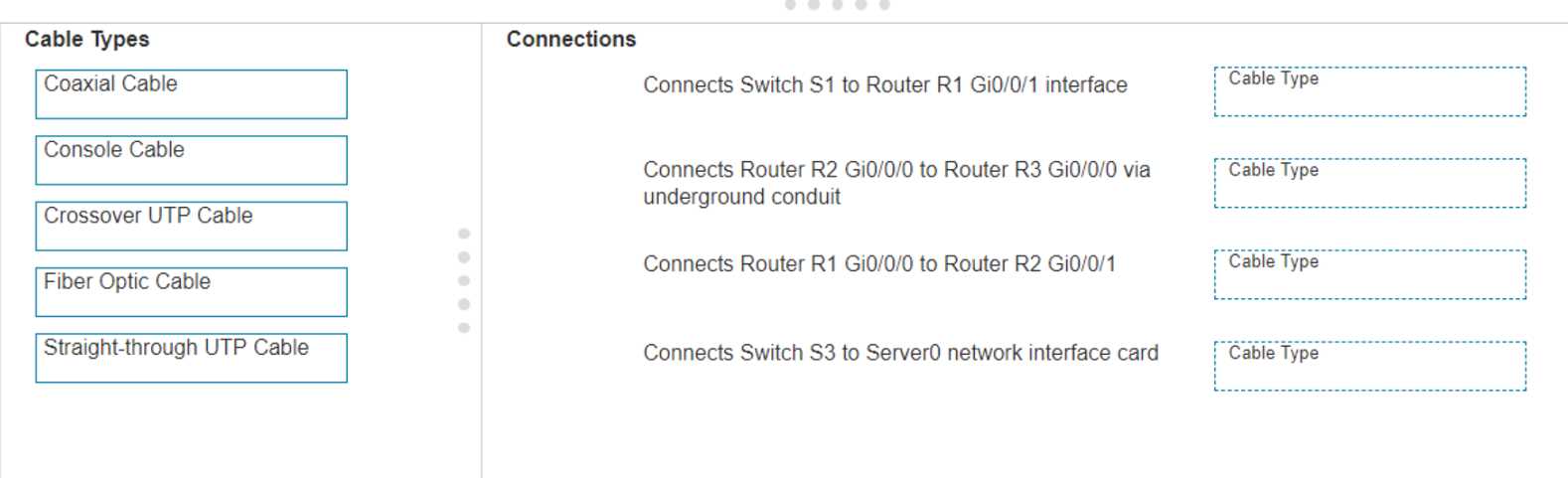
DRAG DROP Examine the connections shown in the following image. Move the cable types on the right to the appropriate connection description on the left. You may use each cable type more than once or not at all. CISCO CCST-NETWORKING 100-150 question CISCO CCST-NETWORKING 100-150 question

Drag & Drop
24 comments in the community discussion
5
Pretty textbook cabling for these types of connections. Switch to router and switch to server both use straight-through UTP, routers underground get fiber, and router-to-router is crossover. Can't see another way unless they're hiding a trick.
5
S1 to R1: Straight-through, R2 to R3 (underground): Fiber Optic, R1 to R2: Crossover, S3 to Server0: Straight-through. These follow Cisco standard wiring rules-straight-through for switch-to-router/server, crossover for router-to-router. Pretty sure that's it but let me know if you spot something off.
Question 1 of 20

Premium Access Includes

  • Quiz Simulator
  • Exam Mode
  • Progress Tracking
  • Question Saving
  • Flash Cards
  • Drag & Drops
  • 3 Months Access
  • PDF Downloads
Get Premium Access
Scroll to Top