
Q: 1
Your company has 10 offices in North America and Europe.
The company has 5,000 users.
You plan to deploy Microsoft Teams for all the users.
You run a pilot project for the planned deployment.
You need to identify the network packet loss from the pilot computers to Microsoft Teams during
calls.
Solution: From the Microsoft Teams admin center, you review Usage reports.
Does this meet the goal?
Options
Discussion
Usage reports in the Teams admin center can show call quality metrics, including packet loss stats. So yeah, option A looks correct here. Pretty sure that's where you check for these details after a pilot. If anyone saw something different on test, let me know.
Option A makes sense since the usage reports in Teams admin center can highlight packet loss trends during calls for the pilot group. B is tempting if you expect deep analysis, but for just identifying packet loss, A should cover it. If I missed a detail, happy to be corrected.
Maybe B, since I thought Usage reports in Teams admin center mostly show overall call usage, not specifics like packet loss per call. Unless I'm missing something-does the report actually break down packet loss for pilot calls? Not fully sure here.
I don’t think it’s B. A makes more sense for usage reports even though it's not granular.
Its A, not B. Usage reports in Teams admin center do show packet loss for the pilot, but not real-time per user. Some mix this up with Call Analytics, I think.
I thought it was B, since usage reports usually just show summary info not packet loss specifically.
I don’t think B’s right here. Usage reports do actually surface packet loss stats from Teams calls, enough for pilot analysis, even if it’s not super detailed per user. Looks like B is a distractor if you’re thinking about deeper diagnostics.
A or B? I'd actually pick A here, but not totally convinced since usage reports show overall trends and packet loss, just not real-time or super detailed per-user stats. I think B is a trap if you overthink the granularity. Disagree?
Usage reports do cover packet loss info, so A makes sense. It doesn't ask for real-time or in-depth per-user stats, just that you can identify packet loss during the pilot. I think that's the key point here. Wouldn't pick B unless they specified needing more detailed diagnostics.
A tbh, usage reports in the Teams admin center do show packet loss info for calls during a pilot. It's not super detailed but it covers what the question asks. Think that's enough unless they wanted real-time per-user details, which they don't mention.
Be respectful. No spam.
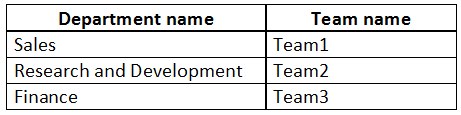 You need to recommend a solution to prevent the users in each department from inviting users from
other departments to their team.
What should you include in the recommendation?
You need to recommend a solution to prevent the users in each department from inviting users from
other departments to their team.
What should you include in the recommendation?