
Q: 18
HOTSPOT You need to define the properties of the comments field of the Non-conformity page. How should you complete the code segment? To answer, select the appropriate options in the answer area. NOTE; Each correct selection is worth one point. 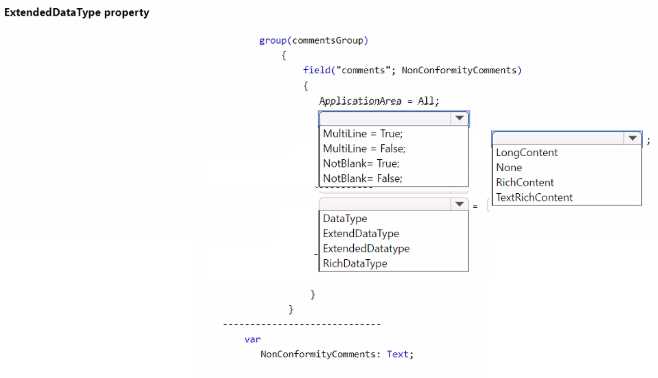
Your Answer
Discussion
Multiline = true, ExtendedDatatype, RichContent. Multiline=false looks like a trick option here, comments usually need multiple lines. Agree?
Makes sense for a comments field.
Multiline = true, ExtendedDatatype, RichContent
Multiline = true, ExtendedDatatype, RichContent
Multiline = true, ExtendedDatatype, RichContent. That matches how comments fields usually get set up in Business Central labs and the official documentation. I think "RichContent" specifically brings in the rich text editor everyone expects for comments. If you want to be totally sure, I'd check official docs or run a quick hands-on in a sandbox just to confirm the behavior with these properties.
Multiline = true, ExtendedDatatype, TextRichContent. I thought TextRichContent was the right enum value for rich text in AL, not just "RichContent" by itself. Maybe I'm mixing it up with another property set though.
Yeah, saw something like this on a practice test. Multiline = true, ExtendedDatatype, RichContent
Multiline = true, ExtendedDatatype, RichContent. I've seen similar in exam practice, that's the combo for a proper comments field in Business Central.
Multiline = true; ExtendedDatatype; RichContent. Pretty sure Multiline=false is a trap, comments need multiple lines here.
Multiline = false; ExtendedDataType; TextRichContent
Be respectful. No spam.