Free PL-900 Practice Test Questions and Answers (2026)
You overwrite a Power Automate flow by editing the definition and saving the changes. You need to be able to revert a flow to the current state. Which two options can you use? Each correct answer presents a complete solution.
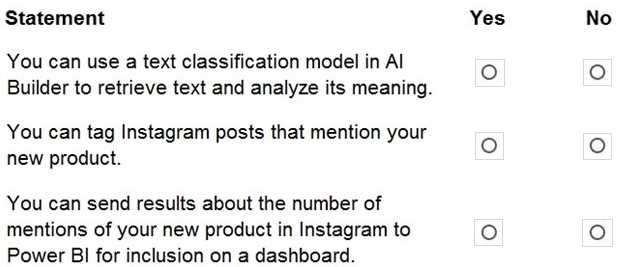
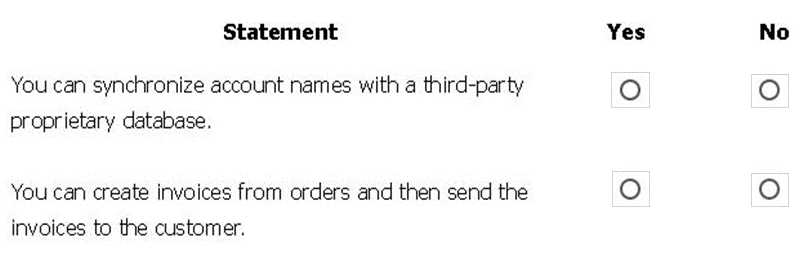
HOTSPOT A business plans to including AI Builder. Which actions can you perform? For each of the following statements, select Yes if the statement is true. Otherwise, select No.
HOTSPOT A company plans to build solutions by using Power Platform technologies. For each of the following statements, select Yes if the statement Is true. Otherwise, select No.
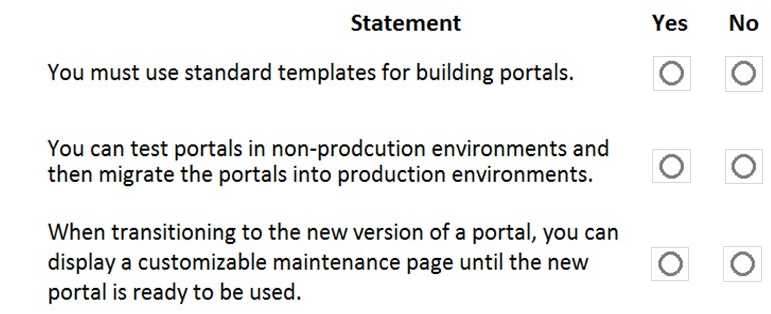
HOTSPOT A company plans to build Power Apps portals. For each of the following statements, select Yes if the statement is true. Otherwise, select No.
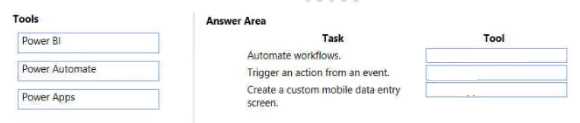
DRAG DROP Match each tool to its task. To answer, drag the appropriate tool from the column on the left to its task on the right. Each tool may be used once, more than once, or not at all.
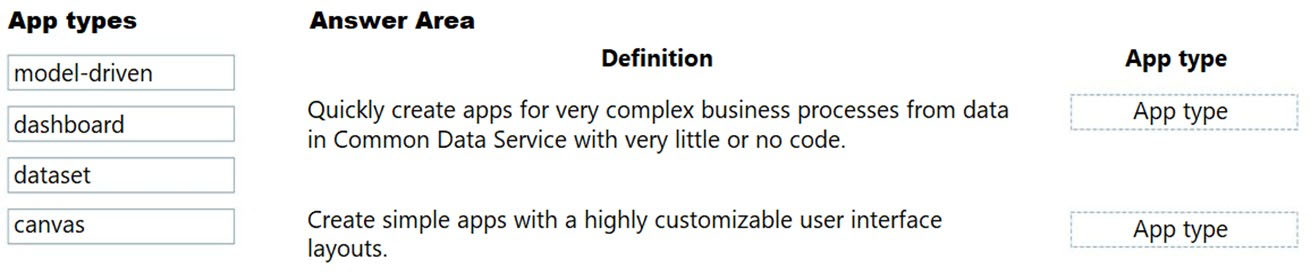
DRAG DROP -
A company needs to create a series of mobile applications to empower their field engineers to accomplish several tasks with varying degrees of complexity.
Match each app type to its definition. To answer, drag the appropriate app type from the column on the left to its definition on the right. Each app type may be used once, more than once, or not at all.
NOTE: Each correct match is worth one point.
Select and Place:
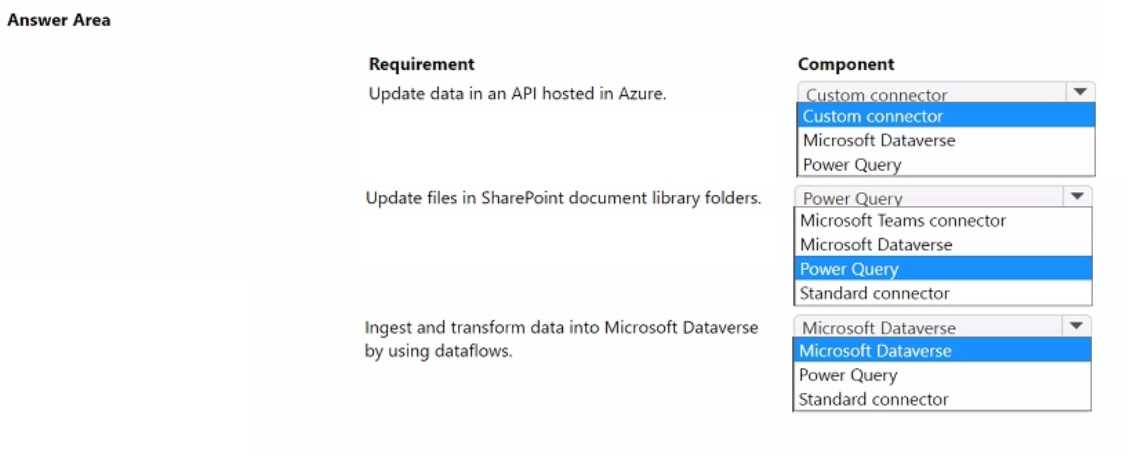
HOTSPOT A company uses Microsoft Power Platform to connect to multiple data sources and manage business data. The low-code components in Microsoft Power Platform must be able to create and update data in these data sources. You need to access the required data by using Microsoft Power Platform components. Which component should you use for each requirement? To answer, select the appropriate options in the answer area.
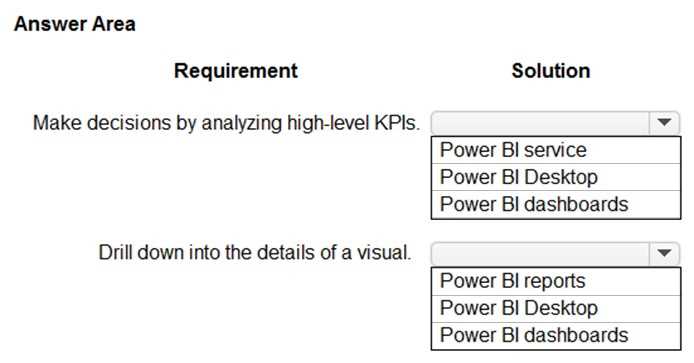
HOTSPOT You are creating Power Bl visualizations. You need to display the visuals where a user can perform each function. Which solution should you use? To answer, select the appropriate option in the answer area.
HOTSPOT A company plans to implement Microsoft Power Platform apps. The company does not plan to use any development tools or plug-ins. Which actions can you perform? For each of the following statements, select Yes if the statement Is true. Otherwise, select No.
HOTSPOT A company plans to implement Power Platform apps. The company does not plan to use any development tools or plug-ins. Which actions can you perform? For each of the following statements, select Yes if the statement is true. Otherwise, select No.
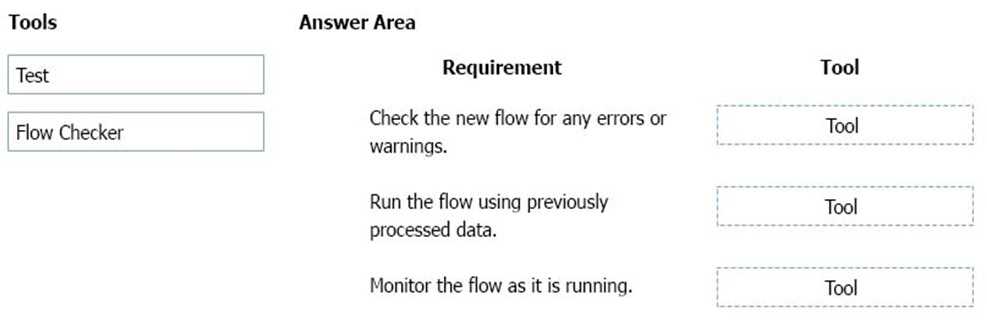
DRAG DROP You build a flow using a template. You want to add support for additional business scenarios. You need to ensure that the new workflow does not break existing functionality. Which flow editing utilities should you use? To answer, drag the appropriate tools to the correct requirements. Each tool may be used once, more than once, or not at all You may need to drag the split bar between panes or scroll to view content.
A company is considering using Power Pages for its website. You need to identify the capabilities of Power Pages. What are two capabilities of Power Pages? Each correct answer presents a complete solution.
DRAG DROP You create a Power Bl dashboard. Match each option to its requirement. To answer, drag the appropriate option from the column on the left to the correct requirement on the right. Each option may be used once, more than once, or not at all.
What's covered in this practice questions set
4: Demonstrate the capabilities of Power Apps · 9 questions
📖 About this Domain
This domain introduces the Power Apps low-code platform for building custom business applications. It covers the different app types, their core components, and how they connect to data sources like Microsoft Dataverse.
🎓 What You Will Learn
- Differentiate between canvas apps, model-driven apps, and Power Pages for specific business needs.
- Identify the core components of a model-driven app, including sitemaps, forms, views, and dashboards.
- Describe how Power Apps uses connectors to integrate with data sources like SharePoint, Dataverse, and custom APIs.
- Explain the value proposition of AI Builder for embedding pre-built AI models directly into your apps.
🛠️ Skills You Will Build
- Select the correct Power App type based on user experience requirements and data structure.
- Define a basic data model in Microsoft Dataverse using tables, columns, and relationships.
- Describe the process of creating a Power App from a data source like a SharePoint list or an Excel file.
- Articulate how to use Power Fx for basic formulas and logic within a canvas app.
💡 Top Tips to Prepare
- Practice creating a canvas app from a template to understand controls and data connections.
- Build a simple model-driven app to grasp the relationship between Dataverse tables, forms, and views.
- Review the list of standard, premium, and custom connectors available for Power Apps.
- Complete the Microsoft Learn modules for PL-900 that focus specifically on Power Apps capabilities.
5: Demonstrate the capabilities of Power Automate · 3 questions
📖 About this Domain
This domain introduces Power Automate, the Power Platform service for creating automated workflows. It focuses on how to connect apps and services to synchronize files, get notifications, and collect data. You will learn the core components for building business process automation.
🎓 What You Will Learn
- You will learn to identify different flow types like automated cloud flows, scheduled cloud flows, and desktop flows.
- You will learn to describe how to build a basic flow by using templates and from blank.
- You will learn the function of triggers, actions, and connectors in automating a business process.
- You will learn to describe the business value of integrating AI Builder into Power Automate flows.
🛠️ Skills You Will Build
- You will build the skill to create a cloud flow using a trigger and multiple actions.
- You will build the skill to identify and use connectors to integrate services like SharePoint, Outlook, and Teams.
- You will build the skill to implement business process flows to guide users through a defined process.
- You will build the skill to describe how to use the approvals connector to manage approval workflows.
💡 Top Tips to Prepare
- Practice building flows from templates in the Power Automate portal to understand triggers and actions.
- Clearly differentiate the use cases for automated, instant, scheduled, desktop, and business process flows.
- Review the function of common connectors like SharePoint, Dataverse, and the approvals connector.
- Explore the Microsoft Learn path for PL-900, focusing on the 'Automate a business process with Power Automate' module.
2: Identify the core components of Microsoft Power Platform · 3 questions
📖 About this Domain
This domain introduces the primary applications within the Microsoft Power Platform ecosystem. You will explore the purpose and capabilities of Power Apps, Power Automate, Power BI, and Power Virtual Agents. Understanding these core components is foundational for building low-code solutions.
🎓 What You Will Learn
- You will learn to describe the capabilities of Power Apps, including canvas apps, model-driven apps, and Power Pages.
- You will learn to identify the different types of flows in Power Automate, such as cloud flows and desktop flows for automation.
- You will learn to explain the function of Power BI for data visualization through dashboards and reports.
- You will learn to describe how Power Virtual Agents enables the creation of low-code chatbots using topics and entities.
🛠️ Skills You Will Build
- You will build the skill to differentiate between Power Apps, Power Automate, Power BI, and Power Virtual Agents for specific use cases.
- You will build the ability to identify the appropriate Power Platform component to solve a given business requirement.
- You will build an understanding of how common components like Microsoft Dataverse and connectors integrate across the platform.
- You will build the competency to articulate the value proposition of each core Power Platform product.
💡 Top Tips to Prepare
- Focus on the distinct business value and use cases for each core component, such as when to use Power BI versus Power Apps.
- Master the differences between app types in Power Apps, specifically canvas versus model-driven apps.
- Utilize the official Microsoft Learn learning path for PL-900 to explore interactive modules on each component.
- Understand the role of foundational elements like Microsoft Dataverse and connectors, as they are integral to all components.
3: Demonstrate the capabilities of Power BI · 3 questions
📖 About this Domain
This domain introduces the business value and core components of Microsoft Power BI. It covers the end-to-end process of connecting to data sources to build reports and interactive dashboards. The focus is on transforming raw data into actionable business intelligence.
🎓 What You Will Learn
- You will learn to identify the core components of the Power BI ecosystem, including Power BI Desktop, the Power BI service, and Power BI mobile.
- You will learn how to use data connectors to get data from various data sources into Power BI for analysis.
- You will learn to build a basic Power BI report by adding data visualizations like charts and graphs to a report page.
- You will learn the process of creating a Power BI dashboard by pinning visuals and publishing reports to the Power BI service.
🛠️ Skills You Will Build
- You will build the skill to differentiate between Power BI Desktop for authoring, the Power BI service for sharing, and Power BI mobile for consumption.
- You will build the skill to connect to disparate data sources using built-in Power BI connectors.
- You will build the skill to create interactive reports by selecting appropriate visualizations to represent underlying data.
- You will build the skill to construct and publish a dashboard in the Power BI service for business users.
💡 Top Tips to Prepare
- Memorize the distinct functions of Power BI Desktop versus the Power BI service, as exam questions test this separation of concerns.
- Clearly understand the technical difference between a Power BI report and a Power BI dashboard.
- Gain hands-on experience by using Power BI Desktop with a sample dataset to build a simple report and publish it.
- Review the concept of data connectors and recognize common data sources available within the Get Data experience.
6: Demonstrate the capabilities of Power Virtual Agents and AI Builder · 2 questions
📖 About this Domain
This domain introduces the AI capabilities within the Power Platform. You will explore how to build no-code chatbots with Power Virtual Agents and infuse apps and flows with intelligence using AI Builder models.
🎓 What You Will Learn
- Identify core components of Power Virtual Agents, including topics, entities, and trigger phrases for chatbot creation.
- Describe the different types of AI Builder models, such as form processing, object detection, and prediction models.
- Learn how to consume an AI Builder model from within a Power Automate flow or a Power Apps canvas app.
- Recognize business scenarios where Power Virtual Agents and AI Builder provide value by automating processes and insights.
🛠️ Skills You Will Build
- Constructing a functional chatbot by defining topics, authoring conversations, and publishing the bot.
- Implementing AI Builder by selecting, training, and publishing a model to solve a business problem.
- Integrating AI models into Power Automate flows to create intelligent process automation.
- Embedding AI Builder components into Power Apps to build smarter user-facing applications.
💡 Top Tips to Prepare
- Gain practical experience by building a basic chatbot and using a prebuilt AI Builder model in a developer environment.
- Memorize the primary use cases for each AI Builder model type, such as when to use form processing versus text recognition.
- Complete the official Microsoft Learn learning paths dedicated to Power Virtual Agents and AI Builder fundamentals.
- Focus on the integration points, understanding how Power Virtual Agents can call Power Automate flows that utilize AI Builder.
1: Describe the business value of Microsoft Power Platform
📖 About this Domain
This domain covers the fundamental business value of the Microsoft Power Platform as a low-code platform for building business solutions. It explains how the interconnected components drive digital transformation and operational efficiency. You will learn to articulate how the platform solves common business challenges.
🎓 What You Will Learn
- Analyze how the Power Platform enables organizations to build end-to-end business solutions by connecting data and processes.
- Identify the specific business value of each core component: Power Apps, Power Automate, Power BI, and Power Virtual Agents.
- Understand how connectors extend platform value by integrating with Microsoft 365, Dynamics 365, Azure, and third-party services.
- Recognize the role of Microsoft Dataverse in providing a secure and scalable data foundation for business applications.
🛠️ Skills You Will Build
- Articulate the return on investment (ROI) of implementing Power Platform solutions to business stakeholders.
- Map specific business requirements to the appropriate Power Platform component for an optimal solution.
- Describe the integration capabilities of the platform using connectors to leverage existing enterprise data and services.
- Explain how Power Platform empowers citizen developers to rapidly transform business processes and drive innovation.
💡 Top Tips to Prepare
- Focus on real-world business scenarios and case studies to understand the practical application of the platform's value.
- Complete the 'Microsoft Power Platform Fundamentals' learning path on Microsoft Learn to cover all official objectives for this domain.
- Understand the 'better together' narrative, focusing on how components integrate with each other and with Microsoft 365 and Dynamics 365.
- Create a clear distinction between the primary function of each Power Platform component to answer comparative questions correctly.