
Q: 11
DRAG DROP Match each tool to its task. To answer, drag the appropriate tool from the column on the left to its task on the right. Each tool may be used once, more than once, or not at all. 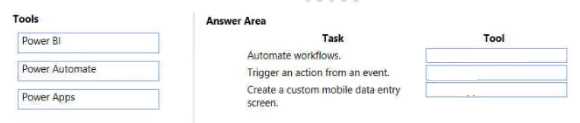
Drag & Drop
Discussion
Yeah this fits what I've learned. Power Automate gets both 'Automate workflows' and 'Trigger an action from an event', Power Apps is the right pick for custom mobile data entry screens. Power BI isn't used for automation stuff here.
Yeah this matches what I've seen. Power Automate goes with both Automate workflows and Trigger an action from an event, while Power Apps fits Create a custom mobile data entry screen. Not seeing any reason to pick Power BI here tbh.
Power Automate -> Automate workflows, Trigger an action from event; Power Apps -> Create a custom mobile data entry screen.
I've seen a similar twist where "trigger an action" could look like Power Apps (using button click), but here it's meant as workflow triggers, so both go to Automate. If the event source was user-driven inside an app, this would flip. Anyone else catch that nuance?
I've seen a similar twist where "trigger an action" could look like Power Apps (using button click), but here it's meant as workflow triggers, so both go to Automate. If the event source was user-driven inside an app, this would flip. Anyone else catch that nuance?
Power Automate -> Automate workflows & Trigger an action from event, Power Apps -> Create a custom mobile data entry screen. Pretty sure that fits the core use cases for each tool, but let me know if you see it differently.
Power BI -> Automate workflows, Power Automate -> Trigger an action, Power BI -> Create custom mobile data entry screen.
Had something like this in a mock: Power BI matches to Automate workflows. Power Apps for the rest.
Be respectful. No spam.