B or D? I'd say B because 0.000000001 milliwatts is -90 dBm, not -65 dBm, so difference to -65 dBm is 15 dBm. But if they're assuming the noise floor is already -90 and not 0, maybe that's where D comes from. Kinda fuzzy on which number they want for 'noise floor' here, anyone else read it that way?
Free HPE6-A85 Practice Test Questions and Answers (2026) | Cert Empire Practice Questions
Free preview: 20 questions.
HP HPE6 A85
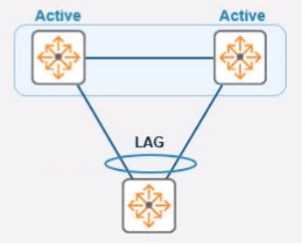
In the given topology, a pair of Aruba CX 8325 switches are in a VSX stack using the active gateway
What is the nature and behavior of the Virtual IP for the VSX pair if clients are connected to the
access switch using VSX as the default gateway?Had something like this in a mock. in other practice sets and option B fits since the Virtual IP is meant to float between the VSX switches if one fails. That's the whole point of active gateway in this Aruba setup: seamless failover for clients. I think this matches what the exam wants, but let me know if you see a different angle.
Yeah, B makes sense. The virtual IP is designed to float over to the secondary switch if the primary goes down, so clients keep their default gateway without even noticing a change. That’s basically the point of using an active gateway in a VSX setup. Pretty sure that’s what Aruba doc examples show too, but happy to hear counterpoints.
Looks like B is the right format for most Cisco gear: ip route 10.2.10.0 255.255.255.0 172.16.1.1. I picked B since it includes the mask and next hop, but not sure if the 'description aruba' at the end should be there for Aruba devices.
Tricky since the mask format isn't specified. If they were expecting traditional subnet mask style for static routes, D would work because ip route-static plus dotted decimal is legit in some HPE contexts. I'm mostly basing this on similar CLI from older HPE/Comware gear. Not 100 percent sure here though, could go either way if more context was given.
D
For me, A fits ArubaOS-CX since it uses the ip-route command with CIDR (/24), which is standard for static routes on these switches. D is more Comware style with the dotted mask, but that's not what they're asking for in this context. Not 100 percent sure if it's universal but for Aruba, A looks right. Anyone disagree?
I’m going with C here, regular static route syntax is what you need for in-band via SVI. The VRF mgmt one (option B) is only used for out-of-band management. Pretty sure that's how it works on Aruba CX, but let me know if I missed something.
I don’t think it’s B, gotta go with C. B misses 'no routing' before LACP and doesn't clearly link the interfaces to the LAG in proper Aruba style. C actually gets the sequence right: VLAN 20 with name, SVI on VLAN 20, lag config with native VLAN set, LACP active mode, and all ports enabled. Pretty sure that's what Aruba expects but feel free to disagree.
Option A is correct here. The Alerts and Events dashboard is what you use when you want to review and acknowledge issues in Aruba Central before taking further action. Tools dashboard is more for hands-on diagnostics, so not quite what the question asks. I think A matches the intent best, but happy to see other views if someone disagrees.
Agree with C and E here. UXI's main advantages are acting like a client (C) and checking real app performance like HTTP or Office 365 (E). D is more for dedicated coverage tools, not what UXI usually does. Pretty confident but open if I've missed anything.
Pretty sure the right combo is C and E for this one. UXI devices act as simulated clients (that's what C means) and they test real-world user apps like HTTP or Office 365, per E. D sounds more like a site survey tool, not what UXI is built for. Let me know if you see it differently!
It's actually A. The decision to roam is made by the client device based on things like signal strength and quality, not by the APs or controller. Network gear can suggest or steer, but only the client triggers the move. Seen this a few times in Aruba docs too. Correct me if I'm off.
Bonding multiple 20MHz channels is really just for more throughput between AP and client, not antenna gain or redundancy. B fits. Pretty sure about this but open if someone has a different take on how antennas tie in.
Why would someone think D is right here? Channel bonding is all about boosting throughput, not antenna strength or coverage. B matches what 802.11n/ac/ax channel bonding actually accomplishes. If you need extra bandwidth for clients, that's when you'd bond those channels. Correct me if I'm missing a use case?
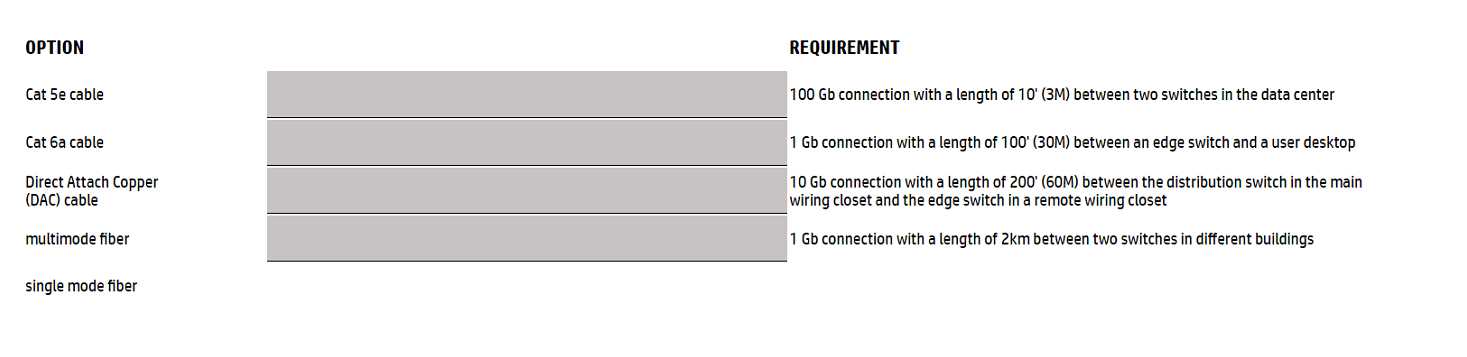
DRAG DROP Match the most cost-effective option for cabling each requirement. (All lengths indicate total cable length including patch cable(s), service loops, etc. where used.) 
100Gb 3M = single mode fiber, 1Gb 100' = Cat 6a, 10Gb 200' = DAC, 1Gb 2km = multimode fiber. I don’t think DAC is valid for the longer run since that’s way past its limit, and single mode at short range is often cheaper at high speeds than multi or fancy copper in enterprise gear. Trap here is thinking DAC for the shortest span (common on CCNA), but that usually maxes at ~10m and gets pricey fast. Pretty sure this lines up with exam practice sets-open to corrections if anyone's actually priced these builds recently.
Pretty standard picks for cost. 100Gb at 3m needs single mode fiber, Cat6a works for that 100' desktop run, DAC cable does best for 10Gb over 200', and multimode fiber is cheapest for that long 2km link. I've seen similar on other exams, open to corrections if I'm missing something.
100Gb 3M = single mode fiber, 1Gb 100' = Cat6a, 10Gb 200' = DAC cable, 1Gb 2km = multimode fiber. I think that's the most cost-effective lineup since copper can't do long runs at that speed and multimode fiber is overkill for anything short. Pretty confident based on exam reports-anyone have a real-world counterexample?
If the question said "most future-proof" instead of "most cost-effective," would you still pick single mode for the 3M 100Gb link?
Seen similar configs before. For cost, I’d map it as:
100Gb 3M → single mode fiber
1Gb 100' → Cat6a
10Gb 200' → DAC cable
1Gb 2km → multimode fiber
Pretty sure that’s cheapest overall in this lineup but not 100% convinced on DAC vs. fiber for the 10Gb stretch. Anyone disagree?
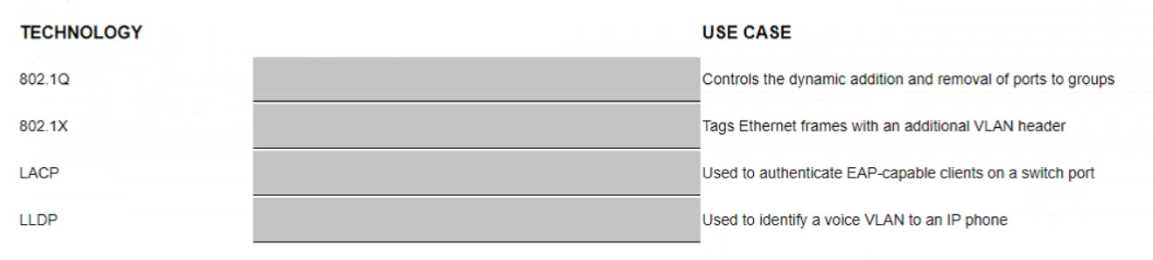
DRAG DROP Match the switching technology with the appropriate use case. 
These acronyms get tossed around so much but on actual config, it's easy to mix up which one maps where. Pretty sure that's the right order from similar questions in practice sets. If you think otherwise let me know.
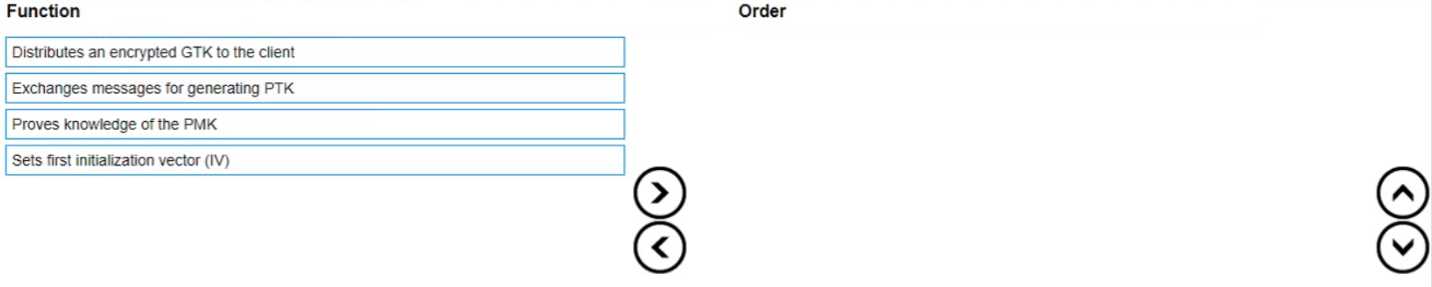
DRAG DROP List the WPA 4-Way Handshake functions in the correct order. 
Proves knowledge of the PMK → Exchanges messages for PTK → Distributes encrypted GTK → Sets IV. That's the typical WPA 4-way handshake flow from Aruba guides and CWNP material. Some mix up PTK exchange before proving PMK due to how Message 1/2 are labeled, but proving PMK actually kicks everything off. I think this order is correct, unless they're asking about a rekey scenario which could change things.
Yeah this matches what I've mostly seen in study guides. The correct order should be: Proves knowledge of the PMK, Exchanges messages for generating PTK, Distributes encrypted GTK to the client, then Sets first initialization vector (IV). Pretty sure that's how the WPA handshake logic flows. If anyone has seen a variation in a different context, let me know!
Nah, I don’t think "Distributes GTK" comes before "Sets IV". In the real WPA 4-way handshake, it’s: first prove PMK knowledge, then generate PTK, after that distribute encrypted GTK, and finally set the IV. That’s what I’ve seen in official study material-trap is swapping steps 3 and 4.
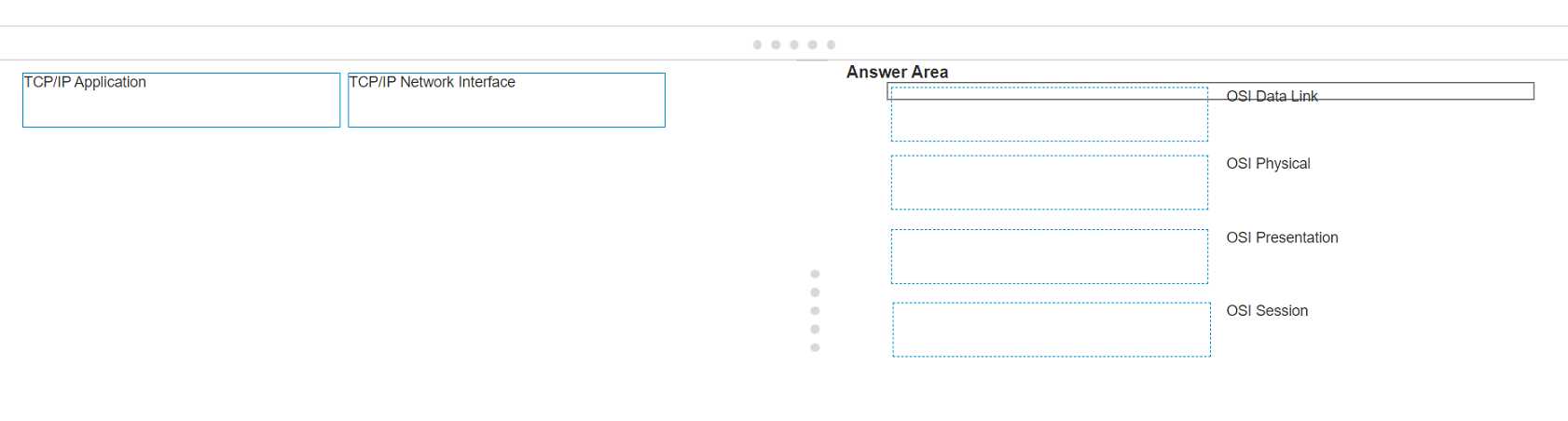
DRAG DROP Match the Open Systems Interconnection (OSI) layer with its comparable member of the TCP/IP stack. (Options may be used more than once.) 
Seen a similar drag and drop in practice-it's always Data Link and Physical going to Network Interface, while Presentation and Session line up with Application. OSI layers above Transport just get lumped into the TCP/IP Application layer. Let me know if anyone disagrees!
- OSI Data Link → TCP/IP Network Interface
- OSI Physical → TCP/IP Network Interface
- OSI Presentation → TCP/IP Application
- OSI Session → TCP/IP Application
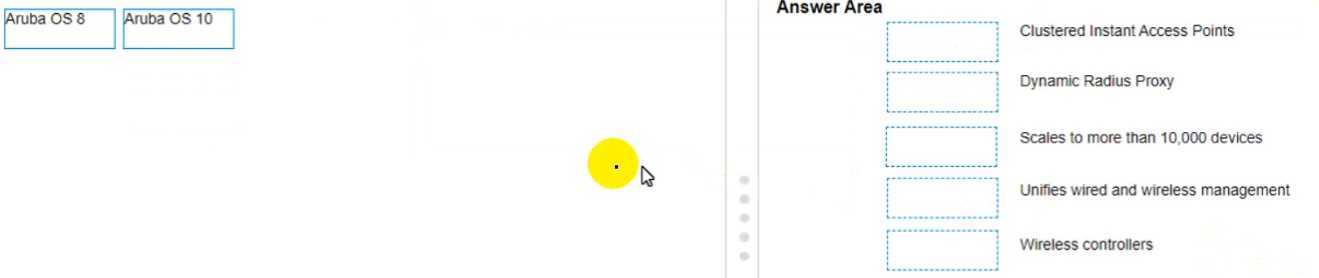
DRAG DROP Match the feature to the Aruba OS version (Matches may be used more than once.) 
Clustered Instant APs, Dynamic Radius Proxy, Unifies wired and wireless management, Wireless controllers map to OS 8. Scales to more than 10,000 devices goes with OS 10. I think that's right based on Aruba docs and what I've seen in training. Only thing I'm not 100% on is the unified management line but most match it with OS 8. Anyone disagree?
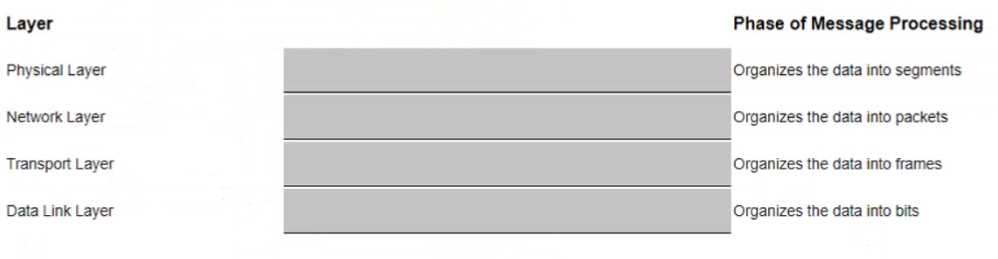
DRAG DROP Match the phase of message processing with the Open Systems interconnection (OSl) layer. 
That lines up with how I learned it. Segments go with Transport Layer, packets map to Network, frames to Data Link, bits to Physical. Pretty standard OSI model logic here honestly, unless Aruba changed something up in their docs.
- Segments -> Transport Layer
- Packets -> Network Layer
- Frames -> Data Link Layer
- Bits -> Physical Layer
Yep, the usual order applies here. Transport Layer is segments, Network Layer is packets, Data Link Layer is frames, Physical Layer is bits. That's the typical OSI breakdown when talking about message processing phases. Pretty sure that's what Aruba expects too, but happy to hear if anyone has seen otherwise in other study materials.
- Organizes the data into segments → Transport Layer
- Organizes the data into packets → Network Layer
- Organizes the data into frames → Data Link Layer
- Organizes the data into bits → Physical Layer
I get why folks mix up frames and packets but here's the right match: Physical Layer - bits, Data Link Layer - frames, Network Layer - packets, Transport Layer - segments. The exam likes to swap Data Link and Network so don't fall for that trap. Anyone think differently?
Not totally sure cause OSI layers always trip me up, but I guessed: Physical Layer - Organizes into segments, Network Layer - frames, Transport Layer - packets, Data Link Layer - bits. Is that right?
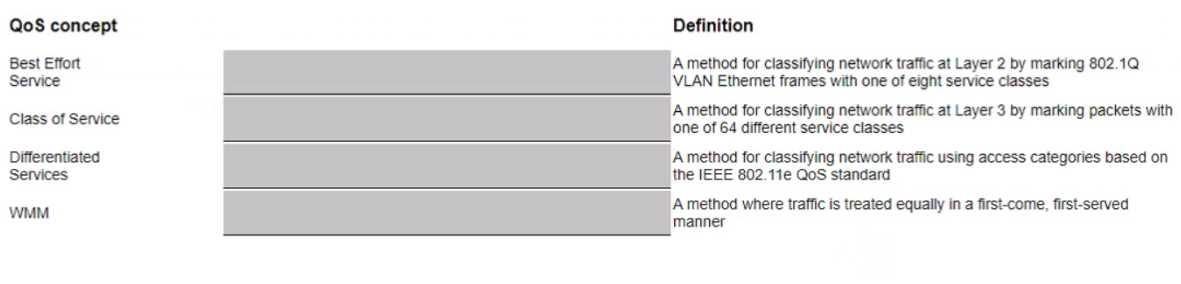
DRAG DROP Match the appropriate QoS concept with its definition. 
I don't think mapping Differentiated Services to Layer 2 (802.1Q VLAN) is right, since DSCP is Layer 3. Trap is confusing CoS and DSCP. Should be: Class of Service for Layer 2 VLAN tags, Differentiated Services for Layer 3 DSCP, WMM for 802.11e Wi-Fi, Best Effort for equal treatment. Correct me if I'm missing something!