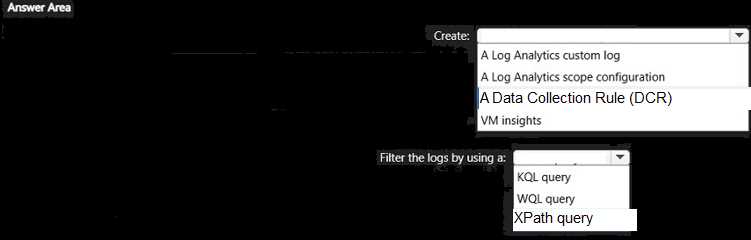
HOTSPOT You have 100 Azure virtual machines that run Windows Server. You plan to use Azure Monitor agents to track occurrences of event 10 1035 in the Application log of each virtual machine. You need to ensure that the events will be available tor analysis in Log Analytics. The solution must minimize the total volume of events stored in Azure. What should you do? To answer, select the appropriate options in the answer area. NOTE: Each correct selection is worth one point. 
Free AZ-801 Practice Test Questions and Answers (2026)
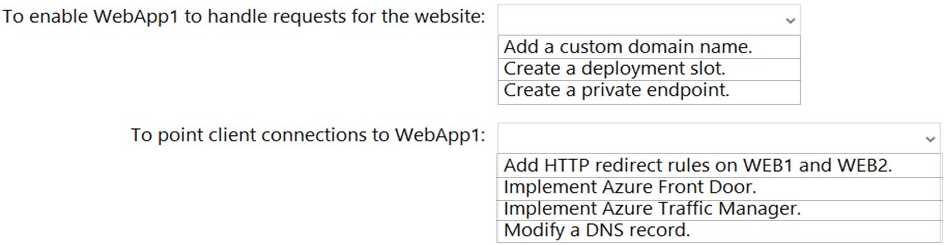
HOTSPOT You are planning the www.fabrikam.com website migration to support the Azure migration plan. How should you configure WebApp1? To answer, select the appropriate options in the answer area. NOTE: Each correct selection is worth one point.
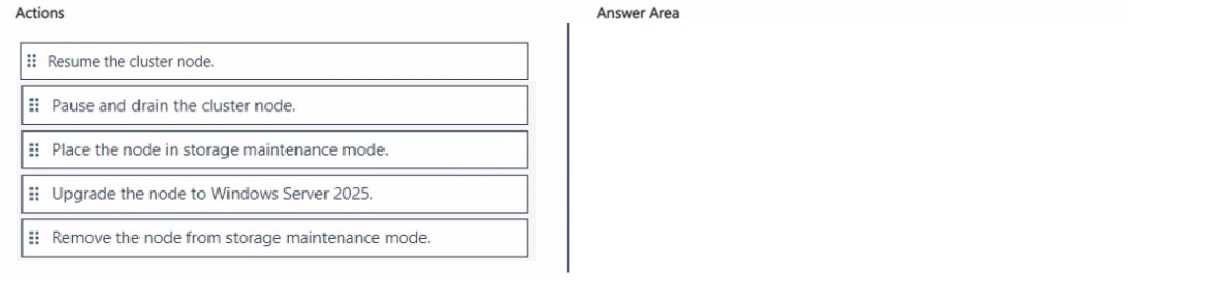
DRAG DROP You have a Windows Server 2022 Storage Spaces Direct cluster named Cluster1. Cluster1 has four nodes that contain virtual machines. You need to perform an in-place upgrade of Cluster! to Windows Server 2025. The solution must ensure that the virtual machines are always available during the upgrade. In which order should you perform the actions? To answer, move all actions from the list of actions to the answer area and arrange them in the correct order.
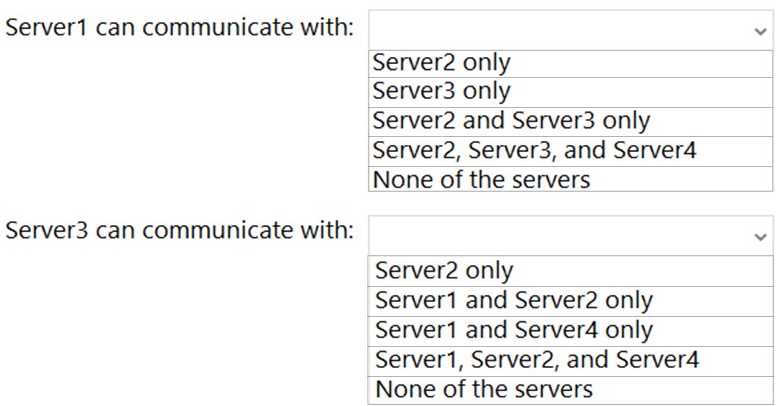
HOTSPOT With which servers can Server1 and Server3 communicate? To answer, select the appropriate options in the answer area. NOTE: Each correct selection is worth one point.
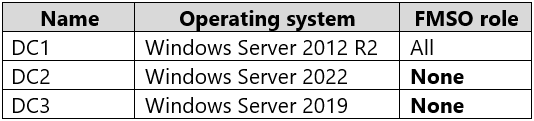
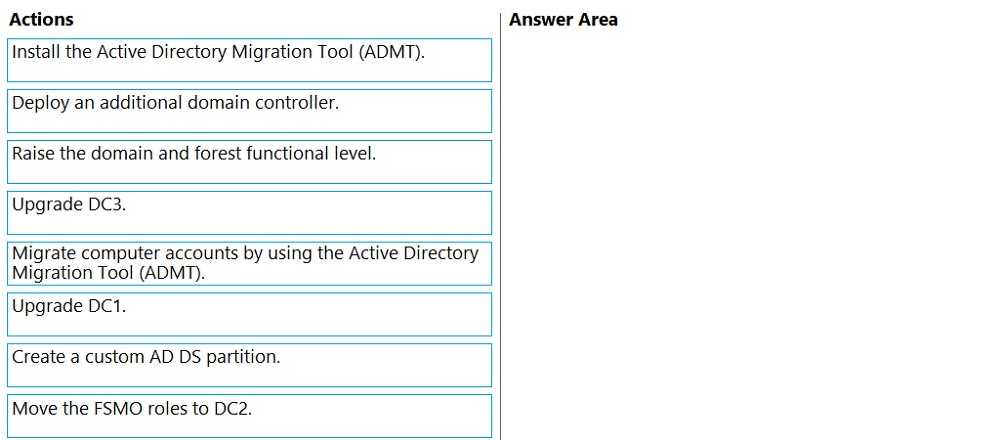
DRAG DROP Your network contains an Active Directory Domain Services (AD DS) domain named contoso.com. The functional level of the forest and the domain is Windows Server 2012 R2. The domain contains the domain controllers shown in the following table. 
HOTSPOT Your network contains an Active Directory Domain Services (AD DS) domain. The domain contains a server named Server1 that runs Windows Server. 
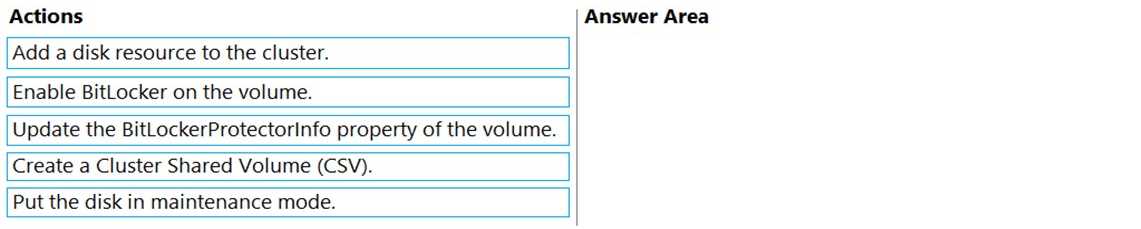
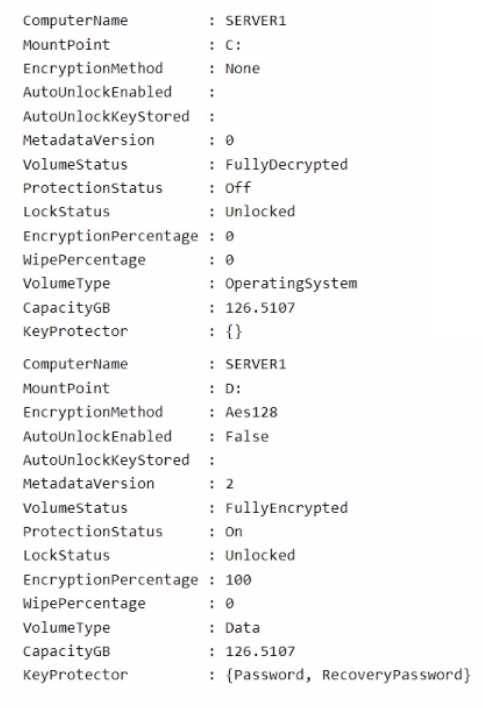
DRAG DROP You are planning the implementation of Cluster2 to support the on-premises migration plan. You need to ensure that the disks on Cluster2 meet the security requirements. In which order should you perform the actions? To answer, move all actions from the list of actions to the answer area and arrange them in the correct order.
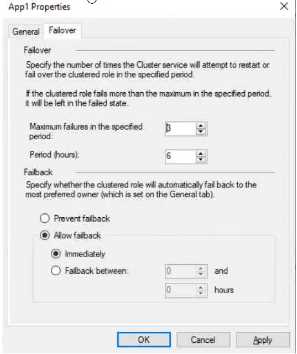
The Failover tab in App1 Properties is shown in the Failover exhibit. (Click the Failover tab.)
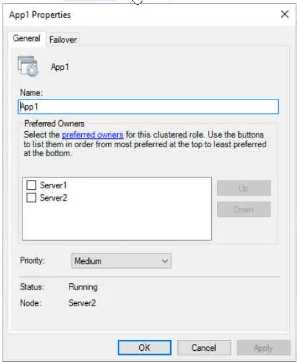
Server1 shuts down unexpectedly.
You need to ensure that when you start Server1, App1 continues to run on Server2.
Solution: You increase Maximum failures in the specified period for the App1 cluster role.
Does this meet the goal?
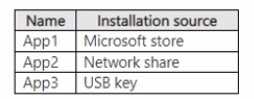
You have the apps shown in the following table.
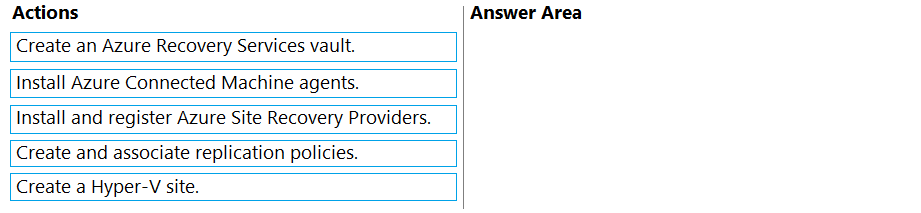
Which apps can you install on Served?DRAG DROP You need to meet the technical requirements for Cluster2. Which four actions should you perform in sequence before you can enable replication? To answer, move the appropriate actions from the list of actions to the answer area and arrange them in the correct order.
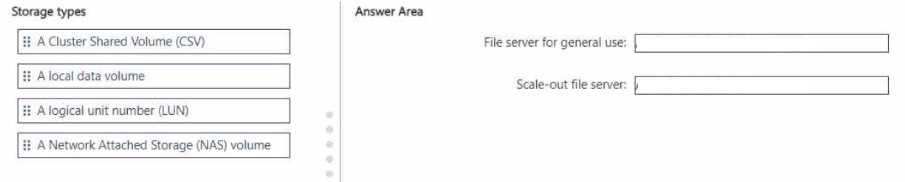
DRAG DROP Your on-premises network contains an Active Directory Domain Services (AD OS) domain. You plan to implement a failover cluster to enable a highly available file server. You are evaluating the following clustered file servers: • File server for general use • Scale-out file server Which type of storage should you use for each file server? To answer, drag the appropriate storage types to the correct file servers. Each storage type may be used once, more than once, or not at all. You may need to drag the split bar between panes or scroll to view content. NOTE: Each correct selection is worth one point.
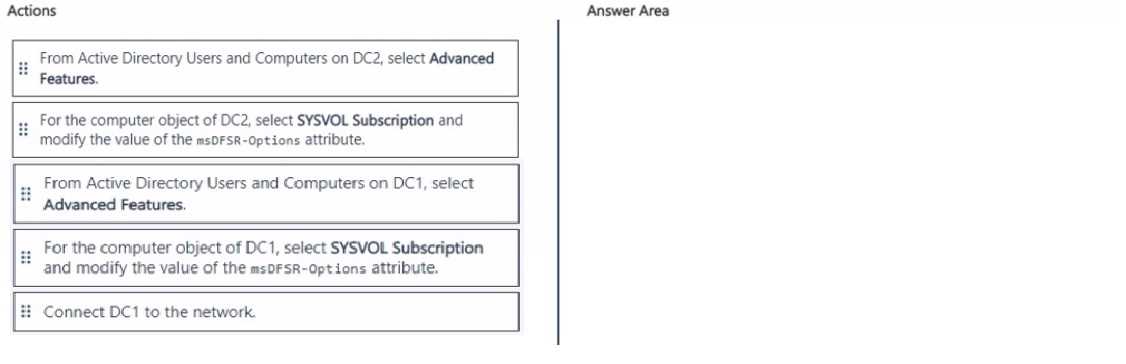
DRAG DROP You have a single-domain Active Directory Domain Services (AD DS) forest named contoso.com that contains two domain controllers named DC1 and DC2. DC1 and DC2 run Windows Server. You plan to perform an authoritative restore of SYSVOL on DC1. You isolate DC1 and restore DC1 from a backup. You need to ensure that SYSVOL on DC1 replicates to DC2. Which three actions should you perform in sequence? To answer, move the appropriate actions from the list of actions to the answer area and arrange them in the correct order.
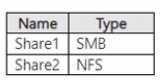
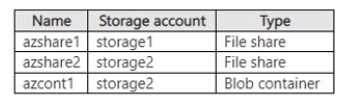
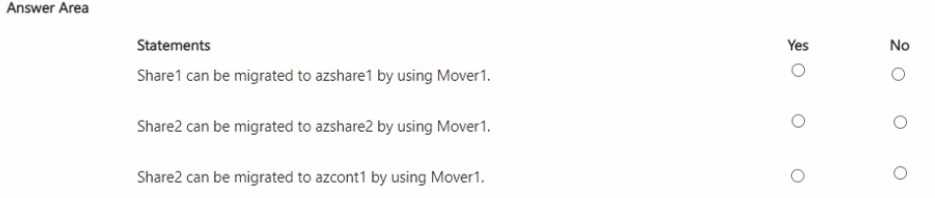
HOTSPOT You have an on-premises server named Server1 that runs Windows Server and contains the shares shown in the following table. 


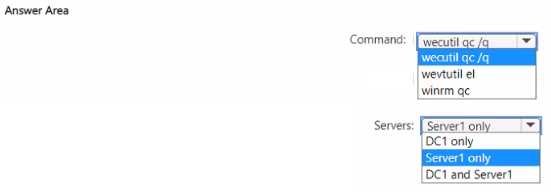
HOTSPOT Your network contains an Active Directory domain. The domain contains a domain controller named DC1 and a server named Server1 that runs Windows Server. You need to enable event log subscriptions to forward events from DC1 to Server1. Which command should you run to enable the Windows Event Collector service, and on which servers should you run the command? To answer, select the appropriate options in the answer area. NOTE: Each correct selection is worth one point.
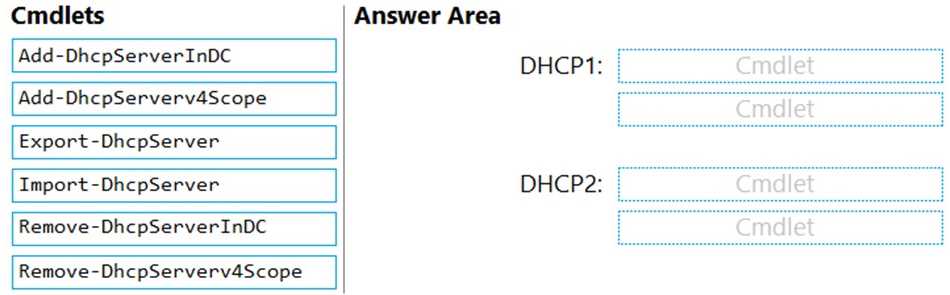
DRAG DROP You are planning the DHCP1 migration to support the DHCP migration plan. Which two PowerShell cmdlets should you run on DHCP1, and which two PowerShell cmdlets should you run on DHCP2? To answer, drag the appropriate cmdlets to the correct servers. Each cmdlet may be used once, more than once, or not at all. You may need to drag the split bar between panes or scroll to view content. NOTE: Each correct selection is worth one point.
What's covered in this practice questions set
2: Implement and manage Windows Server high availability · 6 questions
📖 About this Domain
This domain covers the implementation and management of high availability solutions for Windows Server. You will learn to configure Failover Clustering, Storage Spaces Direct, and other resiliency features. The focus is on maintaining service uptime for critical on-premises and hybrid workloads.
🎓 What You Will Learn
- Implement and manage Windows Server Failover Clustering, including quorum configurations and cluster networking.
- Deploy and manage Storage Spaces Direct (S2D) to create hyper-converged, highly available storage solutions.
- Configure high availability for Hyper-V virtual machines, including live migration and VM monitoring.
- Implement stretch clusters and cluster sets for disaster recovery and large-scale deployments.
🛠️ Skills You Will Build
- Deploying and validating Failover Clusters using PowerShell and Windows Admin Center for various workloads.
- Configuring and managing Cluster Shared Volumes (CSVs) and resilient volumes on Storage Spaces Direct.
- Performing live migrations and storage migrations of clustered Hyper-V virtual machines without downtime.
- Troubleshooting cluster quorum, networking, and storage issues to maintain service availability.
💡 Top Tips to Prepare
- Practice deploying multi-node Failover Clusters and Storage Spaces Direct in a lab environment.
- Master the Failover Clustering PowerShell module for automated deployment and management tasks.
- Understand the different quorum configurations and how they prevent split-brain scenarios in a cluster.
- Review Microsoft documentation on Cluster-Aware Updating (CAU) and stretch cluster implementation.
4: Migrate servers and workloads · 6 questions
📖 About this Domain
This domain covers key concepts related to 4: Migrate servers and workloads.
🎓 What You Will Learn
- Core concepts of 4: Migrate servers and workloads
- Best practices and implementation
- Real-world application scenarios
🛠️ Skills You Will Build
- Technical proficiency in 4: Migrate servers and workloads
- Problem-solving abilities
- Practical implementation skills
💡 Top Tips to Prepare
- Review official documentation and study guides
- Practice with hands-on exercises
- Focus on understanding core principles
1: Secure Windows Server on-premises and hybrid infrastructures · 5 questions
📖 About this Domain
This domain covers hardening the Windows Server operating system and securing hybrid infrastructures. You will configure layered security controls for compute, storage, and networking. It emphasizes integrating on-premises servers with Azure security services for unified management.
🎓 What You Will Learn
- You will learn to secure Windows Server by using Windows Defender Application Control, Credential Guard, and local security policies.
- You will learn to secure network infrastructure using Windows Defender Firewall, IPsec, and SMB encryption.
- You will learn to protect data by implementing BitLocker Drive Encryption for server volumes.
- You will learn to manage server security posture and detect threats by using Microsoft Defender for Cloud and Microsoft Sentinel.
🛠️ Skills You Will Build
- Ability to implement Just Enough Administration (JEA) to reduce administrative attack surface.
- Competency in deploying and managing Windows Server Update Services (WSUS) and Azure Update Management for patch compliance.
- Proficiency in onboarding on-premises servers to Azure Arc to extend Azure security policies and monitoring.
- Skill in analyzing security events and logs from Windows Server for threat hunting and incident response.
💡 Top Tips to Prepare
- Gain hands-on experience configuring security baselines using Group Policy Objects (GPOs) and Security Compliance Toolkit.
- Practice PowerShell scripting for security automation, including firewall rule configuration and JEA endpoint creation.
- Master the process of connecting hybrid machines to Microsoft Defender for Cloud and interpreting its security recommendations.
- Understand the differences and use cases for various security features like AppLocker versus Windows Defender Application Control (WDAC).
5: Monitor and troubleshoot Windows Server environments · 3 questions
📖 About this Domain
This domain focuses on maintaining the health and performance of Windows Server infrastructure in on-premises and hybrid configurations. It covers the use of native and Azure-based tools for monitoring security, performance, and connectivity, as well as systematic troubleshooting methodologies.
🎓 What You Will Learn
- You will learn to monitor Windows Server performance and events using tools like Performance Monitor, Event Viewer, and Azure Monitor.
- You will understand how to troubleshoot Windows Server boot processes, hardware, and network connectivity issues in on-premises and hybrid scenarios.
- You will master techniques for troubleshooting Active Directory replication, group policy processing, and hybrid authentication with Azure AD.
- You will gain knowledge on monitoring security by using Microsoft Defender for Identity and analyzing security logs for threat detection.
🛠️ Skills You Will Build
- You will build the ability to use Performance Monitor and Azure Monitor to diagnose and resolve system performance bottlenecks.
- You will develop skills to troubleshoot Active Directory replication, Group Policy application, and Azure AD Connect synchronization failures.
- You will gain proficiency in diagnosing Windows Server boot issues and performing system state recovery operations.
- You will learn to configure and analyze security logs and alerts from tools like Microsoft Defender for Identity to secure your environment.
💡 Top Tips to Prepare
- Gain hands-on experience with Performance Monitor, Event Viewer, and Resource Monitor to analyze server health data.
- Practice troubleshooting Active Directory replication issues using command-line tools like repadmin and dcdiag.
- Master the integration of on-premises servers with Azure Monitor and Log Analytics using Azure Arc for centralized monitoring.
- Review Microsoft Learn documentation on troubleshooting Windows Server boot processes and network connectivity in hybrid environments.
3: Implement disaster recovery
📖 About this Domain
This domain focuses on implementing business continuity for Windows Server workloads. It covers backup and recovery using native tools and integrating on-premises infrastructure with Azure services for disaster recovery. Key technologies include Windows Server Backup, Azure Backup, and Azure Site Recovery.
🎓 What You Will Learn
- You will learn to back up and restore Active Directory Domain Services (AD DS), including performing authoritative and non-authoritative restores.
- You will learn to implement Azure Backup for on-premises servers by configuring a Recovery Services vault and deploying the MARS agent.
- You will learn to implement disaster recovery for Hyper-V VMs using Azure Site Recovery (ASR) by configuring replication and failover.
- You will learn to protect virtual machines by configuring and managing Hyper-V Replica for asynchronous replication between hosts.
🛠️ Skills You Will Build
- You will build skills to perform AD DS forest recovery and use ntdsutil for authoritative object restores.
- You will build skills to configure backup policies and manage recovery points for on-premises workloads using Azure Backup.
- You will build skills to orchestrate VM failover and failback procedures using Azure Site Recovery recovery plans.
- You will build skills to use wbadmin.exe and PowerShell for scripting backup and recovery operations on Windows Server.
💡 Top Tips to Prepare
- Get hands-on practice with the Azure portal to create and configure Recovery Services vaults for both Azure Backup and ASR.
- Master the differences between Azure Backup for data protection and Azure Site Recovery for workload availability.
- Practice AD DS restore scenarios in a lab, focusing on Directory Services Restore Mode (DSRM) and the ntdsutil command.
- Understand the prerequisites and components for ASR, including the configuration server, process server, and mobility service.