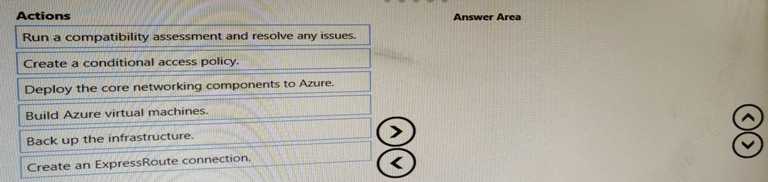
DRAG DROP A customer has an on-premises SAP environment. The customer plans to migrate SAP to Azure. You need to prepare the environment for the planned migration. Which three actions should you perform in sequence before the migration? To answer, move the appropriate actions from the list of actions to the answer area and arrange them in the correct order.
?
Free AZ-120 Practice Test Questions and Answers (2026)
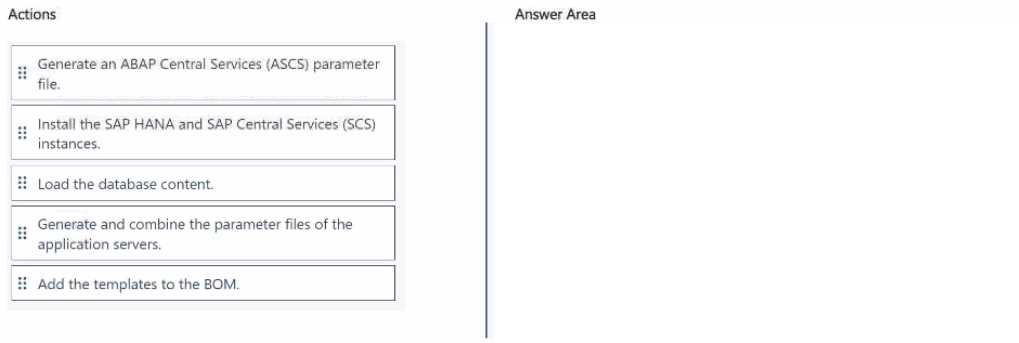
?DRAG DROP You have a bill of materials (BOM) that describes SAP deployments. You plan to automate the implementation of an SAP S4/HANA deployment to Azure by using the SAP deployment automation framework on Azure. You need to generate the SAP application templates for the planned implementation and update the BOM. In which order should you perform the actions? To answer, move all actions from the list of actions to the answer area and arrange them in the correct order. 
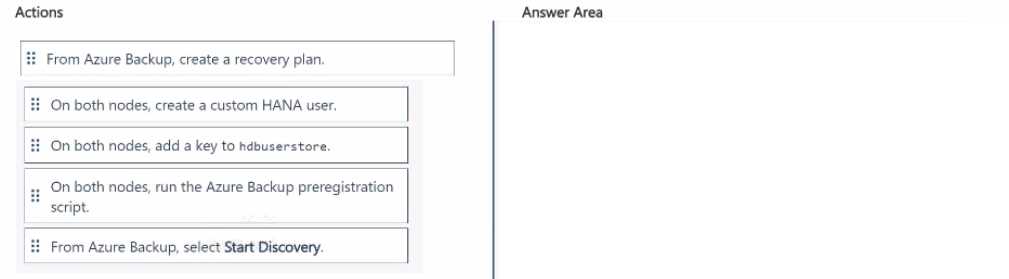
DRAG DROP You have two Azure virtual machines. The virtual machines host a highly available SAP HANA cluster that has HANA system replication configured. You plan to configure Azure Backup to protect the replicated databases of the cluster. You need to ensure that when a failover occurs. Azure Backup automatically uses the new primary node for backups. Which four actions should you perform in sequence? To answer, move the appropriate actions from the list of actions to the answer area and arrange them in the correct order. 
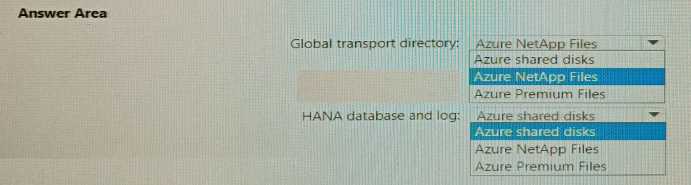
HOTSPOT You plan to deploy a scale-out SAP HANA deployment on Azure virtual machines that will contain a standby node. You need to recommend a storage solution for the deployment. What should you recommend? To answer, select the appropriate options in the answer area. NOTE: Each correct selection is worth one point 
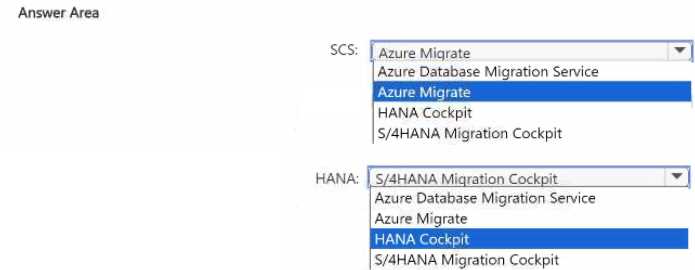
HOTSPOT You have an on-premises SAP landscape that contains an SAP HANA database. You plan to migrate the SAP landscape to Azure. You need to recommend a migration tool that meets the following requirements: • Minimizes downtime during the migration • Migrates the HANA database servers to Azure virtual machines Which tool should you use to migrate SAP Central Services (SCSJ and HANA? To answer, select the appropriate options in the answer area. NOTE; Each correct selection is worth one point. 
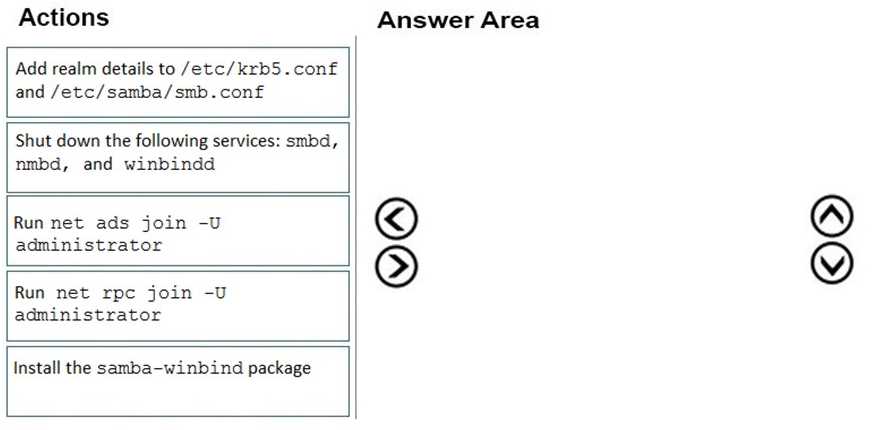
DRAG DROP Your on-premises network contains an Active Directory domain. You have an SAP environment on Azure that runs on SUSE Linux Enterprise Server (SLES) servers. You configure the SLES servers to use domain controllers as their NTP servers and their DNS servers. You need to join the SLES servers to the Active Directory domain. Which three actions should you perform in sequence? To answer, move the appropriate actions from the list of actions to the answer area and arrange them in the correct order. 
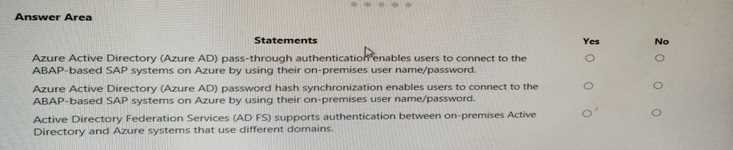
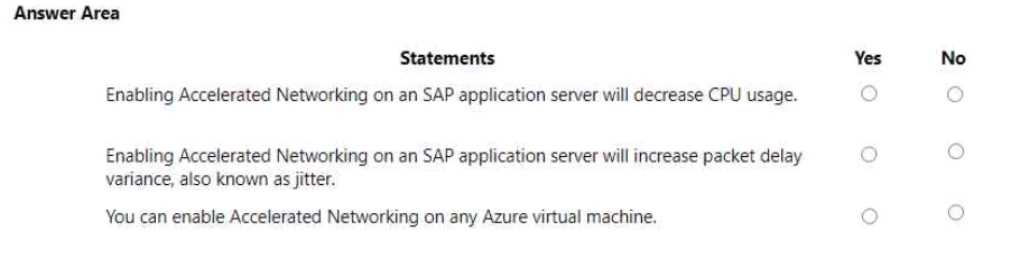
HOTSPOT For each of the following statements, select Yes if the statement is true. Otherwise, select No. NOTE: Each correct selection is worth one point. 
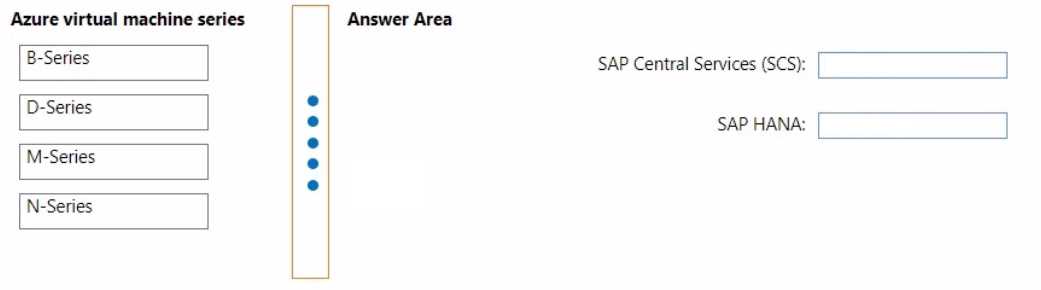
DRAG DROP You need to deploy an SAP production landscape on Azure. The solution must be supported by the SAP production landscape and must minimize costs. Which Azure virtual machine series should you use for each SAP workload? To answer, drag the appropriate series to the correct workloads. Each series may be used once, more than once, or not at all. You may need to drag the split bar between panes or scroll to view content. NOTE: Each correct selection is worth one point. 
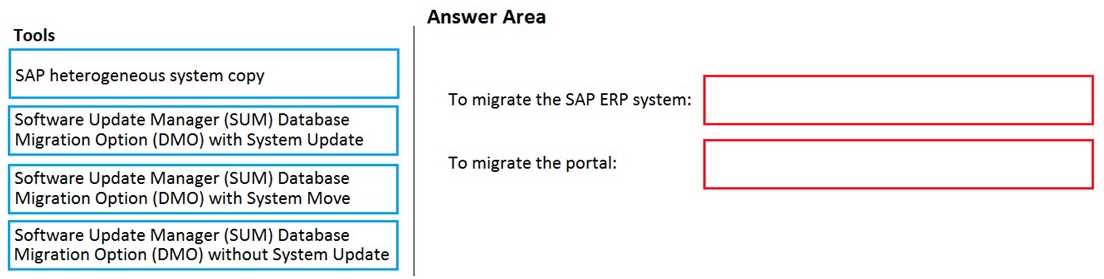
DRAG DROP You have an on-premises SAP environment that runs on SUSE Linux Enterprise Server (SLES) servers and Oracle. The version of the SAP ERP system is 6.06 and the version of the portal is SAP NetWeaver 7.3. You need to recommend a migration strategy to migrate the SAP ERP system and the portal to Azure. The solution must be hosted on SAP HANA. What should you recommend? To answer, drag the appropriate tools to the correct components. Each tool may be used once, more than once, or not at all. You may need to drag the split bar between panes or scroll to view content. NOTE: Each correct selection is worth one point. 
?What's covered in this practice questions set
2: Design and implement an infrastructure for SAP Workloads on Azure (25–30%) · 9 questions
📖 About this Domain
This domain covers the design and implementation of core Azure infrastructure for SAP workloads. You will focus on compute, storage, and networking components to meet SAP performance and availability requirements.
🎓 What You Will Learn
- Design Azure compute for SAP, including selecting certified VM SKUs and configuring Proximity Placement Groups for low latency.
- Configure Azure networking for SAP by designing VNet and subnet layouts and implementing NSGs for traffic segmentation.
- Implement Azure storage for SAP, choosing between Azure Premium Storage, Ultra Disk, and Azure NetApp Files for specific SAP directories.
- Establish High Availability and Disaster Recovery by configuring Availability Sets, Availability Zones, and using Azure Site Recovery.
🛠️ Skills You Will Build
- Deploying SAP-certified Azure VMs and configuring them for optimal performance and supportability.
- Architecting secure network topologies using VNets, subnets, NSGs, and ASGs for multi-tier SAP landscapes.
- Provisioning and managing high-performance storage solutions like ANF for SAP HANA shared filesystems.
- Implementing HA clusters using Pacemaker with STONITH devices and configuring DR replication with Azure Site Recovery.
💡 Top Tips to Prepare
- Memorize the specific SAP-certified M-series and E-series VM families and their primary use cases.
- Practice designing VNet layouts with multiple subnets for application, database, and management tiers.
- Understand the performance tiers and IOPS/throughput capabilities of Azure Premium Storage and ANF for SAP sizing.
- Master the differences between Availability Sets and Availability Zones for SAP HA architecture design.
4: Migrate SAP Workloads to Azure (15–20%) · 8 questions
📖 About this Domain
This domain covers the end-to-end process of migrating existing SAP landscapes to the Azure platform. You will learn to select appropriate migration strategies and tools like Database Migration Option (DMO) and Azure Migrate. The focus is on the technical execution of migrating databases and application servers, followed by post-migration validation.
🎓 What You Will Learn
- Learn to determine the correct migration strategy, such as lift and shift or a new implementation, based on source environment specifics.
- Understand how to select and use migration tools like Software Provisioning Manager (SWPM), Database Migration Option (DMO), and Azure Migrate for SAP workloads.
- Learn the technical steps to migrate SAP databases using methods like backup/restore and application servers using tools like Robocopy or rsync.
- Learn to perform post-migration verification, configure high availability using Pacemaker clusters, and set up Azure Backup for SAP HANA.
🛠️ Skills You Will Build
- You will build skills to assess on-premises SAP environments and design a comprehensive migration plan to Azure.
- You will build the ability to implement and operate migration tools like SWPM and DMO for heterogeneous and homogeneous system copies.
- You will build hands-on skills to execute the migration of SAP Central Services (ASCS/ERS), application servers, and databases to Azure IaaS.
- You will build skills to validate the migrated SAP system, configure Azure Backup, and implement disaster recovery solutions.
💡 Top Tips to Prepare
- Focus on the use cases for DMO with System Move versus classic migration tools like SWPM for system copies.
- Deeply understand networking requirements for migration, including ExpressRoute connectivity and storage configurations for migration targets.
- Know the exact steps for post-migration validation, including running SAP transaction SICK and configuring transport management systems (TMS).
- Revisit how to configure high availability for migrated SAP Central Services (ASCS) and HANA databases using Azure Load Balancers and Pacemaker clusters.
3: Design and implement high availability and disaster recovery (HA/DR) (20–25%) · 2 questions
📖 About this Domain
This domain covers the architecture and implementation of business continuity solutions for SAP workloads on Azure. It focuses on configuring high availability within an Azure region and disaster recovery across Azure regions. You will learn to mitigate downtime and data loss for critical SAP systems.
🎓 What You Will Learn
- You will learn to design and implement HA for SAP NetWeaver and S/4HANA using Azure Load Balancer and Pacemaker clusters.
- You will learn to configure SAP HANA high availability using HANA System Replication (HSR) and STONITH mechanisms.
- You will learn to implement a DR strategy for SAP landscapes by replicating VMs to a secondary region with Azure Site Recovery (ASR).
- You will learn to configure and manage data protection for SAP workloads using Azure Backup for SAP HANA and virtual machines.
🛠️ Skills You Will Build
- You will build skills to configure Pacemaker clusters on SLES/RHEL for SAP Central Services (ASCS/ERS) automatic failover.
- You will build skills to deploy and manage HANA System Replication (HSR) for database-level high availability and disaster recovery.
- You will build skills to orchestrate DR failover and failback for multi-tier SAP applications using Azure Site Recovery plans.
- You will build skills to perform backup and restore operations for SAP HANA databases using the Azure Backup service.
💡 Top Tips to Prepare
- Master the configuration of STONITH devices, specifically the Azure Fence Agent, for Pacemaker clusters to prevent split-brain scenarios.
- Understand the different HANA System Replication modes and their impact on Recovery Point Objective (RPO) and Recovery Time Objective (RTO).
- Gain hands-on experience with Azure Site Recovery by performing test failovers for a multi-tier SAP application.
- Focus on the prerequisites and configuration steps for the Azure Backup for SAP HANA on Azure VM solution, including the pre-registration script.
1: Plan and administer a Microsoft Azure for SAP Workloads solution (25–30%) · 1 questions
📖 About this Domain
This domain covers key concepts related to 1: Plan and administer a Microsoft Azure for SAP Workloads solution (25–30%).
🎓 What You Will Learn
- Core concepts of 1: Plan and administer a Microsoft Azure for SAP Workloads solution (25–30%)
- Best practices and implementation
- Real-world application scenarios
🛠️ Skills You Will Build
- Technical proficiency in 1: Plan and administer a Microsoft Azure for SAP Workloads solution (25–30%)
- Problem-solving abilities
- Practical implementation skills
💡 Top Tips to Prepare
- Review official documentation and study guides
- Practice with hands-on exercises
- Focus on understanding core principles