
Q: 14
DRAG DROP A company plans to deploy Microsoft 365. You need to identify differences between the features in Exchange Online and Exchange Server. Match the appropriate features to the corresponding supported environments. To answer, drag the appropriate environments to the correct features. Each environment may be used once, more than once, or not at all. You may need to drag the split bar between panes or scroll to view content. 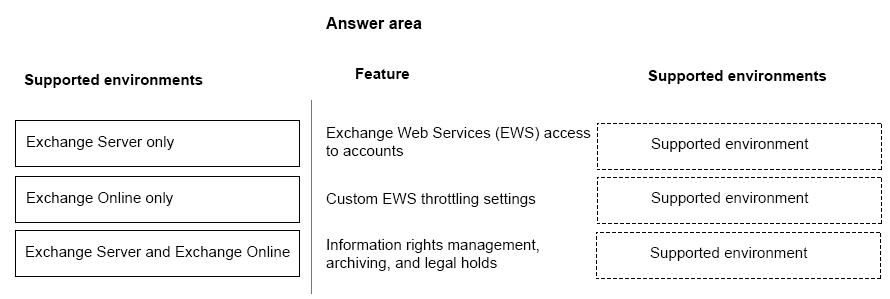
Drag & Drop
Discussion
EWS access to accounts: both, Custom EWS throttling: Exchange Server only, IRM/archiving/legal holds: both. Custom throttling is the common trap.
EWS access to accounts: both, Custom throttling: Exchange Server only, Compliance features: both. Seen this pattern a few times.
EWS access: both, Custom throttling: Exchange Server only, Compliance features: both. Pretty sure that's the right match.
EWS access to accounts: both, Custom EWS throttling: Exchange Server only, IRM/archiving/legal holds: both. Confident but open to pushback.
Exchange Web Services access to accounts: both, Custom EWS throttling settings: Exchange Server only, IRM/archiving/legal holds: both. EWS access and compliance tools work in both setups but only the server lets you tweak throttling. Think that's right based on how Microsoft manages online configs. Someone correct me if I missed something.
Be respectful. No spam.