SIMULATION Task 10 You need to set Microsoft SharePoint as the only cloud storage option for all teams.
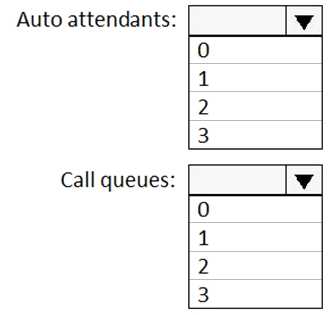
HOTSPOT Your company has a Microsoft 365 subscription that uses Phone System. You need to configure Microsoft Teams to meet the following requirements: Ensure that calls to the company’s sales department are routed to multiple users in the sales department. Ensure that calls to the company’s marketing department are routed to multiple users in the marketing department. Outside of business hours, ensure that calls from PSTN users receive a custom greeting. During business hours, ensure that calls from PSTN users can be received by the sales and marketing department users. What is the minimum number of auto attendants and call queues you should configure to meet the requirements? To answer, select the appropriate options in the answer area. NOTE: Each correct selection is worth one point.
I don’t think you should recommend any inbound ports for Teams cloud-just outbound 80 (HTTP) and 443 (HTTPS). Inbound is only needed on-prem or when you're running local services, which isn’t the case here. The question trips people up with those inbound distractors. Pretty sure outbound 80/443 is all you need for Office 365 connectivity. Let me know if I’m missing something.
I don’t think it needs inbound ports at all for Teams cloud, just outbound 80 and 443. Common mistake to allow unnecessary inbound traffic here from exam reports. Outbound only.
SIMULATION Task 4 You need to add the following disclaimer as pan of all Teams meeting invites: “Disc aimer: This meeting may be recorded for quality and training purposes.”
SIMULATION Task 11 You need to ensure that users can perform the following actions: • Record Teams calls and Teams meeting. • Transcribe Teams calls and Teams meeting.
SIMULATION Task 2 You need to ensure that only users from litwareinc.com can be added to Teams as guest users.
SIMULATION Task 12 A company named Contoso, Ltd, plans to deploy Teams Phone with location-based emergency dialing. You need to ensure that when users dial emergency numbers, the call is routed based on the user's current location You do NOT need to configure networks and locations at this time.
Just curious, are we looking at only the default global policies or is there any info about custom/per-user overrides? The screenshots look like global settings, but Teams can get tricky if something else is layered on top. Anyone spot a user-level policy here?
Is everyone sure the first statement isn't a trap? I saw a similar question and the global meeting policy toggle can quietly block it, while the live events one looks more permissive. Did anyone catch a setting that makes both Yes?
Are you sure about the first statement being No? I checked the meeting policy and it looks like the restriction set will block that specific meeting action. Maybe I’m missing something here. What setting makes it Yes instead?
SIMULATION Task 1 Your company is opening a branch office in Miami. The office uses a network range of 10.10.10.0/24. You need to restrict Teams bandwidth to 1.000 Kpbs for all the users working at the Miami office. The solution must NOT affect other offices.
Nice layout on the table, makes it easy to follow.
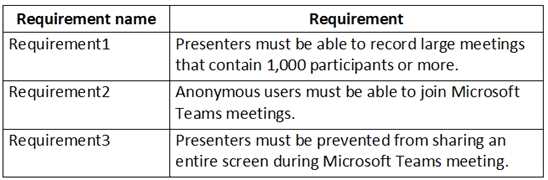
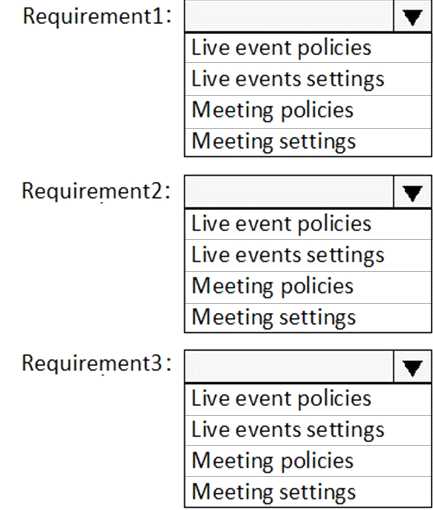
HOTSPOT Your company has a Microsoft 365 subscription. You need to configure Microsoft Teams to meet the requirements shown in the following table. 
Looks like organizer options might be limited since guest users are involved. I'd say the organizer can't assign a guest as a presenter in this policy setting. If you want to double check, the official guide or the live events policy doc is a good source. Pretty sure on this but happy if someone caught a detail I missed.