You have a Microsoft 365 E5 subscription. You purchase the following types of devices: • Windows • Android • iOS You plan to enroll the devices in Microsoft Intune. You need to configure enrollment restrictions. For which device types can you configure device manufacturer restrictions?
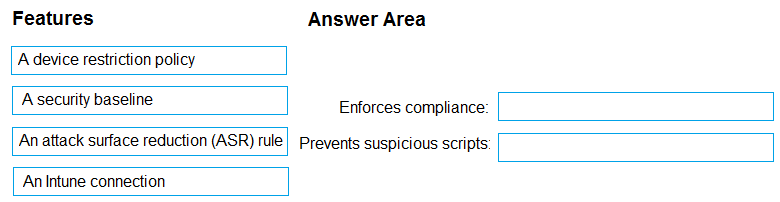
Official docs and compliance policy guides usually get you through these drag-and-drops. For this one, it's: Device 1 - Require Secure Boot, Device2 - Prevent jailbroken devices, Device3 - Prevent rooted devices. Pretty sure that's what exam practice sets mention too.
Practice tests cover this exact setup a lot. Device 1 needs Secure Boot, Device2 is all about blocking jailbroken iOS, and Device3 should block rooted Android. Trusted build focus makes BitLocker the wrong pick for Windows here (seen this on official guides too). Agree?
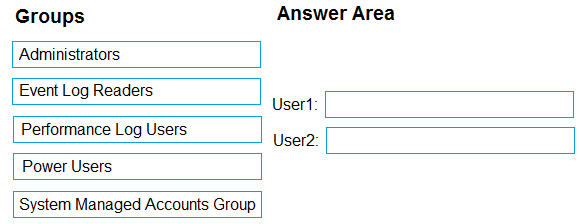
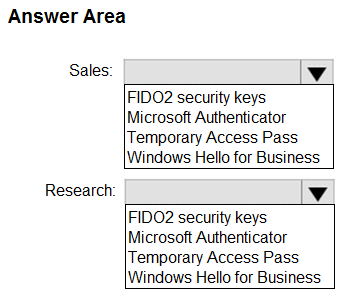
 The company has IT, human resources (HR), legal (LEG), marketing (MKG), and finance (FIN) departments. Contoso recently purchased a Microsoft 365 subscription. The company is opening a new branch office in Phoenix. Most of the users in the Phoenix office will work from home. Existing Environment - The network contains an Active Directory domain named contoso.com that is synced to Azure AD. All member servers run Windows Server 2016. All laptops and desktop computers run Windows 10 Enterprise. The computers are managed by using Microsoft Configuration Manager. The mobile devices are managed by using Microsoft Intune. The naming convention for the computers is the department acronym, followed by a hyphen, and then four numbers, for example FIN-6785. All the computers are joined to the on-premises Active Directory domain. Each department has an organizational unit (OU) that contains a child OU named Computers. Each computer account is in the Computers OU of its respective department. Intune Configuration - The domain has the users shown in the following table.
  User2 is a device enrollment manager (DEM) in Intune. The devices enrolled in Intune are shown in the following table.
 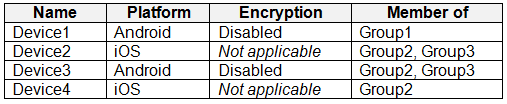 The device compliance policies in Intune are configured as shown in the following table.
  The device compliance policies have the assignments shown in the following table.
 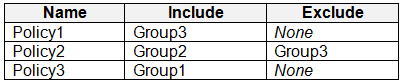 The device limit restrictions in Intune are configured as shown in the following table.
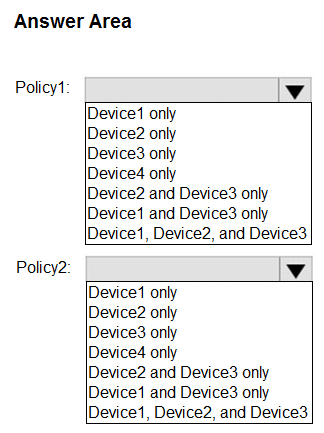
  Requirements - Planned changes - Contoso plans to implement the following changes: • Provide new computers to the Phoenix office users. The new computers have Windows 10 Pro preinstalled and were purchased already. • Implement co-management for the computers. Technical Requirements - Contoso must meet the following technical requirements: • Ensure that the users in a group named Group4 can only access Microsoft Exchange Online from devices that are enrolled in Intune. • Deploy Windows 10 Enterprise to the computers of the Phoenix office users by using Windows Autopilot. • Create a provisioning package for new computers in the HR department. • Block iOS devices from sending diagnostic and usage telemetry data. • Use the principle of least privilege whenever possible. • Enable the users in the MKG department to use App1. • Pilot co-management for the IT department. To which devices do Policy1 and Policy2 apply? To answer, select the appropriate options in the answer area.