
Q: 18
DRAG DROP You have two Fabric notebooks named Load_Salesperson and Load_Orders that read data from Parquet files in a lakehouse. Load_Salesperson writes to a Delta table named dim_salesperson. Load.Orders writes to a Delta table named fact_orders and is dependent on the successful execution of Load_Salesperson. You need to implement a pattern to dynamically execute Load_Salesperson and Load_Orders in the appropriate order by using a notebook. How should you complete the code? To answer, drag the appropriate values the correct targets. Each value may be used once, more than once, or not at all. You may need to drag the split bar between panes or scroll to view content. NOTE: Each correct selection is worth one point. 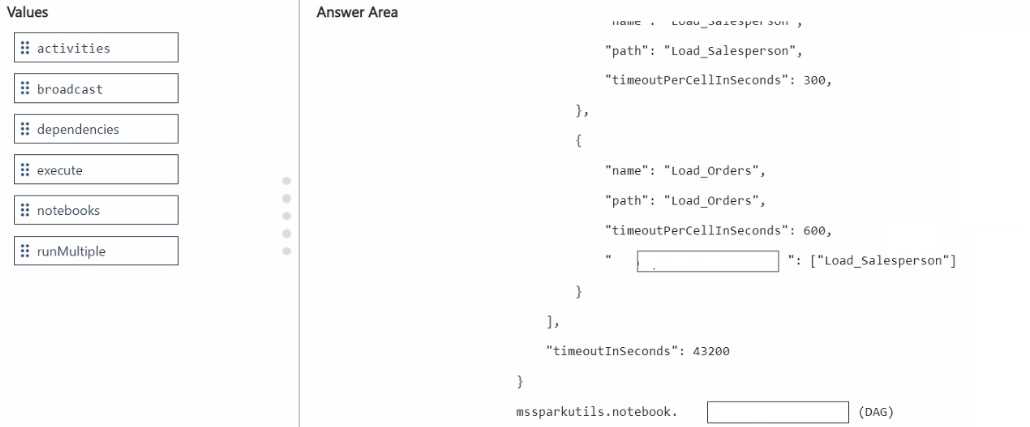
Drag & Drop
Discussion
660, ": dependencies notebook.: runMultiple The trap is mixing up 'activities', but 'dependencies' sets the order. Pretty sure that's it.
660, ": dependencies
notebook.: runMultiple
Pretty sure that works because you define execution order with
notebook.: runMultiple
Pretty sure that works because you define execution order with
dependencies and use runMultiple to trigger the workflow with the right sequence. That matches how notebook DAGs run in Fabric, at least from what I've seen. If there's a newer syntax or method, let me know.dependencies, runMultiple (official guide has some diagrams on this, worth checking for notebook workflow patterns)
Be respectful. No spam.