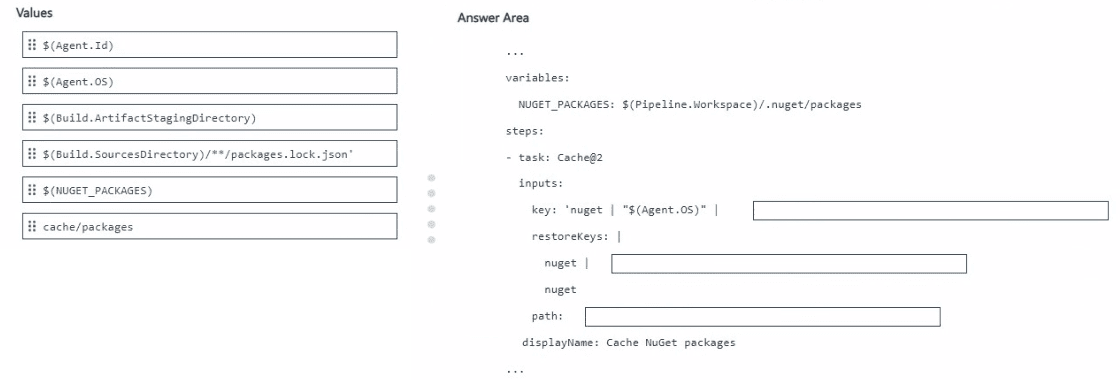
DRAG DROP You use an Azure pipeline to build a .NET app that has NuGet dependencies. You need to ensure that the pipeline caches required NuGet packages. How should you configure thepipeline? To answer, drag the appropriate values to the correct targets. Each value may be used once, more than once, or not at all. You may need to drag the split bar between panes or scroll to view content. NOTE: Each correct selection is worth one point. 
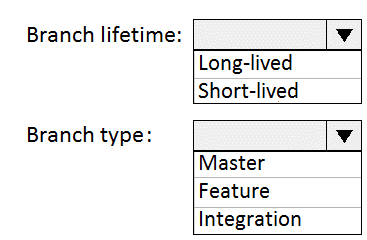
HOTSPOT Your company uses Git as a source code control system for a complex app named App1. You plan to add a new functionality to App1. You need to design a branching model for the new functionality. Which branch lifetime and branch time should you use in the branching model? To answer, select the appropriate options in the answer area. NOTE:Each correct selection is worth one point.
Is anyone using long-lived branches for this kind of work anymore, or is it always short-lived feature branches now? Just trying to see if there's a situation where that's not the best approach.
Short-lived feature branch here. Main reason is you only need the branch until the new functionality is done, then merge back to main. Long-lived branches are mostly for major ongoing streams or releases, which isn't the case. Sometimes people pick release branch by mistake but that's not for features. Pretty sure this matches what you'd see in real projects.
Wouldn't this be a solid case for making a short-lived feature branch? Seems like the normal pattern for adding new functionality in Git unless there's something unusual in the requirements.
Had something like this in a mock, and it was definitely about using a short-lived feature branch for new functionality. This setup lines up with agile workflows, makes merging less painful, and keeps the main branch stable. So for lifetime it's short-lived, for type it's feature. Pretty sure that's what they're after here. Agree?
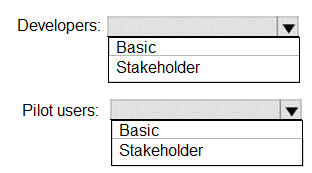
HOTSPOT Your company is building a new web application. You plan to collect feedback from pilot users on the features being delivered. All the pilot users have a corporate computer that has Google Chrome and the Microsoft Test & Feedback extension installed. Thepilot users will test the application by using Chrome. You need to identify which access levels are required to ensure that developers can request and gather feedback from the pilot users. The solution must use the principle of least privilege. Which access levels m Azure DevOps should you identify? To answer, select the appropriate options in the answer area NOTE: Each correct selection is worth one point.
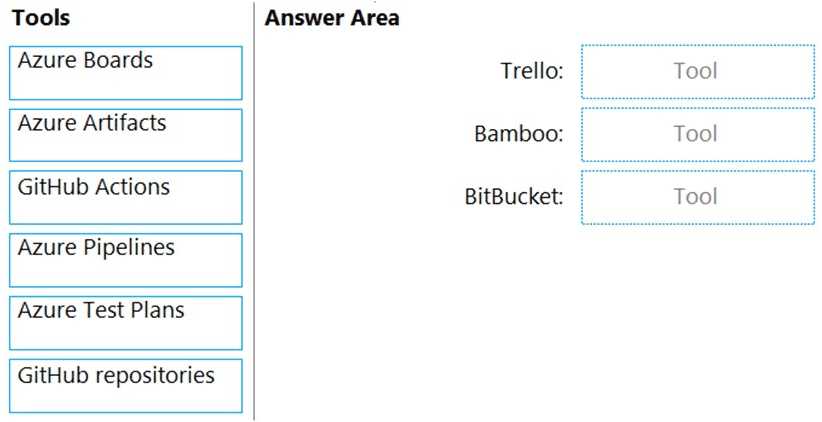
DRAG DROP You need to replace the existing DevOps tools to support the planned changes. What should you use? To answer, drag the appropriate tools to the correct targets. Each tool may be usedonce, more than once, or not at all. You may need to drag the split bar between panes or scroll to view content. NOTE:Each correct selection is worth one point.
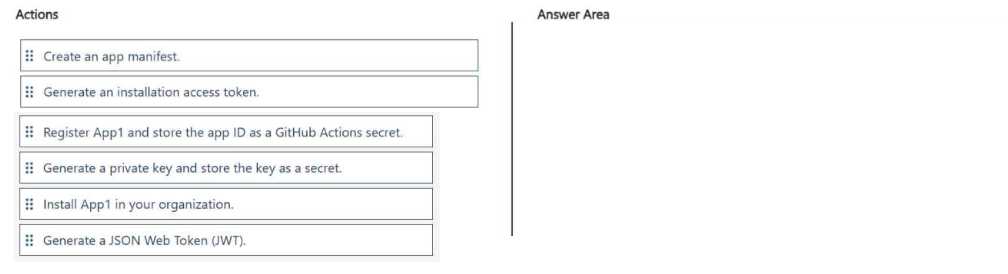
DRAG DROP You have a GitHub organization. You ate creating a GitHub Actions workflow. You need to perform authenticated AP1 requests by using a GitHub app name App1. Which four actions should you perform in sequence? To answer, move the appropriate actions from the list of actions to the answer area and arrange them in the correct order.
I remember a similar scenario from labs on a practice test, sequence is: Register App1 and store app ID, generate private key as secret, install App1 in org, then generate installation access token. That hits each setup stage for GitHub Apps with Actions. I think that's right here but let me know if anyone saw it different on their exam!
Same order as most GitHub Apps setups: Register App1 and save the app ID, generate the private key and store as a secret, install App1 to your org, then generate the installation access token. That lines up with what I've done in practice, but if JWT was in the list, might need to adjust. Does this make sense?
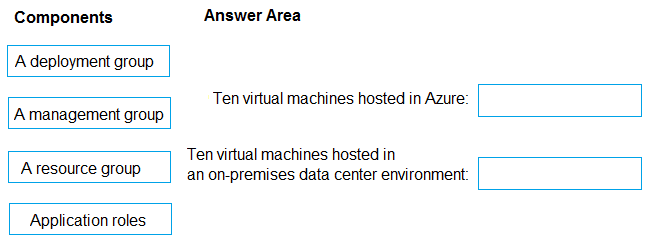
DRAG DROP Your company plans to deploy an application to the following endpoints: • Ten virtual machines hosted in Azure. • Ten virtual machines hosted in an on-premises data center environment All the virtual machines have the- Azure Pipelines agent. You need to implement a release strategy for deploying the application to the endpoints. What should you recommend using to deploy the application to the endpoints? To answer, drag the appropriate components to the correct endpoint. Each component may be used once, more than once, or not at all. You may need to drag the split bar between panes or soon to view content NOTE: Each correct selection n worth one point.
Ten virtual machines hosted in Azure → A deployment group
Ten virtual machines hosted in an on-premises data center environment → A deployment group
DRAG DROP You have a project in Azure DevOps named Project1 that has a release pipeline in Azure Pipeline named ReleaseP1. you need toensure that when a new release is generated for ReleaseP1, a new release note document is created. The release notes must contain new features and bug fixes. Which three actions should you perform in sequence? To answer, move the appropriate actions from the Most of actions to the answer area and arrange them r the correct order. NOTE: More than one order of answer choices is correct You will receive credit for any of the correct orders you select
Yeah, dashboard widget first (to fetch info), then create PAT so the script can access the data, and finish by adding a PowerShell task to actually build the markdown file. Pretty sure that covers the release note workflow here. If anyone thinks using the query step changes things let me know.
Tricky detail here: you actually need to create the query first (to define what counts as features/bugs), then set up a PAT for script auth, and last add the PowerShell task. Widget isn’t for outputting to markdown. Query -> PAT -> PowerShell task is the sequence I’ve seen in labs. If someone got it working by starting with the widget let me know, but pretty sure this is it.
Pretty sure the right flow is: Create a query to get new features and bug fixes, then generate a PAT so the script can authenticate, then add a PowerShell task in ReleaseP1 to write it all out as markdown. This matches how release notes are typically automated. Let me know if you see it differently!
- Create a query for features/bugs
- Create PAT
- Create PowerShell task to write markdown file
Widget as first step looks right to me-seems like the intention is to fetch and show info before automating the file creation. PAT then script after makes sense if you want it all connected. I might be missing a trick with the query step but this way lines up with similar practice tests. Maybe the widget is a trap but I think this order works. Agree?
DRAG DROP You have a protect in Azure DevOps. You need to associate an automated testto a test case. Which three actions should you perform in sequence? To answer, move the appropriate actions from the list of actions to the answer area and arrange them in the correct order.
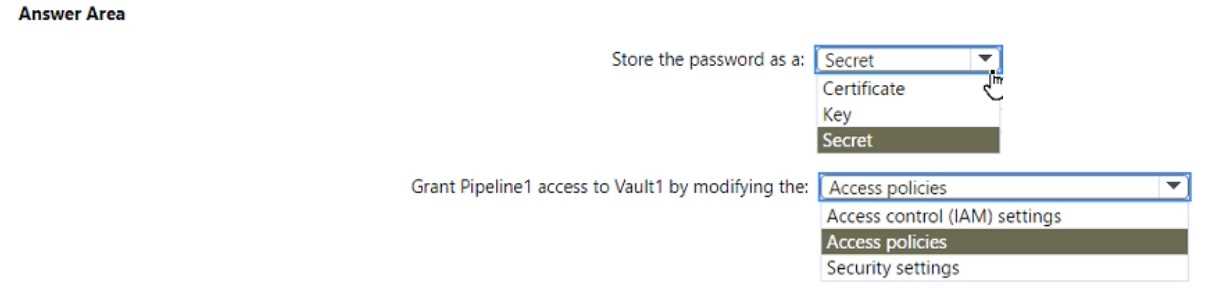
HOTSPOT You have an Azure subscription that contains an Azure key vault named Vault1. an Azure pipeline named Pipeline1, and an Azure SQL database named DB1. Pipeline1 is used to deploy an app that will authenticate to DB1 by using a password. You need to store the password in Vault1. The solution must ensure that the password can be accessed by Pipeline1. What should you do? To answer, select the appropriate options in the answer area. NOTE: Each correct selection is worth one point.
Ugh, Azure loves to switch up between policies and RBAC in these questions. For this one, it's store as a secret and adjust access policies, since no RBAC requirement is mentioned. Seen similar on other practice sets.
Store the password as a secret, then grant Pipeline1 access by updating Vault1's policies. That's the common way in Azure Key Vault for pipelines-secrets hold passwords, and policies control access. Saw similar steps in the official docs and practice labs.