
Q: 1
DRAG DROP You use an Azure pipeline to build a .NET app that has NuGet dependencies. You need to ensure that the pipeline caches required NuGet packages. How should you configure thepipeline? To answer, drag the appropriate values to the correct targets. Each value may be used once, more than once, or not at all. You may need to drag the split bar between panes or scroll to view content. NOTE: Each correct selection is worth one point. 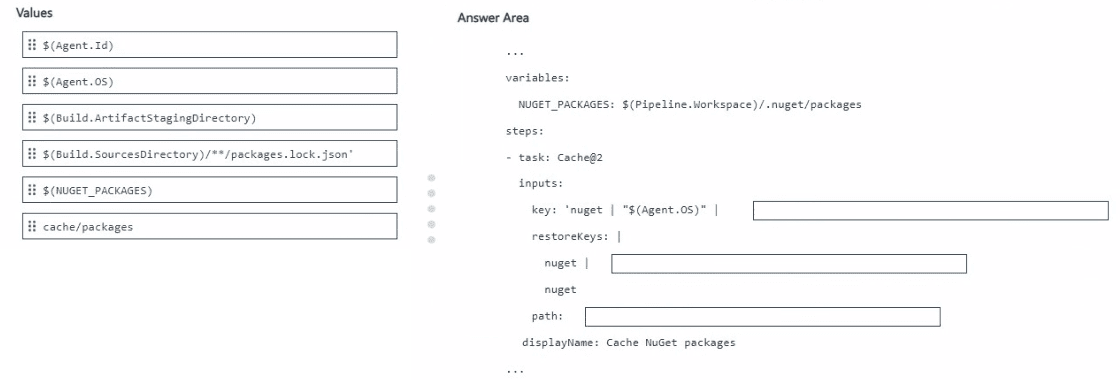
Drag & Drop
Discussion
$(Build.SourcesDirectory)/**/packages.lock.json' for Bucket 1, $(Agent.OS) in Bucket 2, and $(NUGET_PACKAGES) for Bucket 3. This matches how Azure Pipelines cache NuGet packages with proper keys and restore. Pretty sure this is the standard setup unless the question asks for agent-specific keys.
This looks like one from my exam last year, on the official lab, keys line up with bucket order: lock file pattern, OS, then NUGET_PACKAGES.
$(Agent.Id) in Bucket 1, $(Build.ArtifactStaging Directory) for Bucket 2, cache/packages to Bucket 3
$(Build.SourcesDirectory)/**/packages.lock.json' to Bucket 1, $(Agent.OS) in Bucket 2, $(NUGET_PACKAGES) goes to Bucket 3. One trap is using Agent.Id.
Be respectful. No spam.