
DRAG DROP You plan to import data from your on-premises environment to Azure. The data Is shown in the following table.  What should you recommend using to migrate the data? To answer, drag the appropriate tools to the correct data sources-Each tool may be used once, more than once, or not at all. You may need to drag the split bar between panes or scroll to view content. NOTE: Each correct selection is worth one point.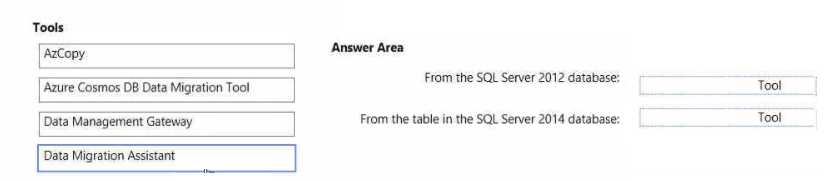
Pretty sure the intended mapping is SQL Server 2012 database to Data Migration Assistant and SQL Server 2014 table to Azure Cosmos DB Data Migration Tool. DMA handles SQL-to-Azure SQL well, while the Cosmos tool is specific for moving data into Cosmos DB from relational sources. If anyone got a different result in live exams, let me know!
Yeah, this matches what’s on the official docs: Data Migration Assistant for the SQL Server 2012 database since that’s what it’s built for, and Cosmos DB Data Migration Tool for migrating a table into Cosmos DB from SQL. Pretty sure this is how they want it split but happy if anyone notices a catch I missed.
- From the SQL Server 2012 database: Data Migration Assistant
- From the table in the SQL Server 2014 database: Azure Cosmos DB Data Migration Tool