Hotspot 1
Correct Answer: joins the conversation
Explanation: The bot's "Greeting" dialog is configured to start upon a ConversationUpdate activity. This specific activity is sent by the channel when a new member, such as a user, is added to the conversation. The condition turn.activity.membersAdded[0].id != turn.activity.recipient.id is a standard check to ensure the activity is processed for a user joining, and not for the bot itself joining, thus triggering the welcome message at the start of the interaction.
References: Microsoft. (2023). Conversation update activities. Microsoft Learn. Retrieved from https://learn.microsoft.com/en-us/azure/bot-service/bot-builder-conversations?view=azure-bot-service-4.0&tabs=csharp#conversation-update-activities. This document states, "When your bot is added to a conversation...it receives a conversation update activity." It also explains the use of the membersAdded property to identify who joined. Microsoft. (2023). Triggers in Composer. Microsoft Learn. Retrieved from https://learn.microsoft.com/en-us/composer/concept-events-and-triggers#activity-triggers. This documentation specifies that the ConversationUpdate activity (often used in a "Greeting" trigger) is fired "when a user or bot joins or leaves a conversation."
Hotspot 2
Correct Answer: Language Generation (.lg) template
Explanation: In Bot Framework Composer, the "Send a response" action is used to send messages to the user. The content of these messages is defined and managed using Language Generation (.lg) files. These files contain templates that can include simple text, variations, and even logic for constructing responses. The exhibit shows a reference to "Welcome message," which is the name of a specific template within an .lg file.
References: Microsoft. (2023). Language generation in Composer. Microsoft Learn. Retrieved from https://learn.microsoft.com/en-us/composer/concept-language-generation. This source states, "Language Generation (LG) is a feature in the Bot Framework SDK that lets you manage your bot's outgoing messages... You define LG templates in .lg files... Composer uses the .lg file format to manage bot responses." Microsoft. (2023). Send a response action. Microsoft Learn. Retrieved from https://learn.microsoft.com/en-us/composer/reference-send-a-response. This page details the "Send a response" action, showing how it is used to select and send responses defined in .lg files.
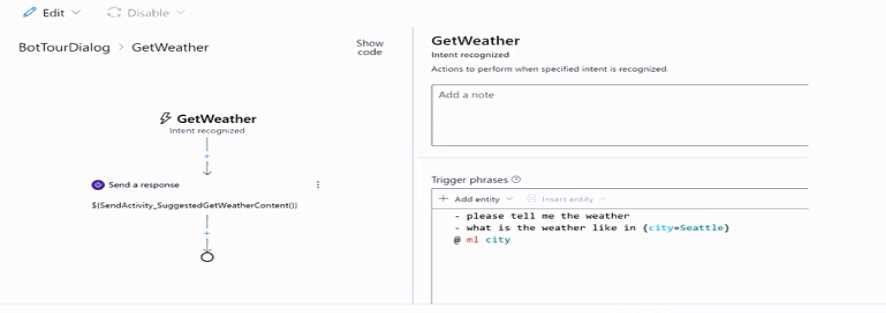
 Use the drop-down menus 10 select the answer choice that completes each statement based on the
information presented in the graphic.
NOTE: Each correct selection is worth one point.
 Use the drop-down menus 10 select the answer choice that completes each statement based on the
information presented in the graphic.
NOTE: Each correct selection is worth one point.
