
DRAG DROP An engineer is configuring a Jabber client installation switch for a phone system using Cisco UCM as the registration server, with a softphone control address of 10.0.1.200. and configuration files received from 10.11.20.201 after all previous configurations are cleared. Drag and drop the snippets from the bottom of the image onto the blanks in the image to complete this configuration. Not all options are used. 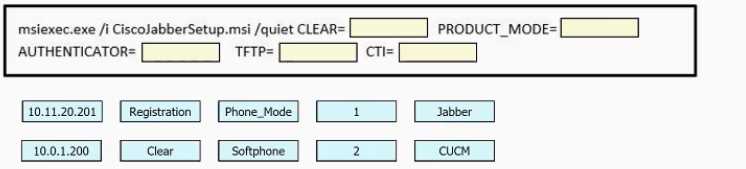
Going with B and D for this one. The UCM should be set as the registration server, and config files come from the TFTP at 10.11.20.201, so those two snippets fit. Pretty sure, but I'd double-check if any special Jabber config applies.
Had something like this in a mock, it's B and D. The IPs match the roles for UCM softphone and config file server. Seen that combo more than once.