Free VMCE V12 Practice Test Questions and Answers (2026)

View Mode
Q: 1
Veeam ONE has been installed and configured. The infrastructure contains five Veeam Backup & Replication servers. The administrator needs to check the remaining capacity on each of the backup repository servers. Where can they see this information?
Options
17 comments in the community discussion
8
Option E. The backup proxy at each site helps keep VM data transfers stable, especially over WAN links where connections can be less reliable. I saw a similar question in some practice exams and E was flagged as the right answer.
4
Option D-official docs and the Veeam lab environment both point to Data Protection View for checking repo capacity. Seen similar in practice exams too, so pretty confident unless something changed recently.
Q: 2
Management asks a backup administrator to deploy the Veeam Agent on a number of Amazon EC2 instances running Windows and Linux operating systems. A Veeam Protection Group is also required by management. The Veeam Distribution Server does not have network access to these instances. What protection group type should be used to select these objects?
Options
13 comments in the community discussion
3
Option C
1
D or maybe C, but Veeam really doesn't make this obvious. Since the distribution server can't touch the EC2s, "Cloud machines" (D) is probably the intent, using AWS API instead of direct network. Not 100% sure though, vendor wording always trips me up.
Q: 3
A corporation needs to give their MS SQL DBAs a way to restore their MS SQL databases. Which action would allow the corporation to grant this access without giving access to other operations?
Options
17 comments in the community discussion
9
A. Official Veeam documentation covers this, especially around failover plans and VM processing order. Practice with the labs or walkthroughs if you can.
6
Option C
Q: 4
The organization has a strategy to copy its VM and Agent backups to the alternate site. The backup administrator has requested to implement a similar backup copy strategy for unstructured data backups with 10 additional days of retention. Which configuration is correct?
Options
14 comments in the community discussion
1
C is the way to go for this one. File share copy job directly supports unstructured data like file shares and gives you separate retention, which matches what the VM/Agent backup copy strategy does. D is only for regular backup copy jobs, not file share-specific stuff. Pretty sure it's C but let me know if I'm missing
1
C/D? I've seen some exam reports mention using agents for SQL Always On clusters. Might be worth checking the official Veeam guide and practice tests for how they handle log backups in this setup.
Q: 5
Veeam Backup and Replication is currently configured with backup jobs that are targeting a local Backup Repository on a Windows Server. The backups are now configured to run periodically every 6 hours. The engineer wants to create a secondary copy of the backups. However, due to bandwidth and compute restrictions, the copies must be created and transferred only once a day. Which option should the engineer choose to achieve this goal?
Options
14 comments in the community discussion
1
Is there a reason some would pick D here? Seems like Immediate Copy or capacity tier options don’t really match the question’s restriction about making only one transfer each day.
1
A tbh, official guide and lab scenarios usually cover this Periodic Copy setup for bandwidth limits.
Q: 6
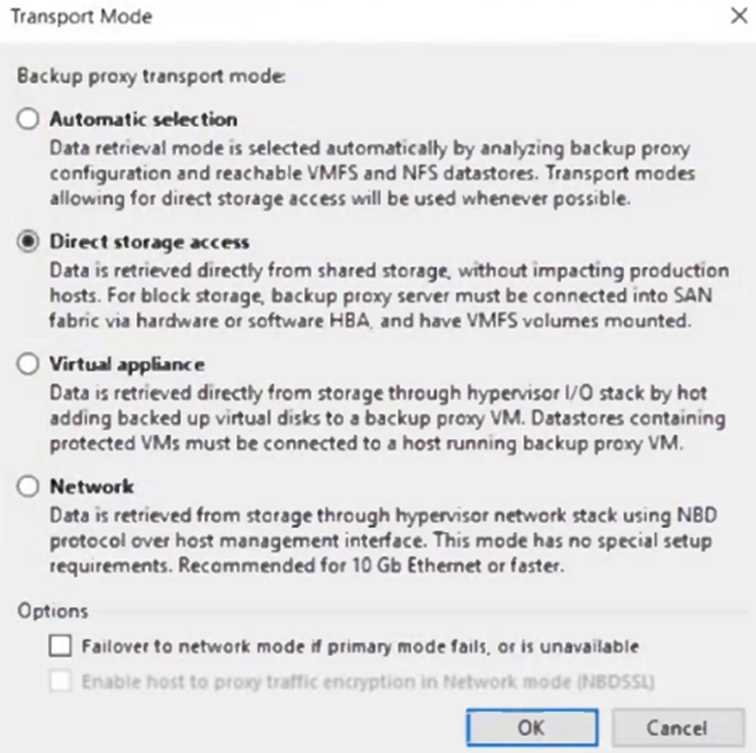
A Veeam proxy server is configured as follows. No modifications are allowed to the transport mode. When performing a restore of a VMware virtual disk using this proxy server, the restore fails. What is a possible cause? Veeam VMCE V12 question
Options
17 comments in the community discussion
2
Option C
1
Yeah, that's C. Thin-provisioned disks run into problems with Direct SAN mode.
Q: 7
A physical Linux file server needs to be migrated to VMware ESXi. The server has several volumes: /dev/sda (60GB), /dev/sdb (1TB) and /dev/sdc (4TB). What is the quickest option to migrate the server?
Options
15 comments in the community discussion
5
Option B is the fastest because Instant VM Recovery spins up the whole physical server as a VM directly from backup. Official guide and hands-on labs both show it's much quicker than exporting disks. Pretty sure that's what Veeam expects here.
1
B , Instant VM Recovery gets the whole physical server online as a VM fast, straight from backup. You don't wait on full disk restores before it boots, so it's easily the quickest for migration. Anybody see a reason this wouldn't work here?
Q: 8
A physical Windows file server protected by Veeam Agent for Windows needs to be migrated to a local VMware ESXi. The server has several volumes: C: (60GB), D: (1TB) and E: (4TB). What is the quickest option to migrate the server to a local VMware ESXi host?
Options
9 comments in the community discussion
1
D imo. Instant VM Recovery is way faster here since you can spin up the VM straight from backup, even with big disks. Easy to get thrown off by C, but D fits "quickest" best.
1
Option D, always these migration questions try to trip you up but Instant VM Recovery is the fastest way here.
Q: 9
Which Veeam replication failover function ensures that changes made during a failover are copied to the original production VM?
Options
14 comments in the community discussion
2
Looks like A. Fallback is the Veeam process that actually pushes all the changes from the replica back to your original VM. Permanent failover (B) just switches prod permanently but doesn't sync changes, so that's a common gotcha. Seen this tested in practice labs-chime in if anyone's seen it act differently.
2
Probably A here. Backup copy job keeps the load off Site B VMs and works with the slow link setup.
Q: 10
A business has the following new regulatory requirements to follow: 3-2-1 Prevent the most recent 31 days of any backup files from being deleted or modified Keep 1 copy of a monthly restore point around for 2 years They have the following setup: A standalone repository on a NAS A backup job keeping 31 days of restore points A backup copy job to an Amazon S3 Repository, keeping 31 days of backups and 24 monthly GFS restore points Which two actions should the engineer take to change the environment to meet the new requirements? (Choose two.)
Options
16 comments in the community discussion
1
D and E tbh, since regular NAS just can't handle Veeam's immutability properly. Linux Hardened Repo covers the local side, S3 Object Lock for cloud. That combo meets the 31-day no-delete rule. Agree?
1
D , but only if the NAS is just SMB/NFS, since Veeam can't do backup immutability there. You'd need a Linux Hardened repo for local and enable S3 Object Lock for cloud. If it was a WORM NAS, maybe A would work but not with standard setups.
Q: 11
What does Veeam's Secure Restore functionality ensure during restores?
Options
5 comments in the community discussion
2
Its C, pretty sure. Secure Restore sounds like it's about encrypting during restore with AES, not just scanning for threats. Did I miss something obvious?
1
A, saw a similar question in an exam report. Instant Disk Recovery is way faster for a single drive.
Q: 12
A 3-node Microsoft SQL Always On cluster is running in a VMware environment. The RPOs are: • 1 day for the cluster nodes • 15 minutes for the log files How should the cluster be backed up?
Options
8 comments in the community discussion
1
C saw similar question in a practice test, only Linux agent supports backup from native snapshots like LVM or Btrfs.
My vote is C, since using the Agent with a managed backup policy and log shipping sounds like it covers SQL logs at 15 min intervals. A is tempting but I thought this type of cluster sometimes needs agent-based jobs. Not 100% sure, open to feedback.
Q: 13
An engineer needs to be able to perform all functions without needing to access the backup server locally or over remote desktop. What should the engineer do?
Options
4 comments in the community discussion
1
You can do everything from the Veeam console installed on your desktop, so C fits best here.
C/D? Not sure here, but thinking D makes sense since instant recovery spins up directly on local VMware and you don’t have to wait for the full restore. C isn’t a thing in Wasabi as far as I know. Anyone got practical experience with this scenario?
Q: 14
An engineer has used a Linux Hardened Repository as the backup repository. The immutability period is set to 60 days. The backup settings are: Retention Policy: 14 days GFS Weekly full backup: 1 week GFS Monthly full backup: 6 months If a full backup is created on 27th May 2023 with a monthly GFS flag, when will this restore point be automatically deleted?
Options
7 comments in the community discussion
8
Option D Similar question came up in practice exams. Data Protection View is where they show backup repo stats like capacity.
1
I don’t think it’s C. B makes more sense because the immutability is set to 60 days, so the earliest Veeam could automatically delete would be after July 26th. The monthly GFS flag does hold it longer, but I thought cleanup happens right after both windows close, which lines up closer to B. That’s how I understood it f
Q: 15
A photography company provides online purchase of photographs. The core of the business operates from an Oracle database that stores all company images. New photos are continuously added to the database at widely variable intervals. Company policy only requires the database to be protected. Which Veeam Feature will provide complete backup and recovery for this database?
Options
4 comments in the community discussion
B , but only if they're using Oracle's RMAN properly. The key is that the plug-in lets you back up both the database and redo logs at a fine-grained interval, which fits the variable photo uploads. If they just want whole-server backup, C could maybe work but doesn't give granular restores. Anyone see it differently?
B , since Veeam Service Provider Console 7.0 added support for deploying and managing Veeam Backup for Microsoft 365 directly. The others aren’t available for remote deployment through the console. Anyone see a reason it’d be something else?
Q: 16
An engineer has 3 Veeam Backup servers in 3 different data centers. The engineer needs a way to have centralized licensing and role-based access control. How should the engineer accomplish this with the least effort?
Options
10 comments in the community discussion
1
C/D? Both let you centralize somewhat but I think D is the one with RBAC built in.
D (not C). is the only option with true centralized licensing and RBAC out of the box.
Q: 17
A company has an application on a VMware VM that stores customer photos. Customers may request their photos be removed at any time. The server needs to be restored from last week's backup. What Veeam restore process allows for custom scripting to be run to automatically remove any required photos before the server is returned to production?
Options
7 comments in the community discussion
1
Staged Restore is the feature you're looking for here, so C. It lets you run scripts in an isolated lab before pushing the VM back to production. Saw similar setups in official guides and labs. Pretty sure that's the Veeam-recommended way, but open to other takes if anyone's used a different process.
1
Option C makes the most sense here. Staged Restore is the only Veeam process that lets you run custom scripts in an isolated environment before putting the VM back into production, which covers deleting the requested customer photos. B is a trap since Instant VM Recovery doesn't let you modify data before going live
Q: 18
To be able to increase backup retention, the company has bought a Data Domain deduplication appliance. After setting up the jobs to use it, the backup administrator observes an increase of resource consumption on the backup server. The proxy configuration has not been modified. What is causing the issue?
Options
8 comments in the community discussion
4
C or D, but leaning C. With Data Domain, if you don't specify a dedicated gateway, the backup server acts as the gateway by default so it gets loaded. Saw similar details in the official guide and some practice tests. Pretty sure that's why the resource use went up.
1
C imo, saw a similar question in another practice set. Backup server acts as gateway by default if proxy isn’t set.
Q: 19
Which two environments can Veeam Agents back up? (Choose two.)
Options
5 comments in the community discussion
1
Not C, it's B and E. Veeam Agents only support mainstream Windows Server and Linux distros like Ubuntu, the others are not supported. C is a common trap since IBM iSeries sounds like a target but it's not covered.
B/C for me. Veeam does Linux so Ubuntu makes sense, and I keep thinking iSeries is supported too.
Q: 20
What is a Recovery Point Objective (RPO) in regards to disaster recovery?
Options
14 comments in the community discussion
4
Option B not C. RPO is about acceptable data loss in time, easy trap with C since that's actually RTO.
1
Nah, I think it's B here. RPO always means how much data loss (in time) you can accept after a disaster, not restoration speed like C. Easy to mix up with RTO-C is that trap option. Anyone disagree?
Question 1 of 20

What's covered in this practice questions set

2: Building Backup Capabilities · 5 questions

📖 About this Domain

This domain covers the configuration of core Veeam Backup & Replication components for data protection. You will focus on deploying backup proxies and repositories to create and manage backup jobs for virtualized workloads.

🎓 What You Will Learn

  • Deploy and manage backup infrastructure components, including backup proxies and various backup repository types.
  • Configure image-level backup jobs with advanced settings like application-aware processing and guest file system indexing.
  • Differentiate and apply backup methods such as forward incremental, reverse incremental, and forever forward incremental.
  • Understand retention policy mechanisms, including simple retention and GFS (Grandfather-Father-Son) retention schemes.

🛠️ Skills You Will Build

  • Ability to design and deploy a Scale-out Backup Repository (SOBR) with performance, capacity, and archive tiers.
  • Skill to optimize data transfer by selecting the appropriate proxy transport mode for specific infrastructure.
  • Competency in configuring application-aware processing to ensure transactional consistency for applications like SQL and Exchange.
  • Proficiency in creating backup jobs that meet defined Recovery Point Objectives (RPOs) through effective scheduling and configuration.

💡 Top Tips to Prepare

  • Deeply understand the data flow and component roles for each backup proxy transport mode: Direct SAN, Hot-Add, and NBD.
  • Know the specific use cases and limitations for different repository types, including Windows, Linux, and object storage.
  • Practice configuring job-level settings for compression, storage optimization, and encryption in a lab environment.
  • Memorize the file types (.vbk, .vib, .vrb, .vbm) and their roles within each type of backup chain.

3: Restoring from Backup · 5 questions

📖 About this Domain

This domain details the recovery mechanisms within Veeam Backup & Replication. It covers restore processes for various data types, from entire virtual machines to granular application items. Mastering these features is critical for achieving low Recovery Time Objectives (RTOs).

🎓 What You Will Learn

  • Perform various VM restore types including Instant VM Recovery, Full VM Restore, and VM file restore.
  • Utilize Veeam Explorers for granular item-level recovery from Microsoft Exchange, Active Directory, SQL Server, and Oracle.
  • Execute file-level restores for both Windows and Linux guest operating systems from image-level backups.
  • Leverage advanced restore options like Secure Restore for malware scanning and Staged Restore for pre-recovery verification.

🛠️ Skills You Will Build

  • Executing different restore wizards to meet specific RTOs and recovery point objectives (RPOs).
  • Performing granular recovery of application items directly from backup files without restoring the full VM.
  • Restoring workloads to different locations or with reconfigured settings for disaster recovery or migration scenarios.
  • Implementing secure recovery procedures to prevent reinfection by scanning restore points for malware before recovery.

💡 Top Tips to Prepare

  • Practice all restore scenarios in a lab, focusing on the differences between Instant VM Recovery and Full VM Restore.
  • Memorize the specific capabilities and limitations of each Veeam Explorer for application-item recovery.
  • Understand the decision-making process for choosing the correct restore method based on a given failure scenario.
  • Review the restore process logs and statistics to understand how Veeam handles data transport and verification during recovery.

6: Veeam Backup Enterprise Manager · 4 questions

📖 About this Domain

Veeam Backup Enterprise Manager (VBEM) is a centralized management console for distributed Veeam Backup & Replication deployments. This domain covers its installation, configuration, and operational use for multi-server management, reporting, and delegated restores.

🎓 What You Will Learn

  • Learn the deployment requirements and configuration steps for Veeam Backup Enterprise Manager, including connecting backup servers.
  • Understand how to use the web interface for centralized job monitoring and management across the entire backup infrastructure.
  • Discover the configuration of role-based access control (RBAC) to delegate restore capabilities to specific users and groups.
  • Explore the vSphere Self-Service Backup Portal and its functionality for tenant-driven backup and restore operations.

🛠️ Skills You Will Build

  • Ability to manage and monitor multiple, geographically dispersed Veeam Backup & Replication servers from a single pane of glass.
  • Skill in implementing delegated restore permissions, reducing the administrative burden on backup operators.
  • Competency in managing encryption passwords centrally, including the configuration of password loss protection.
  • Proficiency in generating consolidated reports for auditing, capacity planning, and infrastructure health assessment.

💡 Top Tips to Prepare

  • Focus on the specific service account permissions required for VBEM installation and its connection to backup servers.
  • Practice configuring different roles, such as Restore Operator and Portal User, to understand their distinct permissions.
  • Memorize the process and limitations of 1-Click Restore for VMs, guest OS files, and application items.
  • Understand the architecture of how VBEM collects data from Veeam Backup & Replication servers and its SQL database.

4: Backup Copy Jobs · 3 questions

📖 About this Domain

Backup Copy Jobs create secondary copies of primary backups, a critical function for disaster recovery and data lifecycle management. This domain focuses on configuring these jobs to move backup data to different storage, including off-site locations, to satisfy the 3-2-1 rule.

🎓 What You Will Learn

  • You will learn the operational differences between Immediate Copy (mirroring) and Periodic Copy modes for data transfer scheduling.
  • You will understand how to configure GFS (Grandfather-Father-Son) retention policies for long-term archival within a backup copy job.
  • You will learn the process of mapping a backup copy job to pre-existing backup files to avoid unnecessary data transfer over the WAN.
  • You will explore advanced settings like health checks, traffic throttling, and the use of WAN accelerators to optimize job performance.

🛠️ Skills You Will Build

  • You will build the skill to design a data protection strategy that includes off-site backup copies for disaster recovery.
  • You will be able to implement complex GFS retention schemes to meet specific business and compliance requirements.
  • You will gain proficiency in seeding backup copy data to a remote site using removable media to reduce initial WAN traffic.
  • You will develop the ability to troubleshoot and manage backup copy job states, synchronization intervals, and repository health.

💡 Top Tips to Prepare

  • Practice configuring both Immediate and Periodic copy modes in a lab to fully grasp their impact on RPO and data transfer.
  • Memorize the GFS flag logic and how it interacts with the simple retention policy for creating weekly, monthly, and yearly fulls.
  • Understand the exact requirements and steps for using the backup mapping feature to link a job to existing backup files.
  • Review the data flow for backup copy jobs, noting the roles of source proxy, target proxy, and WAN accelerators in the process.

7: Veeam ONE · 1 questions

📖 About this Domain

This domain covers Veeam ONE, the monitoring and analytics component of the Veeam Data Platform. It provides visibility into your Veeam Backup & Replication infrastructure, as well as your virtual and physical environments. You will learn its architecture, deployment, and core functionalities for monitoring, reporting, and capacity planning.

🎓 What You Will Learn

  • Understand the Veeam ONE architecture, including the roles of the Veeam ONE Server, Veeam ONE Monitor, and Veeam ONE Reporter.
  • Learn the deployment process for Veeam ONE and how to connect it to Veeam Backup & Replication servers and vCenter/Hyper-V hosts.
  • Explore real-time monitoring capabilities, including predefined alarms, performance dashboards, and troubleshooting data protection operations.
  • Master the use of Veeam ONE Reporter to generate reports for backup infrastructure assessment, compliance, and capacity planning.

🛠️ Skills You Will Build

  • You will build the skill to deploy and configure Veeam ONE for comprehensive infrastructure monitoring.
  • You will be able to analyze real-time data and alarms to proactively identify and resolve issues within the backup environment.
  • You will gain the ability to generate and interpret reports for SLA compliance, resource optimization, and chargeback.
  • You will learn to perform capacity planning for backup repositories and virtual infrastructure to forecast future resource requirements.

💡 Top Tips to Prepare

  • Focus on the key components of the Veeam ONE architecture and the data flow between them.
  • Memorize the purpose of critical predefined alarms, such as those for backup window overruns and repository status.
  • Understand the difference between the dashboards in Veeam ONE Monitor and the reports generated by Veeam ONE Reporter.
  • Practice identifying which specific Veeam ONE report to use for common scenarios like proving recoverability or planning for repository growth.

1: Introduction · 1 questions

📖 About this Domain

This domain introduces the core components and concepts of Veeam Availability Suite V12. It establishes the foundational knowledge of Veeam Backup & Replication architecture and its role in modern data protection.

🎓 What You Will Learn

  • Identify the key components of Veeam Backup & Replication, including the backup server, proxy, and repository.
  • Understand core data protection concepts like RPO, RTO, and the 3-2-1-1-0 Rule.
  • Recognize the primary use cases for Veeam solutions across virtual, physical, and cloud workloads.
  • Differentiate between Veeam product editions and licensing models like the Veeam Universal License (VUL).

🛠️ Skills You Will Build

  • Ability to describe the Veeam Backup & Replication architecture and data flow during backup and restore operations.
  • Skill to apply the 3-2-1-1-0 Rule to design a resilient data protection strategy.
  • Competency in explaining the purpose of Veeam ONE in monitoring and reporting for the backup infrastructure.
  • Capability to map Veeam features to specific business continuity and disaster recovery requirements.

💡 Top Tips to Prepare

  • Master the specific functions of the backup proxy and repository, including transport modes and repository types.
  • Drill down on the 3-2-1-1-0 Rule, ensuring you can explain each component and its significance.
  • Review the official Veeam V12 release notes and 'What's New' documentation for key feature updates.
  • Understand the Veeam Universal License (VUL) model and how it applies to different workloads.

9: Troubleshooting · 1 questions

📖 About this Domain

This domain focuses on troubleshooting methodologies for Veeam Data Platform components. You will learn to analyze job statistics, session data, and log files to diagnose common failure scenarios. This knowledge is critical for maintaining a healthy and reliable data protection environment.

🎓 What You Will Learn

  • Locate and interpret Veeam log files for various components like managers, proxies, and agents.
  • Diagnose common backup and restore job failures related to VSS, network connectivity, and permissions.
  • Utilize Veeam's built-in tools and utilities for data collection and problem analysis.
  • Troubleshoot performance bottlenecks in backup infrastructure components, including proxies and repositories.

🛠️ Skills You Will Build

  • Develop proficiency in navigating and analyzing Veeam log files to pinpoint error sources.
  • Build a systematic approach to isolate issues between source, proxy, repository, and target components.
  • Gain the ability to resolve common error messages and warnings for backup, replication, and restore jobs.
  • Learn to identify performance bottlenecks and misconfigurations within the Veeam infrastructure.

💡 Top Tips to Prepare

  • Memorize the default locations of critical log files for Veeam Backup & Replication and its components.
  • Understand the data flow and component interaction for different job types to better isolate failures.
  • Use a lab environment to simulate common failures, such as network disconnects or permission issues.
  • Familiarize yourself with common Veeam error codes and their solutions by reviewing Veeam KB articles.

8: Product Editions

📖 About this Domain

This domain details the feature sets and capabilities across the different Veeam Data Platform editions. It covers the Veeam Universal License (VUL) model and how specific functionalities are packaged within the Foundation, Advanced, and Premium tiers.

🎓 What You Will Learn

  • You will learn to differentiate the features available in Veeam Data Platform Foundation, Advanced, and Premium editions.
  • You will learn the mechanics of the Veeam Universal License (VUL) model and its application to diverse workloads.
  • You will learn to map advanced functionalities like SureBackup, Storage Integration, and Veeam ONE to their required product edition.
  • You will learn about the legacy per-socket licensing model and its relationship with the current VUL standard.

🛠️ Skills You Will Build

  • You will build the skill to recommend the correct Veeam Data Platform edition based on technical requirements like RTOs and RPOs.
  • You will build the ability to accurately calculate VUL consumption for complex, hybrid-cloud backup infrastructures.
  • You will build the skill to justify edition upgrades by articulating the value of features like WAN Acceleration or Veeam Recovery Orchestrator.
  • You will build competency in managing license files and understanding license usage reporting within the Veeam Backup & Replication console.

💡 Top Tips to Prepare

  • Memorize the key feature differences between editions using the official Veeam feature comparison chart.
  • Practice VUL calculation exercises for mixed environments containing VMs, physical servers, and cloud workloads.
  • Focus on identifying which specific features are exclusive to the Advanced and Premium editions.
  • Understand how license stacking and merging works for managing multiple VUL contracts in a single console.

Premium Access Includes

  • Quiz Simulator
  • Exam Mode
  • Progress Tracking
  • Question Saving
  • Flash Cards
  • Drag & Drops
  • 3 Months Access
  • PDF Downloads
Get Premium Access
Scroll to Top

FLASH OFFER

Days
Hours
Minutes
Seconds

avail 10% DISCOUNT on YOUR PURCHASE