Free PL-900 Practice Test Questions and Answers (2026)

View Mode
Q: 1
A company is building an interactive chatbot to answer questions about products and product warranties You need to create conversation paths re questions about product warranties. Which tool should you use?
Options
29 comments in the community discussion
4
Makes sense to pick D here, since the authoring canvas is actually where you build all those step-by-step chatbot flows. E just gets you to the portal but D is the tool for conversation design.
1
D , E looks tempting but that's mostly for accessing bots, not designing conversation flows.
Q: 2
You are a sales manager for a large retail organization. You are creating a Power Apps app that will display customer product purchase information from your old point-of-sale (POS) system and need to link those sales to the customer accounts and product sales in Dynamics 365 Commerce. You need to use the appropriate component. What should you use?
Options
21 comments in the community discussion
2
I don’t think D is right here. Option C (Common Data Service) is designed for integrating and relating data across systems like POS and D365, while entity metadata (D) just defines structure. Fairly confident in C but open to other angles if I’m missing something.
2
C that's the right move here.
Q: 3

You overwrite a Power Automate flow by editing the definition and saving the changes. You need to be able to revert a flow to the current state. Which two options can you use? Each correct answer presents a complete solution.

Options
26 comments in the community discussion
2
C vs A, I think it's both but feels weird since Export is pretty clear while Save As just copies the flow. Rename and Share don't actually let you restore anything, so not those. Seen a similar trap on practice exams where people pick D by mistake.
1
Option A and C, seen this in a few practice tests and it matches the official docs too. If you want to drill this, the exam guide and some hands-on with Power Automate help a lot.
Q: 4

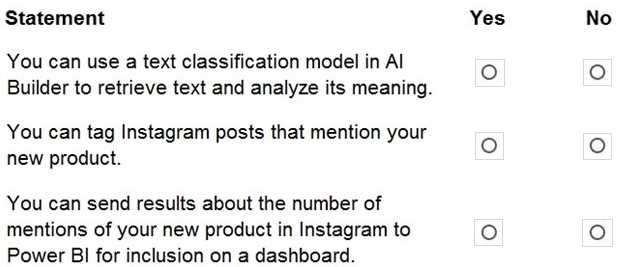
HOTSPOT A business plans to including AI Builder. Which actions can you perform? For each of the following statements, select Yes if the statement is true. Otherwise, select No. PL-900 question

Your Answer
23 comments in the community discussion
6
Yeah that's how it works. Can't use text classification to pull out the actual words from a doc, so first is No. But it does handle tagging/classification, and you can connect results to Power BI if you're using Dataverse or similar-so Yes for those two. Pretty sure that's what Microsoft wants here.
5
Nah, I don’t think it’s all Yes. First one is a trap, goes No, Yes, Yes.
Q: 5
A company currently does not separate testing, development, and production as per standard Application Lifecycle Management (ALM) protocol. The company uses Power for accounting and sales processes. The company needs login only one login account per user. The company also must prevent developing and testing from impacting production. You need to implement a solution to meet the requirements. Which method should you select?
Options
26 comments in the community discussion
3
Option D fits the ALM model for Power Platform since separate environments let you isolate dev/test/prod while letting users stick with one login in the same tenant. Separate tenants (C) would mess up single sign-on. Pretty sure D's right, open to other takes though.
1
D imo
Q: 6

HOTSPOT A company plans to build solutions by using Power Platform technologies. For each of the following statements, select Yes if the statement Is true. Otherwise, select No. PL-900 question

Your Answer
32 comments in the community discussion
6
No, No
6
Not quite No, Yes. Both should be No here. Transcripts save automatically, users don’t control deletion by session, and flows only use the permissions tied to their connection not admin by default. That admin trap always catches people on practice tests, seen it a few times.
Q: 7
A distribution company has multiple warehouses. Tax rates charged on sales orders need to be calculated based on locality and region. You need to recommend a cost-effective solution that can be implemented quickly. What should you recommend?
Options
24 comments in the community discussion
5
A . AppSource add-ons do the heavy lifting for tax calculation by region-no point reinventing the wheel with custom code or just alerting for table changes. B is tempting since it's quick, but alerts alone can't calculate taxes, just flag changes. Pretty sure A lines up best with cost-effective and fast, unless there's
2
Not sure B is right, looks like a trap since alerts won't actually calculate taxes. I'd pick A for the add-on approach.
Q: 8
You are a district manager for a large retail organization. You train each store manager to use Power BI to track sales and daily sales targets. A store manager remembers learning about the Analyze in Excel option but cannot find the option in their Power BI dashboard. You need to help the user resolve the issue. How should you advise the user?
Options
27 comments in the community discussion
2
Its B, you only get Analyze in Excel from the report page not directly from dashboard tiles.
1
Seen similar stuff in practice, and always had to go to the actual report to get the Analyze in Excel option. So B is the way here. The official guide spells this out too but chime in if you’ve run into different behavior.
Q: 9

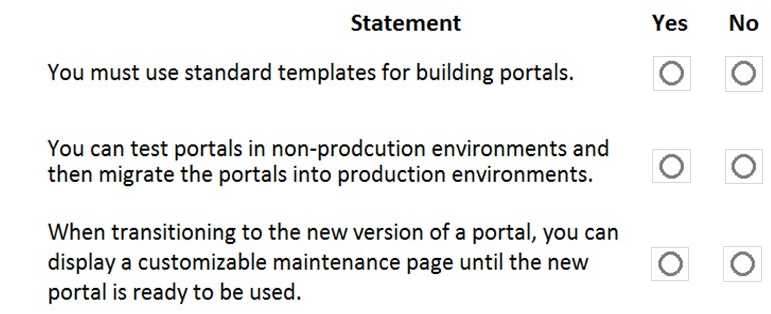
HOTSPOT A company plans to build Power Apps portals. For each of the following statements, select Yes if the statement is true. Otherwise, select No. PL-900 question

Your Answer
34 comments in the community discussion
6
No, Yes, Yes is correct. First one's tricky since you're not forced to use only default templates (you can build from blank). Some pick YES by accident because of the wording. Pretty sure on this from practice questions!
5
NO, YES, YES
Q: 10
A carpet cleaning company uses Dynamics 365 Sales. The process for entering customer information during onsite sales calls is very complicated. The company wants a simplified screen that allows salespeople to capture the customer name, phone number, and other information while speaking to the customer. You need to recommend a solution that works on various types of mobile devices. What should you recommend?
Options
31 comments in the community discussion
5
Makes sense to pick D here. Canvas app is designed for custom mobile data entry and works well across devices. Not seeing how the others (like A or B) would actually solve the UI problem directly.
5
Option D
Q: 11

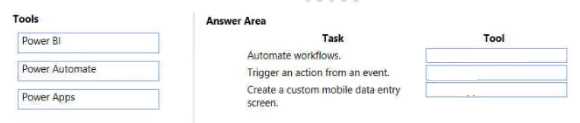
DRAG DROP Match each tool to its task. To answer, drag the appropriate tool from the column on the left to its task on the right. Each tool may be used once, more than once, or not at all. PL-900 question

Drag & Drop
10 comments in the community discussion
3
Yeah this fits what I've learned. Power Automate gets both 'Automate workflows' and 'Trigger an action from an event', Power Apps is the right pick for custom mobile data entry screens. Power BI isn't used for automation stuff here.
3
Yeah this matches what I've seen. Power Automate goes with both Automate workflows and Trigger an action from an event, while Power Apps fits Create a custom mobile data entry screen. Not seeing any reason to pick Power BI here tbh.
Q: 12

DRAG DROP -

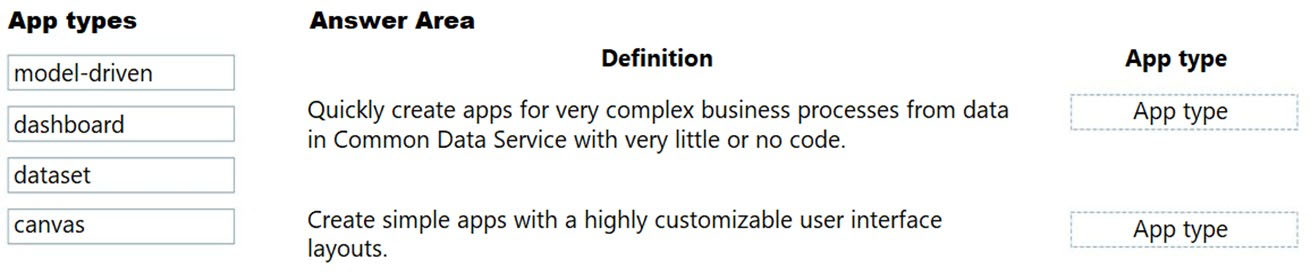
A company needs to create a series of mobile applications to empower their field engineers to accomplish several tasks with varying degrees of complexity.

Match each app type to its definition. To answer, drag the appropriate app type from the column on the left to its definition on the right. Each app type may be used once, more than once, or not at all.

NOTE: Each correct match is worth one point.

Select and Place:


Drag & Drop
11 comments in the community discussion
6
model-driven goes with the CDS/complex process definition, canvas fits the customizable UI one. Easy to mix up if you don’t catch the Dataverse mention. Dashboard and dataset don’t really fit here, I think this is correct.
5
model-driven maps to the complex business process app using CDS, and canvas is for customizable UI layouts. That Dataverse/CDS reference really locks in model-driven here. Pretty sure that's how Microsoft frames it, but open to other interpretations if someone disagrees.
Q: 13

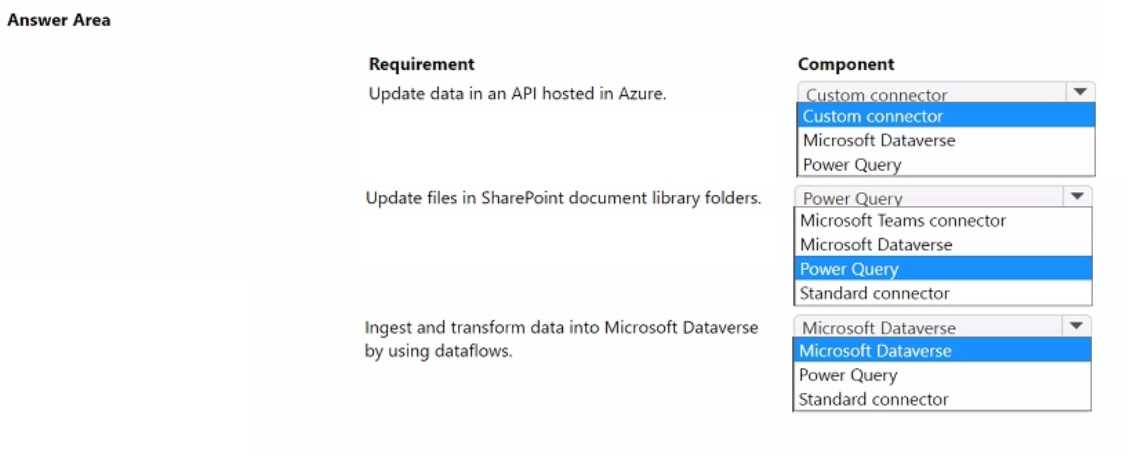
HOTSPOT A company uses Microsoft Power Platform to connect to multiple data sources and manage business data. The low-code components in Microsoft Power Platform must be able to create and update data in these data sources. You need to access the required data by using Microsoft Power Platform components. Which component should you use for each requirement? To answer, select the appropriate options in the answer area. PL-900 question

Your Answer
7 comments in the community discussion
8
Custom connector, standard connector, power query. Had a similar question before, double-checked the requirements and this lines up.
2
Which would you use for external APIs when no built-in connector exists, official docs or lab practice? Both help with remembering custom vs standard connectors and Power Query roles.
Q: 14

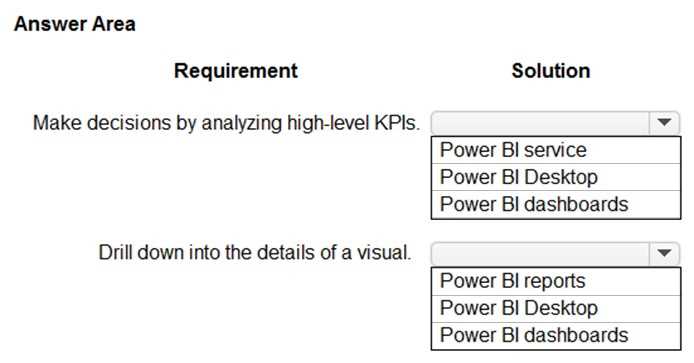
HOTSPOT You are creating Power Bl visualizations. You need to display the visuals where a user can perform each function. Which solution should you use? To answer, select the appropriate option in the answer area. PL-900 question

Your Answer
5 comments in the community discussion
6
Spot on for both. For high-level KPIs, only Dashboards give that at-a-glance view, and actual drilldown just isn't possible there-it happens in Reports. I think that's what the exam expects too, but not 100% if there's a new feature I'm missing. Agree?
1
Requirement 1 is definitely Power BI Dashboards since those are designed for top-level KPI overviews. For drill down (Requirement 2), I don't think dashboards let you actually interact with visuals that way, so it's Power BI Reports. Some people confuse dashboard links, but real drilldown happens inside reports.
Q: 15

HOTSPOT A company plans to implement Microsoft Power Platform apps. The company does not plan to use any development tools or plug-ins. Which actions can you perform? For each of the following statements, select Yes if the statement Is true. Otherwise, select No. PL-900 question

Your Answer
7 comments in the community discussion
5
So if no dev tools or plug-ins, does that still let you build an invoice flow?
4
Yeah you don't need dev tools for either task. YES for both.
Q: 16

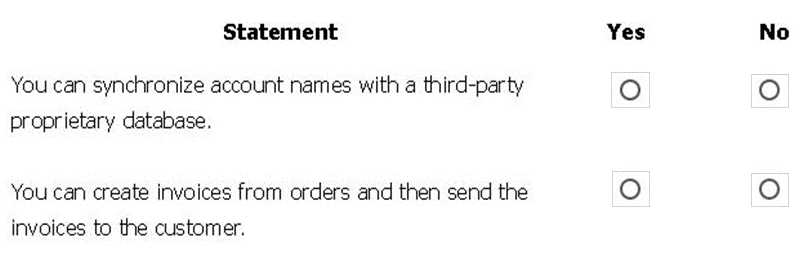
HOTSPOT A company plans to implement Power Platform apps. The company does not plan to use any development tools or plug-ins. Which actions can you perform? For each of the following statements, select Yes if the statement is true. Otherwise, select No. PL-900 question

Your Answer
5 comments in the community discussion
9
First one is No, second is Yes. You can't connect to a proprietary database without custom connectors or code, which counts as development. But creating and sending invoices uses standard features and can be done low-code in Power Platform. Pretty sure that's right, anyone disagree?
1
Makes sense, I've seen similar practice questions. No, Yes is right for this one.
Q: 17

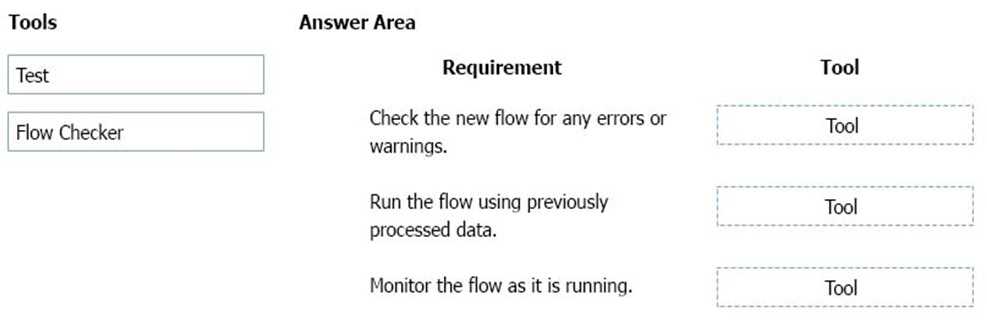
DRAG DROP You build a flow using a template. You want to add support for additional business scenarios. You need to ensure that the new workflow does not break existing functionality. Which flow editing utilities should you use? To answer, drag the appropriate tools to the correct requirements. Each tool may be used once, more than once, or not at all You may need to drag the split bar between panes or scroll to view content. PL-900 question

Drag & Drop
9 comments in the community discussion
5
Flow Checker → check errors/warnings, Test → run with data and monitor as it runs. Pretty sure this is right.
Flow Checker: check errors, Test: run with previous data and monitor flow. Not 100 percent but that matches most official docs.
Q: 18

A company is considering using Power Pages for its website. You need to identify the capabilities of Power Pages. What are two capabilities of Power Pages? Each correct answer presents a complete solution.

Options
5 comments in the community discussion
1
B tbh, I thought custom styling per user was doable if you use custom JavaScript/CSS, but it’s not really a direct feature of Power Pages like the other options. Supporting multiple languages (A) and low-code websites (C) sound like platform features, but B feels like a trap if you aren’t careful. Anyone else miss that
1
A, CHad something like this in a mock. Confident both multilingual support and low-code website hosting fit Power Pages.
Q: 19

DRAG DROP You create a Power Bl dashboard. Match each option to its requirement. To answer, drag the appropriate option from the column on the left to the correct requirement on the right. Each option may be used once, more than once, or not at all. PL-900 question

Drag & Drop
6 comments in the community discussion
Share → Ensure coworkers can see dashboard, Get Data → Display Excel data, Pin → Add report tile. I think this lines up with how Power BI features are normally used but open to corrections if anyone sees it differently.
Q: 20
You are new to working with Microsoft Flow. You create a flow that extracts birth dates for users and then sends a birthday greeting email to users on their birthday. The flow does not properly extract birth dates. Where should you make changes?
Options
7 comments in the community discussion
3
Option B. I saw similar in practice exams. Editing the expression usually fixes extraction or date handling issues.
2
A doesn't seem right, since it's not about the connectors but more about how the flow grabs and handles those dates. Pretty sure it's B, but not confident. Someone confirm?
Question 1 of 20

What's covered in this practice questions set

4: Demonstrate the capabilities of Power Apps · 9 questions

📖 About this Domain

This domain introduces the Power Apps low-code platform for building custom business applications. It covers the different app types, their core components, and how they connect to data sources like Microsoft Dataverse.

🎓 What You Will Learn

  • Differentiate between canvas apps, model-driven apps, and Power Pages for specific business needs.
  • Identify the core components of a model-driven app, including sitemaps, forms, views, and dashboards.
  • Describe how Power Apps uses connectors to integrate with data sources like SharePoint, Dataverse, and custom APIs.
  • Explain the value proposition of AI Builder for embedding pre-built AI models directly into your apps.

🛠️ Skills You Will Build

  • Select the correct Power App type based on user experience requirements and data structure.
  • Define a basic data model in Microsoft Dataverse using tables, columns, and relationships.
  • Describe the process of creating a Power App from a data source like a SharePoint list or an Excel file.
  • Articulate how to use Power Fx for basic formulas and logic within a canvas app.

💡 Top Tips to Prepare

  • Practice creating a canvas app from a template to understand controls and data connections.
  • Build a simple model-driven app to grasp the relationship between Dataverse tables, forms, and views.
  • Review the list of standard, premium, and custom connectors available for Power Apps.
  • Complete the Microsoft Learn modules for PL-900 that focus specifically on Power Apps capabilities.

5: Demonstrate the capabilities of Power Automate · 3 questions

📖 About this Domain

This domain introduces Power Automate, the Power Platform service for creating automated workflows. It focuses on how to connect apps and services to synchronize files, get notifications, and collect data. You will learn the core components for building business process automation.

🎓 What You Will Learn

  • You will learn to identify different flow types like automated cloud flows, scheduled cloud flows, and desktop flows.
  • You will learn to describe how to build a basic flow by using templates and from blank.
  • You will learn the function of triggers, actions, and connectors in automating a business process.
  • You will learn to describe the business value of integrating AI Builder into Power Automate flows.

🛠️ Skills You Will Build

  • You will build the skill to create a cloud flow using a trigger and multiple actions.
  • You will build the skill to identify and use connectors to integrate services like SharePoint, Outlook, and Teams.
  • You will build the skill to implement business process flows to guide users through a defined process.
  • You will build the skill to describe how to use the approvals connector to manage approval workflows.

💡 Top Tips to Prepare

  • Practice building flows from templates in the Power Automate portal to understand triggers and actions.
  • Clearly differentiate the use cases for automated, instant, scheduled, desktop, and business process flows.
  • Review the function of common connectors like SharePoint, Dataverse, and the approvals connector.
  • Explore the Microsoft Learn path for PL-900, focusing on the 'Automate a business process with Power Automate' module.

2: Identify the core components of Microsoft Power Platform · 3 questions

📖 About this Domain

This domain introduces the primary applications within the Microsoft Power Platform ecosystem. You will explore the purpose and capabilities of Power Apps, Power Automate, Power BI, and Power Virtual Agents. Understanding these core components is foundational for building low-code solutions.

🎓 What You Will Learn

  • You will learn to describe the capabilities of Power Apps, including canvas apps, model-driven apps, and Power Pages.
  • You will learn to identify the different types of flows in Power Automate, such as cloud flows and desktop flows for automation.
  • You will learn to explain the function of Power BI for data visualization through dashboards and reports.
  • You will learn to describe how Power Virtual Agents enables the creation of low-code chatbots using topics and entities.

🛠️ Skills You Will Build

  • You will build the skill to differentiate between Power Apps, Power Automate, Power BI, and Power Virtual Agents for specific use cases.
  • You will build the ability to identify the appropriate Power Platform component to solve a given business requirement.
  • You will build an understanding of how common components like Microsoft Dataverse and connectors integrate across the platform.
  • You will build the competency to articulate the value proposition of each core Power Platform product.

💡 Top Tips to Prepare

  • Focus on the distinct business value and use cases for each core component, such as when to use Power BI versus Power Apps.
  • Master the differences between app types in Power Apps, specifically canvas versus model-driven apps.
  • Utilize the official Microsoft Learn learning path for PL-900 to explore interactive modules on each component.
  • Understand the role of foundational elements like Microsoft Dataverse and connectors, as they are integral to all components.

3: Demonstrate the capabilities of Power BI · 3 questions

📖 About this Domain

This domain introduces the business value and core components of Microsoft Power BI. It covers the end-to-end process of connecting to data sources to build reports and interactive dashboards. The focus is on transforming raw data into actionable business intelligence.

🎓 What You Will Learn

  • You will learn to identify the core components of the Power BI ecosystem, including Power BI Desktop, the Power BI service, and Power BI mobile.
  • You will learn how to use data connectors to get data from various data sources into Power BI for analysis.
  • You will learn to build a basic Power BI report by adding data visualizations like charts and graphs to a report page.
  • You will learn the process of creating a Power BI dashboard by pinning visuals and publishing reports to the Power BI service.

🛠️ Skills You Will Build

  • You will build the skill to differentiate between Power BI Desktop for authoring, the Power BI service for sharing, and Power BI mobile for consumption.
  • You will build the skill to connect to disparate data sources using built-in Power BI connectors.
  • You will build the skill to create interactive reports by selecting appropriate visualizations to represent underlying data.
  • You will build the skill to construct and publish a dashboard in the Power BI service for business users.

💡 Top Tips to Prepare

  • Memorize the distinct functions of Power BI Desktop versus the Power BI service, as exam questions test this separation of concerns.
  • Clearly understand the technical difference between a Power BI report and a Power BI dashboard.
  • Gain hands-on experience by using Power BI Desktop with a sample dataset to build a simple report and publish it.
  • Review the concept of data connectors and recognize common data sources available within the Get Data experience.

6: Demonstrate the capabilities of Power Virtual Agents and AI Builder · 2 questions

📖 About this Domain

This domain introduces the AI capabilities within the Power Platform. You will explore how to build no-code chatbots with Power Virtual Agents and infuse apps and flows with intelligence using AI Builder models.

🎓 What You Will Learn

  • Identify core components of Power Virtual Agents, including topics, entities, and trigger phrases for chatbot creation.
  • Describe the different types of AI Builder models, such as form processing, object detection, and prediction models.
  • Learn how to consume an AI Builder model from within a Power Automate flow or a Power Apps canvas app.
  • Recognize business scenarios where Power Virtual Agents and AI Builder provide value by automating processes and insights.

🛠️ Skills You Will Build

  • Constructing a functional chatbot by defining topics, authoring conversations, and publishing the bot.
  • Implementing AI Builder by selecting, training, and publishing a model to solve a business problem.
  • Integrating AI models into Power Automate flows to create intelligent process automation.
  • Embedding AI Builder components into Power Apps to build smarter user-facing applications.

💡 Top Tips to Prepare

  • Gain practical experience by building a basic chatbot and using a prebuilt AI Builder model in a developer environment.
  • Memorize the primary use cases for each AI Builder model type, such as when to use form processing versus text recognition.
  • Complete the official Microsoft Learn learning paths dedicated to Power Virtual Agents and AI Builder fundamentals.
  • Focus on the integration points, understanding how Power Virtual Agents can call Power Automate flows that utilize AI Builder.

1: Describe the business value of Microsoft Power Platform

📖 About this Domain

This domain covers the fundamental business value of the Microsoft Power Platform as a low-code platform for building business solutions. It explains how the interconnected components drive digital transformation and operational efficiency. You will learn to articulate how the platform solves common business challenges.

🎓 What You Will Learn

  • Analyze how the Power Platform enables organizations to build end-to-end business solutions by connecting data and processes.
  • Identify the specific business value of each core component: Power Apps, Power Automate, Power BI, and Power Virtual Agents.
  • Understand how connectors extend platform value by integrating with Microsoft 365, Dynamics 365, Azure, and third-party services.
  • Recognize the role of Microsoft Dataverse in providing a secure and scalable data foundation for business applications.

🛠️ Skills You Will Build

  • Articulate the return on investment (ROI) of implementing Power Platform solutions to business stakeholders.
  • Map specific business requirements to the appropriate Power Platform component for an optimal solution.
  • Describe the integration capabilities of the platform using connectors to leverage existing enterprise data and services.
  • Explain how Power Platform empowers citizen developers to rapidly transform business processes and drive innovation.

💡 Top Tips to Prepare

  • Focus on real-world business scenarios and case studies to understand the practical application of the platform's value.
  • Complete the 'Microsoft Power Platform Fundamentals' learning path on Microsoft Learn to cover all official objectives for this domain.
  • Understand the 'better together' narrative, focusing on how components integrate with each other and with Microsoft 365 and Dynamics 365.
  • Create a clear distinction between the primary function of each Power Platform component to answer comparative questions correctly.

Premium Access Includes

  • Quiz Simulator
  • Exam Mode
  • Progress Tracking
  • Question Saving
  • Flash Cards
  • Drag & Drops
  • 3 Months Access
  • PDF Downloads
Get Premium Access
Scroll to Top

FLASH OFFER

Days
Hours
Minutes
Seconds

avail 10% DISCOUNT on YOUR PURCHASE