I was thinking A could work since Lambda is serverless and SageMaker has solid integration for ML models, so less ops to manage overall. Not totally sure since Macie seems more tailored for S3, but SageMaker plus Lambda still feels pretty light-touch to me. Anyone else think A is a close second?
Free MLA-C01 Practice Test Questions and Answers (2026) | Cert Empire Practice Questions
Free preview: 20 questions.
AWS MLA-C01 Dumps
Had something really similar in a mock, picked D. Invocations metric gives you exactly the API call counts, and CloudWatch alarms let you alert right away when it hits the threshold. Way more straightforward than using CloudTrail or Debugger for this use case. Pretty sure that's what AWS expects here, but happy to hear other takes.
Looks like C could help if you want things to converge faster. Sometimes increasing the learning rate fixes slow training, but here the losses are oscillating. I think I'd still try C before anything else though, since D feels a bit too safe for speed. Disagree?
A company is building a web-based AI application by using Amazon SageMaker. The application will provide the following capabilities and features: ML experimentation, training, a central model registry, model deployment, and model monitoring. The application must ensure secure and isolated use of training data during the ML lifecycle. The training data is stored in Amazon S3. The company needs to use the central model registry to manage different versions of models in the application. Which action will meet this requirement with the LEAST operational overhead?
I figured D since unique tags seem like a quick way to handle versions per model, especially if you just care about simple tracking and not strict organization. Not sure if it's the cleanest for larger setups but it does the job. If I'm off, let me know.
Yeah, C makes sense since SageMaker Model Registry with model groups is specifically built for managing versions centrally. Tags in D can help for custom metadata, but they don't organize versions as cleanly or automatically. I think C keeps things simple and integrates better with SageMaker's ML workflow out of the box. Let me know if I'm missing a nuance, but pretty confident it's C.
A imo. Automating this with Flink's built-in Random Cut Forest on managed service is less ops than setting up SageMaker/Lambda or EC2. B adds too much maintenance risk in practice, I think. Disagree?
Option D here. Data Wrangler's balance data is specifically designed for quick class balancing and sits right inside SageMaker, so fewer steps needed than Glue or Athena. Small catch: if the source data wasn't S3 or SageMaker, setup could be more involved, but in this scenario it's the fastest. Pretty sure that's why D wins.
I’d say this is same as a common exam questions on practice tests and D is usually the right move. SageMaker Data Wrangler has that balance data operation built in, so oversampling takes just a couple clicks. The workflow stays in SageMaker too, so it's definitely less effort than using Glue or Athena. I think D but let me know if you disagree.
Option A matches what I had in a mock. Setting Firehose buffer interval to zero is the only way here to cut batch delay, so you get almost instant updates in OpenSearch. None of the other options really get true sub-second unless you change the buffer itself. Pretty sure it's A, but lmk if you see it differently.
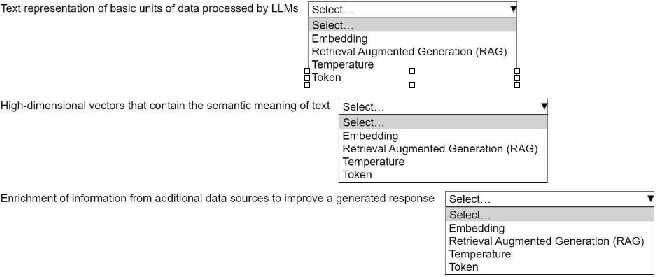
?Embedding, Retrieval Augmented Generation (RAG), Temperature
These match the AWS generative AI patterns in official docs and labs. Used similar terms in practice tests too. I think this is what they're after, but open to other takes if someone disagrees!
Yeah, I'd pick Embedding, Retrieval Augmented Generation (RAG), and Temperature. Embedding is about turning text into vectors, RAG mixes in fresh external data, and Temperature tweaks the randomness in generated responses. Pretty sure that's what AWS expects here, but let me know if you see it differently.
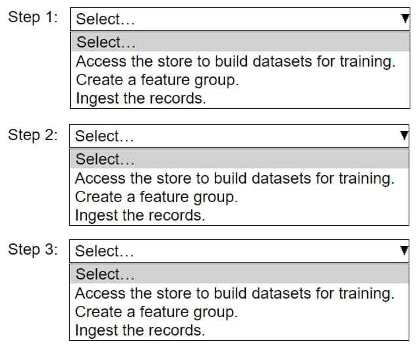
HOTSPOT An ML engineer needs to use Amazon SageMaker Feature Store to create and manage features to train a model. Select and order the steps from the following list to create and use the features in Feature Store. Each step should be selected one time. (Select and order three.) • Access the store to build datasets for training. • Create a feature group. • Ingest the records. 
Doesn't it have to be create the feature group first? You can't ingest records if the schema isn't there yet. I think people might confuse this with updating or using existing groups, but "create" comes first in this context.
Yeah, the right flow is create the feature group, then ingest records, finally access the store for training datasets. You need that structure before you can put any records in, and you can’t build a dataset until the features are there. Pretty sure this matches how SageMaker expects you to use Feature Store. Let me know if anyone sees it differently.
HOTSPOT A company stores historical data in .csv files in Amazon S3. Only some of the rows and columns in the .csv files are populated. The columns are not labeled. An ML engineer needs to prepare and store the data so that the company can use the data to train ML models. Select and order the correct steps from the following list to perform this task. Each step should be selected one time or not at all. (Select and order three.) • Create an Amazon SageMaker batch transform job for data cleaning and feature engineering. • Store the resulting data back in Amazon S3. • Use Amazon Athena to infer the schemas and available columns. • Use AWS Glue crawlers to infer the schemas and available columns. • Use AWS Glue DataBrew for data cleaning and feature engineering. 
Not quite, it's not Athena first. You need to use Glue crawlers up front to actually infer schema since the files lack headers and are pretty sparse. Athena is more for querying, so that's a trap here. So I'd say: Glue crawler, then DataBrew for cleaning/features, finally save back to S3. Do folks agree?
Looks good to me, pretty consistent with practice and exam reports I’ve seen. Glue crawlers to infer schema first, DataBrew for transformation, save back to S3. I’d check the official AWS docs or do a hands-on lab if you want extra clarity.
HOTSPOT An ML engineer is working on an ML model to predict the prices of similarly sized homes. The model will base predictions on several features The ML engineer will use the following feature engineering techniques to estimate the prices of the homes: • Feature splitting • Logarithmic transformation • One-hot encoding • Standardized distribution Select the correct feature engineering techniques for the following list of features. Each feature engineering technique should be selected one time or not at all (Select three.) 
Hmm, I’d actually go with standardized distribution for SIZE OF BUILDING instead of logarithmic transformation. Usually log is best if the data is highly skewed, but unless they specify that in the question, standardizing is common for numeric features. CITY: one-hot encoding and TYPE_YEAR: feature splitting still make sense. Not 100% sure though, maybe overlooked a clue in the image?
HOTSPOT A company wants to host an ML model on Amazon SageMaker. An ML engineer is configuring a continuous integration and continuous delivery (Cl/CD) pipeline in AWS CodePipeline to deploy the model. The pipeline must run automatically when new training data for the model is uploaded to an Amazon S3 bucket. Select and order the pipeline's correct steps from the following list. Each step should be selected one time or not at all. (Select and order three.) • An S3 event notification invokes the pipeline when new data is uploaded. • S3 Lifecycle rule invokes the pipeline when new data is uploaded. • SageMaker retrains the model by using the data in the S3 bucket. • The pipeline deploys the model to a SageMaker endpoint. • The pipeline deploys the model to SageMaker Model Registry. 
1. An S3 event notification invokes the pipeline when new data is uploaded
2. SageMaker retrains the model by using the data in the S3 bucket
3. The pipeline deploys the model to a SageMaker endpoint
Had something like this in a mock. This order makes sense because S3 events are used to trigger automation, then retraining, and finally deploy the fresh model to an endpoint for inference. Pretty sure this is what they want here.
Does this pipeline really need Model Registry if the question says nothing about approvals or versioning? I always see the sequence go S3 event triggers pipeline, then SageMaker retrains, and finally deploy to endpoint for automated inference-not Registry. Do you all agree the three steps should skip the Registry step?
S3 event triggers the pipeline, retrain with SageMaker, then deploy to endpoint. That's the usual automated flow for new data hitting S3. Pretty sure this sequence is right unless they specify something about versioning.
Wow, AWS loves to bury you in their services for these pipelines. The right order is: S3 event notification triggers the pipeline when new data lands, SageMaker does the retraining, then you push the model to a SageMaker endpoint for inference. Pretty standard MLOps pattern here, unless I'm missing something sneaky in their options.
Option C is it. Keeping compute and data in the same AZ (and subnet) really reduces network latency for distributed ML jobs, which exam guides and AWS whitepapers drill on. I remember labs where any cross-AZ setup added delays fast. Pretty sure about this but open to other interpretations if someone's seen different in practice.