
In a class extended PreferenceFragmentCompat. What method is used to inflate the given XML
resource and add the preference hierarchy to the current preference hierarchy?
Options
Discussion
No comments yet. Be the first to comment.
Be respectful. No spam.
Correct Answer:
C
Q: 2
Filter logcat messages. If in the filter menu, a filter option “Edit Filter Configuration”? means:
Options
Discussion
No comments yet. Be the first to comment.
Be respectful. No spam.
Correct Answer:
C
Q: 3
In application theme style, flag windowActionBar () indicates:
Options
Discussion
No comments yet. Be the first to comment.
Be respectful. No spam.
Correct Answer:
D
Reference:
https://developer.android.com/guide/topics/ui/look-and-feel/themes
https://developer.android.com/reference/android/R.styleable.html
Q: 4
An example. In our ViewModelFactory (that implements ViewModelProvider.Factory) we have an
instance of our Repository, named mRepository. Our ViewModel has such constructor:
class MyViewModel(private val mRepository: MyRepository) : ViewModel() ...
Next, in our ViewModelFactory create ViewModel method (overriden) looks like this:
override fun create(modelClass: Class): T {
return try {
//MISSED RETURN VALUE HERE”
} catch (e: InstantiationException) {
throw RuntimeException("Cannot create an instance of $modelClass", e)
} catch (e: IllegalAccessException) {
throw RuntimeException("Cannot create an instance of $modelClass", e)
} catch (e: NoSuchMethodException) {
throw RuntimeException("Cannot create an instance of $modelClass", e)
} catch (e: InvocationTargetException) {
throw RuntimeException("Cannot create an instance of $modelClass", e)
}
}
What should we write instead of “//MISSED RETURN VALUE HERE”?
Options
Discussion
No comments yet. Be the first to comment.
Be respectful. No spam.
Correct Answer:
C
Q: 5
For example, we have a file in our assets folder app/src/main/assets/sample_teas.json. To get an
InputStream for reading it, from out Context context, we can try do this:
Options
Discussion
No comments yet. Be the first to comment.
Be respectful. No spam.
Correct Answer:
B
Q: 6
What do you want from Room when you create a DAO method and annotate it with @Update?
Example:
@Dao
interface MyDao {
@Update
fun updateUsers(vararg users: User)
}
Options
Discussion
No comments yet. Be the first to comment.
Be respectful. No spam.
Correct Answer:
B
Q: 7
Once your test has obtained a UiObject object, you can call the methods in the UiObject class to
perform user interactions on the UI component represented by that object. You can specify such
actions as: (Choose four.)
Options
Discussion
No comments yet. Be the first to comment.
Be respectful. No spam.
Correct Answer:
ACEF
Q: 8
What is the incorrect statement about Data Access Object (androidx.room.Dao)?
Options
Discussion
No comments yet. Be the first to comment.
Be respectful. No spam.
Correct Answer:
D
Q: 9
Select four different types of app components. (Choose four.)
Options
Discussion
No comments yet. Be the first to comment.
Be respectful. No spam.
Correct Answer:
CDGH TOPIC 2, JAVA EXAM
Q: 10
For example, we have a file in our raw folder app/src/main/res/raw/sample_teas.json. To get an
InputStream for reading it, from out Context context, we can do this:
Options
Discussion
No comments yet. Be the first to comment.
Be respectful. No spam.
Correct Answer:
C
Q: 11
What is demonstrated by the code below?
// RawDao.kt
@Dao
interface RawDao {
@RawQuery
fun getUserViaQuery(query: SupportSQLiteQuery?): User?
}
// Usage of RawDao
...
val query =
SimpleSQLiteQuery("SELECT * FROM User WHERE id = ? LIMIT 1",
arrayOf(sortBy))
val user = rawDao.getUserViaQuery(query)
...
Options
Discussion
No comments yet. Be the first to comment.
Be respectful. No spam.
Correct Answer:
A
Q: 12
The Layout Inspector in Android Studio allows you to compare your app layout with design mockups,
display a magnified or 3D view of your app, and examine details of its layout at runtime. When this is
especially useful?
Options
Discussion
No comments yet. Be the first to comment.
Be respectful. No spam.
Correct Answer:
B
Q: 13
If you want the Database Inspector to automatically update the data it presents as you interact with
your running app, check the Live updates checkbox at the top of the inspector window. While live
updates are enabled, what happens with the table in the inspector window?
Options
Discussion
No comments yet. Be the first to comment.
Be respectful. No spam.
Correct Answer:
B
Q: 14
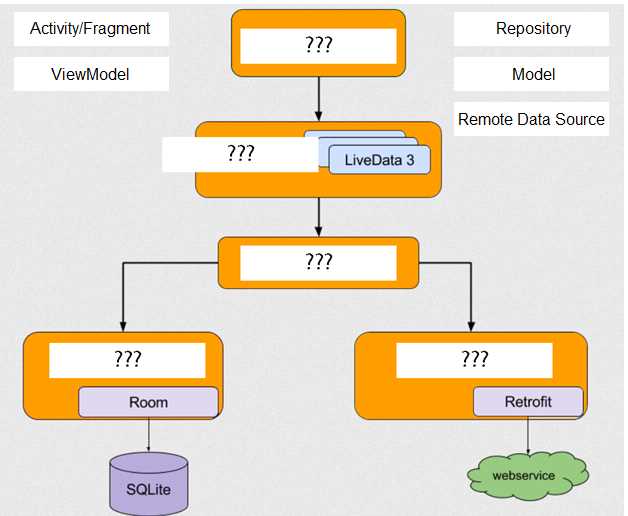
DRAG DROP With recommended app architecture. Fill the following diagram, which shows how all the modules usually should interact with one another after designing the app (drag modules to correct places).
Drag & Drop
Discussion
No comments yet. Be the first to comment.
Be respectful. No spam.
Correct Answer:
Answer Areas
Top: D. Activity/Fragment
LiveData3: E. ViewModel
Middle: A. Repository
Room: B. Model
Retrofit: C. Remote Data Source
Explanation
Q: 15
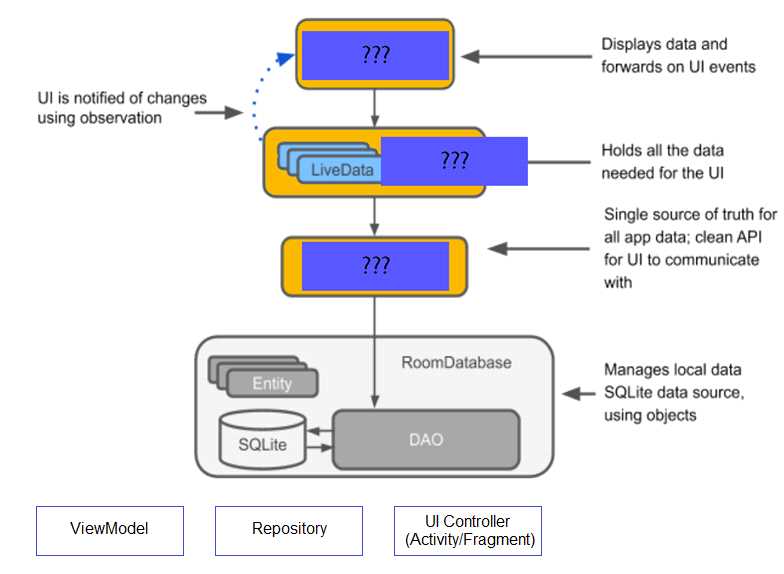
DRAG DROP The diagram below shows a basic form of the recommended architecture for apps that use Architecture Components. The architecture consists of a UI controller, a ViewModel that serves LiveData, a Repository, and a Room database. Drag modules to correct places.
Drag & Drop
Discussion
No comments yet. Be the first to comment.
Be respectful. No spam.
Correct Answer:
Answer Area
Displays data and forwards on Ul events: C. Ul Controller (Activity/Fragment)
Holds all the data needed for the Ul: A. ViewModel
Single source of truth for all app data; clean API for Ul to communicate with: B. Repository
Explanation
Q: 16
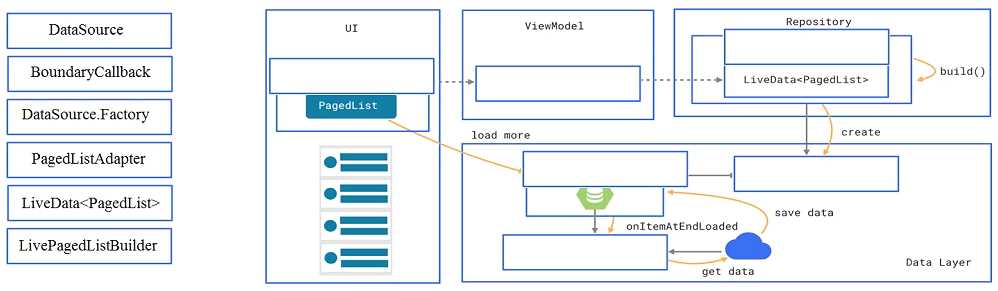
DRAG DROP In a common Paging Library architecture scheme, move instances to the correct positions.
Drag & Drop
Discussion
No comments yet. Be the first to comment.
Be respectful. No spam.
Correct Answer:
Answer Areas
UI: D. PagedListAdapter
ViewModel: E. LiveData
Repository: F. LivePagedListBuilder
Load More: A. DataSource
Create: G. DataSourceFactory
onItemAtEndLoaded: B. BoundaryCallback
Explanation
Q: 17
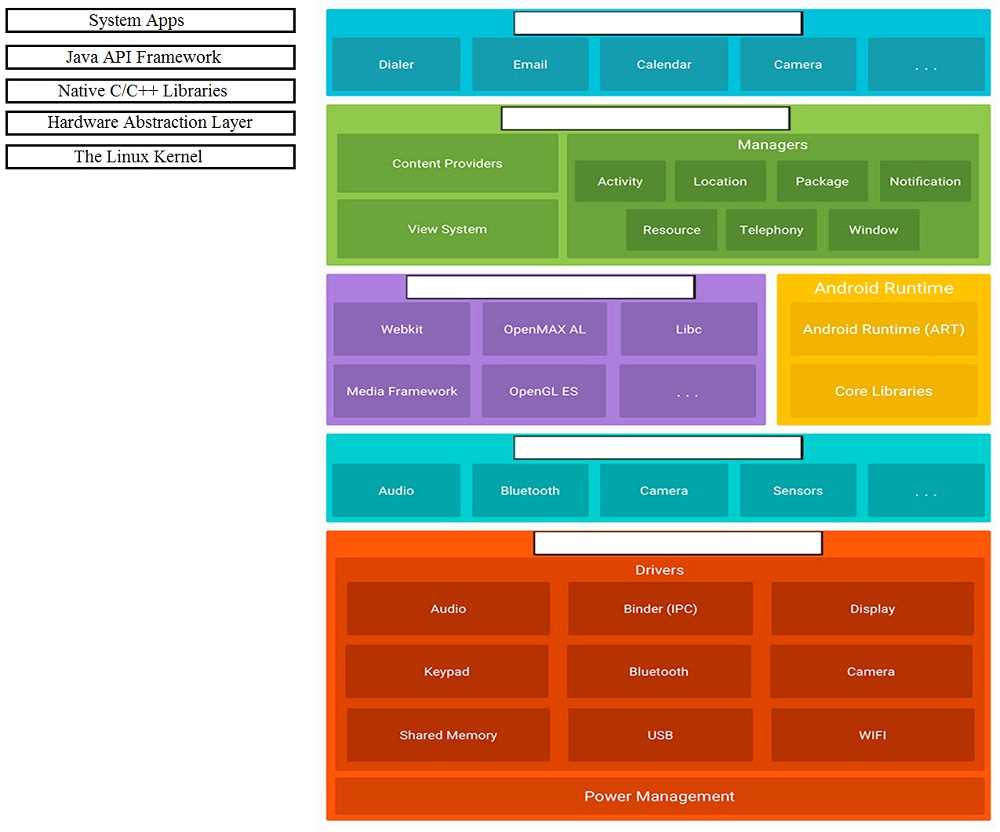
DRAG DROP Move the major components of the Android platform to correct places in diagram.
Drag & Drop
Discussion
No comments yet. Be the first to comment.
Be respectful. No spam.
Correct Answer:
Answer Areas
Target 1: A. System Apps
Target 2: B. Java API Framework
Target 3: C. Native C/C++ Libraries
Target 4: D. Hardware Abstraction Layer
Target 5: E. The Linux Kernel
Explanation
Q: 18
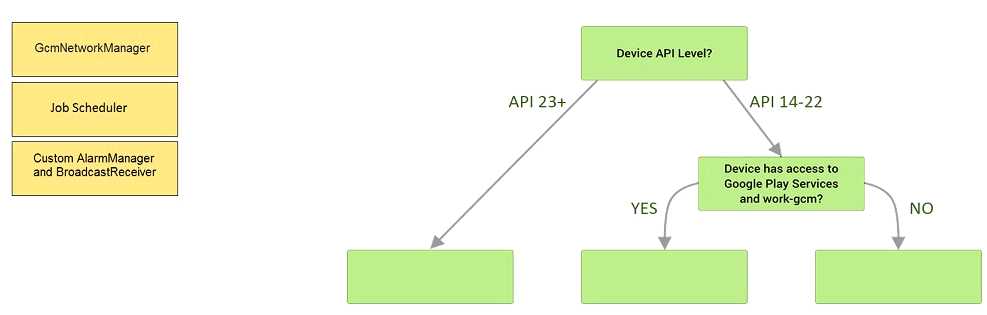
DRAG DROP Under the hood WorkManager uses an underlying job dispatching service based on the following criteri a. You need to move services to the correct places.
Drag & Drop
Discussion
No comments yet. Be the first to comment.
Be respectful. No spam.
Correct Answer:
Answer Area
Target 1: B. Job Scheduler
Target 2: A. GcmNetworkManager
Target 3: C. Custom AlarmManager and BroadcastReceiver
Which build options in the Build menu to choose to delete all intermediate/cached build files.
Options
Discussion
No comments yet. Be the first to comment.
Be respectful. No spam.
Correct Answer:
D
Reference:
https://developer.android.com/studio/run
Q: 20
The easiest way of adding menu items (to specify the options menu for an activity) is inflating an
XML file into the Menu via MenuInflater. With menu_main.xml we can do it in this way:
Options
Discussion
No comments yet. Be the first to comment.
Be respectful. No spam.
Correct Answer:
A
Reference:
https://developer.android.com/guide/topics/ui/accessibility/custom-views