Free ADA-C01 Practice Test Questions and Answers (2026)
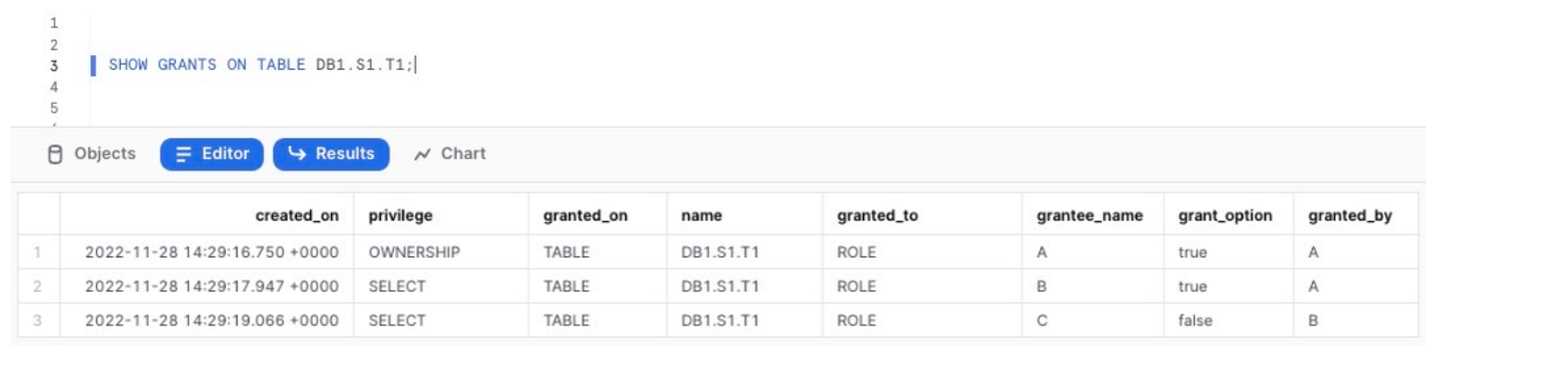
This statement is executed:
USE ROLE ACCOUNTADMIN;
DROP ROLE A;
What will occur?

The ACCOUNT1 has a database PROD_DB and the ORGADMIN role enabled.
Management wants to have the PROD_DB database replicated to ACCOUNT2.
Are there any necessary configuration steps in ACCOUNT1 before the database replication can be
configured and initiated in ACCOUNT2?What's covered in this practice questions set
2: Account Management and Data Protection · 3 questions
đź“– About this Domain
This domain covers the administration of Snowflake accounts, focusing on cost management and data lifecycle protection. It details features for business continuity, disaster recovery, and secure data collaboration.
🎓 What You Will Learn
- You will learn to configure account parameters and resource monitors to control virtual warehouse credit consumption.
- You will learn to implement data protection features like Time Travel and Fail-safe for data recovery.
- You will learn to use zero-copy cloning for instant data copies and Secure Data Sharing for provider-consumer collaboration.
- You will learn to configure account replication and manage failover/failback for business continuity.
🛠️ Skills You Will Build
- You will build skills to manage data retention periods and recover objects using Time Travel and the UNDROP command.
- You will build skills to implement cost controls by creating and assigning resource monitors to warehouses.
- You will build skills to configure database replication and failover groups to ensure high availability.
- You will build skills to create and manage secure shares to provide data access to consumer accounts.
đź’ˇ Top Tips to Prepare
- Master the distinction between Time Travel and Fail-safe, including their retention periods and associated storage costs.
- Practice the syntax for creating and altering resource monitors, including setting triggers and actions like SUSPEND.
- Understand the object types included in account replication and the specific SQL commands for failover and failback.
- Know the differences between standard, transient, and temporary tables and how they affect data protection features.
1: Snowflake Security and Role-Based Access Control (RBAC) · 3 questions
đź“– About this Domain
This domain covers Snowflake's multi-layered security framework, focusing on user authentication and access control. It emphasizes the implementation of Role-Based Access Control (RBAC) and other security features to protect data at rest and in transit.
🎓 What You Will Learn
- Implement and manage network policies, user authentication, and multi-factor authentication (MFA).
- Design and implement a robust Role-Based Access Control (RBAC) hierarchy using roles, users, and grants.
- Utilize advanced security features like dynamic data masking, row access policies, and object tagging for granular data protection.
- Understand Snowflake's security principles, including managed and customer-managed keys for encryption.
🛠️ Skills You Will Build
- Construct a scalable RBAC model by creating custom roles and granting privileges on securable objects.
- Configure network policies to restrict access based on IP addresses and manage federated authentication (SSO).
- Apply dynamic data masking and row access policies to tables and views for sensitive data protection.
- Audit security configurations and user access using system views and functions like LOGIN_HISTORY.
đź’ˇ Top Tips to Prepare
- Master the concept of role hierarchy and privilege inheritance, including the MANAGE GRANTS privilege.
- Practice creating and applying network policies, row access policies, and masking policies in a test environment.
- Understand the differences and use cases for the ACCOUNTADMIN, SYSADMIN, and SECURITYADMIN default roles.
- Review the syntax for GRANT and REVOKE commands for different object types and future grants.
5: Data Sharing and Data Marketplace · 2 questions
đź“– About this Domain
This domain covers Snowflake's Secure Data Sharing architecture, which allows live data sharing between accounts without data movement. It details the roles of data providers and consumers, the mechanics of shares, and the function of the Snowflake Marketplace.
🎓 What You Will Learn
- Differentiate between data providers and consumers and the SQL commands used to create and manage shares.
- Understand the configuration and use cases for reader accounts versus sharing with full Snowflake accounts.
- Explore the process of publishing data via listings on the Snowflake Marketplace and consuming data from it.
- Learn how to create a database from a share and the implications for querying shared, immutable data.
🛠️ Skills You Will Build
- Executing DDL and DCL to create shares, grant object privileges, and add consumer accounts.
- Administering inbound shares as a consumer by creating databases from them for immediate querying.
- Managing reader accounts, including provisioning, monitoring credit usage, and object access.
- Implementing data sharing strategies using direct shares, private listings, or the public Snowflake Marketplace.
đź’ˇ Top Tips to Prepare
- Memorize the specific privileges that can be granted on database objects to a share.
- Master the differences in setup and cost implications between reader accounts and full consumer accounts.
- Practice the end-to-end workflow for both a provider creating a share and a consumer creating a database from that share.
- Understand the role of metadata in Secure Data Sharing and why it enables instant, no-copy data access.
3: Performance Monitoring and Tuning · 1 questions
đź“– About this Domain
This domain focuses on analyzing and improving Snowflake performance. It covers the tools and techniques for identifying query bottlenecks, optimizing virtual warehouse utilization, and applying data clustering strategies. You will learn to use Snowflake's monitoring features to ensure efficient resource consumption.
🎓 What You Will Learn
- How to use the Query Profile to analyze query execution plans and identify performance issues like disk spilling or inefficient joins.
- The different types of caching in Snowflake, including the result cache and local warehouse cache, and how they impact query performance.
- Strategies for virtual warehouse tuning, such as scaling up for query complexity and scaling out for concurrency using multi-cluster warehouses.
- Methods for monitoring credit consumption and performance trends using Account Usage views like QUERY_HISTORY and WAREHOUSE_METERING_HISTORY.
🛠️ Skills You Will Build
- Diagnosing and resolving slow-running queries by interpreting the query execution plan and operator statistics.
- Implementing effective data clustering strategies by selecting appropriate clustering keys to reduce table scan times.
- Configuring and managing virtual warehouses for optimal price-performance, including setting auto-suspend and auto-resume parameters.
- Applying advanced performance features like the Search Optimization Service and materialized views for specific query workloads.
đź’ˇ Top Tips to Prepare
- Gain hands-on experience with the Query Profile, focusing on identifying operators that cause disk spilling and partition pruning effectiveness.
- Practice querying the SNOWFLAKE.ACCOUNT_USAGE schema to build your own performance monitoring dashboards and alerts.
- Understand the distinct scenarios for when to scale up a warehouse versus when to use a multi-cluster warehouse for scaling out.
- Memorize the impact of different DML operations on micro-partitions and how clustering metadata is maintained or affected.
4: Data Loading and Unloading · 1 questions
đź“– About this Domain
This domain focuses on the methods for moving data into and out of Snowflake. It covers bulk data loading using the COPY command and continuous data ingestion with Snowpipe. Key topics include stages, file formats, transformation during load, and troubleshooting data movement.
🎓 What You Will Learn
- Learn to execute bulk data loads using the COPY INTO
command from internal and external stages.
- Understand how to configure Snowpipe for automated, continuous micro-batch data ingestion from cloud storage.
- Master the process of unloading data from Snowflake tables to stages using the COPY INTO command.
- Explore data loading considerations, including file sizing, parallelization, and error handling using copy options.
🛠️ Skills You Will Build
- You will build the ability to create and manage stage objects and file format objects for various data types.
- You will gain proficiency in transforming data during the loading process using a SELECT query within the COPY command.
- You will develop skills to monitor and troubleshoot data loading activities by querying the COPY_HISTORY and PIPE_USAGE_HISTORY views.
- You will learn to implement data validation strategies using the VALIDATION_MODE copy option before committing a load.
đź’ˇ Top Tips to Prepare
- Practice using different COPY options like ON_ERROR, PURGE, and MATCH_BY_COLUMN_NAME to handle various loading scenarios.
- Gain hands-on experience by setting up a Snowpipe with auto-ingest notifications on a cloud storage provider (S3, GCS, Azure Blob).
- Understand the best practices for data file preparation, specifically file splitting strategies to optimize parallel loading by a virtual warehouse.
- Review the privileges required for different data loading and unloading operations, including for stages, file formats, and target tables.