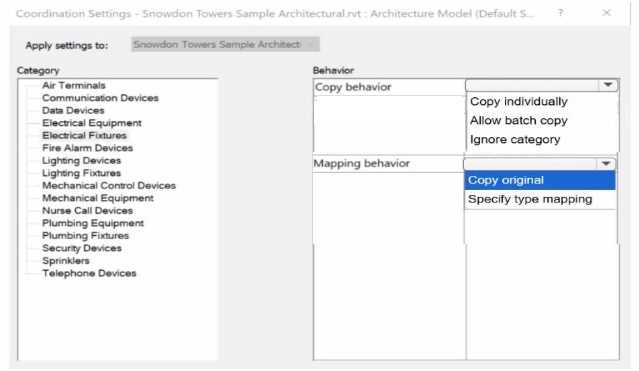
https://kxbjsyuhceggsyvxdkof.supabase.co/storage/v1/object/public/file-images/AutoDesk_RVT_ELEC_01101/page_57_img_2.jpg When working on linked architectural and electrical Revit models, the Copy/Monitor tool enables electrical designers to copy selected elements (such as lighting or electrical fixtures) from the architectural model into their electrical model. This workflow ensures that any subsequent modifications to these elements in the architectural file are automatically detected and flagged for coordination review. According to the Revit MEP User’s Guide (Chapter 46 “Copy/Monitor and Coordination Review”): “Use Copy/Monitor to copy elements from a linked model so that changes to the original elements are tracked. When copying multiple similar elements, select Allow batch copy to automatically copy all instances of that category.” The Coordination Settings dialog provides two primary behavioral controls for each category (such as Electrical Fixtures): 1️⃣ Copy Behavior Allow batch copy: Automatically copies all elements of the selected category from the linked architectural model to the host electrical model. This option is ideal for electrical fixtures because it ensures all instances are copied efficiently without manual selection and allows future synchronization. 2️⃣ Mapping Behavior Copy original: Creates an exact duplicate of the architectural family in the electrical model without substituting family types or parameters. This ensures full fidelity with the architect’s fixtures and enables Revit to automatically detect newly added or modified elements in the linked model for coordination review. The Smithsonian Facilities Revit Template User’s Guide also confirms this workflow: “Set Copy Behavior to Allow batch copy and Mapping Behavior to Copy original when monitoring shared architectural elements like lighting fixtures, ensuring accurate duplication and automatic update tracking.” These settings allow Revit to issue coordination warnings such as “Instance of link needs Coordination Review” whenever the architectural model is updated, maintaining synchronization across disciplines.