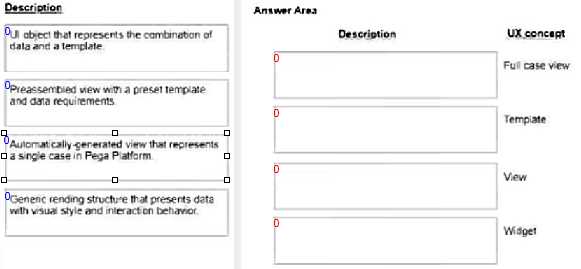
UI object that represents the combination of data and a template. - Template Preassembled view with a preset template and data requirements. - View Automatically generated view that represents a single case in Pega Platform. - Full case view Generic rendering structure that presents data with visual style and interaction behavior. - Widget Comprehensive Detailed Explanation with Reference: The four descriptions provided relate to elements within the Pega Platform, specifically tailored for the Constellation UI architecture, which is focused on delivering a responsive and user-friendly interface for applications. Template: In Pega, a template refers to a predefined format for presenting dat a. It specifies the layout and structure used to display information. A UI object that combines data and a template can be seen as the blueprint from which UI elements are generated, ensuring consistency and adherence to design standards. View: A view in Pega is a configuration that determines how data is displayed in the UI. It's a preassembled component that combines a specific template with data requirements, thus simplifying the creation of user interfaces by allowing developers to reuse common patterns and layouts with different sets of data. Full case view: This refers to a holistic view of a case in Pega, showing all relevant information and actions that can be taken. It is generated automatically by the platform to represent all the aspects of a case, providing a comprehensive interface for users to interact with case data and perform necessary tasks. Widget: Widgets in Pega are generic, reusable UI components that display data and offer interactive behavior. These can range from simple data fields to complex graphical components. They are styled and have behaviors that allow users to interact with the data presented, such as drop-down menus, charts, or data grids.