A . All the output values are available after a successful terraform apply command. This means that
after the deployment, you can view the output values by running terraform output or terraform
show in the same directory where you ran terraform apply1. You can also use the output values in
other Terraform configurations or external systems by using the terraform output command with
various options2. B. The subnet_private_1 value is defined in the variables.tf file. This means that the
subnet_private_1 value is an input variable that can be customized by passing a different value when
running terraform apply or by setting an environment variable3. The variables.tf file is where you
declare all the input variables for your Terraform configuration4.
The other options are incorrect because:
After the deployment, Terraform output values are not visible only through AWS CloudShell. You can
access them from any shell or terminal where you have Terraform installed and configured with your
AWS credentials.
You do not need to specify all the AWS credentials in the output.tf file. The output.tf file is where you
declare all the output values for your Terraform configuration4. You can specify your AWS credentials
in a separate file, such as provider.tf, or use environment variables or shared credentials
files. Reference:
Output Values - Configuration Language | Terraform - HashiCorp Developer
Command: output - Terraform by HashiCorp
Input Variables - Configuration Language | Terraform - HashiCorp Developer
Configuration Language | Terraform - HashiCorp Developer

 You are tasked with deploying a webserver and FortiGate VMS in AWS_ You are using Terraform to
automate the process
Which two important details should you know about the Terraform files? (Choose two.)
You are tasked with deploying a webserver and FortiGate VMS in AWS_ You are using Terraform to
automate the process
Which two important details should you know about the Terraform files? (Choose two.)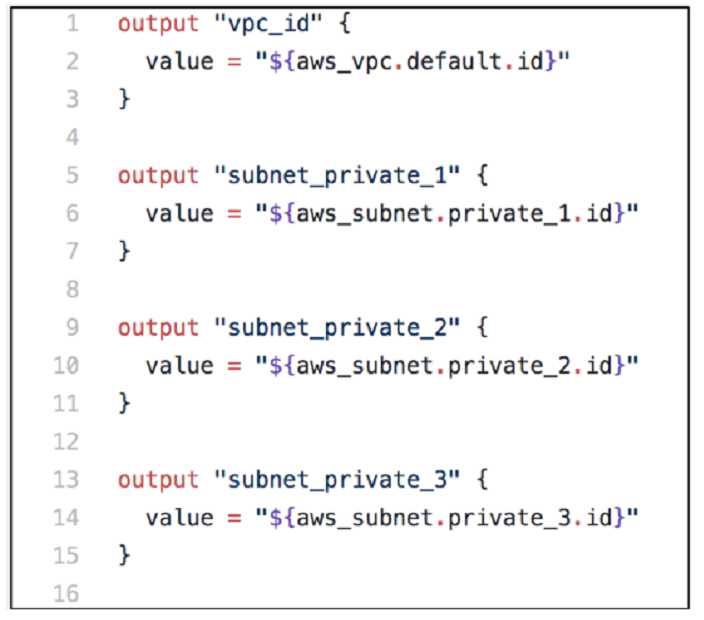 You are tasked with deploying a webserver and FortiGate VMS in AWS_ You are using Terraform to
automate the process
Which two important details should you know about the Terraform files? (Choose two.)
You are tasked with deploying a webserver and FortiGate VMS in AWS_ You are using Terraform to
automate the process
Which two important details should you know about the Terraform files? (Choose two.)