Understanding the Issue
The administrator is investigating VM performance complaints and is analyzing CPU Ready Time
data.
CPU Ready Time is a crucial metric in Nutanix and virtualization environments (AHV, ESXi, or Hyper-
V).
It measures the amount of time a VM is waiting for CPU scheduling due to resource contention.
High CPU Ready Time indicates that VMs are ready to run but are waiting because the host lacks
available CPU resources.
Analysis of the Exhibit
The graph shows CPU Ready Time spikes for multiple VMs.
Some VMs have CPU Ready Time exceeding 18% to 21.5%, which is very high.
A healthy CPU Ready Time should be below 5%.
Values above 10% indicate CPU contention, and anything above 20% is critical and requires
immediate troubleshooting.
Evaluating the Answer Choices
❌ (A) Check the number of vCPUs assigned to each CVM. (Incorrect)
CVMs (Controller VMs) have fixed CPU allocation, and modifying their vCPU count is not
recommended unless advised by Nutanix Support.
The issue is related to VM CPU contention, not CVM configuration.
✅ (B) Review host CPU utilization. (Correct Answer)
High CPU Ready Time suggests CPU overcommitment or host saturation.
The administrator should check host CPU usage in Prism Central to determine if the cluster is
overloaded.
If host CPU usage is consistently above 85–90%, VMs are competing for CPU resources, leading to
high CPU Ready Time.
❌ (C) Assess cluster SSD capacity. (Incorrect)
SSD capacity impacts storage performance (latency, read/write speeds) but does not affect CPU
Ready Time.
High CPU Ready Time is a CPU scheduling issue, not a storage bottleneck.
❌ (D) Enable VM memory oversubscription. (Incorrect)
Memory oversubscription does not impact CPU scheduling.
Enabling memory oversubscription affects RAM allocation, but CPU Ready Time is strictly related to
CPU contention.
Next Steps to Diagnose & Resolve the Issue
Review Host CPU Utilization:
Navigate to Prism Central → Analysis → CPU Usage per Host.
Identify hosts experiencing high CPU load.
Check VM vCPU Allocation:
Ensure that VMs do not have excessive vCPUs assigned, which can lead to scheduling inefficiencies.
Overprovisioning vCPUs can cause unnecessary contention.
Balance Workload Across Hosts:
Use Nutanix AHV DRS (Dynamic Scheduling) or VMware DRS to redistribute VMs across hosts.
Check if certain hosts are overloaded while others have spare CPU capacity.
Consider Scaling Out the Cluster:
If CPU usage is consistently high, adding more nodes may be required to reduce CPU contention.
Multicloud Infrastructure

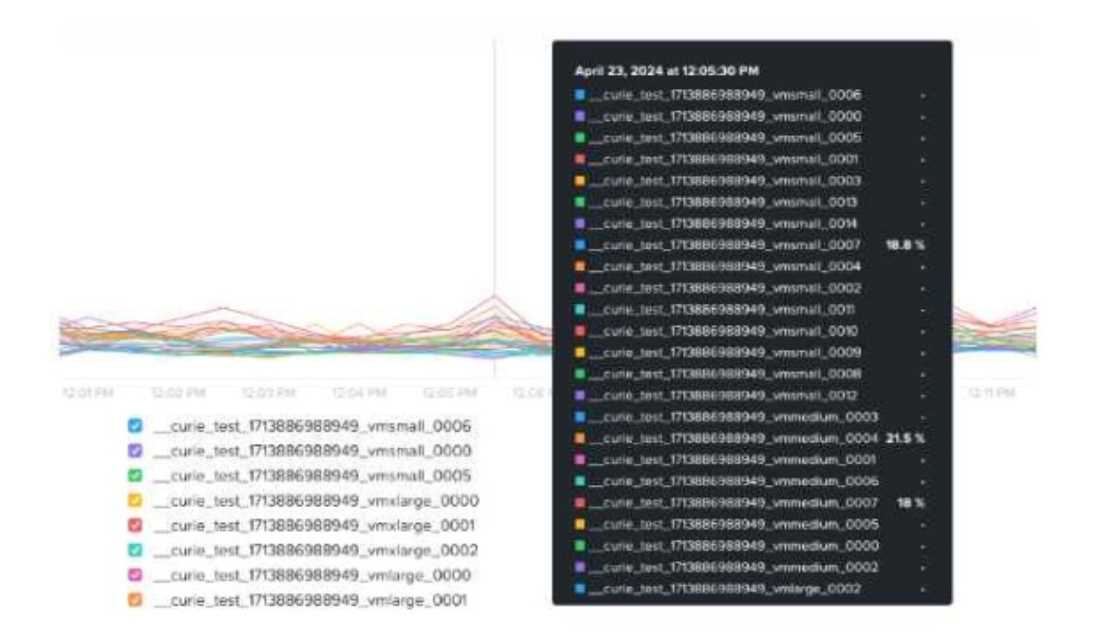 After reviewing the VM’s CPU Ready Time data shown in the exhibit, which step should the
administrator take to diagnose the issue further?
After reviewing the VM’s CPU Ready Time data shown in the exhibit, which step should the
administrator take to diagnose the issue further?